A 301 redirect permanently sends an old URL to a new location. In WordPress, the key isn’t just adding a redirect rule. You need to check whether a redirect is already handling the URL, choose a genuinely relevant destination, select the correct redirect type, test the old URL, verify the HTTP response and final destination, and then clean up the links that still point to the old address. For the broader technical SEO context, see our Technical SEO WordPress: The Layers That Actually Affect Rankings. That is the approach used throughout this guide.
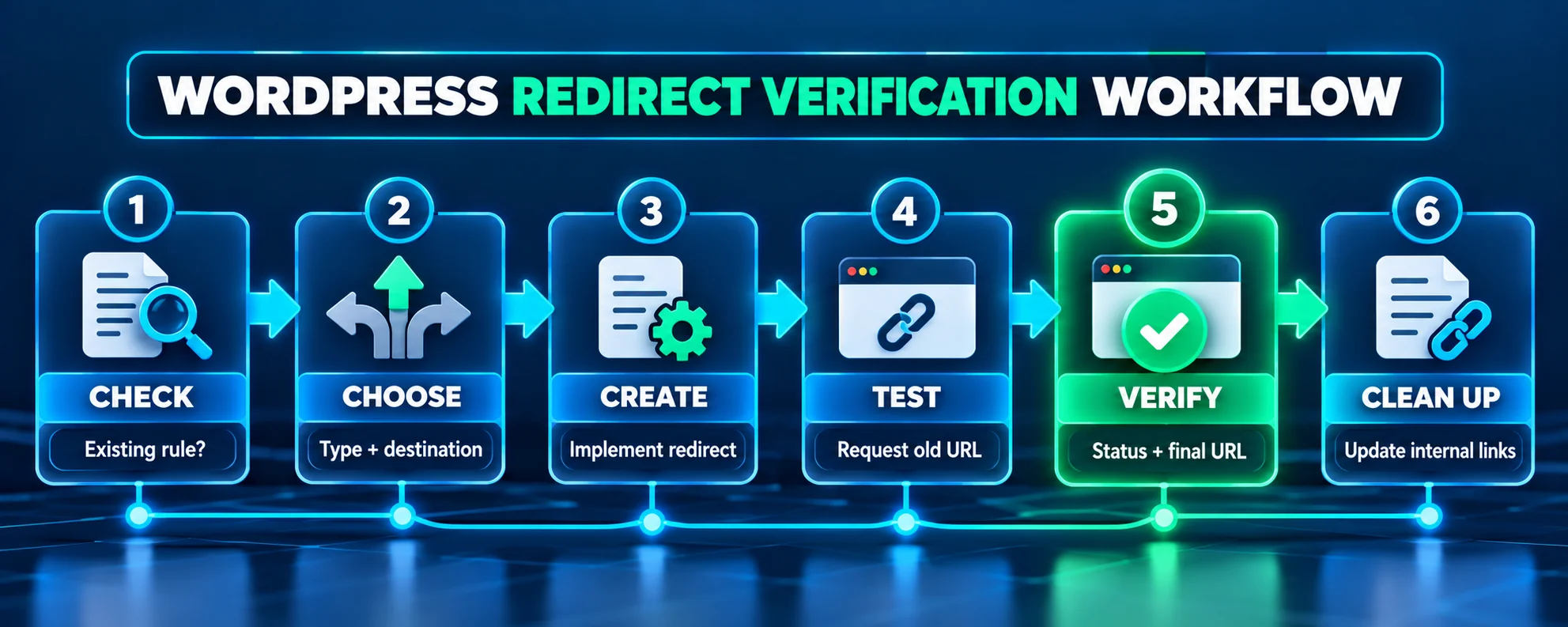
A 301 redirect is only successful when the entire request path makes sense. Use this process: CHECK → CHOOSE → CREATE → TEST → VERIFY → CLEAN UP. It keeps a small URL change from turning into a chain, loop, wrong-page redirect, or unresolved 404.
What Is a 301 Redirect in WordPress?
If you’ve changed a WordPress URL, the real question is what should happen when someone visits the old address. This guide is designed to solve that practical problem.
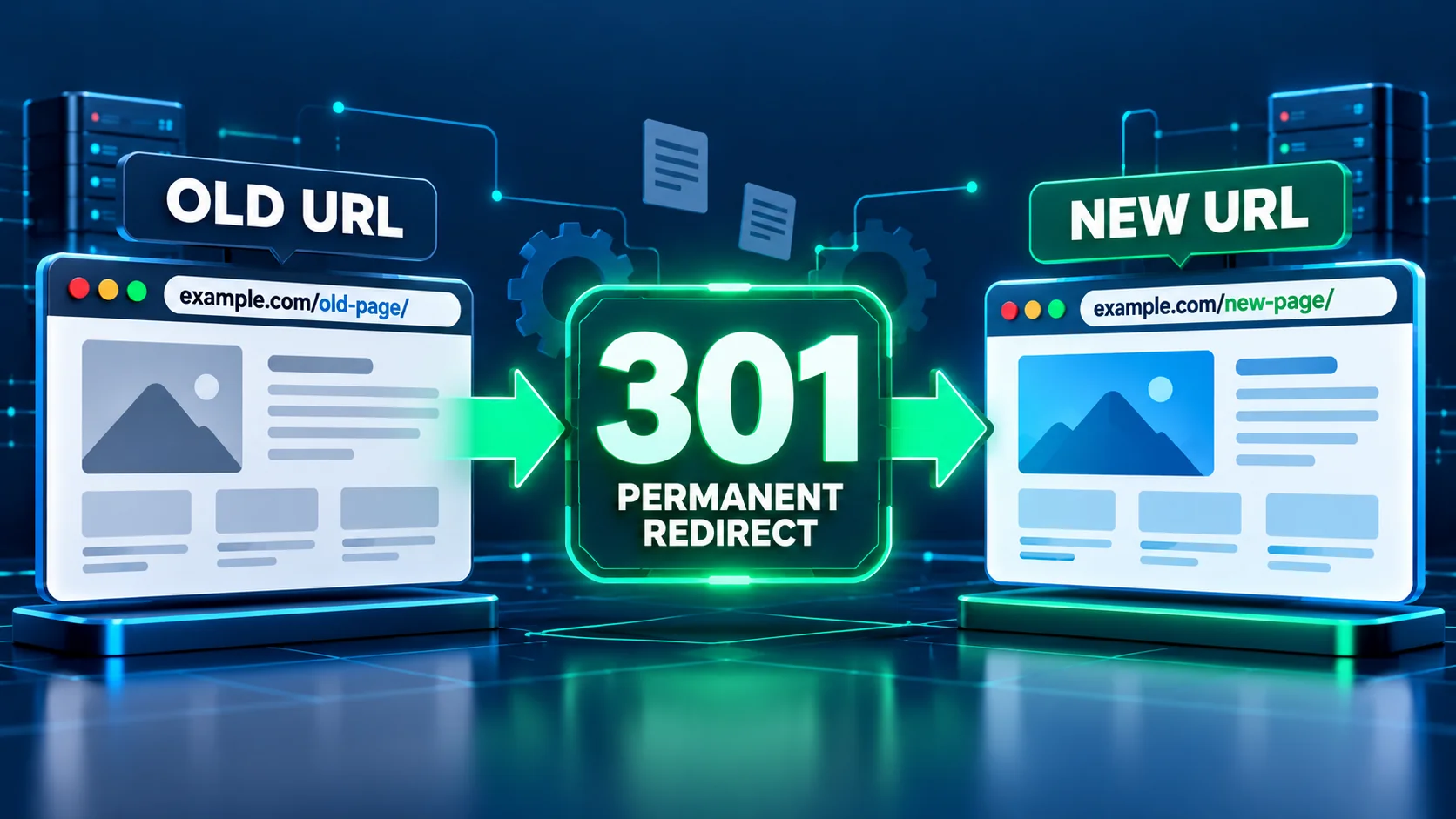
A 301 is an HTTP status code that means the requested resource has moved permanently. The server normally returns a Location header pointing to the new URL, and the browser or crawler follows it. The HTTP semantics for a 301 response are defined in RFC 9110 — HTTP Semantics. Google treats permanent redirects as a signal that the redirect target should become the canonical URL in search, while temporary redirects are handled differently.
Google’s documentation on redirects explains the distinction between permanent and temporary redirects and recommends server-side redirects when possible.
In practical WordPress work, that means a 301 is appropriate when the old address has genuinely been replaced and the new page is the best relevant destination. It is not a universal fix for every 404, and it is not a reason to send unrelated URLs to the homepage.
Do You Actually Need a 301 Redirect?
That check is the first part of a reliable redirect workflow.
Before creating a 301 redirect, check what is happening now. A WordPress site can already have redirect behavior coming from WordPress core, Rank Math, another plugin, the web server, the hosting layer, or a CDN. Adding a second rule without checking can create unexpected behavior.
Ask four questions in order:
- Has the old URL actually moved or been replaced?
- Is the move permanent rather than temporary?
- Is there a relevant final destination that satisfies the same user need?
- Does an existing redirect already handle the old URL?
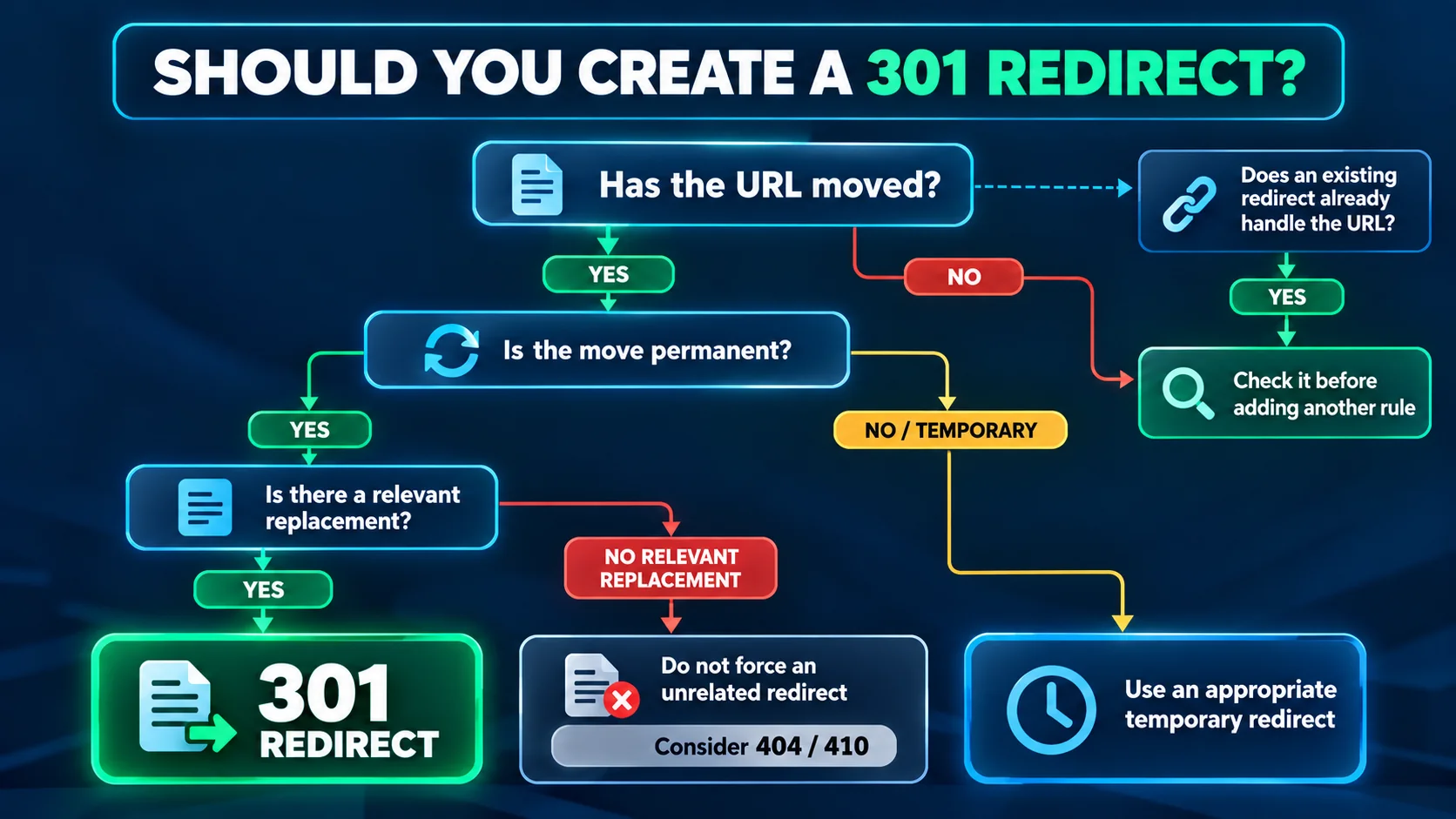
If the answer is yes to a permanent move and there is a relevant replacement, a 301 is usually the right direction. If the change is temporary, use an appropriate temporary redirect instead. If the content has been permanently removed and there is no relevant replacement, a 404 or 410 may be more accurate than inventing a destination.
Choose the Right Destination Before Creating the Redirect
A strong redirect setup starts with the destination, not the plugin screen.
The destination matters as much as the redirect status. A technically valid 301 can still be a poor implementation if it sends visitors and crawlers to a page that does not satisfy the original intent.
For a changed slug, point to the current version of the same content. For a consolidated article, point to the strongest replacement that covers the old topic. For a product or service that has been replaced, use the closest genuine successor. If there is no meaningful replacement, do not manufacture relevance just to avoid a 404.
Also check the final destination before you create the rule. If the target itself redirects somewhere else, you may be creating a redirect chain. A direct old-URL → final-URL relationship is easier to maintain and easier to verify. If you’re unsure whether duplicate URLs need a redirect or should instead be consolidated through a canonical tag, see our guide to Alternate Page with Proper Canonical Tag: Meaning and Fixes to understand the difference and choose the appropriate approach.
How to Create a 301 Redirect in WordPress
There is no single WordPress-only method. The best implementation depends on your hosting stack, technical access, and how many redirects you need to manage. WordPress also provides native redirect functions, including wp_redirect(), wp_safe_redirect(), and wp_old_slug_redirect(), so a plugin is not a universal requirement. If you’re learning how to redirect a page in WordPress, start by identifying the old URL and the most relevant final destination.
If you’re searching for “redirect URL WordPress,” the practical workflow is to identify the source URL, choose the final destination, select the appropriate status, and test the response.
Create a 301 Redirect with Rank Math
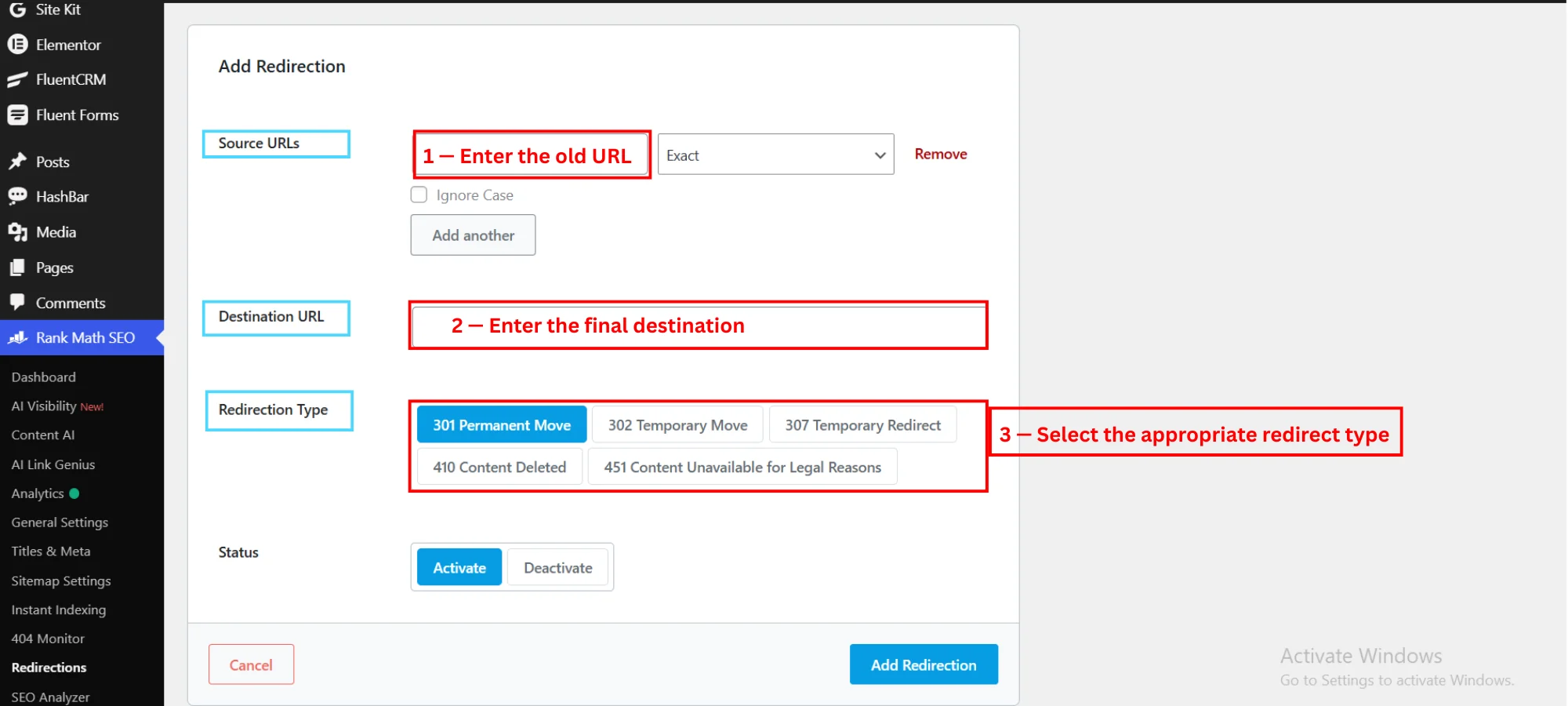
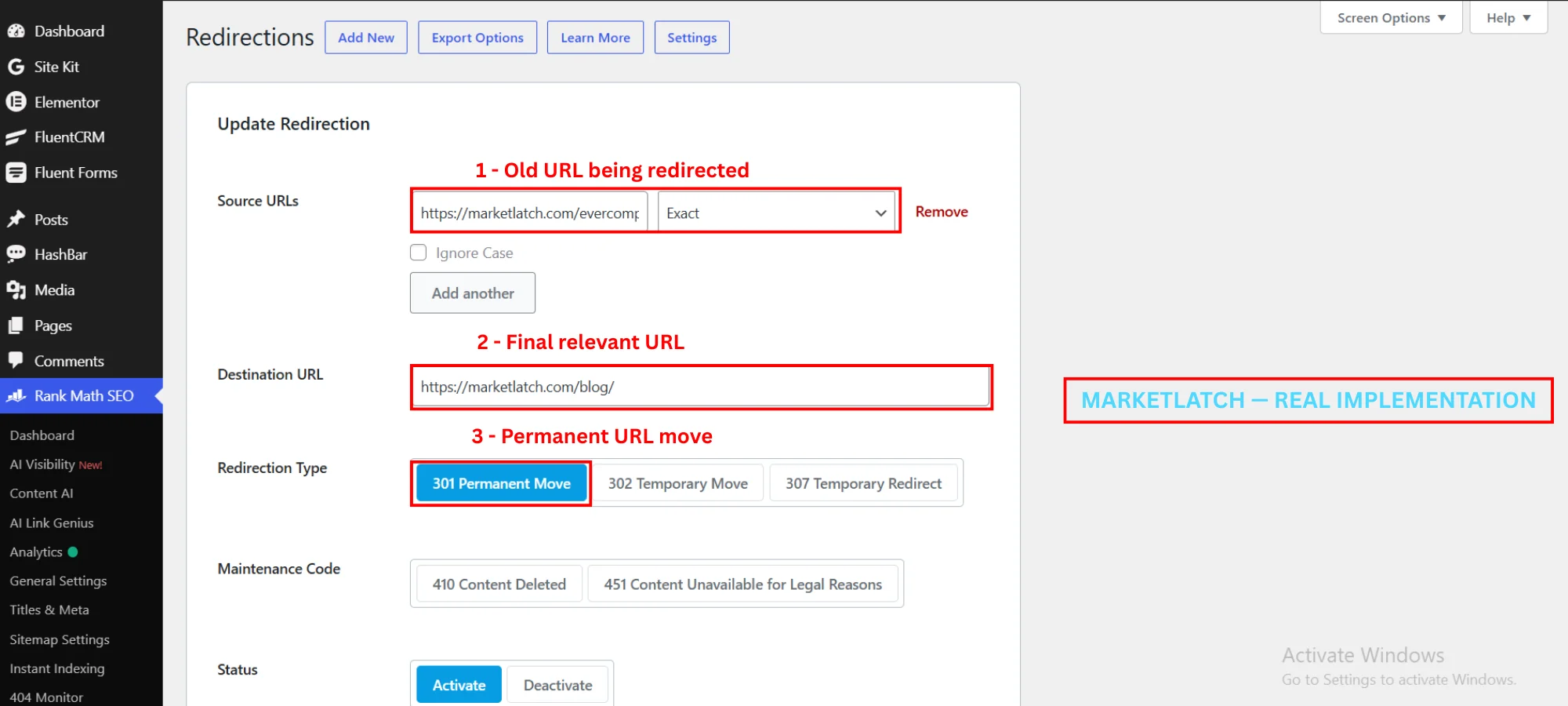
For a WordPress URL redirect, enter the old source URL, the final destination, and the appropriate redirect type. If you’re setting up a redirect in Rank Math, treat the source and destination as one decision: old URL in, final relevant URL out.
This is the method I use on MarketLatch. In WordPress, go to Rank Math SEO → Redirections → Add New. If the Redirections module is not visible, enable it from Rank Math SEO → Dashboard → Modules; Rank Math notes that the module is available when Advanced Mode is enabled.
Rank Math documents the Redirections module and the fields used to create a redirect in its redirection setup guide.
On MarketLatch, the workflow is straightforward: enter the old source URL, enter the final destination, select 301 Permanent Move, and activate the rule. Rank Math also documents this process in its guide to creating a redirection. I then open the old URL and verify what the server actually returns. I do not treat the saved rule as proof that the redirect works.
That distinction is important. A redirect manager tells you what rule you configured; an HTTP test tells you what a visitor or crawler actually receives.
Use a Dedicated WordPress Redirect Plugin
The same principles apply when another redirect manager is already part of your stack.
A dedicated redirect plugin can make sense if you need centralized redirect management, bulk imports, logging, or features that your existing SEO plugin does not provide. The principle does not change: define the correct source, choose the relevant destination, use the correct status, and test the live response.
Do not install multiple redirect systems simply because each one offers a different interface. First identify which layer already owns the redirect. Two systems attempting to handle the same URL can make troubleshooting harder.
Create a Redirect at the Server Level
A server-side redirect is still governed by the same source, destination, status, and verification logic.
Server-side redirects can be configured at the web-server layer, such as Apache or NGINX. Google recommends server-side permanent redirects when technically possible, and both 301 and 308 are permanent redirect status codes.
Redirect 301 /old-page/ https://example.com/new-page/
This is a simple Apache-compatible example for an .htaccess file. For a typical WordPress Apache/LiteSpeed setup, the .htaccess file is normally in the site’s document root; back up the existing file before editing it. Replace the paths with your real source and destination, then test the old URL immediately after the change. NGINX uses a different configuration syntax, so do not paste this rule into an NGINX config.
How to Test a WordPress 301 Redirect
If you’re troubleshooting a 301 redirect WordPress setup, the fastest way to validate it is to request the old URL and inspect the response, not just watch the browser change pages.
Do not stop at the moment the browser lands on the new page. The test should start with the old URL because that is the URL whose behavior you are changing.
For a quick command-line check, request the old URL without following the redirect:
curl -I https://example.com/old-page/
Look for a 301 status and a Location header pointing to the intended destination. To inspect the full redirect history, follow the chain:
curl -IL https://example.com/old-page/
The final response should be the page you intended to reach, normally a successful response such as 200. If you see multiple 3xx responses, trace each Location value and fix the mapping rather than assuming the browser’s final page tells the whole story.
A useful test checks at least three things:
Test Common URL Variants
Test the representative URL forms your site actually exposes. The goal is not to invent extra URLs; it is to catch a redirect that works for one request but fails for another.
- The old path with and without the trailing slash, if both forms can be requested.
- HTTP and HTTPS versions when an HTTPS migration is involved.
- www and non-www versions when both hostnames can receive requests.
- The old URL with a real query string or UTM parameter used by your campaigns.
After each representative test, confirm the status, Location header, number of hops, and final destination. This makes the verification step repeatable instead of relying on one browser test.
What Happens to Query Parameters?
A redirect can receive a URL with a query string, such as /old-page/?utm_source=newsletter. Do not assume those parameters will automatically disappear or be preserved in every redirect layer. The behavior depends on the implementation. Rank Math currently passes query strings to the destination by default, including UTM parameters, so test the exact URL format you use for campaigns and tracking.
Rank Math explains this behavior in its UTM parameters with redirects guide; the important point is to test the exact parameterized URL you use.
For other redirect layers, verify the behavior yourself. A tracking parameter that is unexpectedly retained, stripped, or altered can affect analytics or URL matching, so the safe rule is simple: test a representative parameterized URL before you consider the redirect verified.
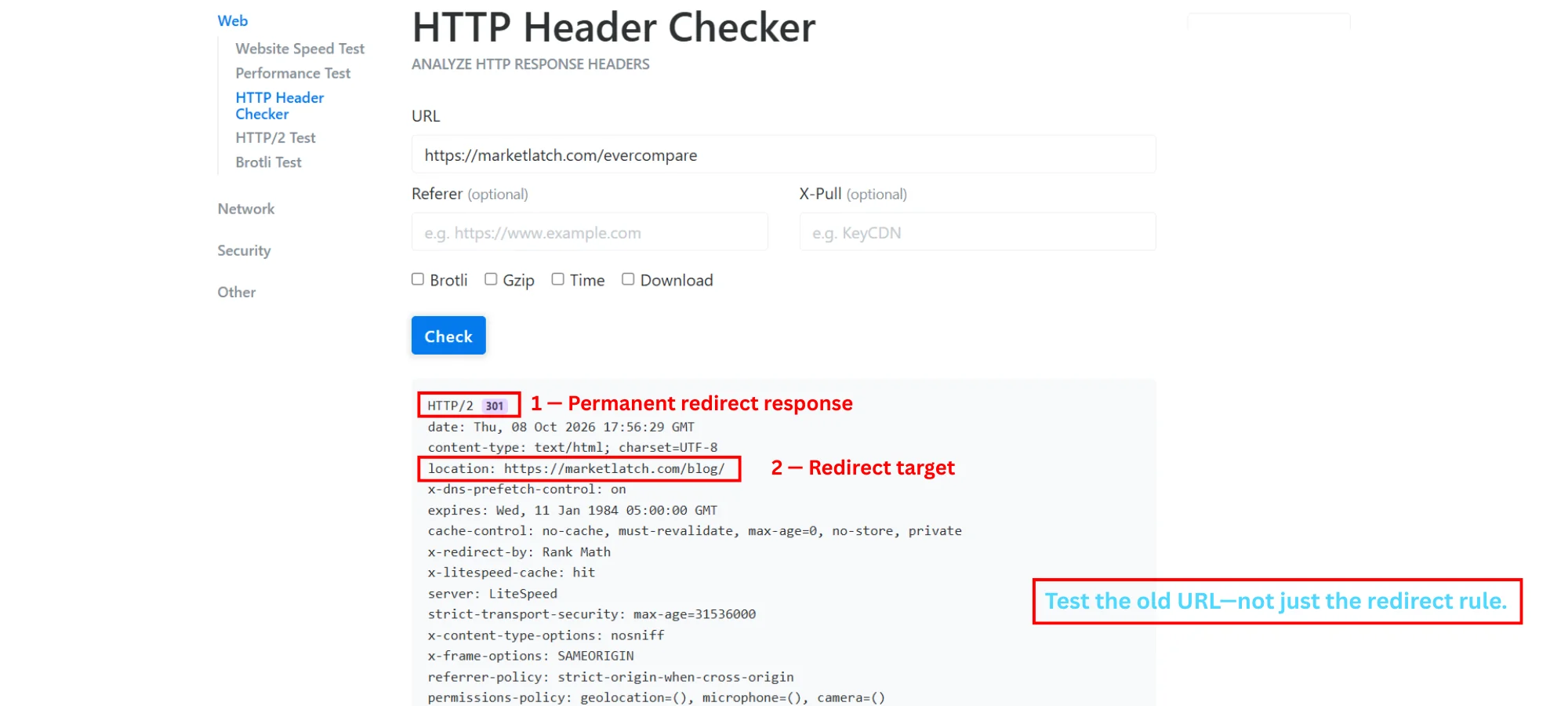
- The old URL returns the intended permanent redirect status.
- The Location header points to the intended final destination.
- The destination itself loads successfully and does not introduce another unexpected redirect.
For deeper testing, inspect the full redirect history rather than relying only on the final page shown in a browser. This is how you catch a 301 that appears to work while quietly passing through another URL first.
Fix Common WordPress Redirect Problems
Most redirect failures are easier to diagnose when you draw the request path. Ask: old URL → what response? → what destination? → does that destination redirect again?
Redirect Chain
If a redirect rule creates an extra hop, fix the mapping instead of accepting the chain as normal.
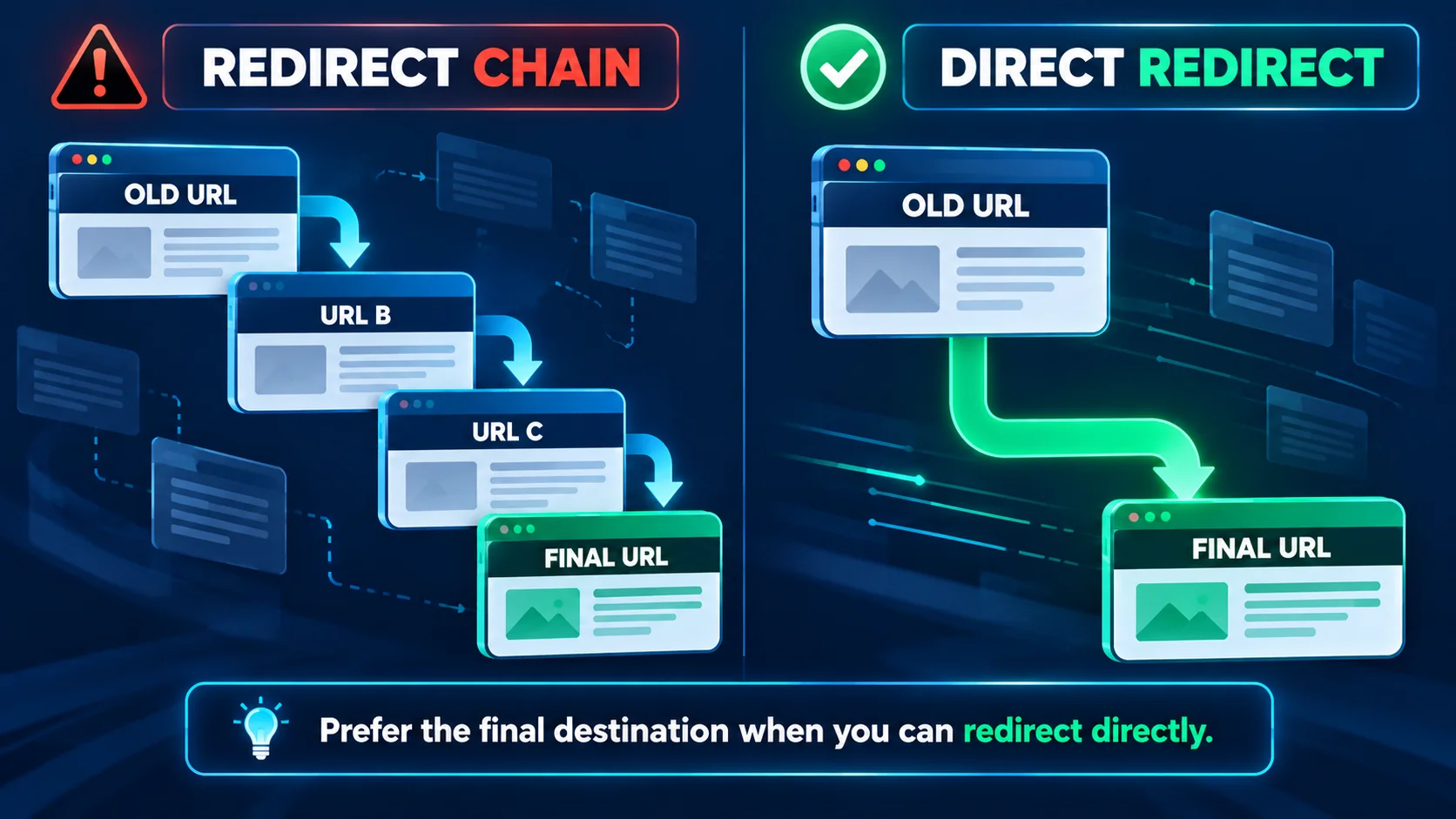
A redirect chain occurs when one redirect points to another URL that redirects again before the request reaches the final page. Google says it can follow up to 10 hops, but recommends keeping chains low—ideally no more than three and fewer than five—and directing the old URL to the final destination when possible.
If you find old URL → URL B → URL C → final URL, update the original rule so the old URL points directly to the final URL where that is technically and editorially correct. Then update internal links so your site stops sending users through the old address.
Google’s site-move guidance explicitly recommends avoiding redirect chains and keeping them low when a direct mapping is not possible.
Redirect Loop
When a redirect loop appears, trace every redirect layer rather than repeatedly editing the same rule.
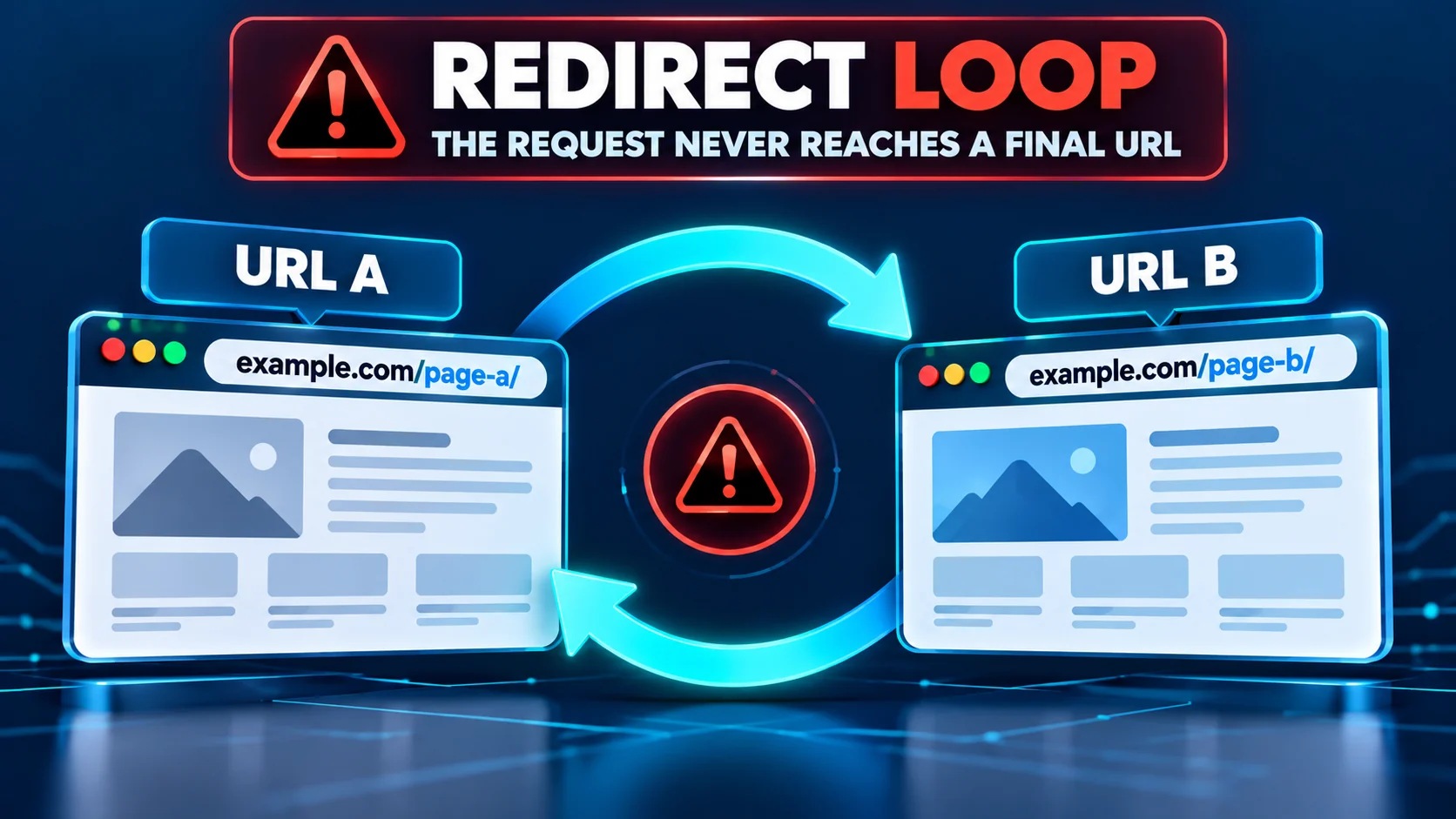
When a loop appears, inspect every layer that can redirect the request: WordPress, Rank Math or another plugin, server rules, HTTPS enforcement, host settings, and CDN behavior. Do not assume the last rule you edited is the only rule involved.
Too Many Redirects
The browser message “too many redirects” usually means the redirect path is looping or conflicting. Start with the old URL and trace each hop. Pay particular attention to HTTP-to-HTTPS rules, www/non-www normalization, trailing-slash behavior, and overlapping plugin or server rules.
Redirect Goes to the Wrong Page
A 301 can return the correct status and still be wrong. If an old SEO guide redirects to a generic blog archive, for example, the HTTP implementation may be valid while the destination choice is poor. Review the source intent and the final page together.
The Old URL Returns a 404
A WordPress 404 redirect is appropriate only when the missing URL has a genuinely relevant replacement. First check whether the URL is supposed to redirect. If it was permanently replaced and has a relevant destination, create and test the redirect. If the content is genuinely gone and there is no useful replacement, allowing the URL to return 404 or 410 can be the more accurate response.
What to Do After Changing a WordPress Permalink
A redirect process should be reviewed periodically because URL architecture changes over time.
Changing a permalink is a common reason to need a 301 redirect. Before changing the slug, record the old URL and decide what the final URL will be. After the change, confirm that the old URL redirects directly to the new one.
Then clean up your own site. Update internal links, navigation, related-content links, and other references that still point to the old URL. Update the sitemap so it contains the current canonical URLs rather than a list of URLs that only redirect.
How to Redirect a Deleted Page in WordPress
The same redirect decision applies here: relevance first, redirect status second.
Deletion alone does not tell you whether a 301 redirect is appropriate. The decision depends on whether a relevant replacement exists.
WordPress 301 Redirects During a Site Migration
For a migration, treat each mapping as a row in a controlled old-to-new URL map.
A migration is where redirect planning becomes a mapping exercise. List the old URLs, identify their final destinations, and implement the mappings before or as the new URLs go live.
Google recommends creating an old-to-new URL mapping, using server-side permanent redirects when possible, avoiding chains, updating sitemaps, and monitoring the move. If URL changes affect structured data or other URL-bearing markup, validate those references as part of the migration QA; our structured data error guide covers that validation process.
Google’s site migration documentation provides the full URL-mapping and migration workflow.
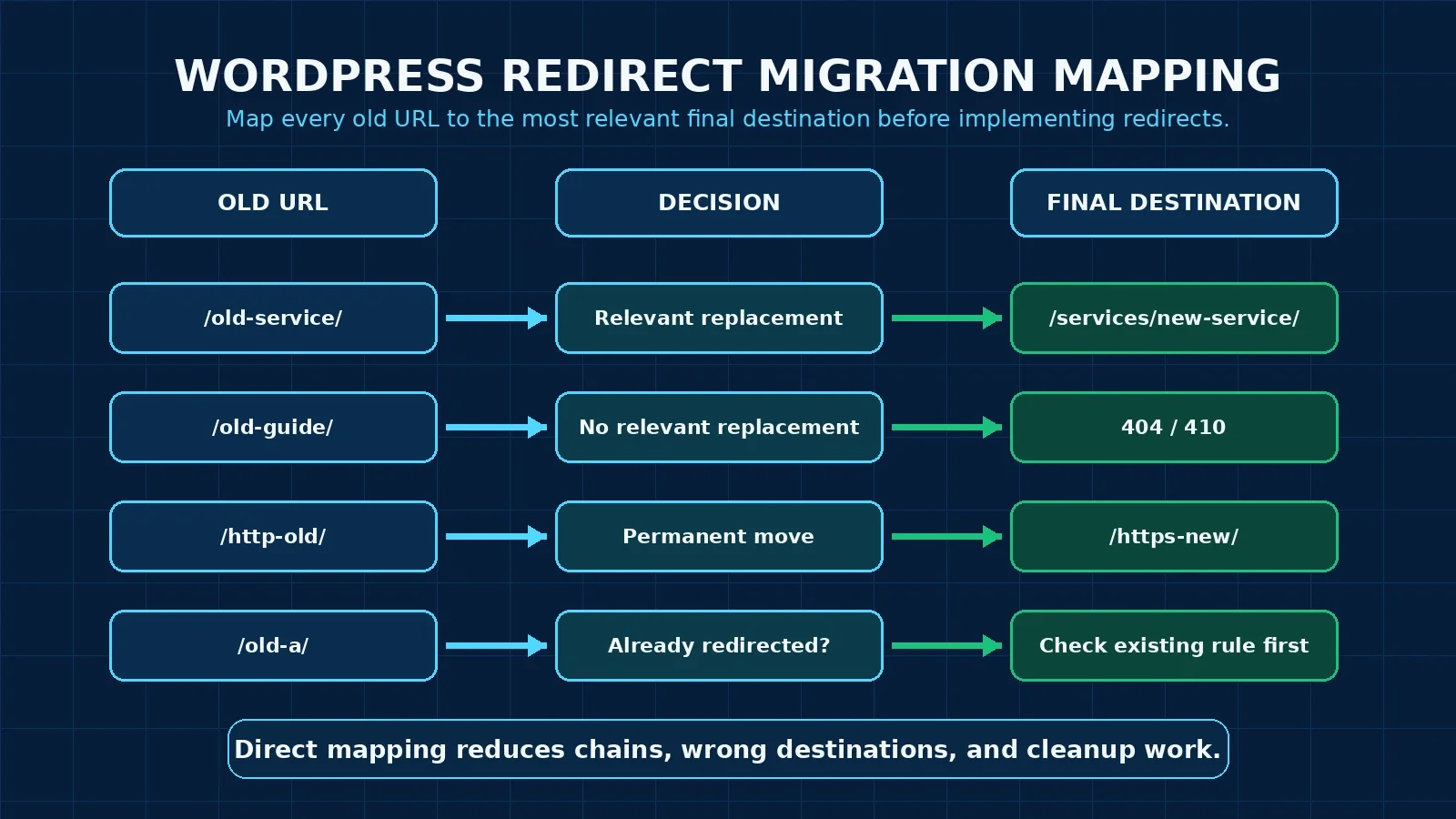
HTTP to HTTPS Redirects in WordPress
When a site moves from HTTP to HTTPS, the old HTTP URLs should resolve to the corresponding HTTPS URLs through permanent redirects. The important word is corresponding: do not combine an HTTPS migration with unrelated URL changes if you can avoid it.
Test representative HTTP URLs, confirm the HTTPS destination, check for additional hops, and update internal links and canonical references to use HTTPS. That gives the migration a cleaner signal and makes the resulting URL architecture easier to maintain.
How to Manage WordPress Redirects Over Time
A mature redirect workflow includes periodic review because URL architecture changes over time.
Redirects are not a set-and-forget list. As URLs change again, an old redirect can become part of a chain or point to a destination that is no longer the best replacement.
I recommend reviewing redirect rules whenever you change URL architecture, migrate content, merge pages, or reorganize major sections. Look for inactive rules, duplicate rules, chains, loops, and destinations that no longer match the original content.
After a migration, keep the redirects in place for as long as they remain useful. Google advises keeping redirects as long as possible, generally at least one year for site moves, while longer retention may be appropriate when old links remain in use.
Common WordPress 301 Redirect Mistakes
- Creating a redirect before checking whether another rule already handles the URL. Also remember that WordPress robots.txt guidance is a separate technical control; robots.txt does not replace a redirect.
- Redirecting every 404 to the homepage.
- Sending unrelated old URLs to a generic destination.
- Building chains instead of pointing directly to the final relevant URL.
- Editing plugin and server redirects at the same time without a controlled test.
- Assuming a saved redirect rule proves the HTTP response is correct.
- Leaving internal links pointed at URLs that now redirect.
- Keeping obsolete redirect rules forever without reviewing whether the destination still makes sense.
WordPress 301 Redirect Checklist
| Use this six-step check CHECK the existing redirect behavior → CHOOSE the correct type and relevant destination → CREATE the rule → TEST the old URL → VERIFY the status, location, and final page → CLEAN UP internal links and URL references. |
- Check whether WordPress, Rank Math, another plugin, the server, host, or CDN already handles the URL.
- Confirm the move is permanent before selecting 301.
- Choose the most relevant final destination, not simply the homepage.
- Create one clear redirect rule in the appropriate layer.
- Test the old URL and inspect the HTTP response and redirect history.
- Confirm the final page loads correctly.
- Remove chains and loops where possible.
- Update internal links, navigation, canonicals, and sitemap references.
- Keep a migration map or redirect record for large URL changes.
- Review the rule later when the site’s URL architecture changes again.
Frequently Asked Questions
What is a 301 redirect in WordPress?
A 301 redirect is a permanent HTTP redirect from an old URL to a new URL. In WordPress, it can be implemented through a redirect plugin or SEO plugin, WordPress code, or the server depending on the site’s setup.
How do I create a 301 redirect in WordPress?
Choose a relevant final destination first, then create the rule in your existing redirect system. With Rank Math, use Rank Math SEO → Redirections → Add New, enter the source and destination, select 301 Permanent Move, activate it, and test the old URL.
Should every deleted WordPress page be redirected?
No. Redirect a deleted page when there is a genuinely relevant replacement. If there is no useful replacement, a 404 or 410 can be more accurate than sending visitors to an unrelated page.
How do I fix a WordPress redirect loop?
Trace the full redirect path and check every layer that can issue redirects: WordPress, plugins, server rules, HTTPS enforcement, host settings, and CDN configuration. Remove the conflicting rule so the request reaches one final URL.
Are 301 and 302 redirects the same?
No. A 301 indicates a permanent move. A 302 is a temporary redirect. Use the status that matches the real situation rather than choosing one because it is common.
Should I redirect an old URL to the homepage?
Only when the homepage is genuinely the relevant destination for that old URL. It should not be the default destination for unrelated deleted or moved pages.
Conclusion
A good redirect is more than a saved rule. It is a small piece of URL architecture that should make sense from the old URL all the way to the final page.
Use the lifecycle: CHECK what already handles the URL, CHOOSE the right redirect type and relevant destination, CREATE the rule in the appropriate layer, TEST the old URL, VERIFY the HTTP response and final destination, and CLEAN UP the internal links and other references that still point to the old address.
That approach keeps redirects understandable and maintainable—and it gives you evidence when something goes wrong instead of forcing you to guess which setting caused it.
About the author

Nadeem Alam is the founder of MarketLatch and a digital growth strategist and WordPress specialist. His work covers technical SEO, on-page SEO, WordPress, WooCommerce, Elementor, structured data, Generative Engine Optimization, Answer Engine Optimization, Google Ads, and Meta Ads.
His approach to WordPress SEO is implementation-first and verification-driven: inspect what the site actually outputs, identify which system produced it, test targeted changes, and verify the result rather than assuming a plugin setting explains the whole problem.
Nadeem is also the author of the Generative Engine Optimization Book, the AEO Masterclass Guide and the AI SEO Implementation Checklist 2026. His training and certifications include Google Digital Garage, Semrush Academy, Coursera, uConnect and Virtual University (DigiSkills).