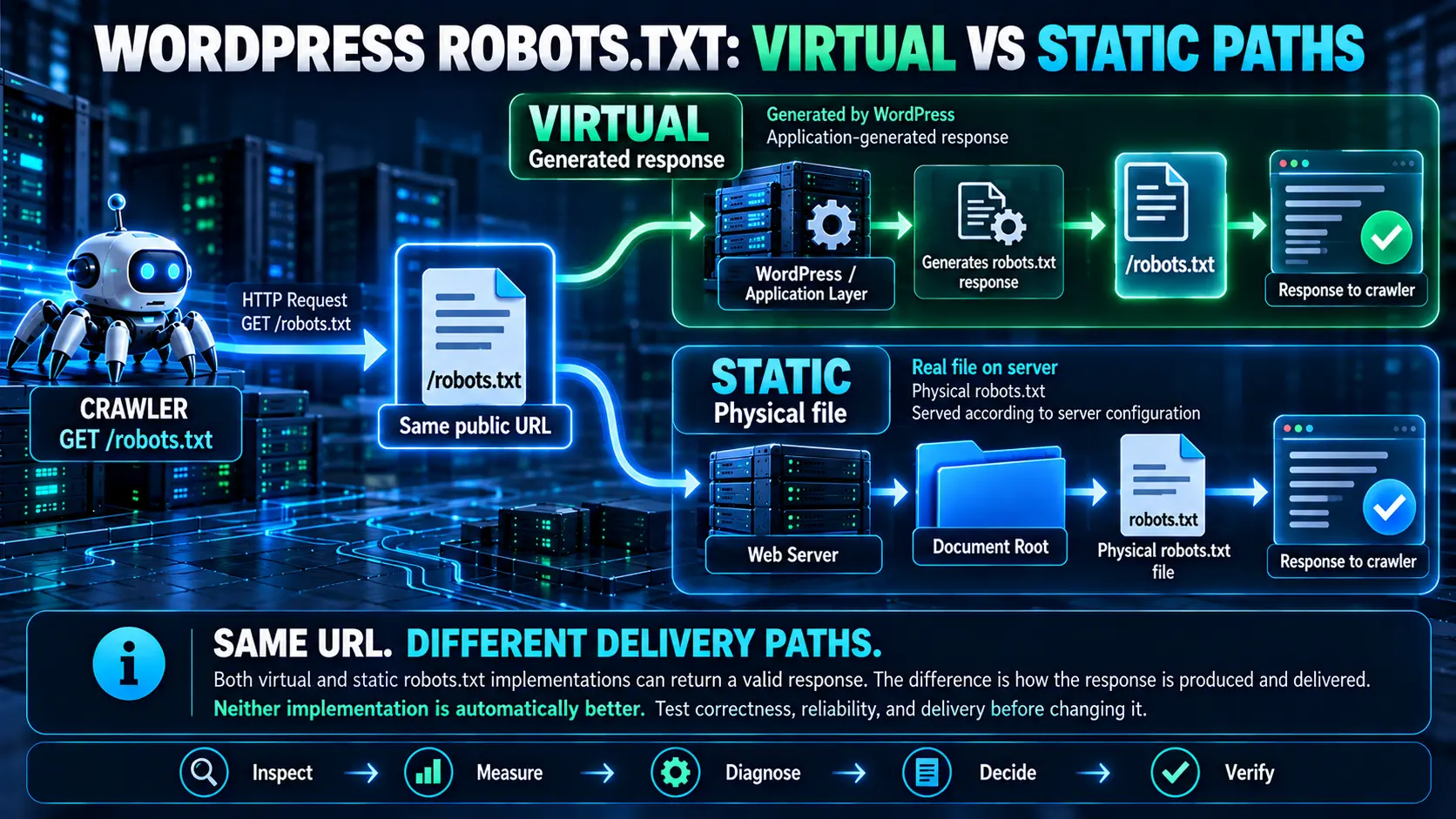
WordPress can serve a WordPress robots.txt response without a physical file on the server, and that is normal. A virtual robots.txt is not automatically bad for SEO, slower, or something you need to replace. The right question is whether the response is correct, reliable, and delivered acceptably to crawlers. A static file becomes worth considering when testing shows a real delivery, reliability, or application-level problem that the simpler file-based path can address.
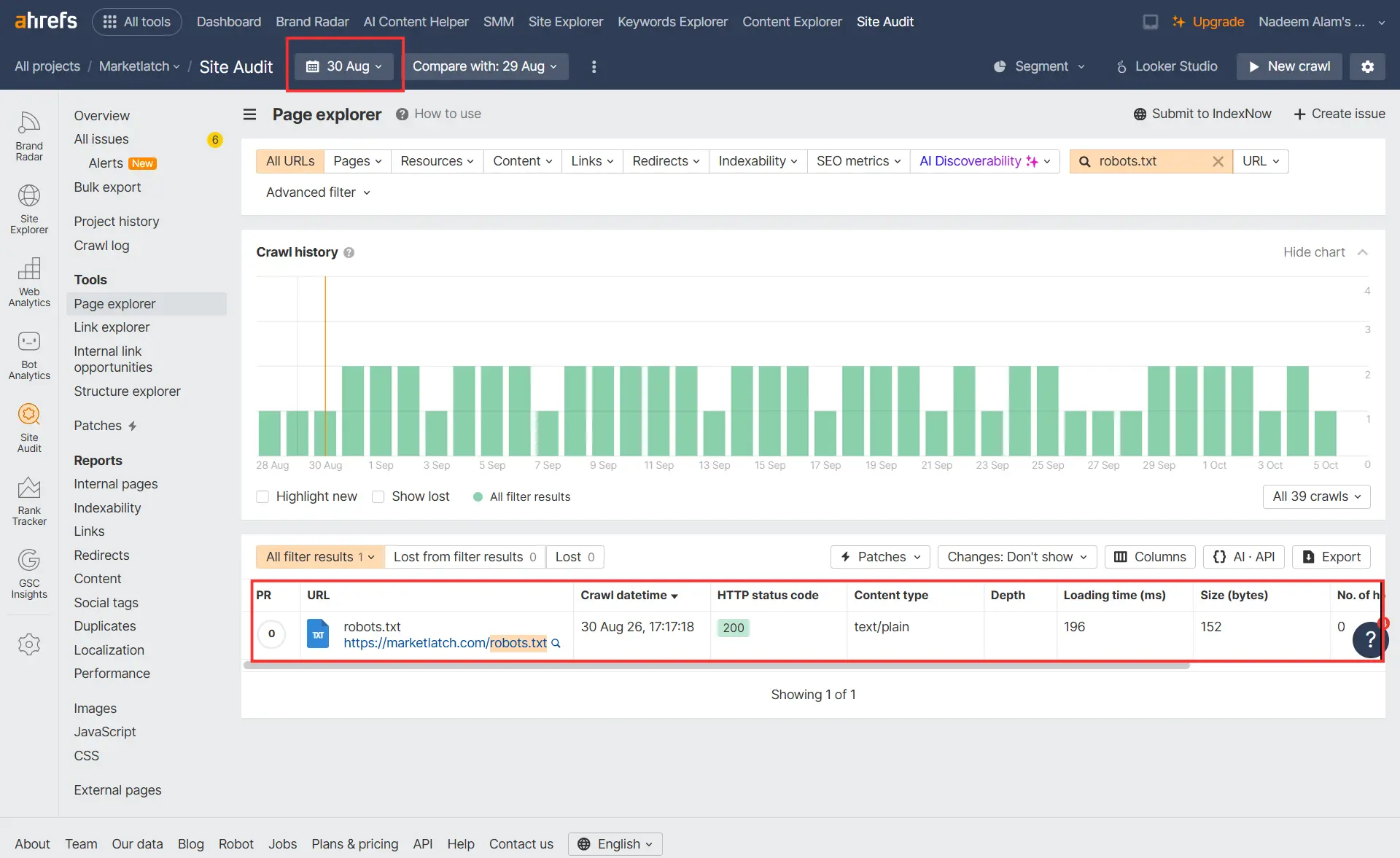
MarketLatch had a useful real-world example. An Ahrefs crawl on August 29, 2026 recorded an HTTP 520 response for /robots.txt with a 4,502 ms load time. The following day’s crawl recorded an HTTP 200 response, text/plain, 152 bytes, and a 196 ms load time. That is an observed change in response behavior—not proof that one specific change caused the recovery. The evidence shows a change in response behavior, but it does not establish the cause.
| The short answer: Keep WordPress’s virtual robots.txt when it is correct and reliable. Consider a physical/static file only when repeated testing identifies a meaningful technical problem and the static implementation can be maintained safely. Never replace it simply because it is virtual. |
What Is robots.txt in WordPress?
WordPress robots.txt is a plain-text resource at the top level of a host that tells compliant crawlers which URL paths they may or may not request. It is a crawl-access mechanism, not a general security boundary and not an indexing-removal tool. The underlying protocol is defined by the IETF’s Robots Exclusion Protocol, while Google documents how Googlebot interprets the file in Google Search.
What /robots.txt does
A crawler requests the resource at the host’s /robots.txt path, reads the applicable user-agent group, and evaluates the Allow and Disallow rules for the URLs it wants to crawl. The file can also contain a Sitemap record, which crawlers may interpret as a discovery hint. The protocol requires the top-level /robots.txt resource to be served as UTF-8 plain text.
For the protocol-level rules, see the IETF Robots Exclusion Protocol (RFC 9309).
What robots.txt does not do
robots.txt does not guarantee that a URL will disappear from Google’s index. Blocking crawling can prevent Google from fetching the page, but Google may still know that the URL exists through other signals. If the goal is index exclusion, use the appropriate indexing controls rather than treating robots.txt as a noindex directive.
Google explains this distinction in its robots.txt specification.
Why WordPress can serve robots.txt without a physical file
WordPress has built-in support for generating a robots.txt response. Its do_robots() function sends a text/plain response and builds default output, including the site’s administrative path and an Allow rule for admin-ajax.php. The output can then be modified through the robots_txt filter. This is why a working /robots.txt URL does not, by itself, prove that a robots.txt file exists in the document root.
See WordPress’s do_robots() developer reference for the implementation details.
The related robots_txt hook lets WordPress code filter the generated output.
Where Is robots.txt in WordPress?
The WordPress robots.txt resource is normally available at the root of the host: https://example.com/robots.txt. That public URL is the important crawler-facing endpoint. The question of whether a physical file exists is a separate implementation question.
The public URL
Start with the live URL. Open /robots.txt directly and inspect the response. If it returns valid plain text, that tells you what a client can retrieve from the endpoint; it does not yet tell you whether the response came from a physical file or WordPress.
Why URL existence does not prove a physical file exists
A server can route a request for /robots.txt into an application. WordPress has specific handling for robots requests, and its template loader can fire the do_robots action when the request is identified as robots.txt. In other words, the browser-visible URL and the underlying implementation are two different layers.
How to check the document root
If you have hosting or server access, inspect the site’s document root. A physical WordPress robots.txt file is usually visible alongside other root-level files. For a WordPress site hosted in cPanel, that commonly means checking the public_html directory, although the actual document root depends on the hosting configuration.
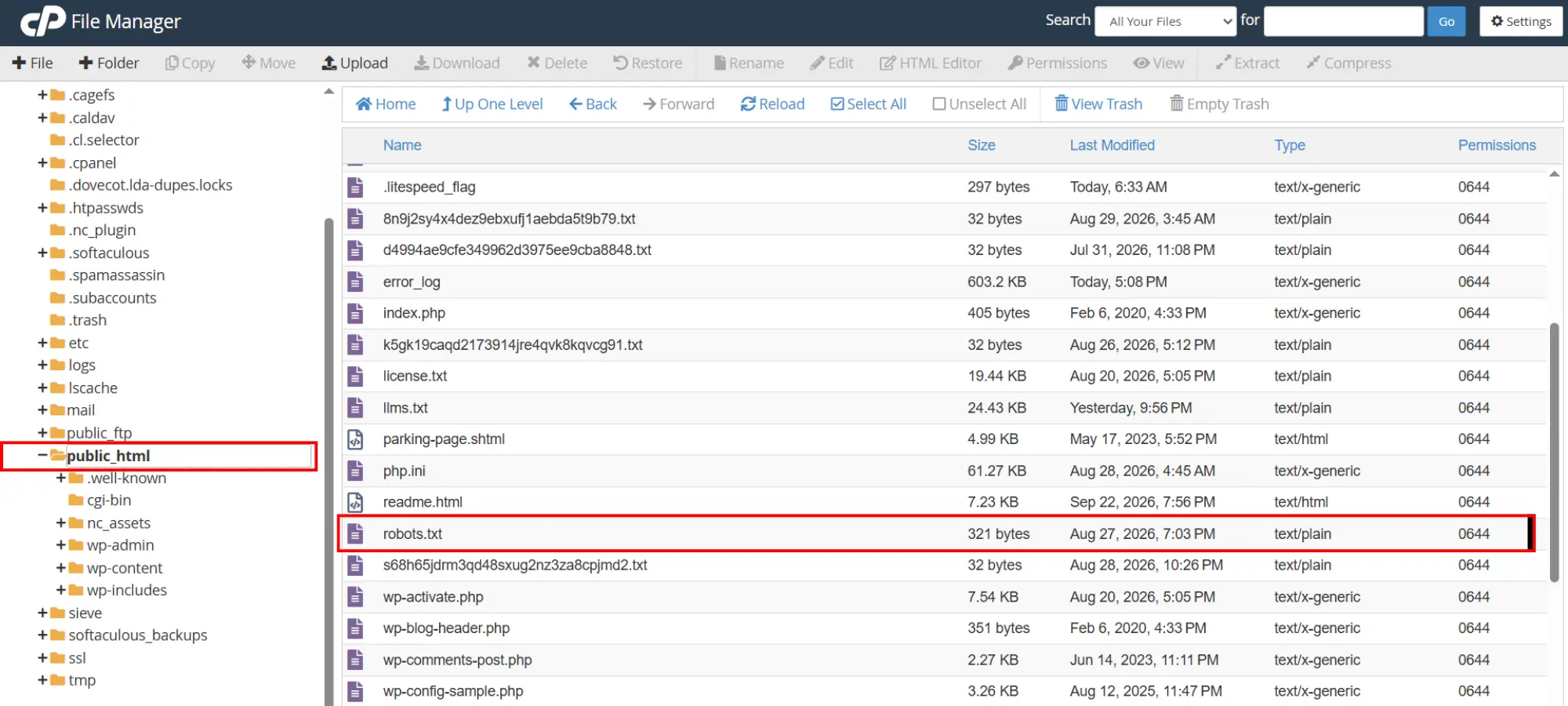
In the MarketLatch evidence, the physical file is visible in public_html at 321 bytes with 0644 permissions. The live HTTP response separately returns Content-Type: text/plain. The file is therefore confirmed as a physical resource at the document root. The timestamp shown in the hosting panel records a modification time, but it does not by itself prove why the file was created or modified.
How WordPress Serves a Virtual robots.txt
When a physical file is not the resource being served at the root path, WordPress can handle the WordPress robots.txt request through its application logic. WordPress does not use one identical server path on every installation, but it does provide a normal application-level mechanism for generating the response.
WordPress request path
At a high level, a crawler requests the WordPress robots.txt endpoint at /robots.txt. If the web server does not serve a physical file directly, the request can reach WordPress’s request handling. WordPress recognizes the robots request and its robots function produces a plain-text response. Plugins or other code can modify that output through the documented hook.
How WordPress builds the response
The core do_robots() function sets Content-Type to text/plain; charset=utf-8, fires the do_robotstxt action, builds default directives, and applies the robots_txt filter before outputting the response. This confirms that generated robots.txt output is a normal WordPress mechanism.
When a physical file changes the serving path
If the web server serves a physical robots.txt directly, the request can be handled as a file resource instead of relying on WordPress to generate that response. That can reduce the amount of application processing involved in this particular request, but it does not automatically mean the static version will be faster in every environment. Server configuration, caching, network conditions, and other infrastructure can still affect the observed result.
Virtual vs Static robots.txt: What’s the Difference?
For WordPress robots.txt, the practical difference is where the response is produced and what system owns its maintenance. The public endpoint can remain the same. What changes is the delivery path behind that endpoint.
| Factor | Virtual / generated | Static/physical |
| Physical file required | No | Yes |
| Generated by WordPress | Can be | No, if served directly as a file |
| Application processing | May be involved | Can be avoided for this request |
| Rule maintenance | Can integrate with WordPress/plugin logic | Explicit file maintenance |
| Risk of stale rules | Depends on generator/configuration | Higher if the file is forgotten |
| Normal WordPress implementation | Yes | Optional |
| Best reason to choose | Normal operation with correct, reliable delivery | Measured technical need with safe maintenance |
The table is not a performance ranking. A static file has a simpler conceptual delivery path, but a real site can still have slow DNS, network, TLS, web-server, CDN, cache, or hosting behavior. A virtual response can also be perfectly acceptable when it is correct and reliably delivered.
Is WordPress’s Virtual robots.txt Bad for SEO?
No. A virtual WordPress robots.txt response does not mean the implementation is broken. The SEO question is whether the crawler receives a valid response with the intended rules and whether that response remains reliable enough for search-engine access.
Virtual does not mean slow
A virtual response can be fast, and a static response can be slow. A single timing measurement cannot tell you whether the implementation itself is the root cause. Measure more than once, compare conditions, and separate the response problem from the implementation label.
What actually matters: correctness, reliability, and delivery
MarketLatch uses three tests before changing the WordPress robots.txt implementation. Correctness asks whether the rules are right. Reliability asks whether crawlers can retrieve the resource consistently. Delivery asks whether the response behaves acceptably under the conditions that matter for the site.
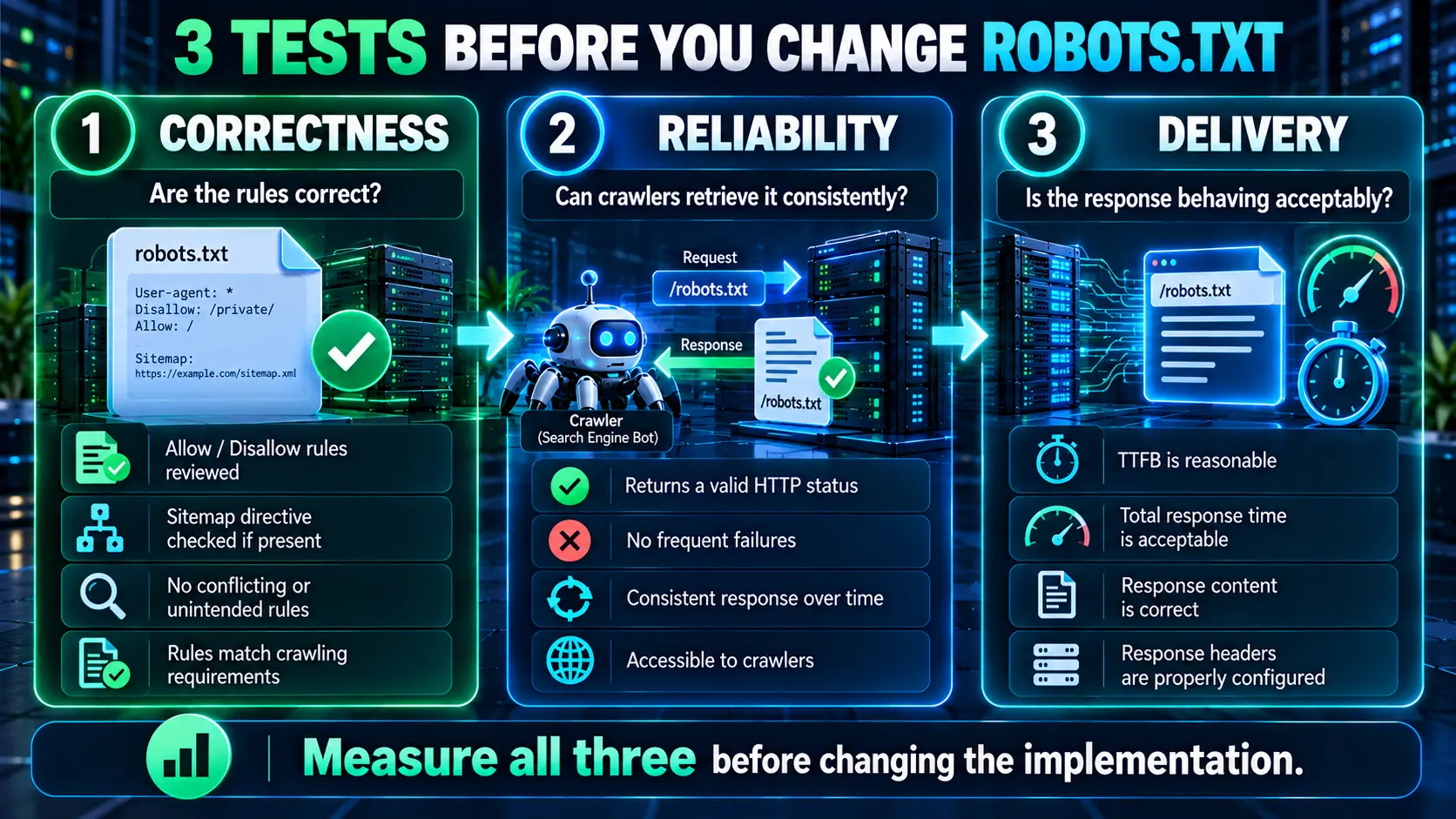
| A useful diagnostic rule: Do not start with the question “virtual or static?” Start with “what is the response doing?” Then use the evidence to decide which implementation is better suited to the diagnosed problem. |
How to Check Your WordPress robots.txt
A reliable WordPress robots.txt audit is a small HTTP investigation. You are not trying to make the file look sophisticated. You are verifying what crawlers actually receive and whether that response remains dependable.
1. Open the public /robots.txt URL
Read the live response. Confirm that the content is actually robots.txt rules rather than an HTML error page, login page, redirect chain, or hosting-generated error.
2. Check the HTTP status
For a normal successful fetch, you want a successful HTTP response. A repeated 5xx response is materially different from an isolated slow request. Do not interpret a crawler error only from a screenshot of the file content; inspect the actual HTTP response.
3. Check Content-Type and response content
The robots protocol expects plain text. Google documents UTF-8 plain text for robots.txt, and RFC 9309 specifies the text/plain media type. Also inspect the body: a 200 response containing an HTML error document is not a healthy robots.txt response.
4. Check the actual rules
Review User-agent groups, Allow and Disallow rules, and any Sitemap record. Look for accidental blocking, contradictory rules, stale paths, or directives that do not match the site’s current architecture.
5. Check whether a physical file exists
If you have server access, inspect the document root. This establishes the implementation state, but it is not a reason by itself to switch implementations.
6. Compare the physical and public versions
If a physical file exists, compare its content with the public response. They should not silently diverge. A mismatch can reveal caching, routing, application generation, or file-maintenance problems.
7. Measure response timing
Use command-line or browser developer tools to record time to first byte and total response time. Treat these as observations under a specific test condition, not universal WordPress benchmarks.
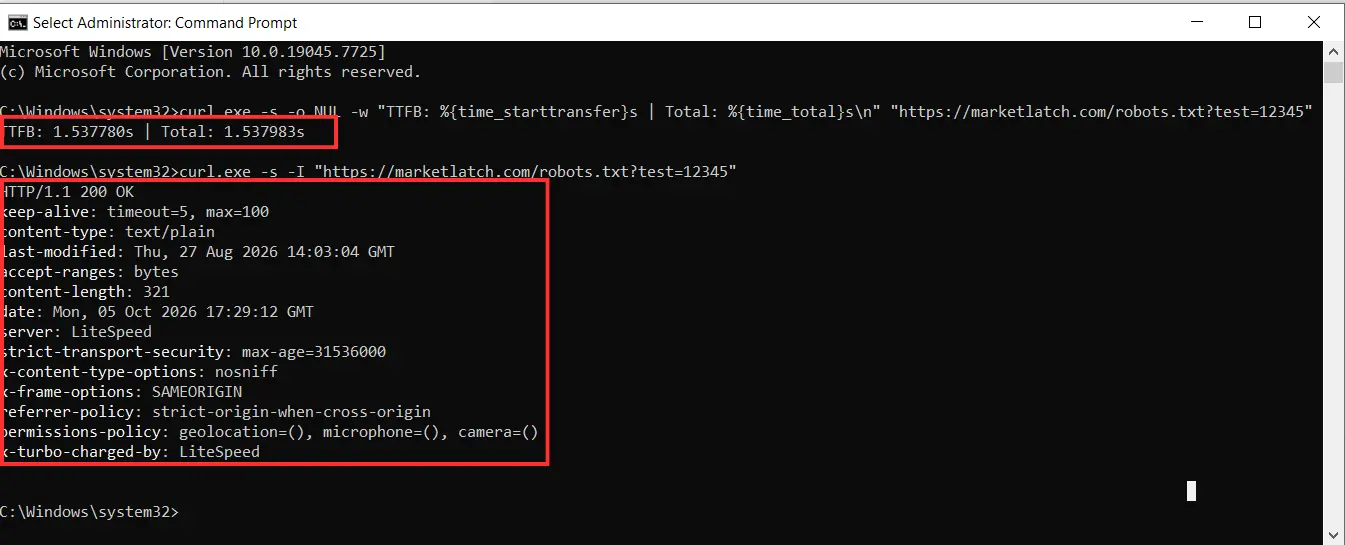
The current MarketLatch direct curl test shown above returned HTTP 200, Content-Type text/plain, Content-Length 321, and a measured TTFB of 1.537780 seconds with a total time of 1.537983 seconds. This evidence also limits the conclusion: even with a physical file present and a successful response, current response time can vary with the test path and conditions.
8. Repeat the test
Repeat the measurement at different times and, where practical, from different networks or monitoring systems. A single request can be affected by connection setup, cache state, server load, CDN behavior, or network conditions.
9. Check crawler-tool results
Third-party crawlers can expose failures that a casual browser test misses. Compare their recorded status, content type, size, and load time with your own direct tests. If the tools disagree, preserve both observations and investigate the difference rather than choosing the result you prefer.
MarketLatch Case Study: A robots.txt HTTP 520 Failure
This case study shows why the virtual-versus-static question should be treated as a diagnosis rather than a preference. The MarketLatch site produced different crawler-observed responses on two consecutive Ahrefs dates.
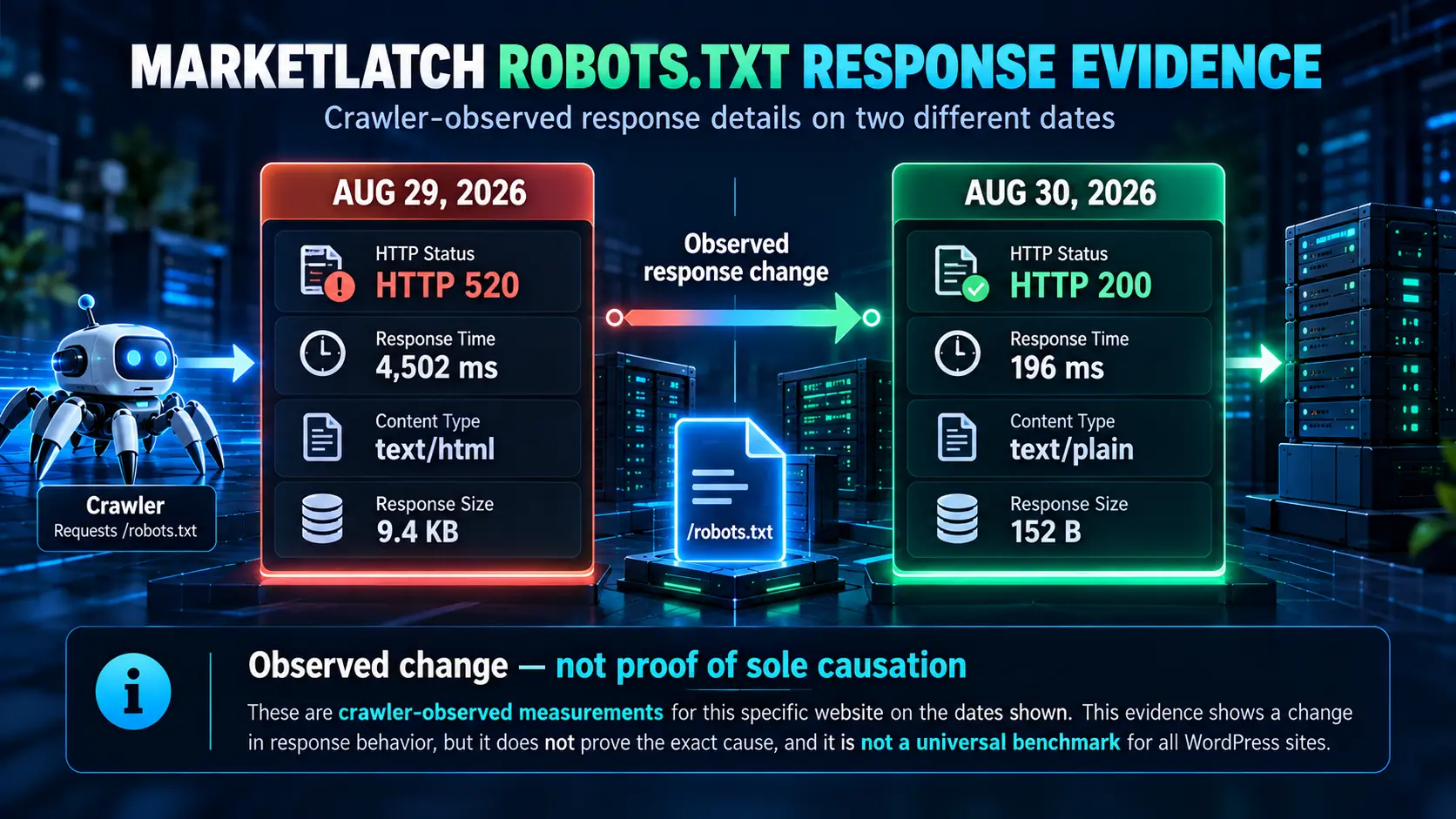
What Ahrefs recorded on August 29
| Date | HTTP status | Load time | Content type | Response size |
| Aug 29, 2026 | 520 | 4,502 ms | text/html | 9.4 KB |
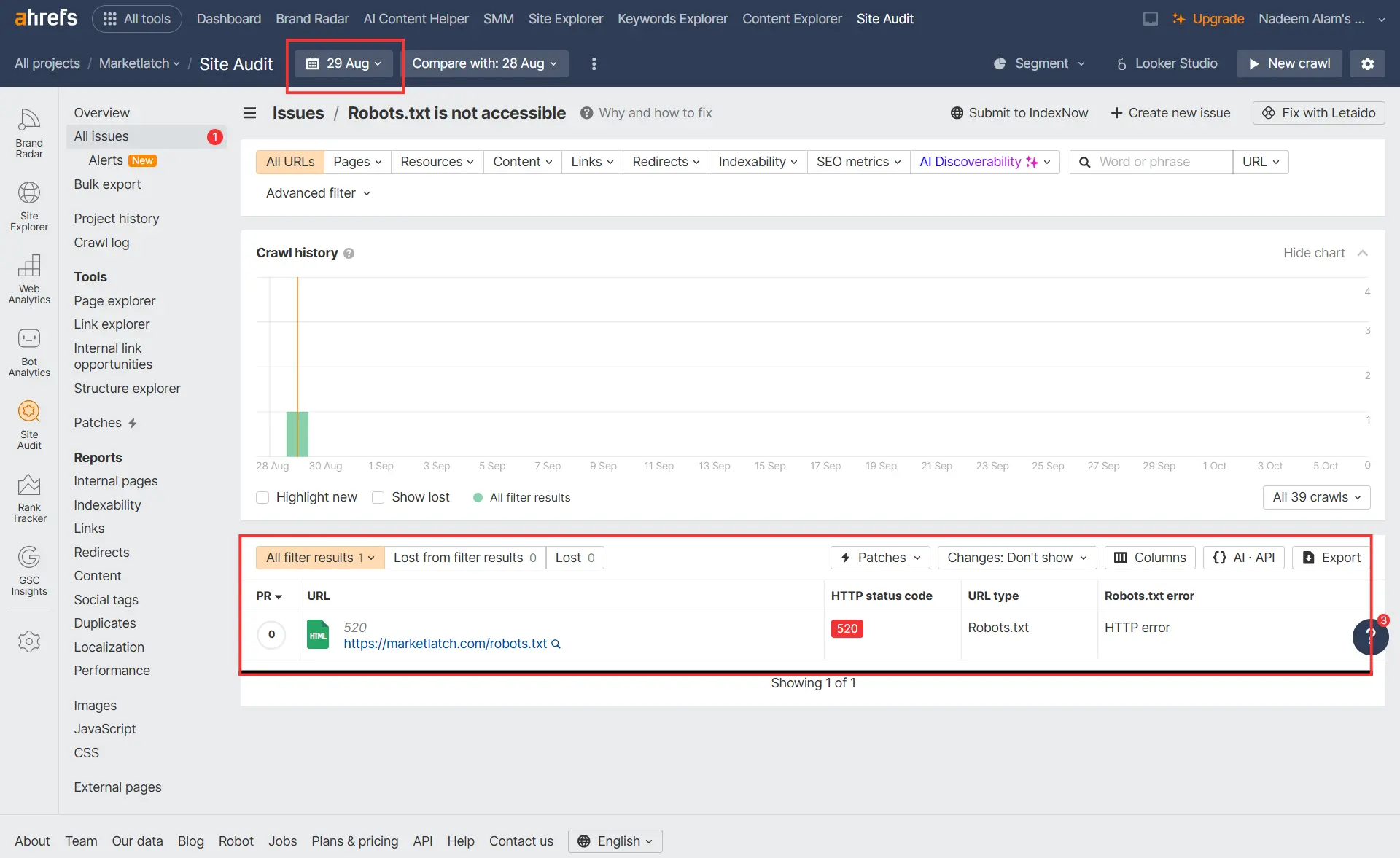
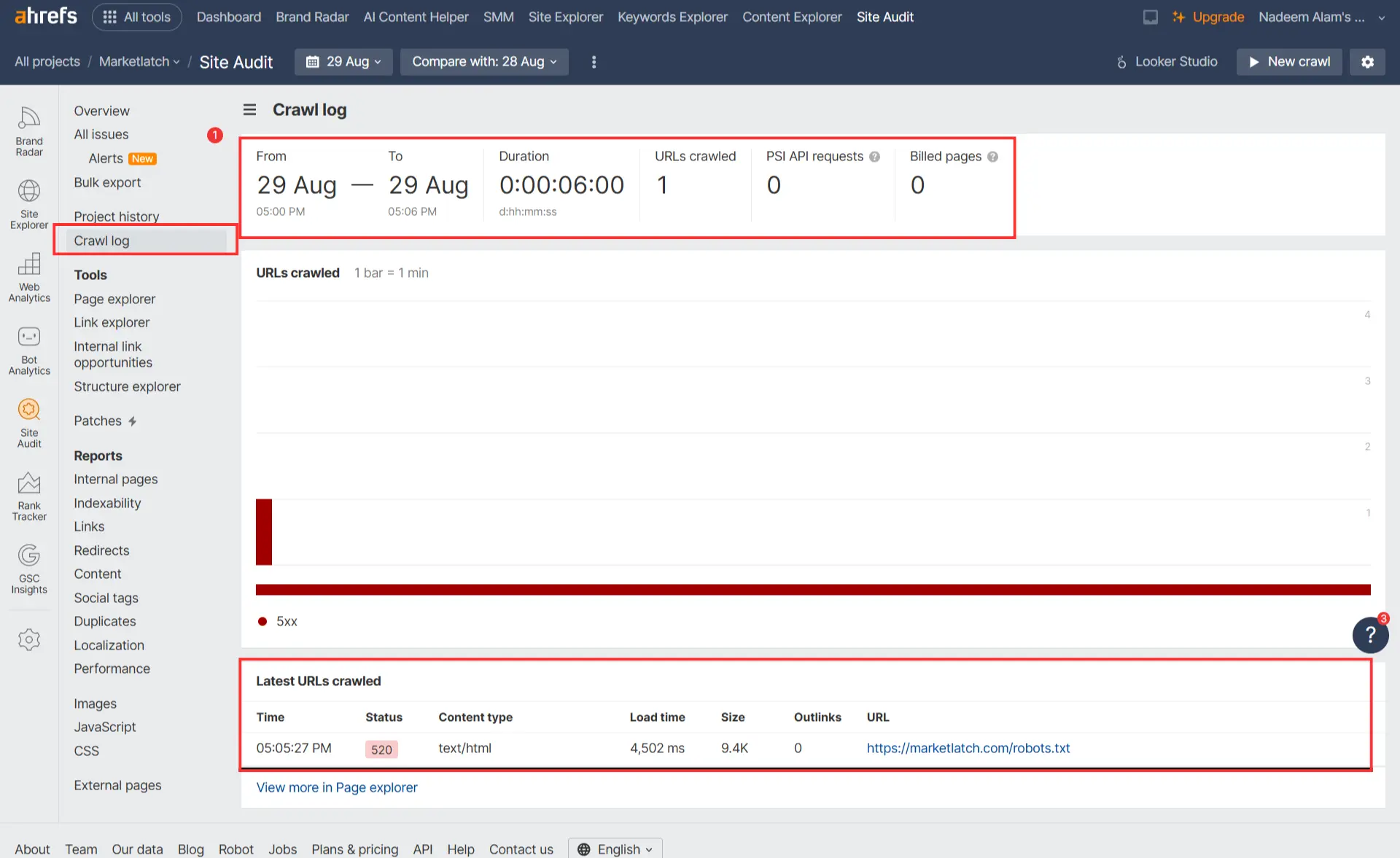
Ahrefs’s Site Audit marked /robots.txt as not accessible on August 29 and recorded HTTP 520. The crawl log provides more detail: one URL was crawled during the six-minute crawl window, and the robots.txt request returned text/html with a 4,502 ms load time and a 9.4 KB response.
What Ahrefs recorded on August 30
| Date | HTTP status | Load time | Content type | Response size |
| Aug 30, 2026 | 200 | 196 ms | text/plain | 152 B |
On August 30, Ahrefs’s Page Explorer recorded the same /robots.txt URL as HTTP 200, text/plain, 196 ms, and 152 bytes. That is a substantial change in the crawler-observed response.
What we can prove
- Ahrefs recorded an HTTP 520 response for /robots.txt on August 29, 2026.
- The August 29 crawl log recorded a 4,502 ms load time, text/html content type, and 9.4 KB response.
- Ahrefs recorded HTTP 200, text/plain, 196 ms, and 152 bytes for the same URL on August 30, 2026.
- The current MarketLatch document root contains a physical robots.txt file.
- A current direct curl test returns HTTP 200 and text/plain content from /robots.txt.
What we cannot prove
- We cannot prove from these screenshots alone that the physical file caused the August 30 recovery.
- We cannot prove that WordPress itself caused the August 29 HTTP 520.
- We cannot generalize the 196 ms result into a benchmark for static robots.txt files.
- We cannot use the file’s August 27 modification timestamp to prove why the file was created or changed.
- We cannot claim that switching from virtual to static robots.txt improves Google rankings.
| The correct interpretation: The evidence establishes a real change in crawler-observed response behavior. It does not establish a single causal mechanism. That is exactly why the article recommends diagnosing the delivery stack before declaring the implementation to be the problem. |
How to Diagnose a Slow or Failing robots.txt
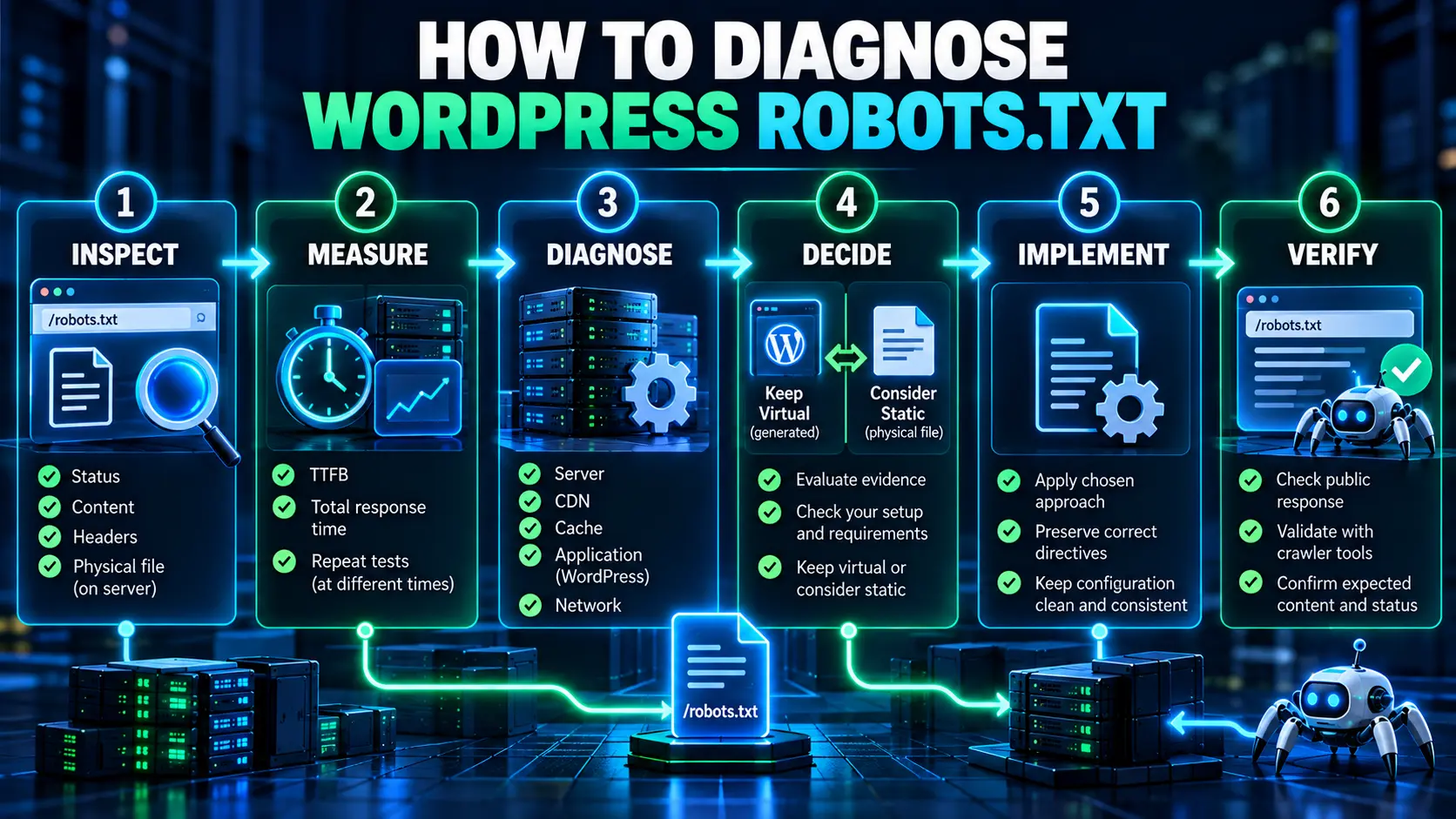
A slow robots.txt response and a failed robots.txt response are related but different problems. A 4.5-second successful response is not the same failure mode as an HTTP 520. Start with correctness, then reliability, then delivery. Only after those questions are answered should you decide whether the implementation itself needs to change.
Inspect
Confirm status, content, headers, rules, and whether a physical file exists. Establish what the site is actually serving before changing anything.
Measure
Record TTFB, total response time, response size, and repeated observations. If a third-party crawler reports a failure, preserve its measurement rather than replacing it with a more convenient local result.
Diagnose
Look across the server, CDN, cache, application, WordPress stack, and network. A failure can originate in any layer. A virtual response is only one possible explanation.
Decide
If the response is correct and reliable, keep the implementation. If there is a repeated, measurable technical problem and a physical file is appropriate for the environment, consider the static path.
Implement
Make one controlled change. Preserve the intended directives and document what changed. Avoid changing unrelated SEO settings at the same time because that makes the evidence harder to interpret.
Verify
Re-test the public URL, response headers, content, timing, and crawler-tool behavior. The change is complete only when the crawler-facing endpoint behaves as intended.
What Happens When Google Cannot Fetch robots.txt?
Google’s current documentation gives special handling to robots.txt server errors. If Google finds a robots.txt file but cannot fetch it because of a 5xx response, Google says it stops crawling the site for the first 12 hours while continuing to retry the robots.txt request. If it still cannot retrieve a new version, Google can use the last good version for the next 30 days while continuing to retry.
After 30 days, Google’s behavior depends on the site’s broader availability. If the site is generally available, Google may behave as if there is no robots.txt while continuing to check for a new version. If the site has general availability problems, Google can stop crawling while still requesting robots.txt periodically. DNS and network failures such as timeouts and reset connections are also treated as server errors in Google’s interpretation.
See Google’s current How Google interprets the robots.txt specification for the documented status-code and caching behavior.
A repeated 5xx robots.txt failure deserves more attention than a minor isolated latency spike. The WordPress robots.txt response is part of the site’s crawl-control infrastructure, and Google’s documented behavior makes availability a meaningful technical concern.
When Should You Replace Virtual robots.txt With a Static File?
There is no universal WordPress robots.txt threshold such as ‘virtual is bad after X milliseconds.’ Use the evidence to decide. A static file is a reasonable option when it addresses a demonstrated problem, the rules are stable enough to maintain safely, and the change can be verified.
| Observed situation | Recommended response |
| 200 + correct rules + reliable access | Keep the virtual implementation if it is serving normally. |
| Virtual but reliable and acceptable delivery | Keep it; there is no SEO reason to change it just because it is virtual. |
| One isolated slow request | Repeat the test and investigate the delivery path before changing implementation. |
| Repeated 5xx responses | Diagnose urgently across server, CDN, cache, application, and network layers. |
| Repeated crawler-tool failures | Compare crawler observations with direct tests and find the common failure point. |
| Measured application-level overhead is demonstrated | Consider whether a physical file would remove the diagnosed dependency. |
| Static file is likely to become stale | Prefer the implementation the team can maintain accurately. |
| No demonstrated problem | Do not change the implementation simply to make it “more SEO-friendly.” |
Keep the virtual implementation when…
- The public /robots.txt response is correct.
- The HTTP response is reliable.
- Crawler tools can retrieve it consistently.
- The response content matches the site’s intended crawl rules.
- There is no demonstrated application or delivery problem worth changing.
Consider a static implementation when…
- The same endpoint has repeated, reproducible failures.
- Testing identifies application-level processing as part of the diagnosed problem.
- A physical file would simplify the specific delivery path being investigated.
- The rules are stable enough to maintain safely.
- You can verify the public response after the change.
| Do not confuse “simpler” with “better.” A physical file can simplify one request path, but it also creates an explicit maintenance responsibility. The best implementation is the one that solves the demonstrated problem without introducing a new source of stale or incorrect rules. |
How to Replace a Virtual robots.txt With a Static File
This is an implementation pattern, not a recommendation to change every WordPress site. If the diagnostic phase has established a reason to move to a physical file, keep the change controlled.
1. Prepare the intended rules
Start from the currently correct WordPress robots.txt response and the site’s actual crawling requirements. Do not blindly copy old rules from a tutorial or another site.
2. Place the file in the correct document root
Create the physical robots.txt file at the top level of the relevant host so that the public /robots.txt endpoint can be served from that document root.
3. Preserve correct directives
Carry over the rules you actually need. Check User-agent groups, Allow/Disallow logic, and Sitemap information. Avoid adding directives simply because another guide lists them.
4. Check plugin and configuration conflicts
Make sure your server configuration and WordPress stack do not create a second competing response or rewrite the request unexpectedly. The goal is one predictable public endpoint.
5. Verify the public response
Do not stop after confirming that the file exists in File Manager. Request the live URL and confirm status, content type, body, headers, and timing.
6. Re-test crawler access
Run the same crawler or monitoring test that exposed the original problem. If the original issue was tool-specific, reproducing the same measurement is especially valuable.
How to Verify a Static robots.txt After the Switch
Run the same WordPress robots.txt checks after the change that you ran before it. That gives you a direct before-and-after comparison instead of relying on a general impression that the new file is better.
- HTTP status: does the endpoint return the expected successful response?
- Content-Type: is it served as plain text?
- Content: are the intended rules present and correct?
- Response timing: did the diagnosed delivery problem actually change?
- Crawler access: can the relevant crawler or audit tool retrieve it?
- Maintenance: does the team know who owns future rule changes?
The final verification loop is simple: Inspect → Measure → Diagnose → Decide → Implement → Verify. If the result does not improve the diagnosed problem, do not assume that “static” was the wrong idea or that WordPress was the cause. Return to the evidence and test the next plausible layer.
Common WordPress robots.txt Mistakes
Assuming WordPress robots.txt is bad because it is virtual: WordPress can generate a normal, valid response. Virtual delivery is not a defect by definition.
Assuming static automatically means faster: Actual timing depends on the full delivery path. Measure the site instead of relying on the file type.
Using robots.txt to solve an indexing problem: robots.txt controls crawler access. It is not a general noindex mechanism.
Blocking important resources by accident: A rule that looks harmless can change what crawlers can fetch. Review the actual paths affected.
Letting a physical file become stale: Static files require explicit maintenance. A correct file today can become wrong after site architecture changes.
Changing implementation without measuring first: Without a baseline, you cannot tell whether the change solved the problem or merely changed the symptoms.
Treating one crawler error as universal proof: A third-party crawler is evidence from a specific test. Compare it with direct HTTP observations and repeated tests.
How This Fits Into a WordPress Technical SEO Audit
WordPress robots.txt belongs to the crawl-and-discovery layer of a broader technical SEO system. It should not be audited in isolation from server access, URL architecture, indexing controls, rendering, performance, and structured understanding.
For the broader diagnostic model, see Technical SEO WordPress: The Layers That Actually Affect Rankings.
That pillar article explains why a visible SEO setting is often only a signal from a deeper system. This robots.txt guide goes one level deeper: it focuses on the crawler-facing resource itself, the delivery path behind it, and the evidence needed to decide whether the implementation should change.
If your investigation moves into structured-data output and validation, see How to Fix Structured Data Errors in Google Search Console.
Use the same approach here: inspect what the system actually outputs, trace the output to its source, make a controlled change, and verify the result.
WordPress robots.txt: Final Decision Framework
For WordPress robots.txt, keep the virtual implementation when it is correct and reliable; investigate isolated latency; diagnose repeated failures; and consider a static file only when testing identifies a specific delivery or application problem that the file-based path can address safely.
| If your evidence shows… | Then… |
| The response is correct and reliable | Keep the current implementation. |
| It is virtual but performs and responds reliably | Keep it; virtual is not inherently an SEO problem. |
| One request is slow | Repeat and diagnose before changing architecture. |
| Repeated 5xx or crawler failures | Treat it as a real technical problem and investigate the delivery stack. |
| Application processing is demonstrated as a material contributor | Consider a static file as one possible corrective measure. |
| A physical file would be difficult to maintain accurately | Do not switch merely for theoretical simplicity. |
| You have no evidence of a problem | Do not change the implementation. |
Frequently Asked Questions
Does WordPress automatically create robots.txt?
WordPress can generate a WordPress robots.txt response through its built-in robots handling when a physical file is not the resource being served. That means a working /robots.txt URL does not prove that a physical file exists.
Where is robots.txt located in WordPress?
The public URL is normally at the root, such as example.com/robots.txt. A physical WordPress robots.txt file, if one exists, is stored in the relevant document root. If no physical file is served, WordPress can generate the response dynamically.
Is virtual robots.txt bad for SEO?
No. A virtual WordPress robots.txt implementation can be completely valid. What matters is whether the crawler receives the correct rules through a reliable, acceptable response.
Should every WordPress site have a physical robots.txt file?
No. A physical WordPress robots.txt file is optional. It can be useful when testing identifies a delivery or reliability problem that a direct file can address, but there is no general SEO requirement to replace a working virtual response.
Can robots.txt return a 5xx response?
Yes. A server or network problem can prevent the resource from being fetched successfully. Google documents special handling for 5xx robots.txt responses, including retrying and using the last good version under certain conditions.
Does a static robots.txt improve Google rankings?
There is no basis for claiming a ranking boost merely because robots.txt is served from a physical file. Static delivery is a technical implementation choice, not a ranking factor by itself.
Does a faster robots.txt response automatically improve SEO?
Not by itself. A faster WordPress robots.txt response can be useful when it resolves a real reliability or infrastructure problem, but there is no universal response-time threshold in this article that should be treated as a ranking rule.
What should I test before changing virtual robots.txt?
Test WordPress robots.txt for correctness, reliability, and delivery. Inspect the rules and public response, repeat status and timing measurements, compare crawler-tool observations, and diagnose the server/application path before choosing a new implementation.
Conclusion
A virtual WordPress robots.txt implementation is normal. You do not need a physical file simply because the public URL is generated rather than stored on disk. If the endpoint returns the right rules, responds reliably, and behaves acceptably under the conditions that matter for your site, keeping the virtual implementation is a reasonable technical decision.
The decision changes when evidence shows a real problem. MarketLatch’s August 29 and August 30 Ahrefs records show why: the same public resource produced materially different crawler-observed responses on consecutive days. The evidence supports a measurement-first approach: inspect the response, measure it, diagnose the underlying problem, make one controlled change, and verify what crawlers receive afterward. A static file is an implementation choice, not an SEO upgrade.
Change the implementation because the evidence identifies a problem—not simply because a tutorial recommends a different setup.
Sources and Further Reading
For authoritative technical reference, Google’s robots.txt specification and crawler-handling documentation explain how Google interprets robots.txt responses and server errors. WordPress’s do_robots() developer reference documents how WordPress generates the robots.txt response, while the robots_txt filter hook documentation explains how generated output can be modified. At the protocol level, the IETF Robots Exclusion Protocol (RFC 9309) defines the standard behavior and format of robots.txt. For the broader technical SEO architecture behind this diagnostic approach, see the MarketLatch WordPress Technical SEO guide.
About the author

Nadeem Alam is the founder of MarketLatch and a digital growth strategist and WordPress specialist. His work covers technical SEO, on-page SEO, WordPress, WooCommerce, Elementor, structured data, Generative Engine Optimization, Answer Engine Optimization, Google Ads, and Meta Ads.
His approach to WordPress SEO is implementation-first and verification-driven: inspect what the site actually outputs, identify which system produced it, test targeted changes, and verify the result rather than assuming a plugin setting explains the whole problem.
Nadeem is also the author of the Generative Engine Optimization Book, the AEO Masterclass Guide and the AI SEO Implementation Checklist 2026. His training and certifications include Google Digital Garage, Semrush Academy, Coursera, uConnect and Virtual University (DigiSkills).