Most SEO reports fail for a surprisingly simple reason: they show the work, but they do not explain the decision.
A client can receive pages of keyword rankings, traffic charts, crawl warnings, backlink data and technical findings and still finish the report with the same question: “What matters, and what should we do next?”
A professional SEO report answers that question. It turns verified SEO evidence into a clear explanation of what changed, why it matters, what has been done, what needs attention first, and what happens next.
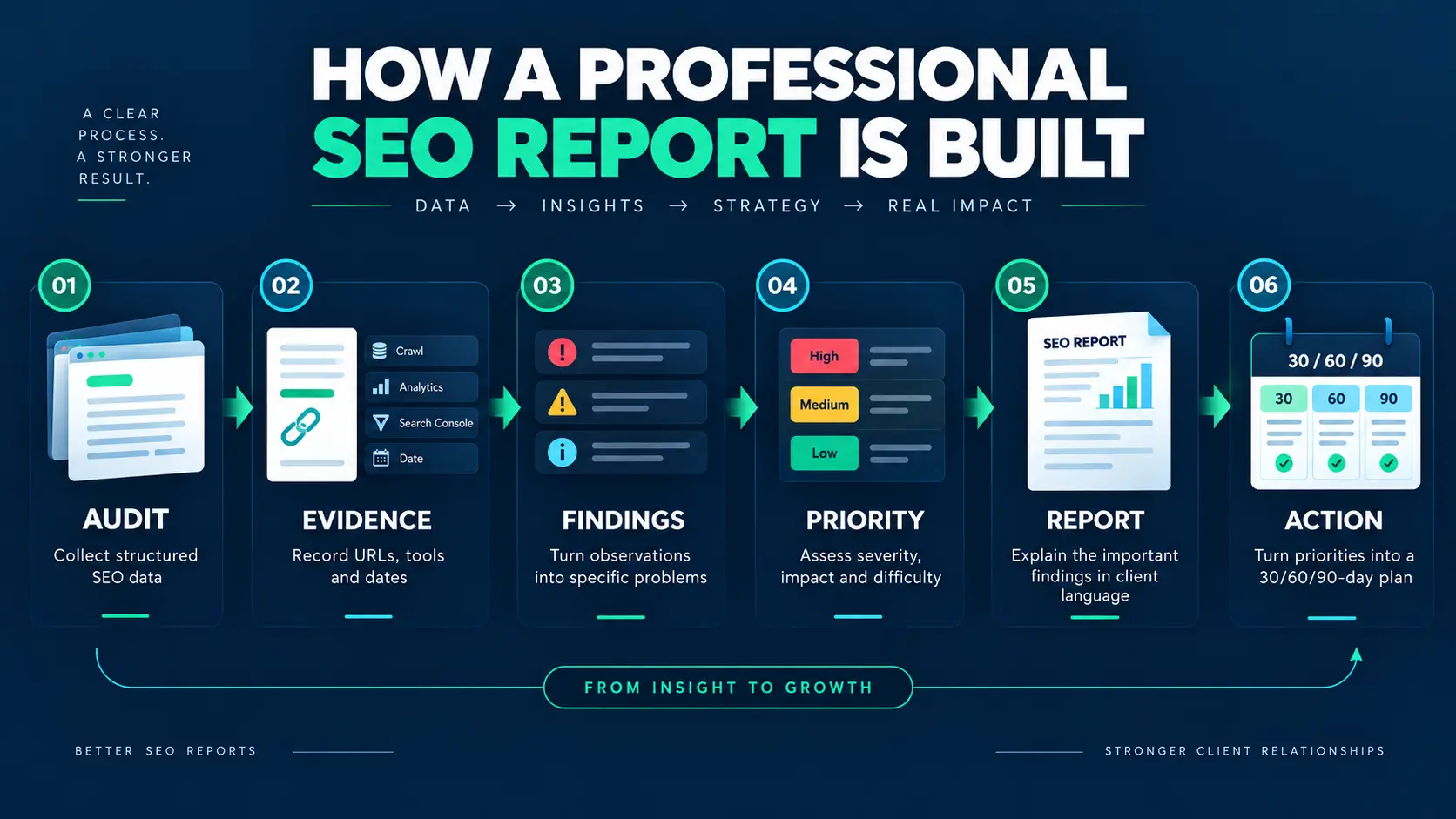
That is why the strongest reporting process separates the audit from the client-facing report:
Audit → Evidence → Findings → Priority → Client Report → Action Plan
Inside the report, the communication logic is even simpler:
Evidence → Interpretation → Priority → Action
If you are looking for an SEO report template, this is the structure worth copying. It is not a prettier spreadsheet. It is a decision document built from the spreadsheet.
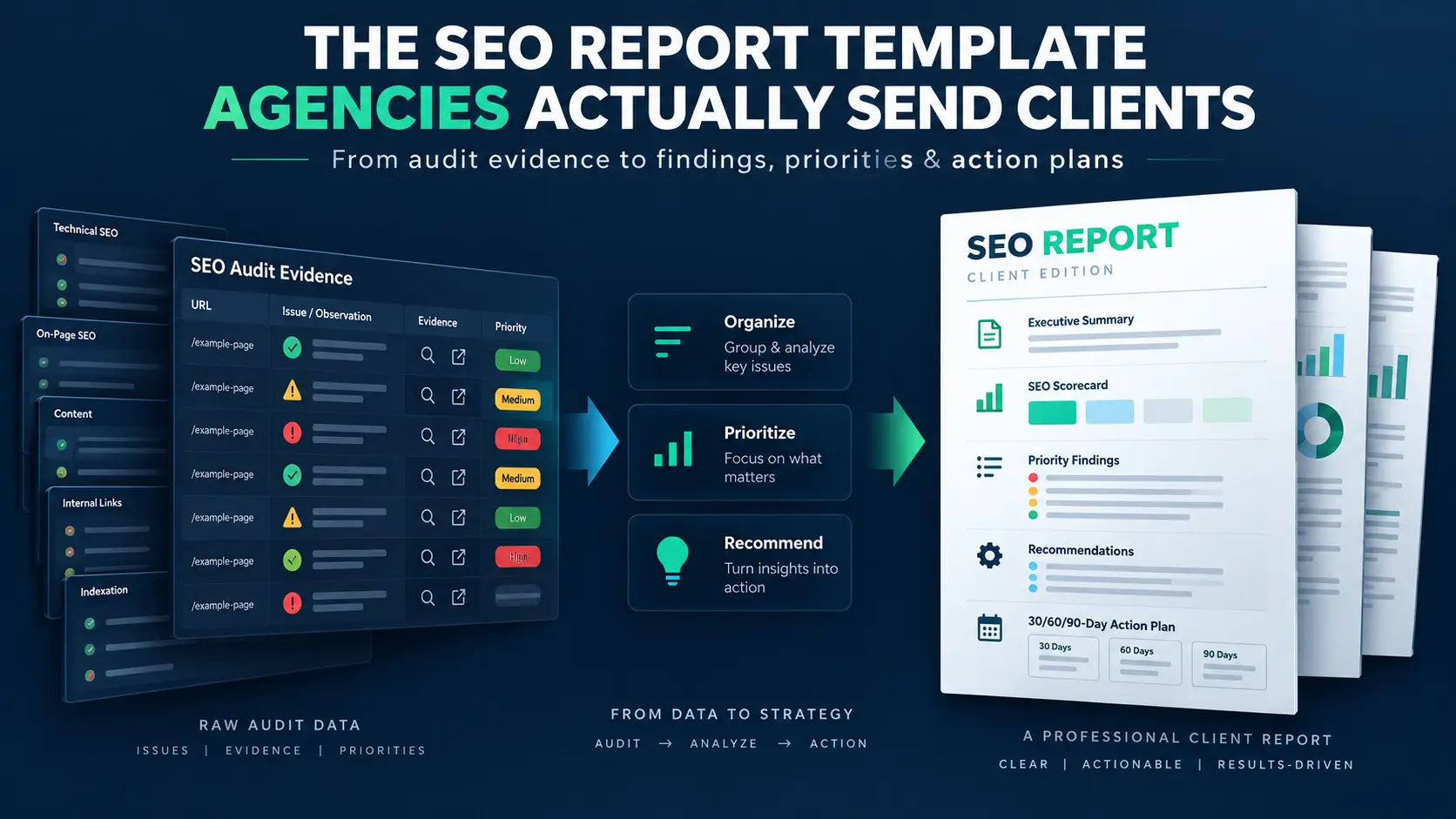
An SEO report template is a reusable structure for presenting organic search performance, findings, completed work and recommended actions to a client. A strong template typically includes an executive summary, KPIs, rankings, traffic, technical findings, priorities, recommendations and a next-step action plan.
SEO Report Template: What You Get
- Executive summary — What changed, what matters, and what needs attention.
- Organic traffic and Search Console KPIs — Clicks, impressions, CTR and relevant performance indicators.
- Keyword and visibility performance — Priority queries, ranking movement and search visibility.
- Work completed — The SEO work actually implemented during the reporting period.
- Findings and evidence — Important issues and opportunities supported by evidence.
- Priority findings — The issues that deserve attention first and why.
- Recommendations — Specific actions based on the findings.
- 30/60/90-day action plan — What should happen next and how progress will be measured.
- Client-ready commentary — Plain-language interpretation that explains why the data matters.
- Reporting checklist — A final verification layer before the report is delivered.
Need the audit system behind the report? See the professional SEO audit template →
SEO Report Template: The Client-Ready Structure
Use this as the basic structure for an SEO client report. The detailed sections below explain what each part should include, what evidence supports it, and how to turn findings into clear next actions.
- Executive Summary — What changed, what matters, and what needs attention.
- Performance Snapshot — Organic traffic, clicks, impressions, CTR and other relevant KPIs.
- Keyword & Visibility Performance — Important ranking and search-query movement.
- Work Completed — What was actually implemented during the reporting period.
- Findings & Evidence — Important issues or opportunities supported by data.
- Priority Findings — What should be addressed first and why.
- Recommendations & Action Plan — Specific actions, owners and expected outcomes.
- 30/60/90-Day Plan — What happens next and how progress will be measured.
The sections that follow break down this structure in detail, including examples, reporting formats and the evidence behind each section.
What Is an SEO Report?
An SEO report is a client-facing document that explains a website’s organic search performance, important changes, work completed, verified findings and recommended next actions for a defined period or project.
A useful SEO reporting template is not built around a fixed number of charts. It is built around the questions the client needs answered.
The five questions a useful report should answer
- What changed?
- Why does the change matter?
- What evidence supports the conclusion?
- What should happen first?
- How will we know whether the action worked?
Those questions force the report to do something a data export cannot do: interpret information.
What an SEO report is not
It is not a raw export from Google Search Console. It is not a dump of every keyword in a rank tracker. It is not a list of every warning generated by a crawler. And it is not a mysterious SEO score presented as though Google itself assigned it. Those materials can be useful inputs. The report is the layer that decides what deserves the client’s attention.
Who uses an SEO client report?
Agencies and consultants use reports to communicate recurring work. Freelancers use them to make recommendations easier to approve. In-house SEO teams use them to explain progress to management. Business owners use them to understand whether SEO activity is connected to meaningful outcomes.
The format can change for each audience. The principle should not: report the information needed for a decision, not every number available.
SEO Audit vs. SEO Client Report: Same Evidence, Different Job
This distinction is the foundation of good SEO client reporting.
The audit is where you investigate. The report is where you communicate the conclusions from that investigation. A professional workflow does not simply export the audit and put a logo on it.
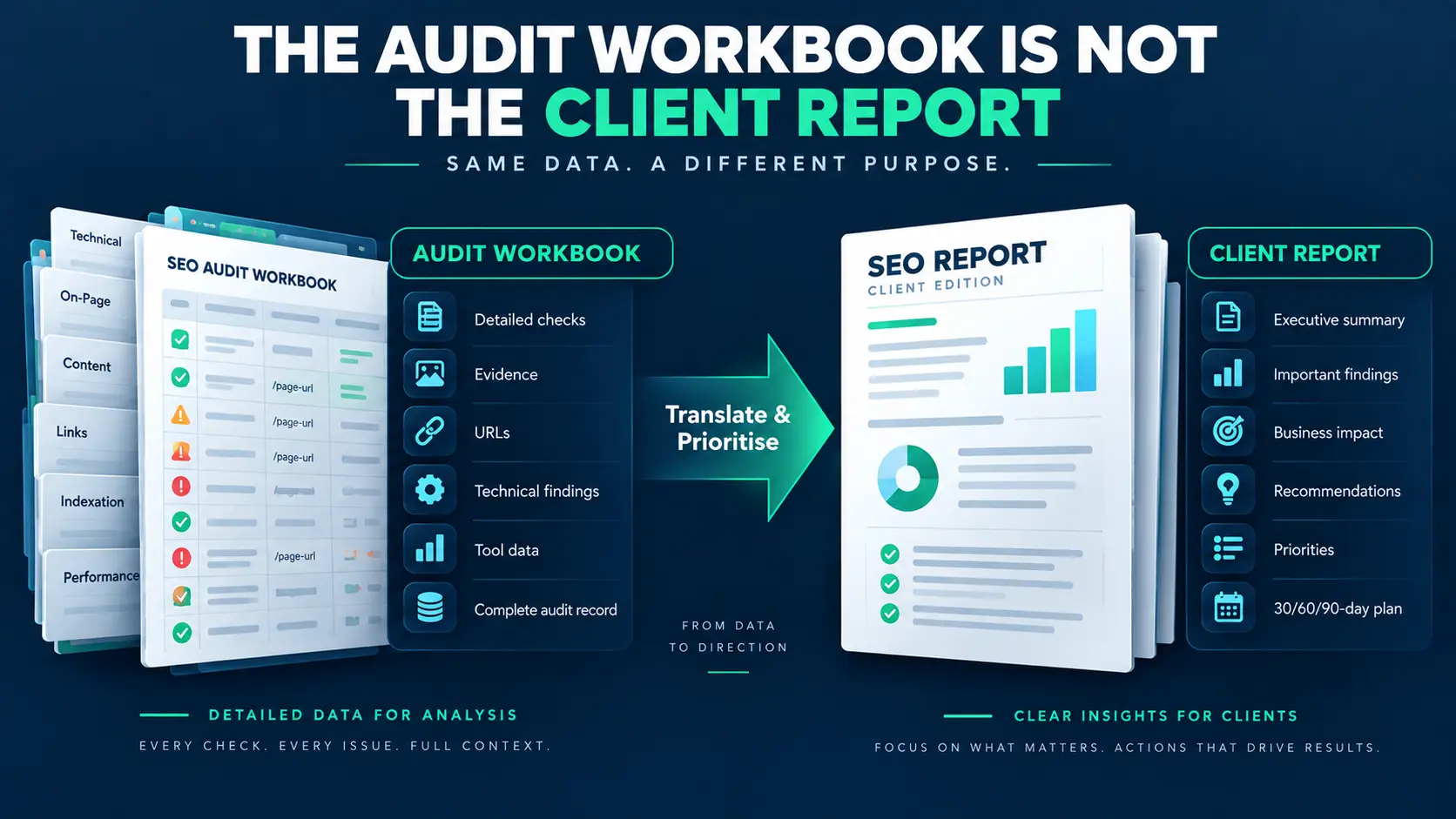
| Audit workbook | Client report |
| Detailed checks, URLs and working notes | Selected findings that matter to the client |
| Tool outputs and evidence | Evidence plus plain-language interpretation |
| Complete finding record | Prioritized findings |
| Technical detail | Business relevance and consequence |
| Every applicable check | Only decision-relevant information |
| Working document | Client communication document |
What belongs in the audit workbook
Keep the detailed record here: URLs, checks, screenshots, source tools, dates, severity, difficulty, impact, evidence, owners, statuses and supporting notes.
This is also where provenance matters. A strong finding should be traceable to the source that produced or confirmed it. If someone asks “Where did this come from?”, the auditor should not have to reconstruct the answer from memory.
What belongs in the client report
The client report should contain the conclusion: what the issue is, why it matters, what evidence supports it, how important it is, what should be done, who should do it when known, and how the result can be verified.
The transformation is the value
The report is valuable precisely because you do not show everything you found. You select, validate, group, interpret and prioritize.
That is the difference between sending a client the work and sending a client the result of the work.
Need the complete audit-to-report workflow? This article explains how to structure and communicate the client report. The professional SEO audit template provides the operational workflow behind it — including audit checks, scoring, findings tracking, prioritization and client reporting.
A practical note from my own workflow
When I build an SEO audit, I deliberately keep the detailed investigation separate from the client-facing report. The audit needs room for URLs, checks, evidence, source data and working notes. The report has a different job: it needs to make the important findings understandable and show what should happen next.
What Should a Professional SEO Report Include?
A strong SEO report format can be short or detailed, but the order should create a clear story. The following structure works well for both one-time projects and recurring reporting.
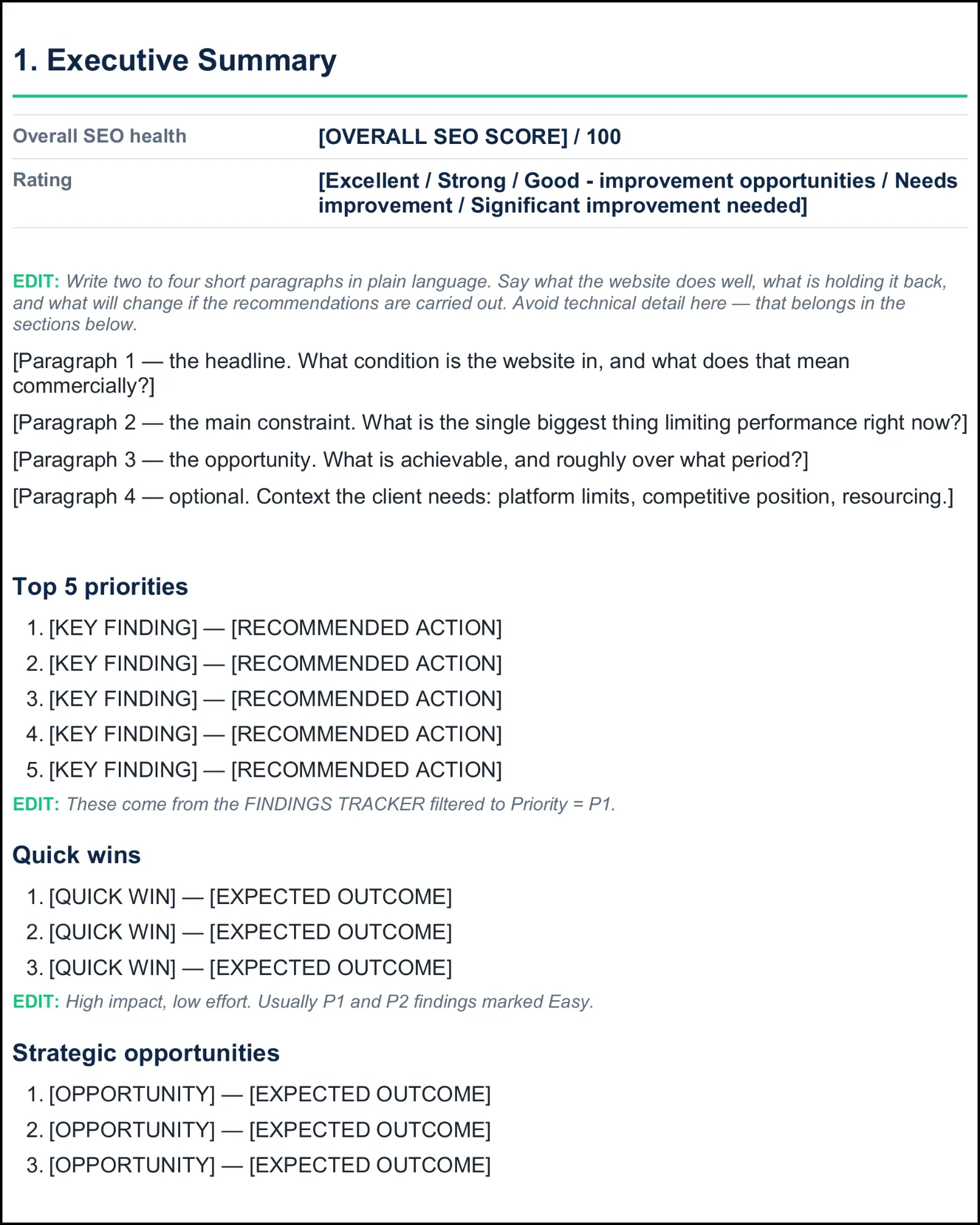
1. Executive Summary
Start with the headline. Tell the client the overall condition, the biggest constraint, the strongest opportunity and the immediate priorities.
Do not turn the executive summary into a technical dump. The detailed evidence belongs later.
2. Performance Snapshot
Use a small set of metrics that connect to the objective. Depending on the project, that might include organic clicks, impressions, CTR, priority query groups, landing-page performance, qualified leads, key events or revenue.
Google Search Console’s current Performance report provides clicks, impressions, CTR and average position, with dimensions such as queries, pages, countries, devices and search appearance. Use those metrics as evidence, not as automatic explanations for why performance changed.
Reference: Google Search Console Performance report documentation
3. Keyword and Ranking Performance
Ranking data belongs in a report when it explains meaningful visibility changes or connects directly to business priorities.
Focus on priority terms, query groups, important landing pages, winners and losers, and changes worth discussing. Avoid a 500-row keyword dump.
Also explain the limitation of average position. Google notes that Search Console’s position is an averaged metric and can differ from what someone sees in an individual search. That makes trend analysis more useful than treating one position number as a precise universal rank. Reference: Google’s explanation of impressions, clicks and average position
4. Work Completed
Show what was actually delivered during the reporting period: technical fixes, content updates, internal-link work, metadata improvements, structured-data changes, local SEO work, measurement fixes or other agreed tasks.
Keep activity separate from outcome. “We published three pages” is an activity. “Those pages generated 18 qualified enquiries” is an outcome. The report should never blur the two.
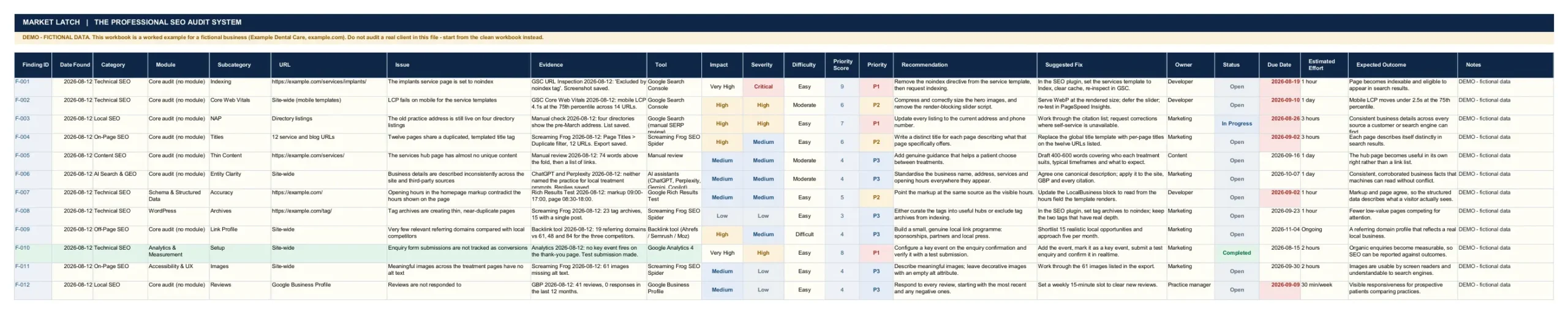
5. Findings and Evidence
A finding should be more than a sentence saying something is wrong. Record the issue, scope, evidence, source, impact and context.
6. Priority Findings
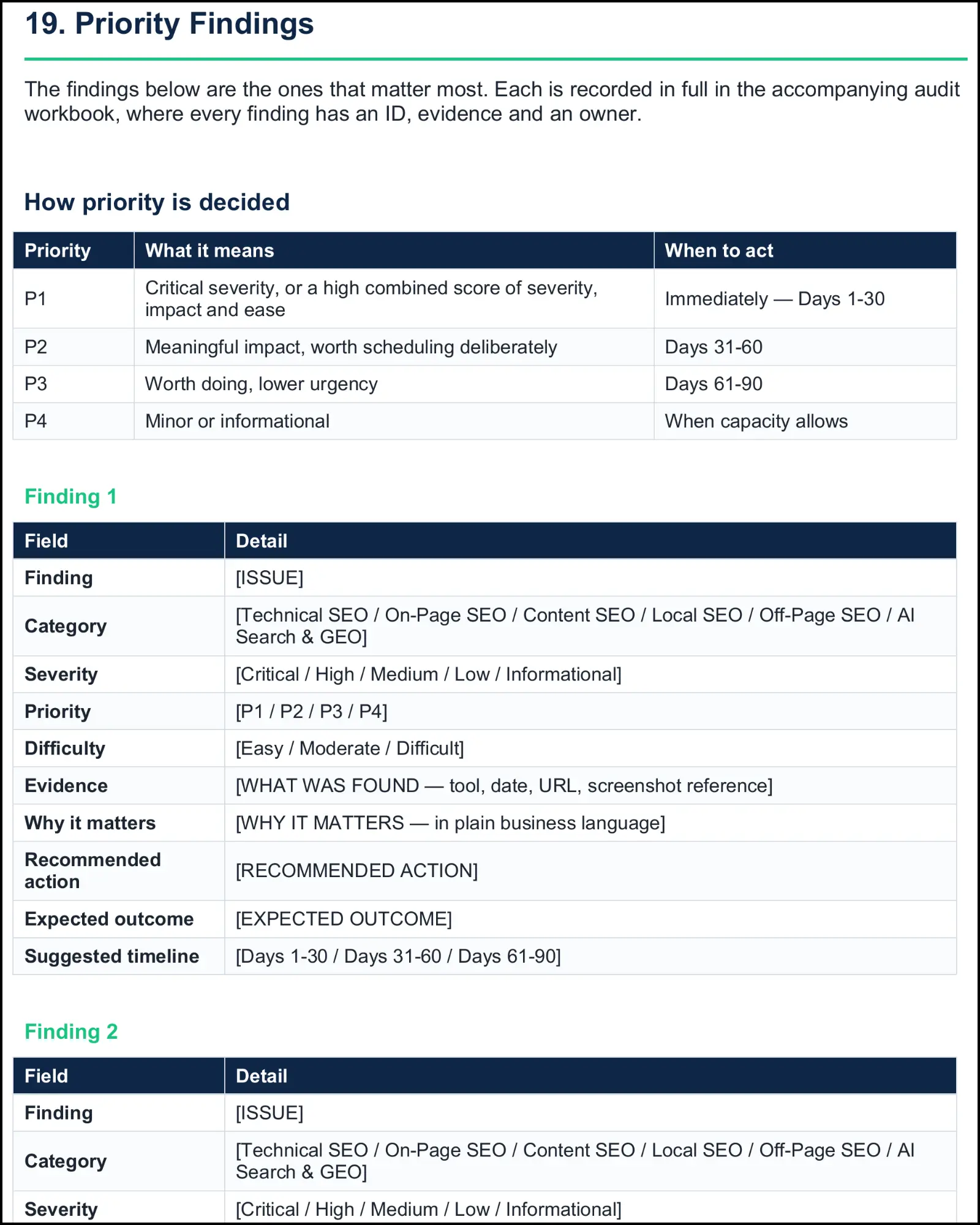
Prioritization is where a report starts becoming useful. If every issue is “high priority,” nothing has actually been prioritized.
A practical system can combine severity, business impact, implementation difficulty and dependencies. The exact scoring model can differ by agency; what matters is that the reasoning is consistent and understandable.
7. Recommendations and Action Plan
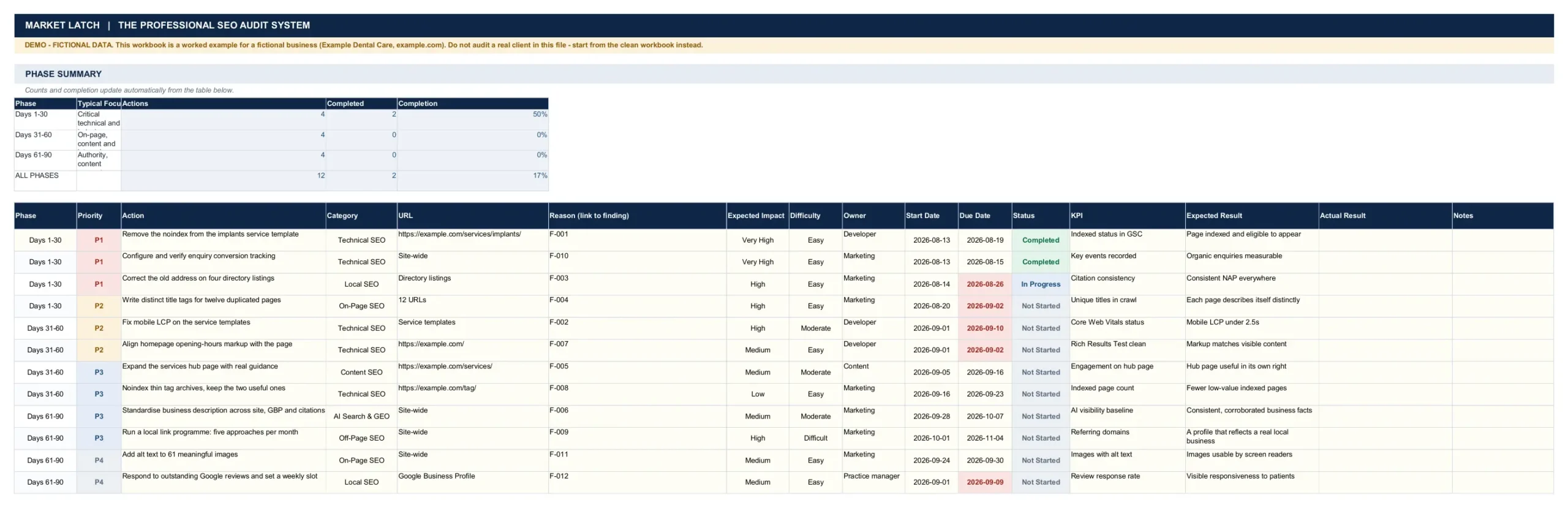
Every important finding should end with a concrete recommendation. A useful recommendation names the action, responsible person or team where known, timing, expected outcome and verification method.
8. Optional Sections
Depending on the engagement, you may include content performance, backlink trends, technical health, local search, competitor context, conversion performance, AI search visibility, or methodology and limitations. Optional does not mean unimportant. It means the section should earn its place by helping the reader understand a meaningful question.
Before You Build the Report, Check What Needs Attention
A client report is only as useful as the SEO evidence behind it. Use the free 47-Point SEO Quick-Win Checklist to identify important SEO problems and prioritize what needs attention first.
How to Build an SEO Report Clients Actually Read
Readable reporting is not mainly a design problem. It is a reasoning problem.
Start with the decision, not the metric
Before adding a chart, ask: what decision does this chart support? If the answer is “none,” move it to the appendix or remove it.
Use evidence before interpretation
A reliable pattern is: observation → source → interpretation → priority → action.
For example: “The service template is applying a noindex directive. Search Console inspection confirms the affected URL is excluded from indexing. Because the page is intended to attract organic leads, remove the directive and verify the URL again.”
That is much stronger than writing “Technical SEO is poor.”
Translate technical findings into business language
Clients do not necessarily need to know every implementation detail. They need to understand the consequence.
Instead of “12 URLs have duplicate title tags,” explain that duplicated titles make it harder for search engines and users to distinguish pages in search results, then identify the pages that matter and the fix.
Prioritize instead of dumping
A professional report should make the order visible. P1 should mean something different from P3. If your priority system cannot explain why one task comes first, it is decoration.
Make recommendations measurable
“Improve indexing” is vague. “Remove the noindex directive, confirm the page is indexable in URL Inspection, and monitor the indexed status” is measurable.
Google’s URL Inspection tool can be used to inspect the indexed version, test a live URL and request indexing when appropriate.
SEO Report Format: A Practical Client-Ready Structure
If someone searches for an SEO report format, they usually need a structure they can adapt immediately. Use this as the default, then remove sections that do not serve the engagement.
| Section | Purpose | Client question answered |
| Executive Summary | State the main story | Where are we and what matters? |
| Performance Snapshot | Show selected KPIs | What changed? |
| Keyword / Visibility | Explain search movement | Where did visibility move? |
| Work Completed | Record delivery | What did the SEO team do? |
| Findings & Evidence | Support conclusions | What did we actually find? |
| Priority Findings | Order the work | What comes first? |
| Recommendations | Define actions | What should we do? |
| 30/60/90 Plan | Sequence implementation | What happens next and when? |
If you are building a monthly SEO report template, keep the same decision logic even when the document is only one page.
A one-page report
For a small engagement, use a headline summary, a compact KPI block, three priority findings and the next actions. This can be enough for a decision-maker who needs a management update rather than a technical audit.
A detailed agency report
For larger projects, keep the same narrative but add evidence, charts and supporting sections. Detail should increase the confidence of the conclusion, not bury it.
What belongs in an appendix
Move long keyword lists, full crawl exports, technical logs, methodology notes and supporting evidence into the appendix or audit workbook. This keeps the main report readable while preserving auditability.
A good seo monthly report should make the month-to-month comparison obvious without turning every small fluctuation into a story.
What Should a Monthly SEO Report Include?
A monthly SEO report is not simply an audit repeated every month. An audit establishes a baseline. Monthly reporting explains change over time.
What a monthly SEO report should compare
- Organic clicks and impressions where Search Console data is relevant.
- Qualified leads or key events when measurement is reliable.
- Priority query or keyword-group movement.
- Important landing-page changes.
- Work completed during the period.
- Technical, indexing or content changes that materially affect visibility.
- Progress against previous recommendations.
What the report should explain
A strong monthly SEO report should answer four questions: What moved? Why might it have moved? What did we do? What are we doing next?
Be careful with causation. SEO performance is affected by multiple factors, and correlation is not proof. When evidence is incomplete, say “likely contributed,” “coincided with,” or “we cannot isolate the cause” rather than inventing certainty.
When to use a quarterly report
Quarterly reporting can work well for slower programmes where individual monthly changes are too noisy to support strategic conclusions. The reporting cadence should match the speed of meaningful decisions. For conversion and acquisition context, see Google Analytics reporting documentation
SEO Report Example: What a Client Should Actually See
A useful SEO report example is easier to understand when you follow one fictional finding from evidence to action. The following example uses the locked MarketLatch demo materials. It is fictional and should never be presented as a real client result.
Example: an indexing problem
Finding: a fictional service-page template applies a noindex directive.
Evidence: the demo workbook records the affected URL, inspection date and Search Console evidence.
Interpretation: if the page is intended to attract organic search traffic, excluding it from the index prevents that page from being eligible to appear in Google’s organic results.
Priority: P1 in the fictional example because the issue affects an important commercial page and the proposed fix is relatively easy.
Action: remove the unintended noindex directive, verify the page again, and monitor the indexing status.
That five-step chain is what makes a report useful. The client does not need to read every audit row to understand the decision.
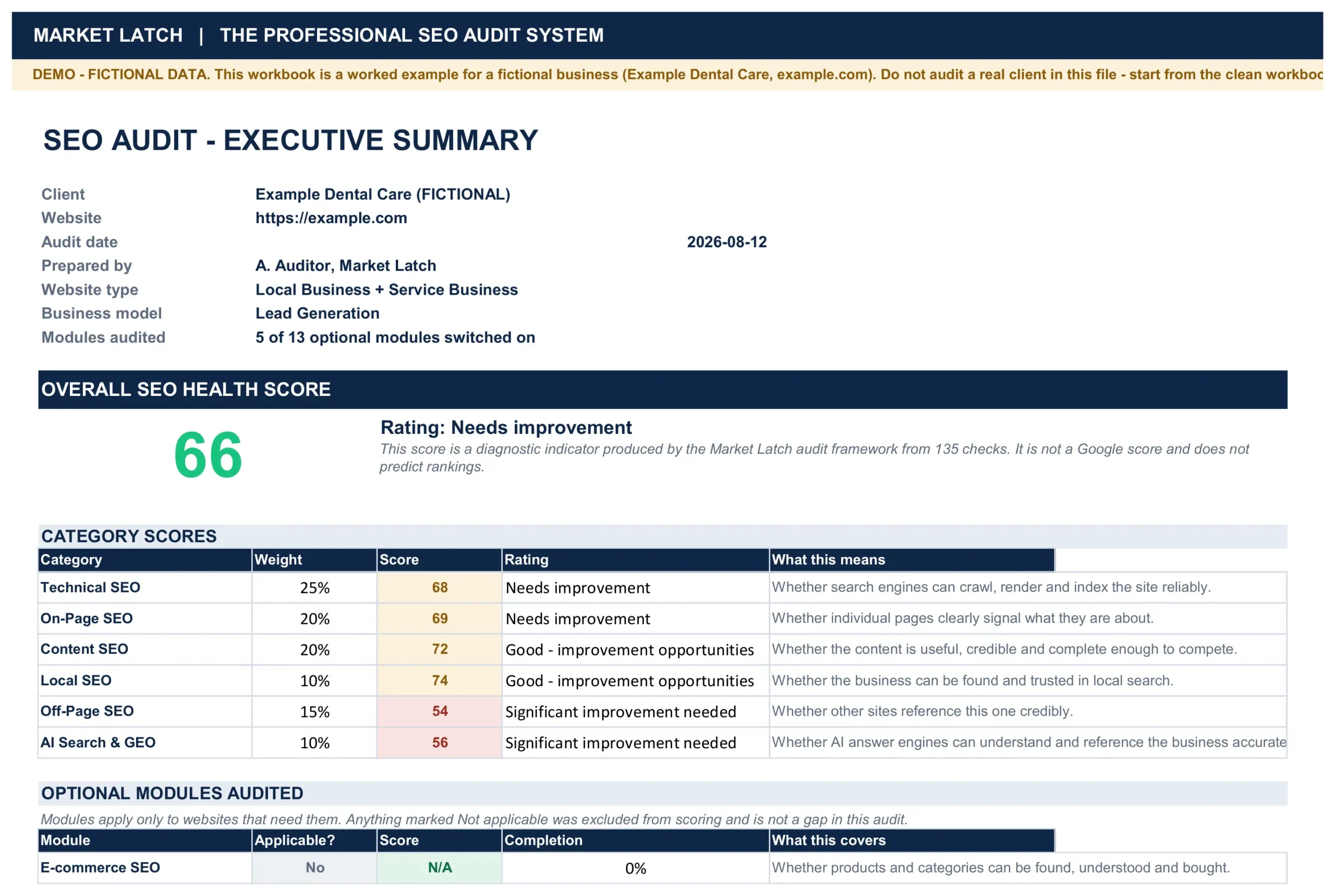
Report cover
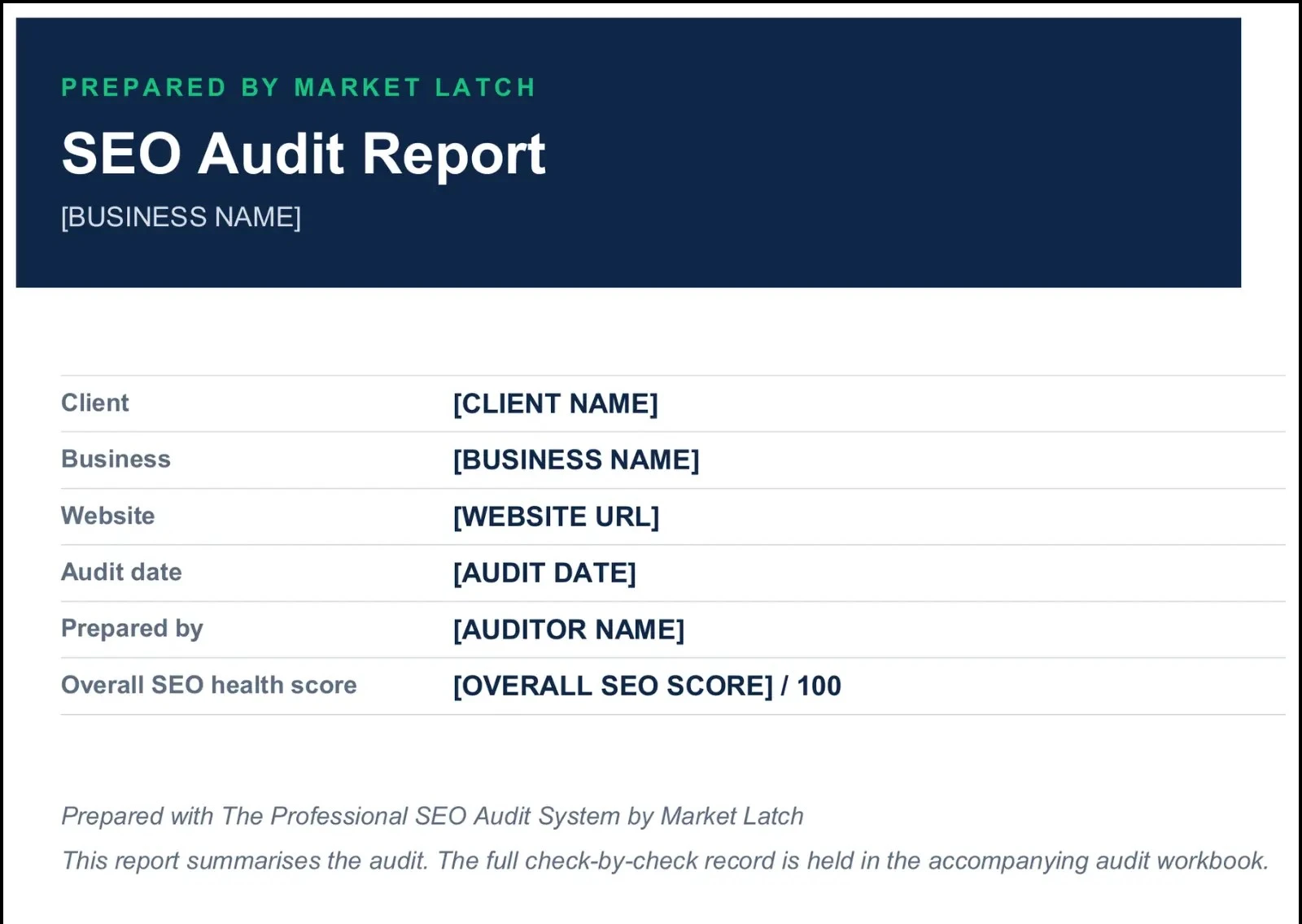
Executive summary
An effective SEO client report should begin with a concise executive summary that explains what changed, why it matters, and what the client should focus on next. Include the most important performance movement, significant SEO findings, completed work, key opportunities, and immediate priorities without overwhelming the reader with raw data. A good executive summary gives decision-makers enough context to understand the current SEO position before they move into rankings, organic traffic, technical findings, content performance, and other supporting evidence.
Findings and priorities
Findings should explain more than what is wrong; they should show why the issue matters and what should happen next. For each important finding, connect the evidence to its likely impact, recommended action, priority, owner, and timing. This turns technical audit data into a client-ready decision rather than another list of warnings. The goal is not to show every issue discovered during the audit, but to highlight the findings that can influence organic visibility, user experience, conversions, or the next stage of SEO work.
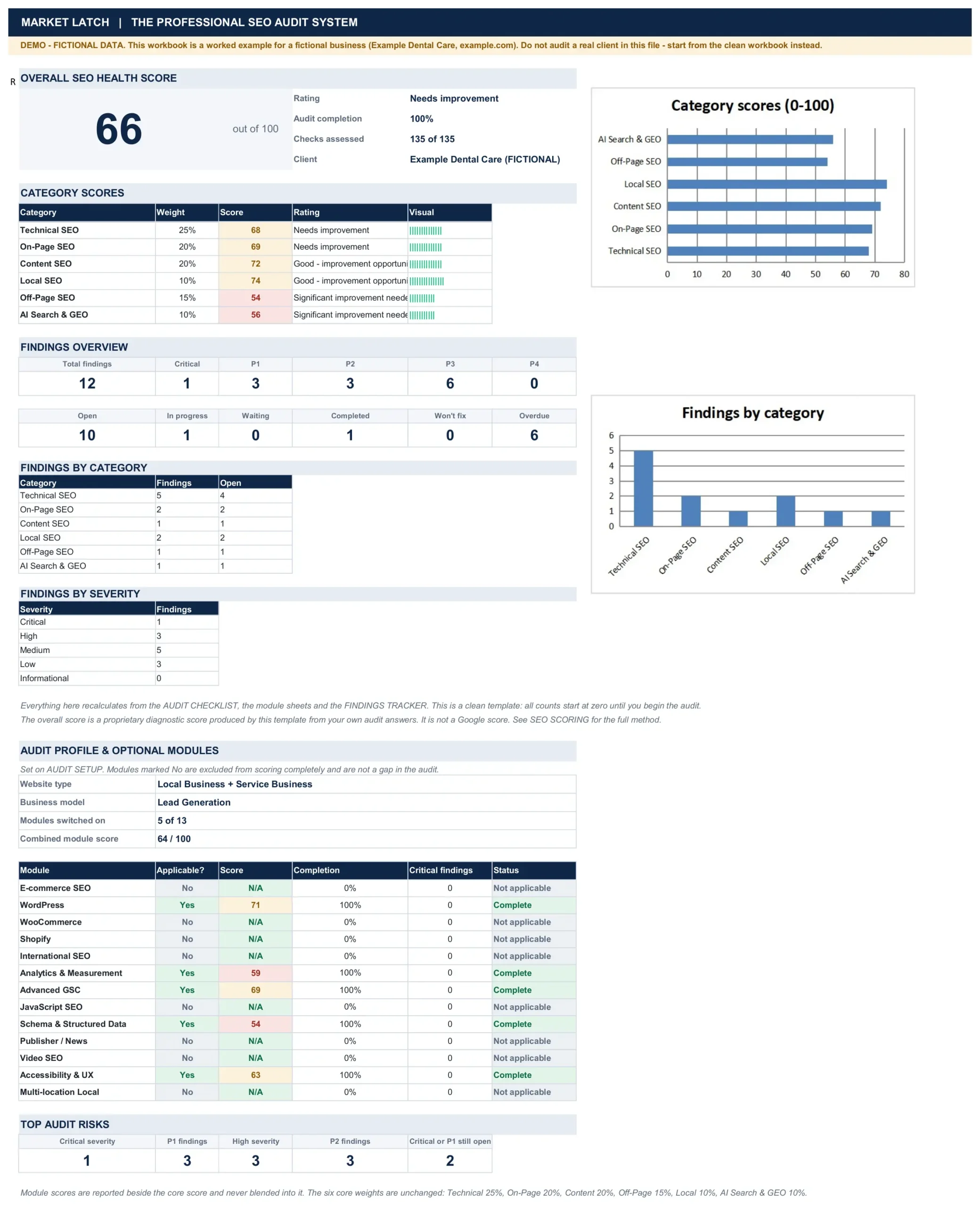
Client summary and dashboard
A client summary should make the most important information easy to scan without forcing the reader to interpret a spreadsheet or audit tool. Show only the metrics that support the report’s story, explain what changed, and connect important movements to findings or actions. The dashboard should support the written explanation—not replace it.
What to Leave Out of an SEO Client Report
A professional report becomes more valuable when you remove information that creates noise without improving a decision.
Raw tool exports
Keep them as evidence, not as the main narrative.
Every keyword
Report meaningful groups and priority terms rather than forcing the client to interpret a giant ranking table.
Unexplained SEO scores
If you use a proprietary or agency score, define it clearly. Never imply that a third-party score is a Google score or a ranking guarantee.
Technical warnings with no business relevance
A crawler can identify issues that are real but not worth acting on now. The report should distinguish between “found” and “important.”
Vanity metrics
A larger number is not automatically a better outcome. Keep metrics that help evaluate visibility, progress or business outcomes.
Unsupported causal claims
Do not turn timing into proof. If several variables changed at once, acknowledge the uncertainty.
Recommendations without ownership or timing
A recommendation becomes operational when someone can own it, schedule it and verify it.
From SEO Audit to Client Report: The Agency Workflow
The workflow should preserve the chain between the evidence you collected and the action you recommend.
Step 1 — Audit
Run the relevant checks and record what you actually verified.
Step 2 — Validate
Confirm important findings with the right source. Third-party tools are useful, but their scores and predictions are not Google data. Google itself recommends evaluating third-party SEO advice against official Search guidance. Reference: Google guidance on third-party SEO tools and advice
Step 3 — Record
Capture the finding, evidence, source, scope, impact, severity, difficulty and recommendation.
Step 4 — Prioritize
Choose what should happen first based on impact, severity, effort and dependencies.
Step 5 — Translate
Turn technical observations into plain language without losing accuracy.
Step 6 — Report
Build the executive summary, performance view, findings, priorities and recommendations.
Step 7 — Action
Turn approved recommendations into an implementation plan with owners, timing and measurement.
Step 8 — Review
At the next reporting cycle, revisit completed actions and compare the new evidence with the previous baseline.
The Google-Safe Way to Think About SEO Reporting
An SEO report is not a ranking trick. It is a truthful explanation of evidence. That matters because Google’s current Search guidance emphasizes helpful, reliable, people-first content, original analysis, clear authorship and evidence of expertise rather than content created primarily to manipulate rankings.
Read Google’s current helpful, reliable, people-first content guidance.
For this article, that means the page should be useful even if the visitor never searches for another keyword after reading it. It should demonstrate the reporting process, explain why each section exists, show practical agency examples, and give the reader enough information to build a better SEO report.
Google’s Search Essentials also recommends helpful, reliable, people-first content, crawlable links, descriptive words in prominent locations, and appropriate best practices for images and structured data.
Reference: Google Search Essentials
Do not confuse SEO compliance with ranking guarantees
Meeting Google’s technical requirements or using structured data does not guarantee crawling, indexing or ranking. Google explicitly says it does not guarantee that pages will be crawled, indexed or served even when they follow Search Essentials.
That same discipline should appear in client reporting. Do not promise rankings. Do not present a tool’s prediction as certainty. Report what the evidence supports.
Use first-party evidence where available
Google recommends using Search Console for information directly from Google Search. Third-party tools can add useful analysis, but the report should distinguish first-party evidence from third-party estimates.
Use structured data accurately
For an article like this one, Article or BlogPosting structured data and BreadcrumbList are appropriate candidates when supported by the page and your SEO setup. Structured data helps Google understand the page; it does not guarantee a rich result.
Reference: Google Article structured data documentation. Reference: Google Breadcrumb structured data documentation
SEO Report Template Final Checklist
Before sending the report, ask whether the document can survive a skeptical client reading it without the auditor sitting beside them.
| Check | Pass condition |
| Scope | Correct client, site and reporting period |
| Data | Metrics have a known source and sensible comparison |
| Evidence | Important findings can be traced to evidence |
| Interpretation | The report explains why important changes matter |
| Priorities | The reader can see what comes first |
| Actions | Recommendations are concrete |
| Ownership | Owner is included where known |
| Timing | Timing is realistic |
| Measurement | Important actions have a verification method |
| Accuracy | No invented outcomes, guarantees or unsupported causation |
| Transparency | Demo/fictitious data is clearly identified |
| Usability | The report makes sense without the audit workbook |
- Check the reporting period and website.
- Confirm important numbers against their source.
- Confirm every major finding has evidence.
- Check that P1/P2/P3/P4 priorities are defensible.
- Remove unnecessary tool exports and vanity metrics.
- Make recommendations specific enough to assign.
- Check owners, dates and KPIs where applicable.
- Keep demo data clearly labeled as demo or fictional.
- Verify all internal and external links before publication.
- Review the article as a human reader, not just through an SEO plugin.
Frequently Asked Questions About SEO Reports
What should an SEO report include?
A professional SEO report normally includes an executive summary, selected performance metrics, meaningful keyword or visibility changes, work completed, evidence-backed findings, priorities, recommendations and a practical action plan. Additional sections should be included only when they help answer a real client question.
What is the difference between an SEO audit and an SEO report?
An SEO audit is the investigation and evidence record. An SEO report is the client-facing interpretation of that work. The audit can contain hundreds of checks; the report should focus on the findings and actions that matter.
How often should an SEO client report be sent?
Monthly reporting is common for ongoing SEO because it creates a consistent comparison period. Quarterly reporting can be better for slower strategic programmes. The cadence should follow the speed of meaningful decisions.
Should an SEO report include keyword rankings?
Yes, when rankings help explain meaningful visibility changes or business priorities. Focus on priority terms and query groups rather than reporting every tracked keyword.
Should SEO reports include traffic and conversions?
They should when the data is reliable and relevant. Traffic is useful, but qualified leads, key events or revenue may provide a stronger connection to business outcomes.
What is a good SEO report format?
A practical format is: executive summary, performance snapshot, keyword or visibility performance, work completed, findings and evidence, priorities, recommendations, and a 30/60/90-day action plan. Supporting data can go into an appendix.
A useful SEO report sample should demonstrate the reasoning, not merely display attractive charts.
What is an SEO report example supposed to show?
A useful SEO report example should show how evidence becomes a finding, how findings become priorities, and how priorities become actions. A collection of charts without that reasoning is not a strong example.
Should an SEO report include AI visibility?
It can when AI search visibility is relevant to the client’s strategy and there is a defensible measurement method. For a practical framework, see How to Measure GEO: A Practical Framework for Tracking AI Search Visibility.
Final Takeaway
The best SEO report template is not the longest one. It is the one that makes the client’s next decision easier.
Keep the investigation detailed in the audit workbook. Keep the client report focused on what changed, why it matters, what the evidence shows, what should happen first and how the work will be measured.
The professional reporting loop is:
Audit → Evidence → Findings → Priority → Client Report → Action Plan
If you need the operational system behind that workflow, MarketLatch’s Professional SEO Audit Template & Client Reporting System can serve as the audit-side implementation layer. The article remains focused on reporting methodology; the product handles the structured audit system.
Explore the Professional SEO Audit Template & Client Reporting System.
For implementation support, see professional SEO services.
For a practical example of how indexing evidence can become an SEO action, see our guide on how to diagnose indexing problems.
About the author

Nadeem Alam is the founder of Market Latch, a digital marketing agency working with clients across the USA, UK, Canada, Australia, the UAE and Pakistan. He is a digital growth strategist and WordPress specialist with around 5 years in search, covering technical, on-page, off-page and local SEO, generative engine optimization and answer engine optimization, WooCommerce and Elementor development, and Google and Meta Ads.
He is the author of the Generative Engine Optimization Book, the AEO Masterclass guide and the AI SEO Implementation Checklist 2026, and holds certifications from Google Digital Garage, Semrush Academy, Coursera, uConnect and Virtual University (DigiSkills).