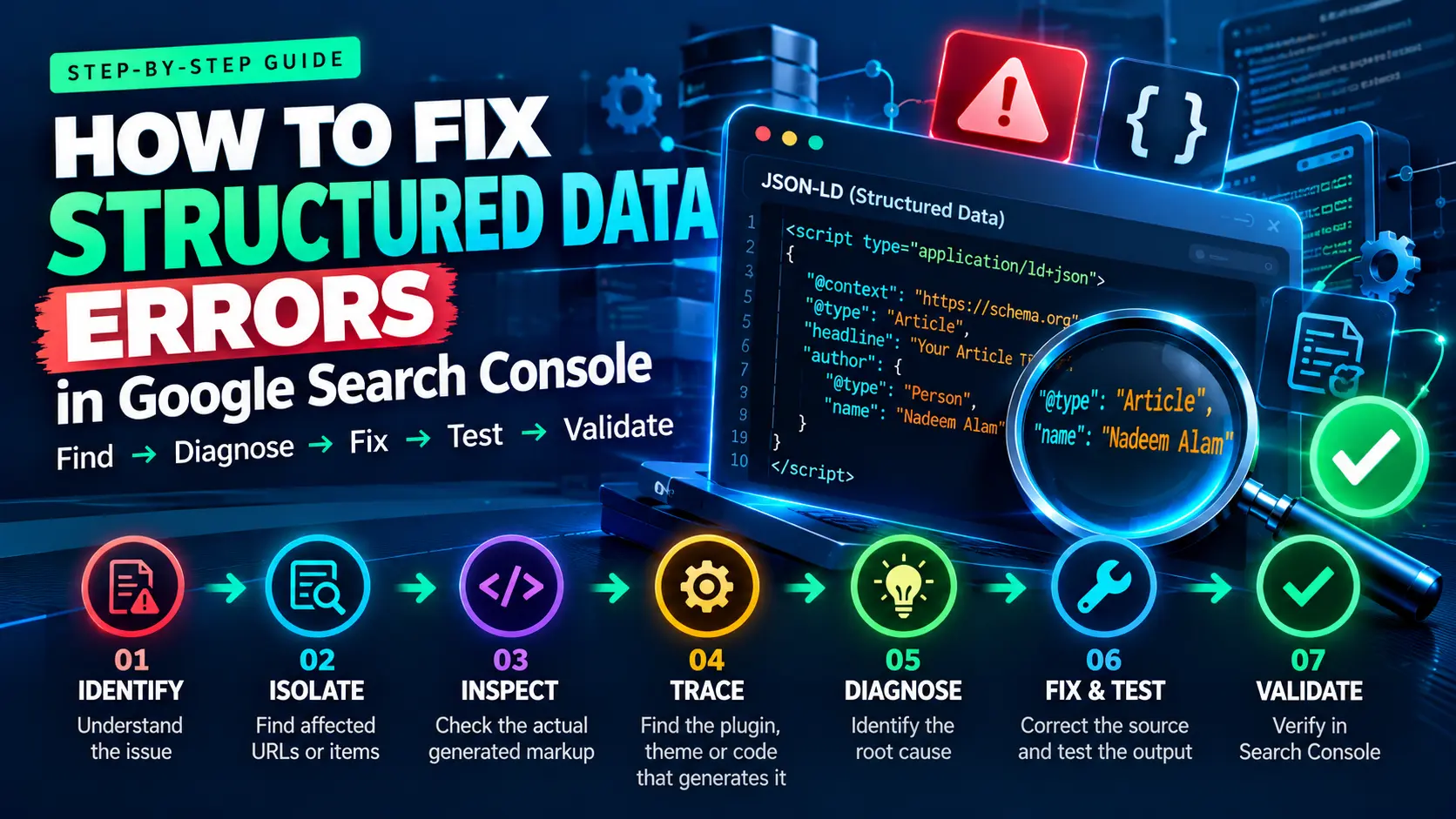
How to Fix Structured Data Errors in Google Search Console starts with evidence, not guesswork. The reliable approach is to work backward from the reported issue: identify the exact problem, isolate the affected pages, inspect the markup that is actually being output, trace it to its source, diagnose the root cause, fix and test that source, and then let Google recrawl and validate the correction.
This article uses that workflow because structured-data problems on WordPress are often system problems rather than one-line editing problems. An SEO plugin, theme, page builder, WooCommerce, a schema extension, and custom code can all participate in the final HTML.
The core principle is simple: don’t debug the reported issue in isolation. Debug the system that produced the issue.
Structured Data Validity, Eligibility, Appearance, and Ranking Are Different Questions
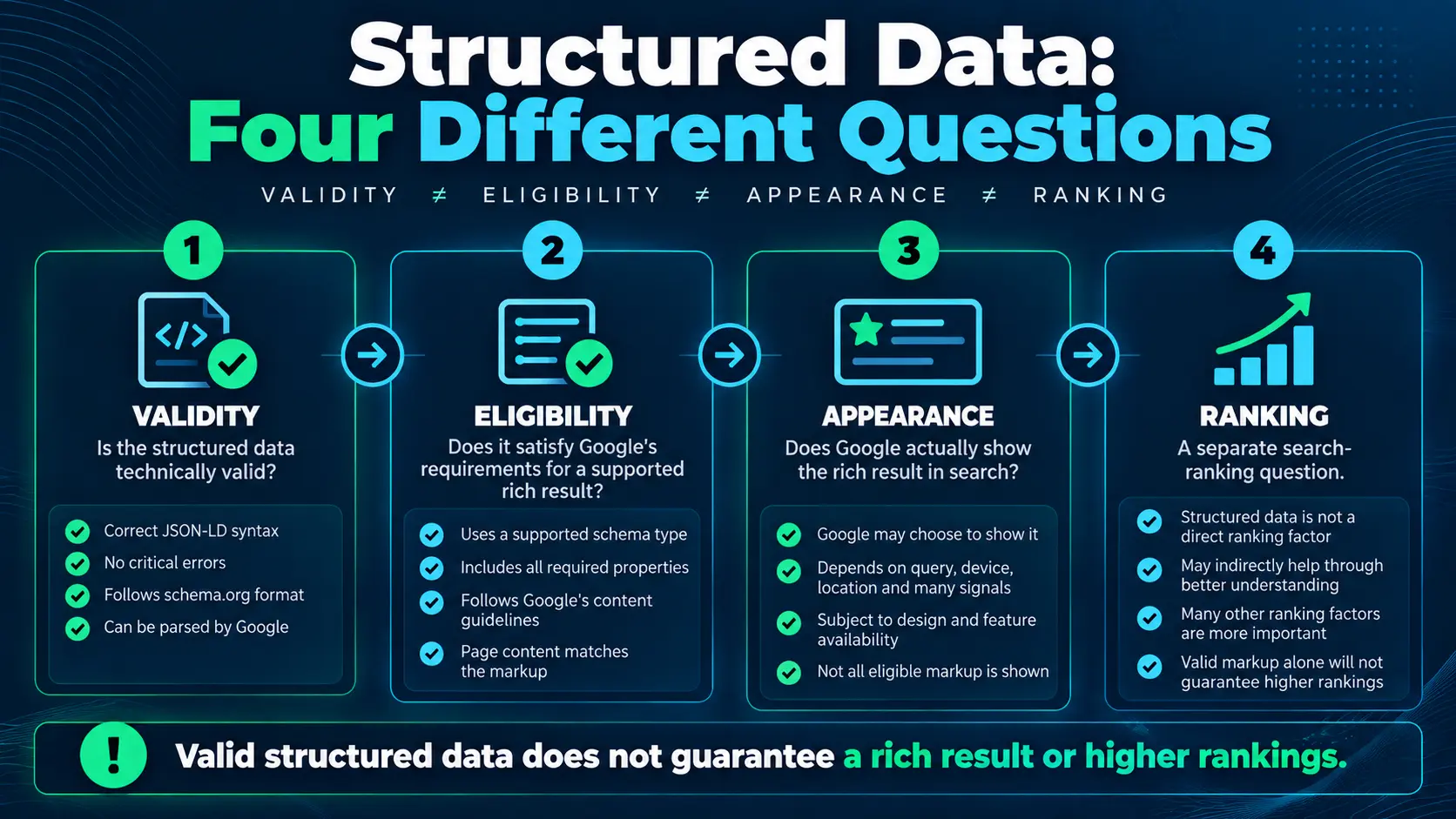
Before troubleshooting, separate four questions that are often mixed. Validity asks whether the markup is syntactically and structurally acceptable. Eligibility asks whether it meets the requirements for a particular Google search feature. Appearance asks whether Google actually chooses to show that feature. Ranking is a separate search-system outcome.
A page can have valid structured data and still not receive a rich result. Google explicitly says that features consuming structured data are not guaranteed to appear in Search. Structured data can help Google understand a page and can make content eligible for supported search features, but it is not a promise of a particular search appearance or ranking outcome.
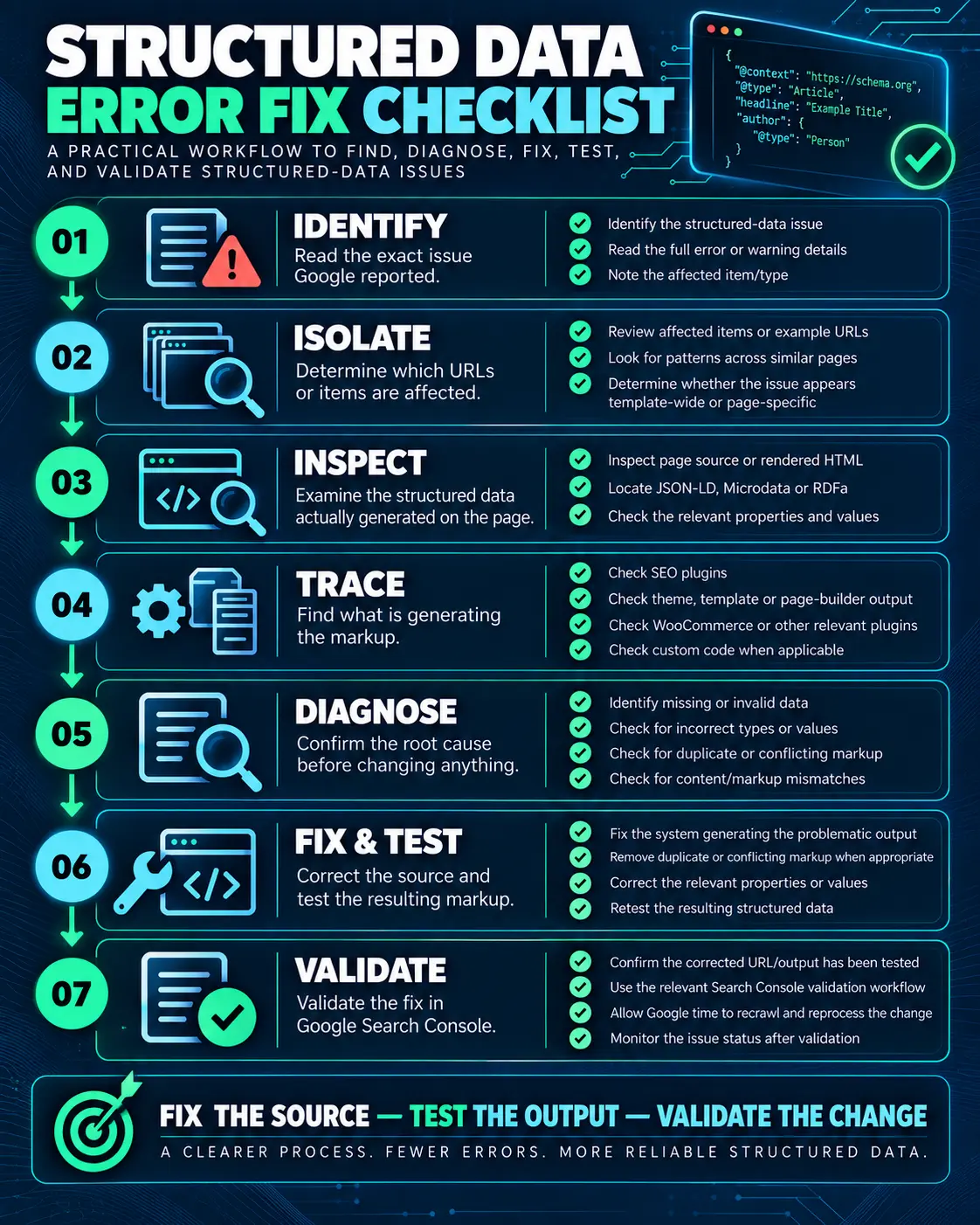
The Seven-Step Structured Data Debugging Workflow
Use this sequence whenever you need to diagnose a structured-data problem. The order matters because changing markup before understanding its source can create a second problem while leaving the first one untouched.
- Identify — read the exact Search Console issue and its details.
- Isolate — determine which URLs, items, and schema types are affected.
- Inspect — inspect the structured data actually present in the current page output.
- Trace — identify which system generated the markup.
- Diagnose — determine the root cause rather than treating the reported issue as the root cause.
- Fix & Test — correct the source and test the resulting implementation.
- Validate — use URL Inspection and Search Console processing/validation to confirm that Google can process the corrected version.
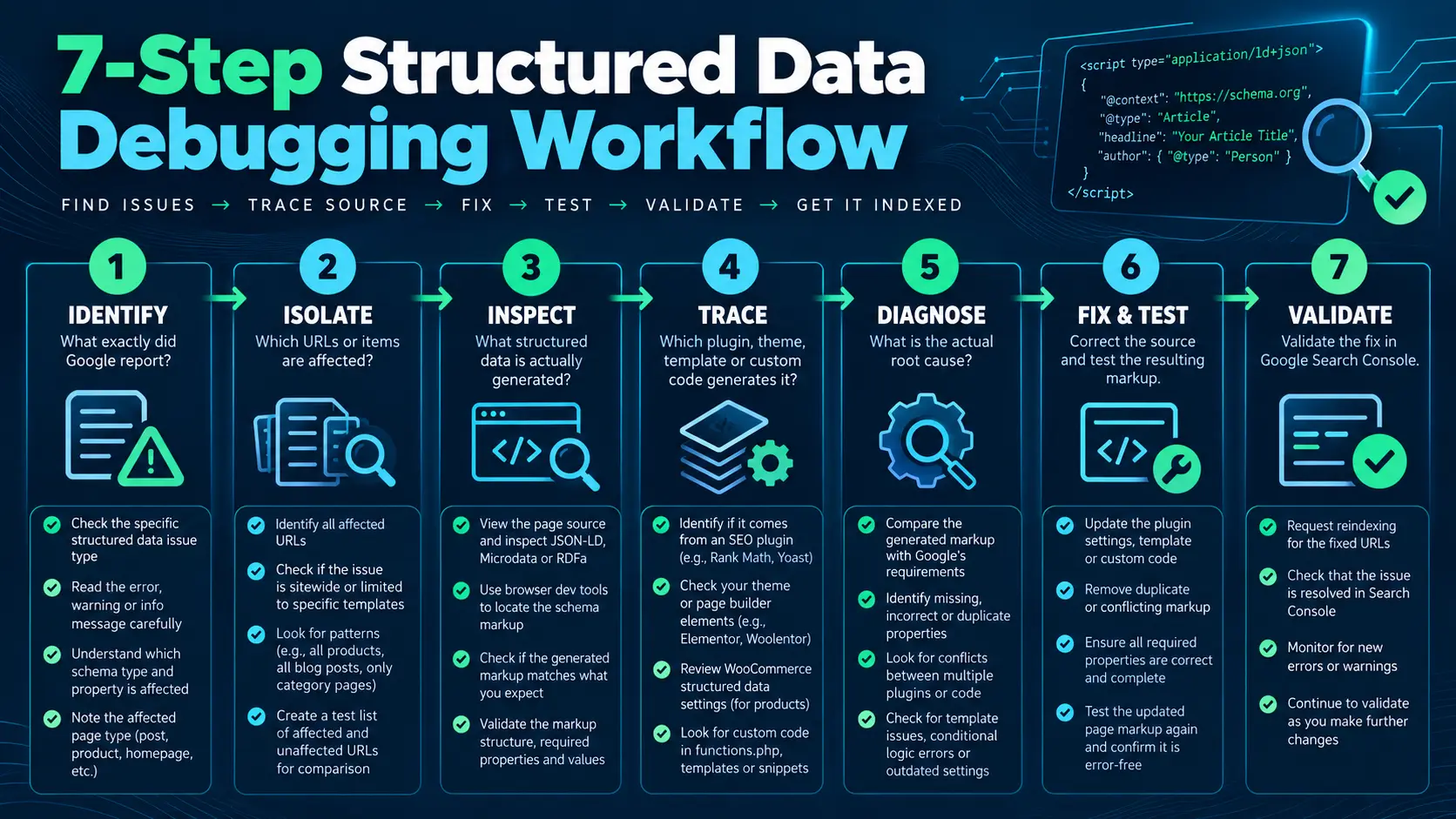
Note: The graphic’s recrawl/reindex language is conditional; the article does not treat requesting a recrawl as universally required.
How to Fix Structured Data Errors: Identify the Exact Search Console Issue
Open the relevant report in Google Search Console and record the exact issue before changing anything. Note the issue type, affected item, affected URL, and any details Google provides about the property or value. In many Search Console reports, Google now groups items or URLs into broad valid/invalid states, while the individual issue details explain the specific problem. Treat the report’s current wording as the source of truth for the interface you are seeing rather than relying on older “Valid / Warning / Error” terminology.
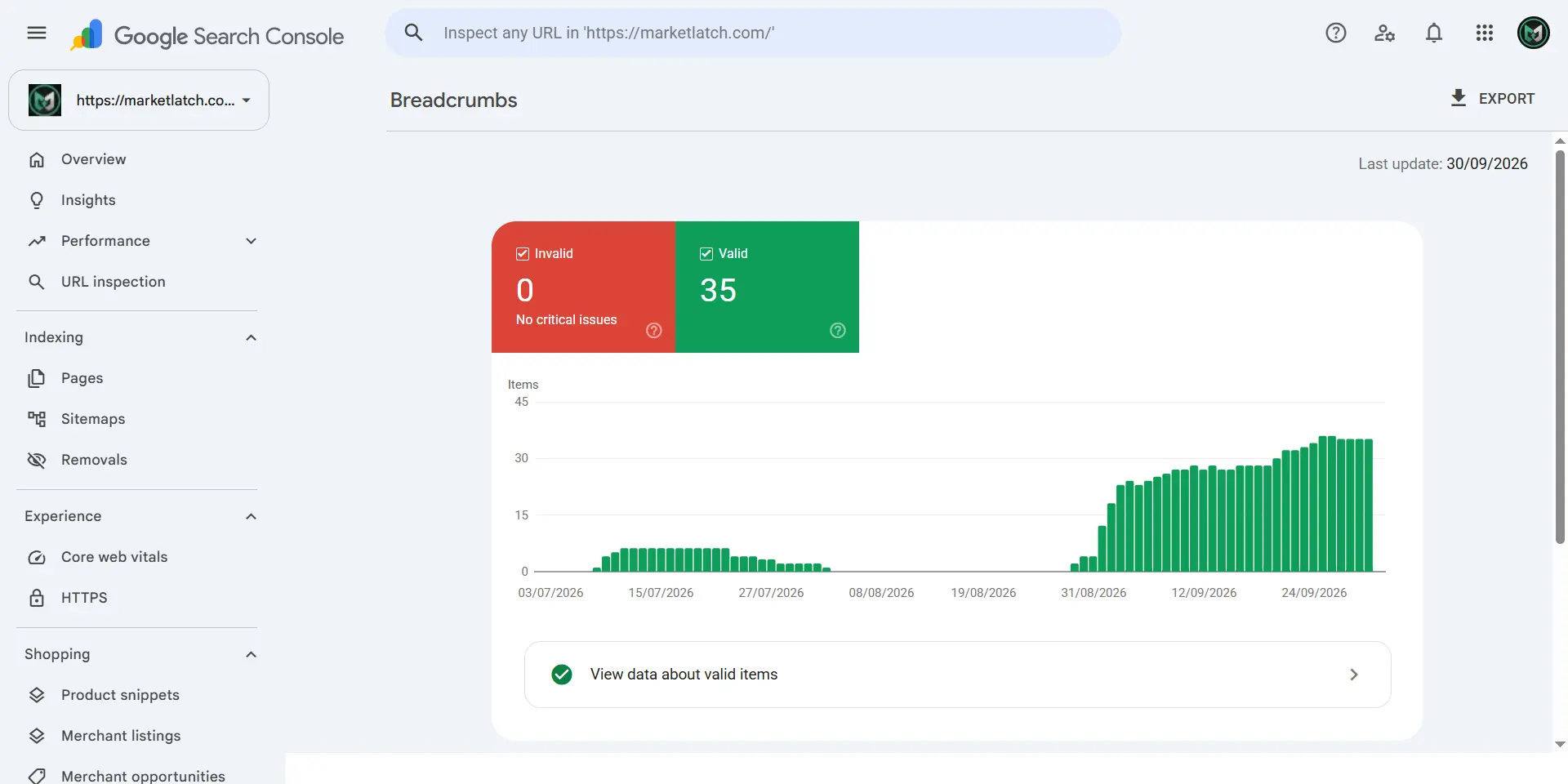
Note: Healthy MarketLatch implementation evidence used to demonstrate report isolation and URL-pattern analysis; it is not a current MarketLatch structured-data error.
This matters because a missing property, invalid value, wrong type, content mismatch, or implementation problem can require completely different fixes. A missing required property is not solved in the same way as a property containing a value in the wrong format. Before changing anything, record the exact property or item Google identifies and compare that report with the current markup. This creates a clean evidence trail instead of turning a generic issue label into an assumed diagnosis.
If the issue is in the Unparsable structured data report, treat it as a parsing problem first. Google describes that report as containing critical structured-data syntax errors and recommends using the Rich Results Test to debug the syntax. When the parser cannot read the markup, fix the syntax or malformed structure before interpreting later property-level messages. A parsing fix can also reveal additional issues once Google can read the underlying data.
Capture the issue first. Fix second.
Isolate the Affected URLs and Items
Next, determine whether the problem is isolated to one URL or repeated across a group of pages. Look for patterns before touching the markup.
- Does the same issue appear on many pages using one template?
- Are the affected URLs all product pages, articles, categories, or another content type?
- Does the same schema type appear on every affected URL?
- Did the problem begin after a template, plugin, theme, or sitewide configuration change?
- Does the issue appear on the current live page or only in Google’s previously processed version?
A repeated issue is an important clue. If dozens of URLs share the same generated markup, fixing each URL individually may only hide the underlying source problem.
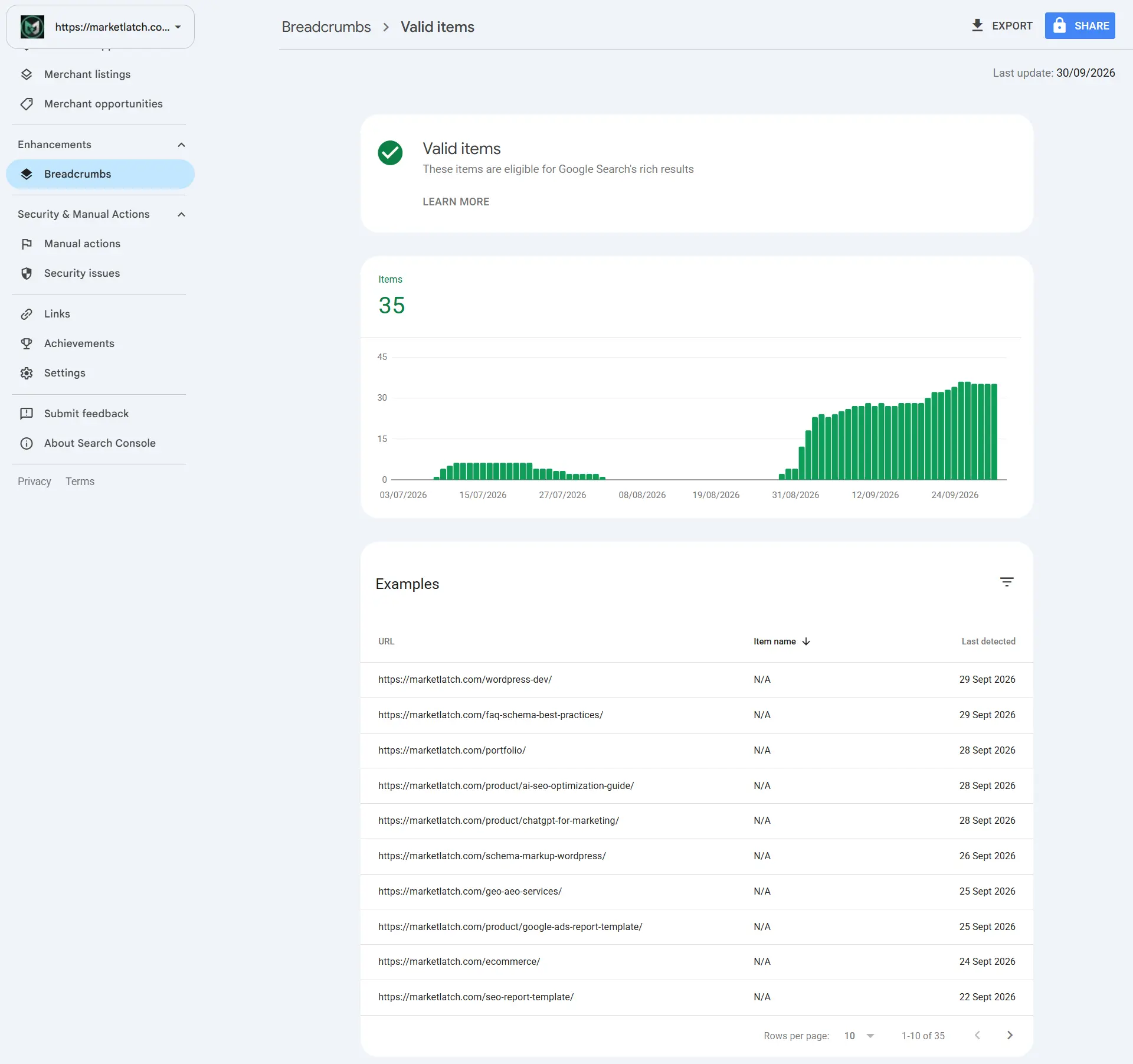
Note: Healthy MarketLatch implementation evidence used to illustrate affected-item and URL-pattern analysis; it is not an error-state screenshot.
Don’t Fix Yet: Use the Pattern as Evidence
Before editing markup, ask one question: what do all affected pages have in common? If the same property is missing from every page generated by one template, the template or generator deserves investigation. If the issue exists on one manually edited page, the cause may be local. If the current page source is already correct, investigate whether Search Console is reporting an earlier crawl or previously processed version.
This checkpoint prevents a common mistake: changing valid current output simply because an older report has not yet caught up with the current implementation.
Inspect the Structured Data on the Actual Page
Do not rely only on what a plugin settings screen says it should generate. Inspect what the browser receives.
Open the affected URL and inspect its HTML source or rendered output for JSON-LD. Look for script elements containing `application/ld+json`, then identify the schema types, entities, identifiers, and properties being emitted.
On WordPress sites, this is especially useful because the visible page and the generated structured data can be controlled by different systems. The key question is: what markup exists on the page right now? That answer is more useful than guessing which plugin is responsible.
Before editing the markup, save a compact evidence record: the affected URL, the exact Search Console issue, the affected item or schema type, the property/value named by the report, the current JSON-LD block or relevant source output, the generator you believe owns that output, and any crawlability/access restrictions. If the live page and Search Console appear to disagree, record both states instead of assuming one is wrong.
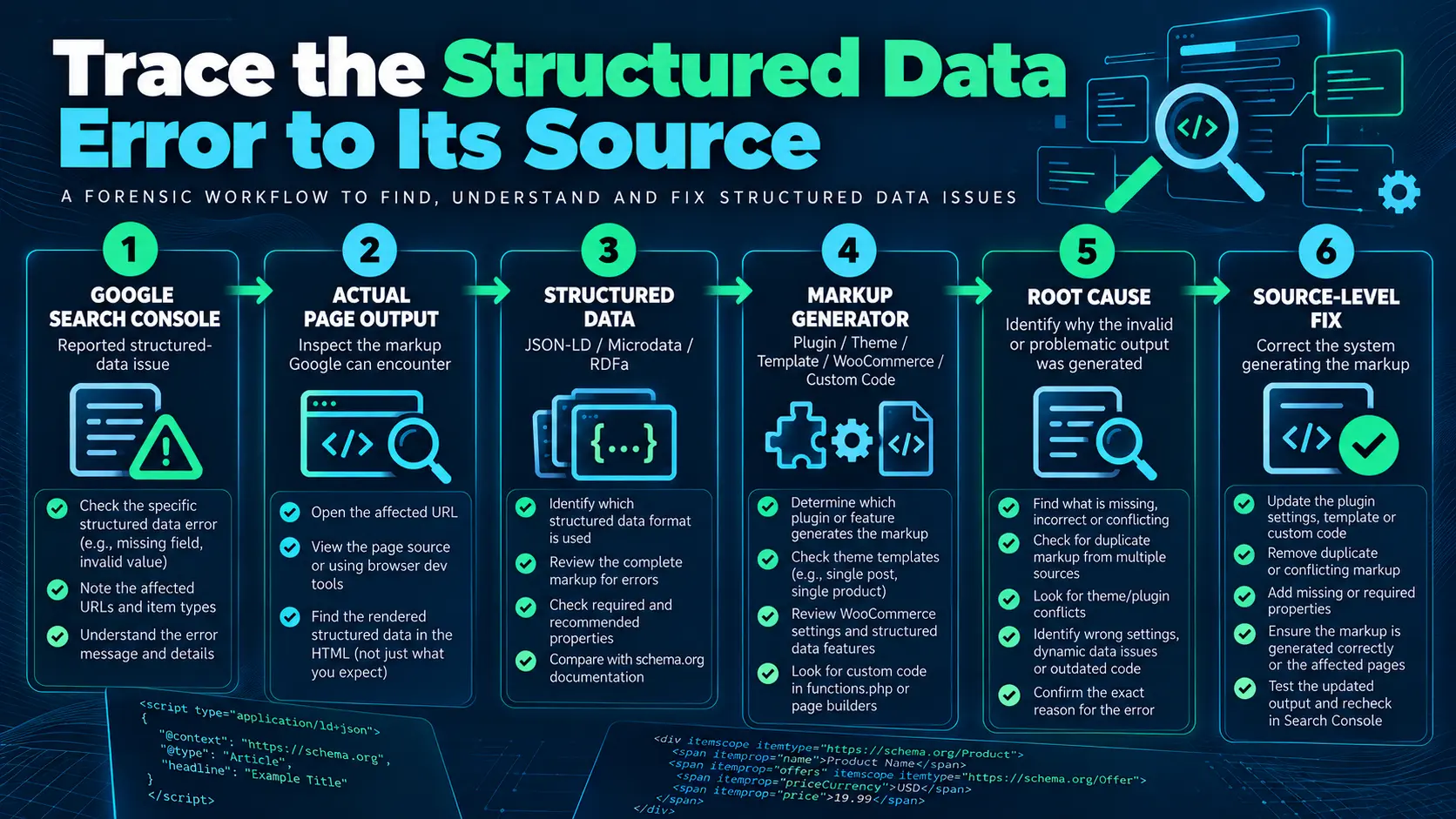
Trace the Markup to Its Source
Once you know what markup is actually being output, determine which system generated it. On a WordPress site, structured data can come from an SEO plugin, dedicated schema plugin, theme, page builder, WooCommerce or another ecommerce extension, custom PHP, custom JavaScript, or manually inserted HTML.
The same page can contain output from more than one source. Multiple generators are not automatically an error. They become a diagnostic concern when they create conflicting entities, duplicate representations, inconsistent properties, or markup that does not accurately describe the visible page.
For example, finding a Rank Math JSON-LD script proves that Rank Math is generating markup. It does not by itself prove that Rank Math caused a Search Console issue. You still need to compare the reported issue with the actual output and trace the specific property or entity back to its source.
A Practical WordPress Structured-Data Generator Map
The most useful WordPress debugging map is not a list of plugins. It is a source map that connects the markup you see to the component that produced it. Start with the JSON-LD block in the page output, identify the entity or property involved, and then work backward to the generator that owns that output.
| Possible source | What to inspect | Diagnostic question |
| SEO plugin | JSON-LD output and schema settings | Is this plugin generating the entity or property? |
| Theme | Theme-level schema and sitewide entities | Is the theme adding another Organization, WebPage, or breadcrumb entity? |
| Page builder | Templates, widgets, dynamic fields | Is the builder or template injecting structured data? |
| WooCommerce / extensions | Product, Offer, and ecommerce output | Is ecommerce markup being generated separately? |
| Dedicated schema plugin | Schema rules and assignments | Is another plugin describing the same entity? |
| Custom PHP / JavaScript | `application/ld+json` blocks and hooks | Is custom code injecting or modifying JSON-LD? |
| Manual HTML | Page/template source | Was markup inserted directly into the page? |
This map is where troubleshooting becomes reproducible. Instead of asking “Which plugin should I change?”, you are asking “Which component owns the markup that produced this specific output?” That distinction reduces blind configuration changes and makes it easier to document the final fix.
How to Fix Structured Data Errors: Diagnose the Root Cause
At this stage, stop thinking of the Search Console message as the cause. It is the symptom you are investigating. The actual cause may be a missing property, invalid value, incorrect type, content mismatch, overlapping generators, a template-level problem, stale configuration, custom code, or a crawlability/access problem.
- A required property is genuinely absent.
- A property contains a value in the wrong format.
- The selected schema type does not accurately describe the content.
- The markup describes information that is not represented on the visible page.
- Two generators are producing overlapping or conflicting markup.
- A template is generating incomplete data for an entire content type.
- A stale configuration continues to output old markup.
- Custom code is injecting JSON-LD that no longer matches the page.
- The page cannot be properly crawled or processed because of access, robots, noindex, login, or related technical restrictions.
The correct fix depends on which condition actually exists. Do not add data simply because a validator reports that a property is missing if the information is not genuinely available on the page.
Example: Diagnose a Specific Missing Property
If Google identifies a missing property, first confirm what the report is asking for and whether that property is actually required for the specific Google-supported feature being tested. Then inspect the current output: is the property absent, empty, attached to the wrong type, generated from missing source data, or present but inconsistent with the visible page? Do not invent a value simply to satisfy a validator. The correct response depends on the property’s documented requirements and on whether the underlying information genuinely exists on the page.
Structured Data Root-Cause Matrix
| Observed pattern | Likely area to inspect | What to verify | Response |
| One URL only | Page/template content | Does the current page contain the wrong or incomplete value? | Fix the local implementation if the schema is appropriate. |
| Many pages, same template | Template or generator | Is the same JSON-LD block repeated? | Trace upstream and fix the shared source. |
| Two similar entities | Multiple generators | Which system owns each entity? Are properties conflicting? | Choose a coherent authoritative implementation. |
| Current source is correct, report persists | Google processing state | Is Search Console reflecting an earlier crawl? | Allow recrawl/reprocessing before changing valid output. |
| Markup describes invisible or unavailable information | Implementation/content alignment | Can a user see or verify the marked-up information? | Remove or correct the inaccurate markup. |
| URL is blocked or inaccessible | Technical access | Robots, noindex, login, server/access issues? | Resolve accessibility before judging the structured data. |
A Hypothetical Recurring-Error Scenario
Hypothetical example: imagine an Article template is used by 100 posts. Search Console reports the same missing property across many of those pages, and the current page source shows the same incomplete JSON-LD block on each affected post.
The useful conclusion is not “edit 100 articles.” The pattern suggests that a shared template or generator is producing the incomplete output. The investigation should therefore move upstream to the component responsible for that block.
Once the shared source is corrected, test representative URLs before asking Google to reprocess the broader set. A representative sample can help confirm that the source-level correction is actually working across the affected template or content type; it does not replace checking the URLs that matter to the reported issue.
Fix the Source — or Reconsider the Implementation
When learning how to fix structured data errors, the key step is to correct the system generating the problematic markup rather than repeatedly editing individual URLs. After diagnosis, there are two legitimate outcomes. The first is a genuine fix: the schema type is appropriate, the information exists on the page, and the generated markup needs correction. The second is to reconsider the implementation: the schema type is not appropriate, the required information does not genuinely exist, or the markup was added only because someone assumed every page should contain that schema.
Do not manufacture information to satisfy a structured-data requirement. Google’s structured-data guidance requires markup to represent the content on the page and follow the applicable guidelines. If the page cannot truthfully support the markup, removing or reconsidering it can be more correct than forcing the page to pass a test.
Fix vs. Reconsider: A Simple Decision Framework
- Keep and fix it when the schema type accurately describes the page and the underlying information is real and visible.
- Keep but correct it when the implementation is appropriate but a property, value, relationship, or format is wrong.
- Reconfigure the generator when the source is valid, but the generator is producing incomplete or conflicting output.
- Remove or reconsider it when the schema type does not describe the page or the marked-up information is not genuinely present.
- Do not add a second generator just to make an issue disappear; first determine what the existing implementation is doing.
Test the Corrected Implementation
The final stages of how to fix structured data errors are testing the corrected output and confirming that it answers the specific problem identified in Search Console. After the source has been fixed, test the resulting output. Testing should answer a specific question rather than simply provide reassurance.
For Google-supported rich-result structured data, use the Rich Results Test to determine whether the implementation is eligible for the supported feature being tested. For broader Schema.org representation checks, the Schema.org Validator can help inspect the structured-data graph.
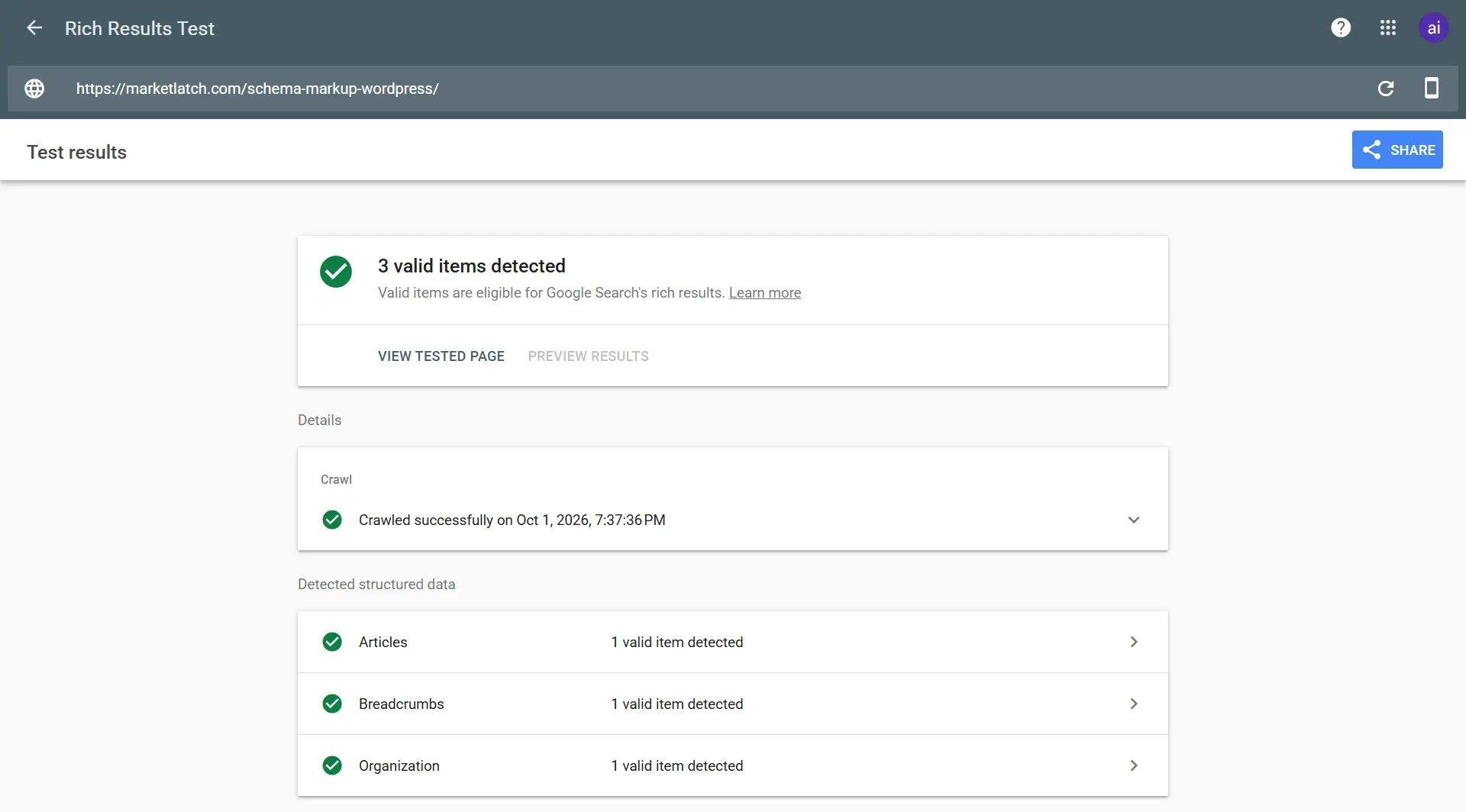
Note: Successful MarketLatch testing evidence; it is not evidence of a structured-data error.
These tools are complementary, not interchangeable. A Schema.org validation result does not establish Google rich-result eligibility, and a successful Rich Results Test does not guarantee that Google will display a rich result. Use the result from each tool only for the question that tool is designed to answer.
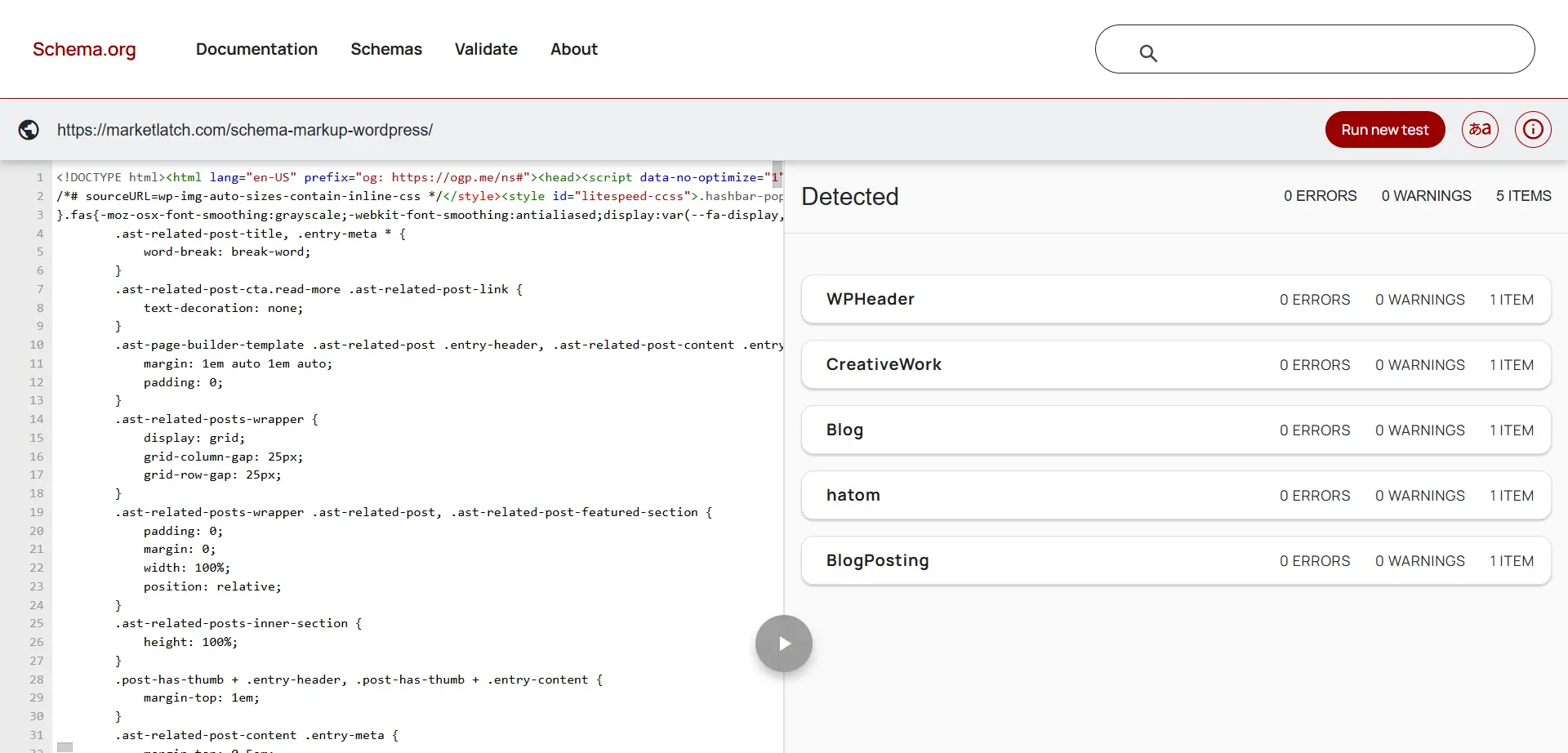
Note: MarketLatch validation evidence about the parsed Schema.org representation; it is not proof of Google rich-result eligibility.
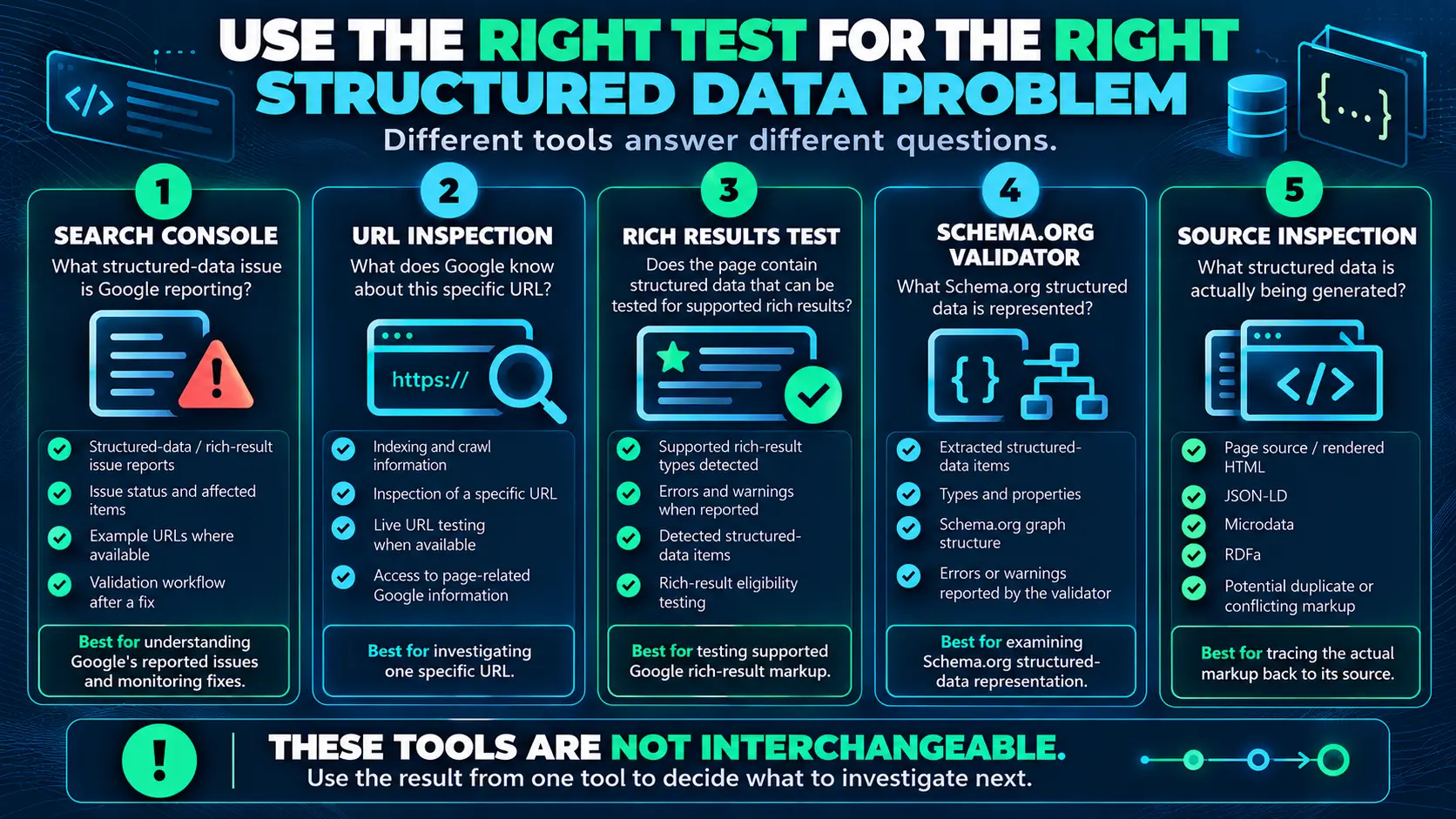
| Question | Use | What it tells you |
| What markup is actually on the page? | View source / developer tools | Current HTML and JSON-LD output. |
| Can Google inspect this live URL? | URL Inspection | Google’s ability to access and inspect the URL. |
| Is it eligible for a supported rich result? | Rich Results Test | Eligibility and detected issues for supported features. |
| What entities/properties does the graph contain? | Schema.org Validator | Broader Schema.org representation. |
| Is Search Console still reporting the issue? | Search Console report/validation | Google’s processed state after recrawling and validation. |
Use the Right Test for the Right Problem
If you are asking “What is actually on this page?”, inspect the source. If you are asking “Can Google access and process this URL?”, use URL Inspection and check crawlability. If you are asking “Is this implementation eligible for a supported rich result?”, use the Rich Results Test. If you are asking “What structured-data entities and properties are represented?”, use the Schema.org Validator.
When Search Console and Live Tests Disagree
A live test and a Search Console report can describe different states of the same URL. A live inspection reflects what Google can access on the current page, while a Search Console report can reflect data Google previously processed. If a live URL now passes but the report still shows the issue, first confirm that you tested the same URL and the same structured-data item, then check crawlability and access restrictions and allow time for Google to recrawl and process the updated output. If the problem persists, return to the issue details and inspect the affected examples rather than assuming the live test alone closed the report.
Validate and Let Google Reprocess the Fix
Once the implementation is corrected and tested, use URL Inspection where appropriate to confirm that the live URL is accessible and can be inspected. Google recommends making sure the page is not blocked by robots.txt, `noindex`, or login requirements before relying on the test. After that, allow Google to recrawl and process the updated page.
For an issue affecting many pages, you do not necessarily need to begin by manually checking every URL. A representative sample can help confirm that the source-level fix is working before broader validation.
Search Console validation is part of the processing cycle. A corrected site does not mean the report will change instantly because Google needs to recrawl and process the affected pages. Google says validation typically takes up to about two weeks, but some cases can take longer.
If Search Console shows a structured-data manual action, treat it separately from an ordinary structured-data validation issue. Check the Manual Actions report and review Google’s structured-data policies before making changes. A manual action can affect eligibility for certain rich-result features, so resolving it requires addressing the policy or implementation issue identified by Google rather than treating it as a normal parsing or property error.
Structured Data Error Fix Checklist
- Read the exact Search Console issue.
- Record affected URLs and item types.
- Look for patterns across affected pages.
- Do not change markup before identifying the source.
- Inspect the actual current JSON-LD/page output.
- Identify which plugin, theme, template, extension, or custom code generated it.
- Determine the actual root cause.
- Confirm the schema accurately represents visible page content.
- Fix the source rather than repeatedly patching symptoms.
- Test the corrected implementation.
- Check crawlability and accessibility.
- Use URL Inspection where appropriate.
- Allow Google to recrawl and process the correction.
- Validate the affected issue in Search Console when available.
- Monitor whether the same problem returns.
What If the Error Keeps Coming Back?
A recurring issue is often evidence that the original source-level problem was not removed. Check whether a template recreates the markup after each update, a plugin or extension regenerates the same property, custom code still injects an older JSON-LD block, a second generator creates overlapping entities, the visible page content and generated markup have drifted apart, or Google is still processing an earlier version of the page.
This is where the article’s central principle matters most: don’t keep treating a Search Console issue as an isolated event. Trace the system that produces the output.
How to Check Whether Two Schema Generators Are Interfering
Multiple schema generators are not automatically wrong. The diagnostic question is whether they create an implementation that is duplicated, conflicting, incomplete, or inaccurate.
Search the page source for multiple JSON-LD blocks. Compare the entities, types, identifiers, properties, and relationships. Then identify which component owns each block.
If two systems independently describe the same entity, decide which implementation should be authoritative and whether the other is necessary. Avoid removing a component blindly; first establish what else depends on it.
Common Mistakes When Fixing Structured Data
- Changing the markup before inspecting the current output.
- Assuming the plugin named in a page source is automatically the cause.
- Fixing individual URLs when the same template is generating the problem everywhere.
- Adding properties with invented, hidden, or unverifiable information.
- Treating a successful Rich Results Test as a guarantee of a rich result.
- Using Schema.org validation as proof of Google search-feature eligibility.
- Adding FAQPage markup simply because the article contains an FAQ section.
- Assuming a Search Console report updates immediately after a source change.
- Confusing structured-data validity with rankings.
Schema Markup for WordPress: When the Generator Matters
If you are working on WordPress and want a broader implementation review, see Schema Markup for WordPress: 8 Essential Checks Before You Add Schema. The useful connection is source ownership: before changing schema, determine which system is generating it and whether another component is generating overlapping output. For related FAQ implementation context, see FAQ Schema Best Practices before deciding whether any FAQ-related markup is appropriate.
First-Hand Implementation Lesson: Trace the Output, Not the Settings Screen
- Search Console report
- Affected URL or item
- Current page output
- Generated structured data
- Generator/source
- Root cause
- Source-level fix
- Test and validation
Following that chain turns structured-data troubleshooting from guesswork into a reproducible diagnostic process. It also prevents a common mistake: treating the name of a plugin or tool as proof of causation.
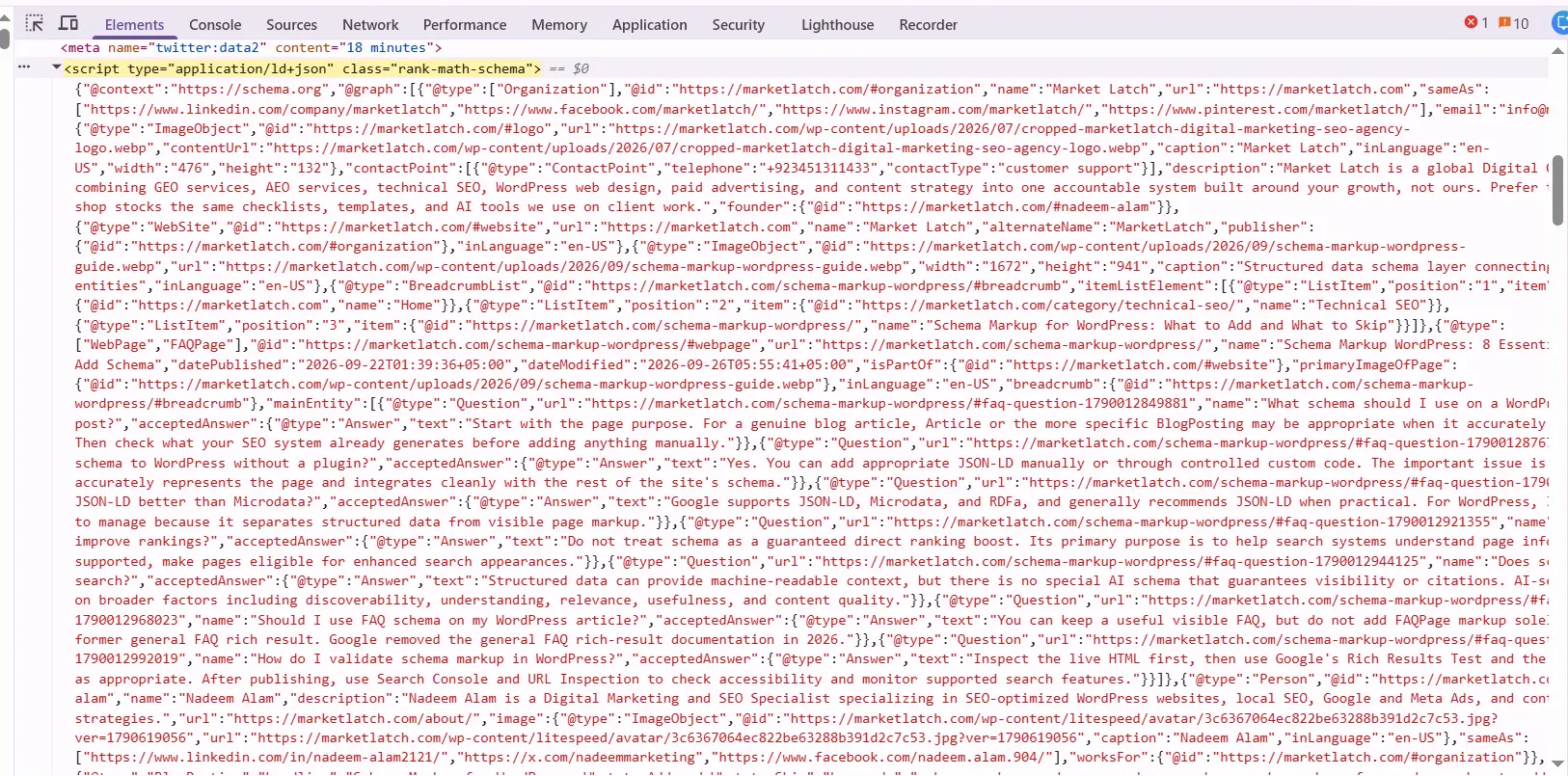
Note: Real MarketLatch implementation evidence of Rank Math-generated JSON-LD; it does not prove Rank Math caused a Search Console issue.
Frequently Asked Questions
What is the first thing I should do when Google Search Console reports a structured-data issue?
Read the exact issue and inspect the affected item or URL before changing the markup. Then determine whether the problem is isolated or repeated across a template or content type.
Can I fix a structured-data error directly in Google Search Console?
No. The underlying implementation is fixed on the website. Search Console can report the issue, help you inspect affected pages, and provide validation after Google processes the correction.
Should I remove structured data when Search Console reports an error?
Not automatically. First determine whether the schema type is appropriate and whether the error is a genuine implementation problem. If the markup accurately represents the page and the type is appropriate, fixing the source may be the right response. If the implementation does not accurately represent the content, reconsidering or removing it may be appropriate.
Does valid structured data guarantee a rich result?
No. Valid structured data can make a page eligible for a supported search feature, but Google does not guarantee that a rich result will appear.
Should I add FAQPage schema to the FAQ section of this article?
No. A normal publisher-written FAQ section does not automatically call for FAQPage markup. Google stopped showing the general FAQ rich result in Search starting May 7, 2026, and removed the related FAQ rich-result documentation. Keep the FAQ useful for readers and use structured data only when it accurately represents the page and the relevant content model. FAQPage remains a Schema.org vocabulary type, but it should not be presented as a way to obtain the retired Google Search treatment.
Is Rank Math responsible for structured-data errors?
You cannot establish that from the presence of Rank Math-generated JSON-LD alone. Inspect the actual output, compare it with the reported issue, and trace the specific property or entity back to its source before identifying the cause.
How long does Search Console validation take?
There is no instant switch from error to resolved. Google needs to recrawl and process the corrected pages. For Search Console validation, Google says the process typically takes up to about two weeks, but it can take longer. Actual timing depends on crawling and processing of the affected URLs.
Can one template cause structured-data errors on many pages?
Yes. If many pages use the same template or generator and receive the same problematic output, the shared source should be investigated. Correcting that source can address the underlying issue across the affected pages.
Structured Data and Google’s Generative AI Features
There is no separate “AI Overview schema” or special markup that guarantees inclusion in Google’s generative AI features. Google’s current guidance says that foundational SEO practices continue to matter for AI Overviews and AI Mode, and that there are no additional technical requirements or special optimizations required specifically for these features. Structured data can help Google understand supported content, but it is not a requirement for appearing in generative AI features and does not guarantee inclusion.
For MarketLatch, the practical editorial takeaway is to make the page easy for people to understand and for systems to interpret accurately: answer the main question early, use descriptive headings, keep important facts in clear text, explain technical terms, show the diagnostic process, and distinguish evidence from recommendations.
This is an editorial methodology, not a claim that “easy to quote” is a documented Google ranking or AI-citation signal. For measurement, Google now provides a Generative AI performance report in Search Console, which can be used to understand how a site performs in generative AI features; the report measures performance and does not turn any individual SEO tactic into a guaranteed visibility factor. For broader context on SEO and generative search, see ChatGPT SEO. Google’s Generative AI performance report guidance explains how to measure performance in generative AI features.
Conclusion: Fix the System, Not Just the Reported Issue
How to fix structured data errors becomes much easier when you stop treating a Search Console issue as the entire diagnosis.
Identify the exact issue. Isolate the affected pages and patterns. Inspect the markup that the current page actually outputs. Trace that markup to the generator or source. Diagnose the root cause. Fix the source and test the result. Then let Google recrawl and validate the corrected implementation.
The most important habit is the same one that prevents unnecessary schema changes: don’t debug the issue in isolation. Debug the system that produced it.
That approach gives you a repeatable process for WordPress sites, ecommerce pages, editorial content, and custom implementations—and helps you make structured-data changes based on evidence rather than guesswork.
Sources and Further Reading
For the underlying Google guidance used in this article, see Creating Helpful, Reliable, People-First Content, Google Search Essentials, Google Search spam policies, General Structured Data Guidelines, Fix structured data issues in Search Console, Rich Results Test, URL Inspection, Schema.org Validator, Google’s guide to generative AI features in Search, and Search Console’s generative AI performance guidance.
About the author

Nadeem Alam is the founder of MarketLatch, a digital marketing agency serving clients across the USA, UK, Canada, Australia, the UAE, and Pakistan. He is a digital growth strategist and WordPress specialist with about five years of experience in SEO and digital marketing, with hands-on experience in technical SEO, on-page SEO, structured data, WordPress, WooCommerce, Elementor, Generative Engine Optimization, Answer Engine Optimization, Google Ads, and Meta Ads.
For WordPress SEO, his work includes structured-data implementation, schema auditing, entity relationships, JSON-LD, technical SEO, and validating structured data against Schema.org specifications and Google’s published documentation. This guide reflects that practical approach: auditing what WordPress, themes, page builders, and SEO plugins already generate; identifying which schema types and entities accurately represent the page; and adding only markup that matches the visible content and the appropriate structured-data model.
Nadeem is also the author of the Generative Engine Optimization Book, the AEO Masterclass Guide and the AI SEO Implementation Checklist 2026. His training and certifications include Google Digital Garage, Semrush Academy, Coursera, uConnect and Virtual University (DigiSkills).