A Google Business Profile can be verified, visible and still need work. The business name may be correct while the categories are too broad. Hours may be outdated. Services may be incomplete. Photos may no longer represent the business. The website may describe the company differently from the profile. Those are not just housekeeping details when the profile is one of the main ways customers discover a local business.
Google Business Profile optimization is the process of making the profile accurate, complete, relevant and useful to both Google and potential customers, then reviewing it as the business changes. It is not a matter of putting a keyword into every available field.
Google says local results are mainly based on relevance, distance and prominence. It also says that complete and detailed business information can help Google understand a business and match it with relevant searches. That is the practical starting point: optimize the profile so it represents the real business clearly, while keeping separate what Google actually documents from what SEO practitioners assume.
This guide walks through the major profile fields, the local ranking concepts Google publicly documents, a practical Google Business Profile audit workflow, common mistakes, Merchant Center’s separate product-visibility role, and the maintenance work that keeps a profile accurate.
Google — Improve your local ranking on Google
Google — How Business Profile information is sourced
What Is Google Business Profile Optimization?
Google Business Profile optimization means reviewing and improving the information, structure and supporting profile elements that describe a business on Google so the profile accurately represents the business and gives customers useful information.
That is different from setting up a profile. Good Google Business Profile optimization starts after the basic profile exists and focuses on how accurately and usefully the profile represents the business. Setup is about getting the business onto Google, claiming it and completing verification. Optimization starts when you ask a more practical question: is the profile as accurate, relevant and useful as it can reasonably be?
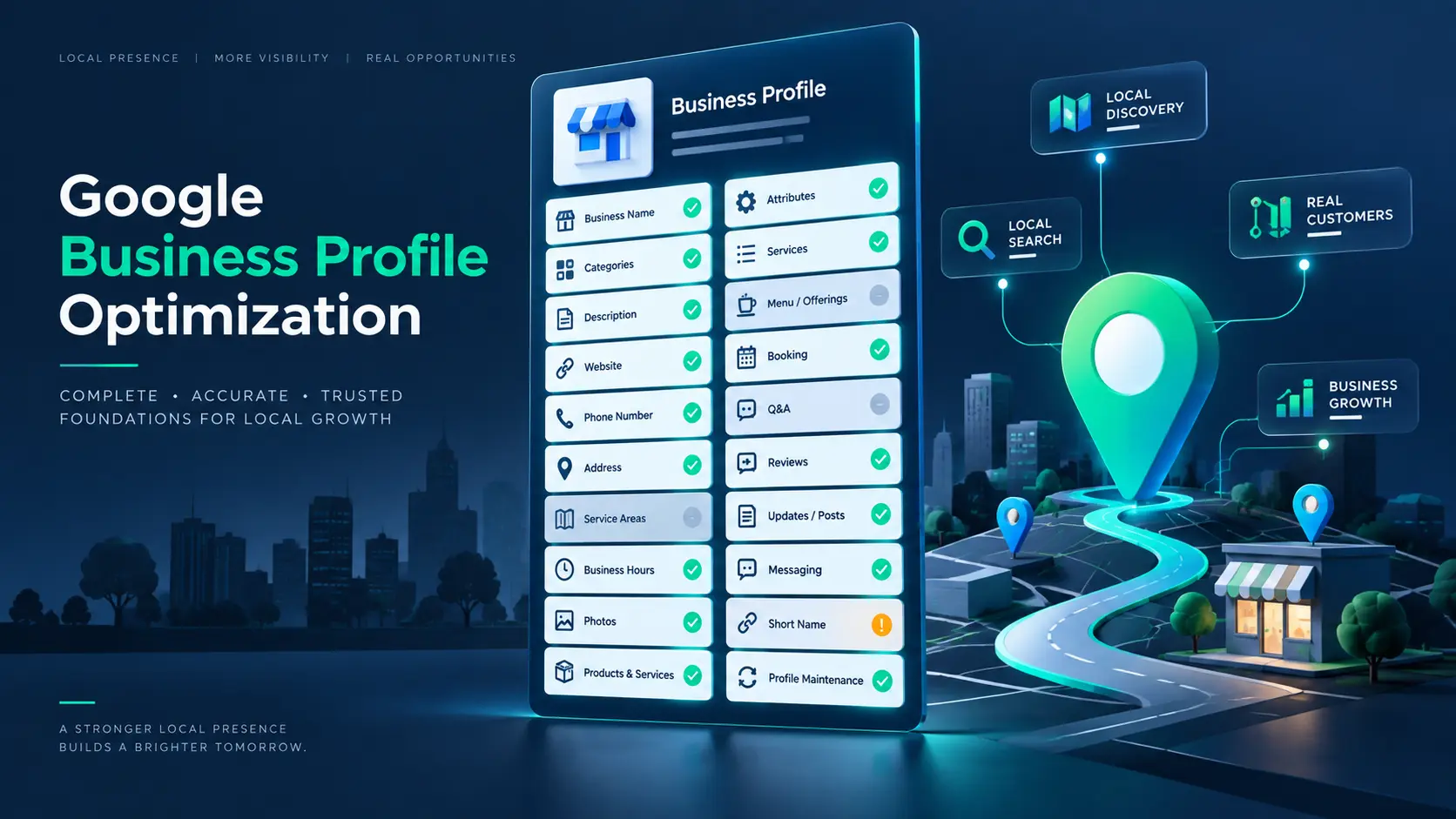
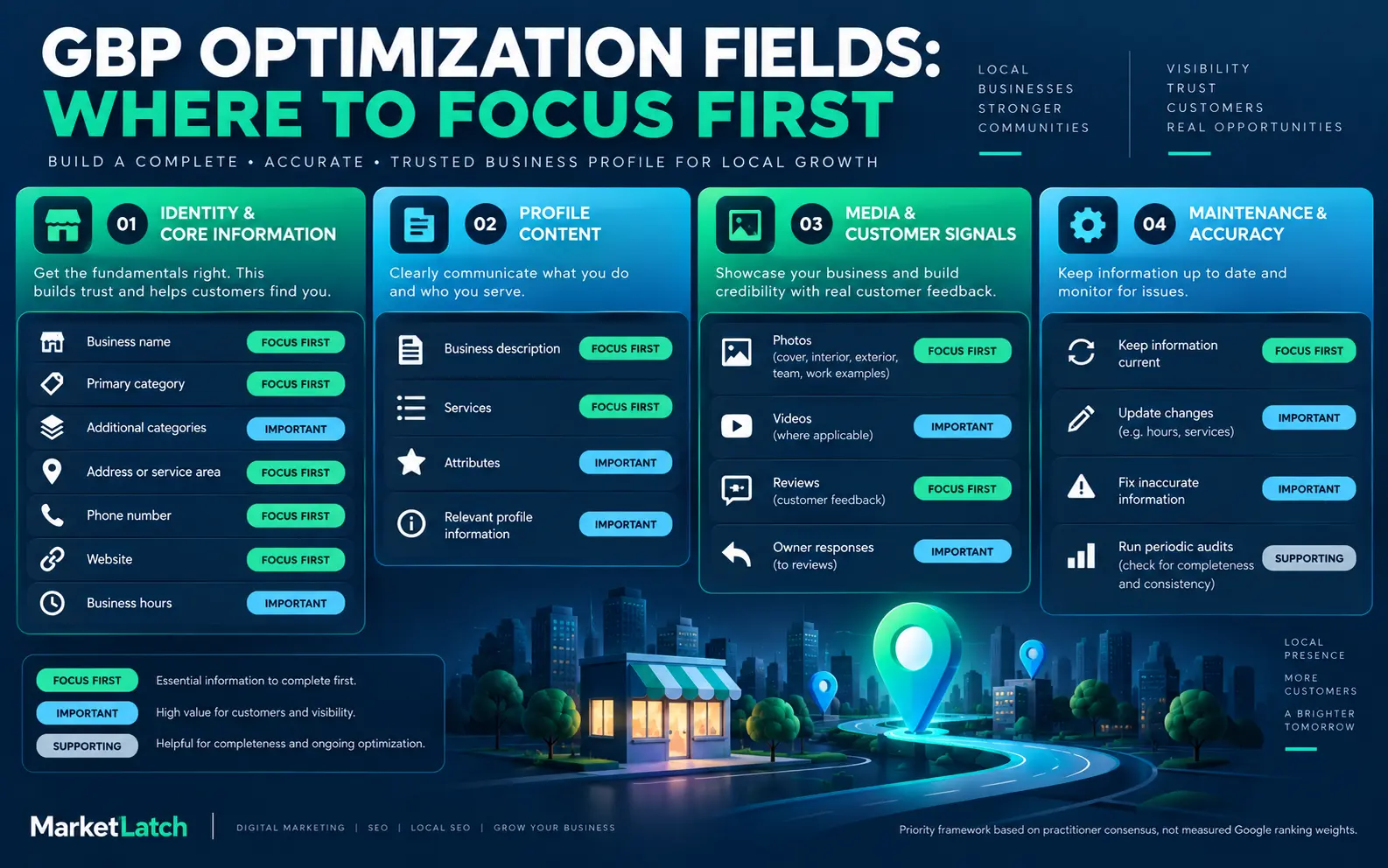
A complete Google Business Profile optimization process covers business identity, primary and additional categories, description, contact information, hours, services, attributes, photos, reviews and website connection. It also includes an audit process because a profile that was accurate six months ago can become inaccurate after a service change, move, new opening hours or website redesign.
If you still search for a “Google My Business optimization checklist,” the terminology has changed. Google now calls the product Google Business Profile. The useful task is still the same: keep the business information accurate and useful.
If you are starting from zero and need to add or claim a profile, use the MarketLatch setup guide first rather than treating this article as a verification tutorial.
MarketLatch — How to Delete a Google Business Profile (and What Happens Next)
MarketLatch — How to Add My Business to Google: Get Your Business on Google Maps
Google Business Profile Eligibility, Representation & Policy Guardrails
A Business Profile is not an unrestricted SEO asset. Before optimizing one, make sure the business is eligible and the profile represents the real business. Google says eligible businesses must make in-person contact with customers during their stated hours, with limited exceptions; online-only businesses and lead-generation companies are examples of businesses that are not eligible.
For an eligible business, keep the profile tied to the real-world operation. Use the real business name, accurate address or service area, the authoritative phone number and website, and one profile per business. Google also advises choosing the fewest categories needed to describe the core business rather than creating a category for every service.
If the business is a service-area business, the service area should reflect where the business actually serves customers. Google says service areas can be defined by cities, postal codes or other areas, not by a radius, and the overall area should be realistic for the business to serve.
If an agency or SEO professional manages the profile, the business owner should remain informed and retain ownership. Google’s authorized-representative guidance requires express consent and says the owner should understand what actions the representative will take.
These are not minor compliance details. A profile can be well optimized from an SEO perspective and still create problems if the business identity, eligibility, location or ownership is inaccurate.
Google — Guidelines for representing your business on Google
Google — Business Profile eligibility and ownership
Google — Service-area and hybrid business guidance
Google Business Profile Ranking Factors: What Google Actually Says
There is a lot of local SEO advice that turns individual GBP fields into supposed ranking formulas. It is worth slowing down here. Google publicly describes three main factors for local results: relevance, distance and prominence. Those concepts are more useful than pretending Google publishes a fixed percentage for every profile field.
A complete profile does not guarantee a particular position in local results. A business can have an excellent profile and still be farther away from a searcher, less prominent on the web, or less relevant to a particular query than another business.
Relevance
Relevance is how well a Business Profile matches what someone is searching for. Complete, detailed business information helps Google understand what the business offers.
This is where categories, services and clear business information become useful. If a company actually provides technical SEO, its profile should describe that service accurately. You do not need to repeat “technical SEO” in every field. The important thing is that the profile makes the offering understandable.
A useful rule is simple: describe the business you actually operate. Do not turn the profile into a collection of keywords you hope Google will associate with the business.
Distance
Distance is the geographic relationship between the searcher and the business, or between the business and the location included in the search. This is one reason local SEO cannot be reduced to profile editing.
You can improve the accuracy of a profile, but you cannot optimize your way out of geography. A business across town does not become physically closer because its description contains the name of the searcher’s neighborhood.
This is also why local ranking advice needs to be careful with guarantees. The same business can appear differently for nearby searchers because their locations differ.
Prominence
Prominence describes how well-known a business is. Google’s documentation notes that prominence can be influenced by information such as links from websites and reviews. This is broader than the Business Profile itself.
That means GBP optimization works best as part of a wider local SEO system. A profile can be accurate and well organized while the business still needs stronger website relevance, reputation, reviews or broader local authority.
Do not interpret prominence as a request to manufacture links or reviews. The useful takeaway is that local visibility is not controlled by one dashboard.
What Google Does Not Publish
Google does not publish a table saying that a primary category is worth a specific percentage, that ten new photos produce a defined ranking lift, or that a particular number of reviews guarantees a Map Pack position. If a recommendation makes one of those claims without evidence, treat it as a claim from the source—not as a documented Google formula.
For this guide, the standard is simple: Google documentation for Google’s stated behavior, first-hand MarketLatch workflows for practical auditing, and clearly labeled practitioner guidance where Google does not publish a specific mechanism.
Google Business Profile Optimization Checklist
Use the following sections as a field-by-field Google Business Profile optimization checklist. The order is practical rather than a claim about Google’s ranking weights. Start with information that defines the business, then work through customer-facing details and finally move into ongoing maintenance.
Business Name and Identity
Use the real-world business name. Do not turn the name field into an SEO title by adding locations, services, slogans or keywords that are not part of the actual business name.
This is one of the easiest places for well-intentioned local SEO work to become counterproductive. If a business is called MarketLatch, adding “Best SEO Agency in Pakistan” to the profile name does not make that phrase part of the real-world identity.
Review the name against the way the business is actually presented to customers. If the name has legitimately changed, update the profile and supporting business information rather than creating a keyword-heavy version for search.
Primary and Additional Categories
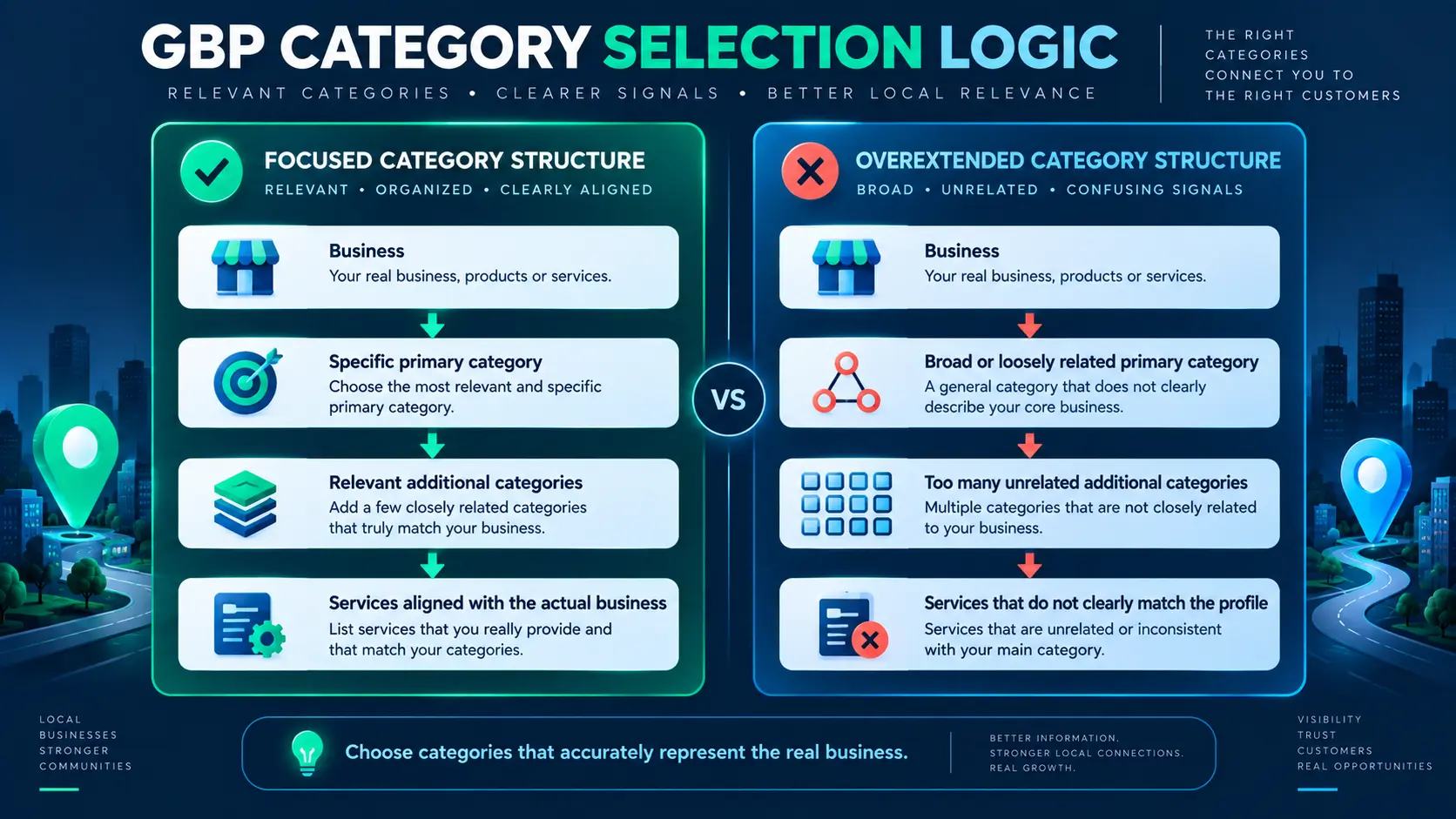
For Google Business Profile optimization, your primary category should describe what the business is. Additional categories should represent genuine additional business activities where Google’s available categories support them.
Category selection is a classification exercise before it is an SEO exercise. Ask: if a customer saw only this category, would it give them a fair description of the business?
Avoid an overextended category structure simply because more categories appear to create more keyword opportunities. A focused set of accurate categories is easier to explain, maintain and reconcile with the actual services.
Business Description
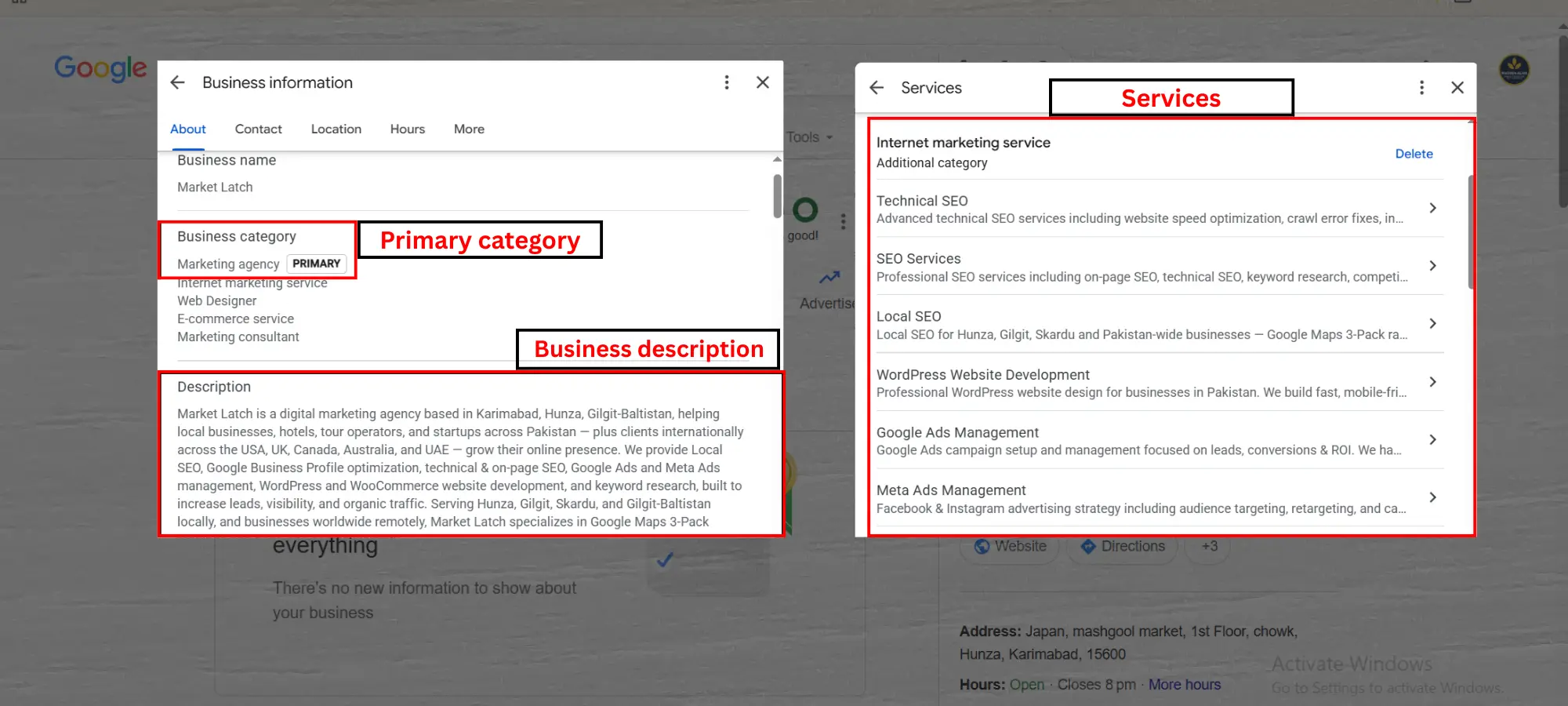
As part of Google Business Profile optimization, the business description is a place to explain what the business offers, what makes it useful and, where appropriate, some of its history. Google currently states that the description can be up to 750 characters and should not contain URLs or HTML. Google also advises focusing on business details rather than promotions, prices or sales.
That makes the description a poor place for a keyword dump. Write it for a person who has just found the business and wants to understand what it does.
For example, a digital marketing business could explain its main services, the markets it serves and the type of work it handles. It does not need to repeat the same keyword three times in different grammatical forms.
Before publishing, check the character limit and remove claims the business cannot substantiate.
Google — Business Profile description guidelines
Contact Information and Hours
As part of Google Business Profile optimization, check the phone number, website, address or service-area setup, regular hours and special hours. These fields are basic, but they are also where a profile can create an immediate customer problem.
An outdated closing time is more damaging to the customer experience than an imperfectly phrased description. Someone searching at 7:30 PM does not care that the profile has excellent keyword coverage if the published hours send them to a closed business.
Compare the profile with the business website and the actual customer-facing operation. If holiday hours change, review the profile again rather than assuming the old schedule will remain correct.
Services and Service Categories
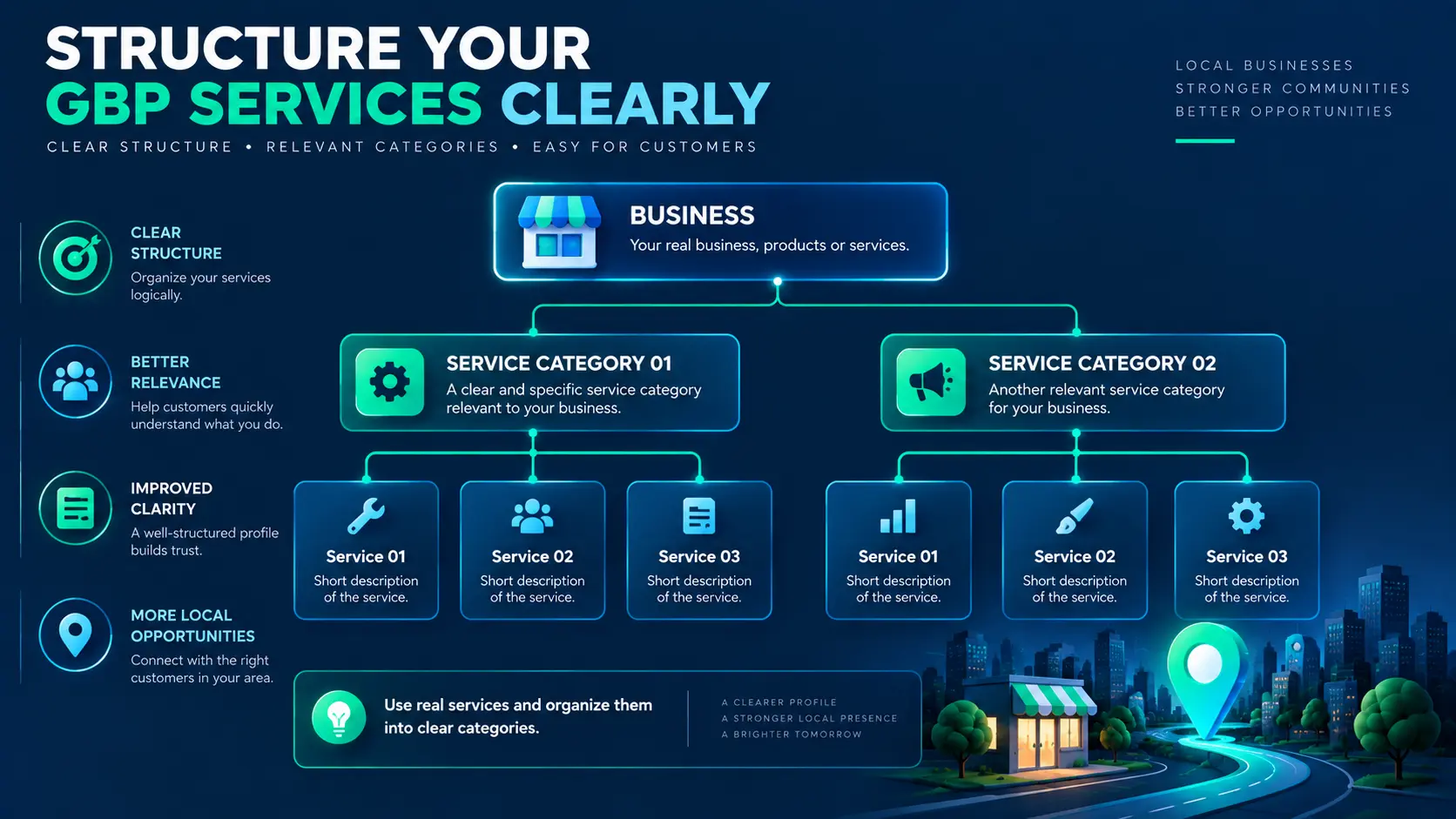
A practical Google Business Profile optimization review treats services as the bridge between a broad business category into specific things the business actually provides. Organize services into clear categories where the profile interface allows it, and use individual service names customers can understand.
For a marketing agency, a service structure might separate SEO, paid advertising and website development rather than placing dozens of unrelated phrases into one long list.
The rule is accuracy first. Do not add a service merely because its keyword has search volume. If the business does not actually provide it, it does not belong in the profile.
Attributes and Amenities
Within Google Business Profile optimization, attributes are profile details that can help customers understand what a business offers or what the customer experience is like. Available attributes depend on the business category, location and Google’s current feature set.
Only select attributes that accurately describe the business. An attribute should answer a real customer question, not serve as a ranking trick.
Because Google can change available attributes, treat this part of the profile as something to review during maintenance rather than a one-time setup task.
Photos and Visuals
A strong Google Business Profile optimization process uses authentic, useful images that represent the business accurately. Depending on the business, that may include an exterior, interior, products, completed work, service delivery, team members or other relevant visuals.
Google’s current photo guidance specifies supported file types and size limits and recommends images that are well lit and in focus. The practical objective is straightforward: the image should help a potential customer understand the real business.
Do not treat a particular image dimension as a guaranteed ranking lever. Technical image requirements and quality guidance are different from a claim about local ranking impact.
For image maintenance, do not assume uploading once is enough. If the business moves, changes its interior, launches a new service or significantly changes its presentation, the photo library should eventually reflect the current business.
Google — Business Profile photo guidelines
Reviews and Customer Signals
Reviews are part of the broader prominence picture Google describes for local results. They are also one of the most visible trust signals customers encounter before visiting a website or contacting a business.
A sustainable review process starts with real customer experiences, not a quota of ratings. Do not buy reviews, manufacture reviews or pressure customers into misleading feedback.
Responses matter from a customer-service perspective even when you cannot prove that a particular response pattern produces a particular ranking lift. A useful response acknowledges the customer’s experience, answers legitimate questions and stays professional when the review is negative.
The same evidence rule applies here as elsewhere: reviews can be important without allowing us to invent a formula such as “get 50 five-star reviews and you will rank.”
Website and Tracking
The website link on the profile should take customers to the most appropriate destination. For many businesses, that will be the main site or a relevant location/service page rather than an unrelated page.
The website and Business Profile should tell the same basic story: business identity, services, location information and customer-facing details should not contradict each other.
UTM parameters can be useful when you want to distinguish traffic coming from a Business Profile link in analytics. Treat tracking as measurement infrastructure, not a ranking trick.
The profile is part of the customer journey. A local searcher can discover the business in Google, click the website, call, request directions or take another action. Optimization should support that journey rather than focus only on a ranking position.
Google Business Profile Audit
Optimization tells you what you can improve. A Google Business Profile audit tells you what is currently wrong, incomplete, inconsistent or outdated.
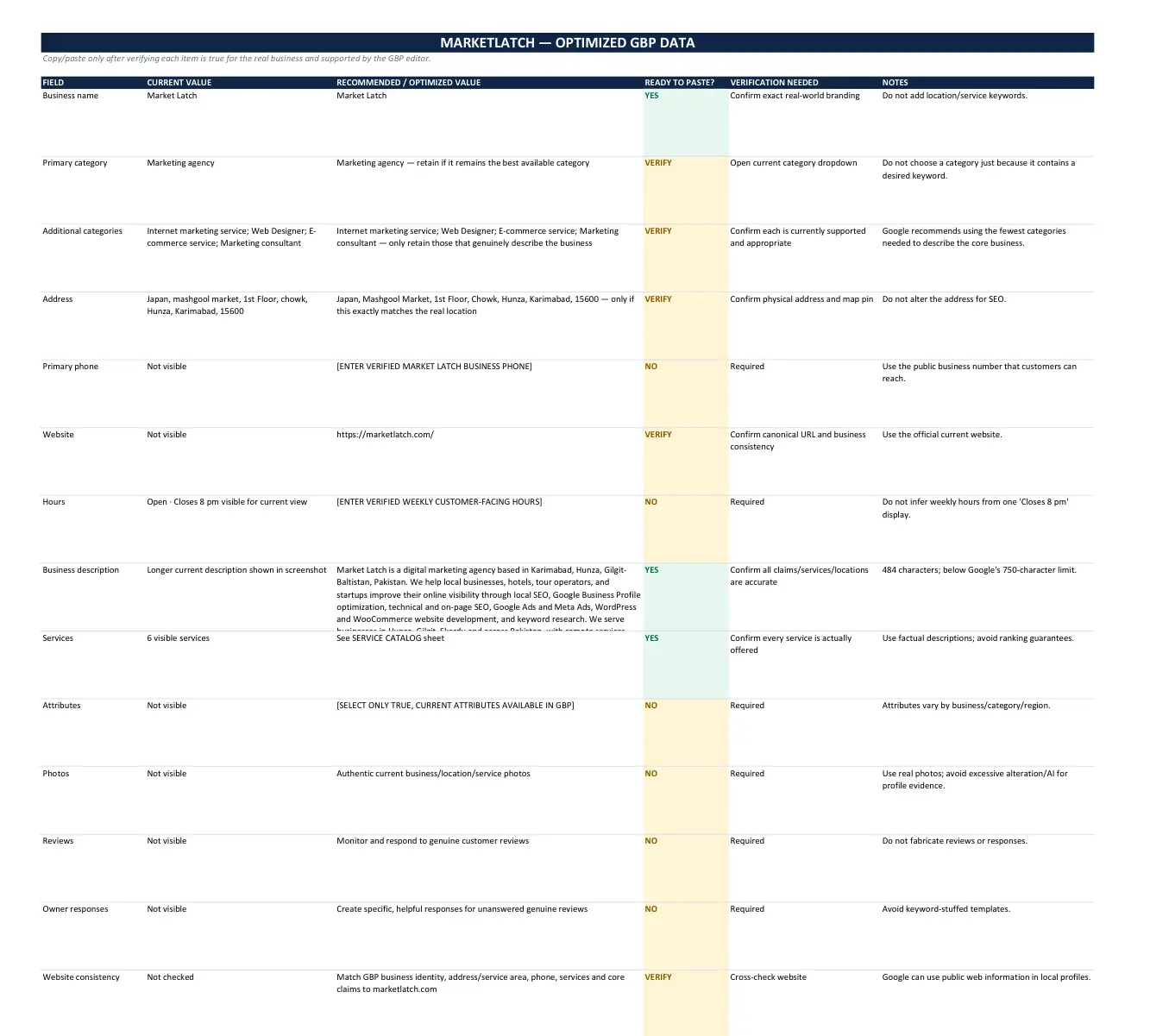
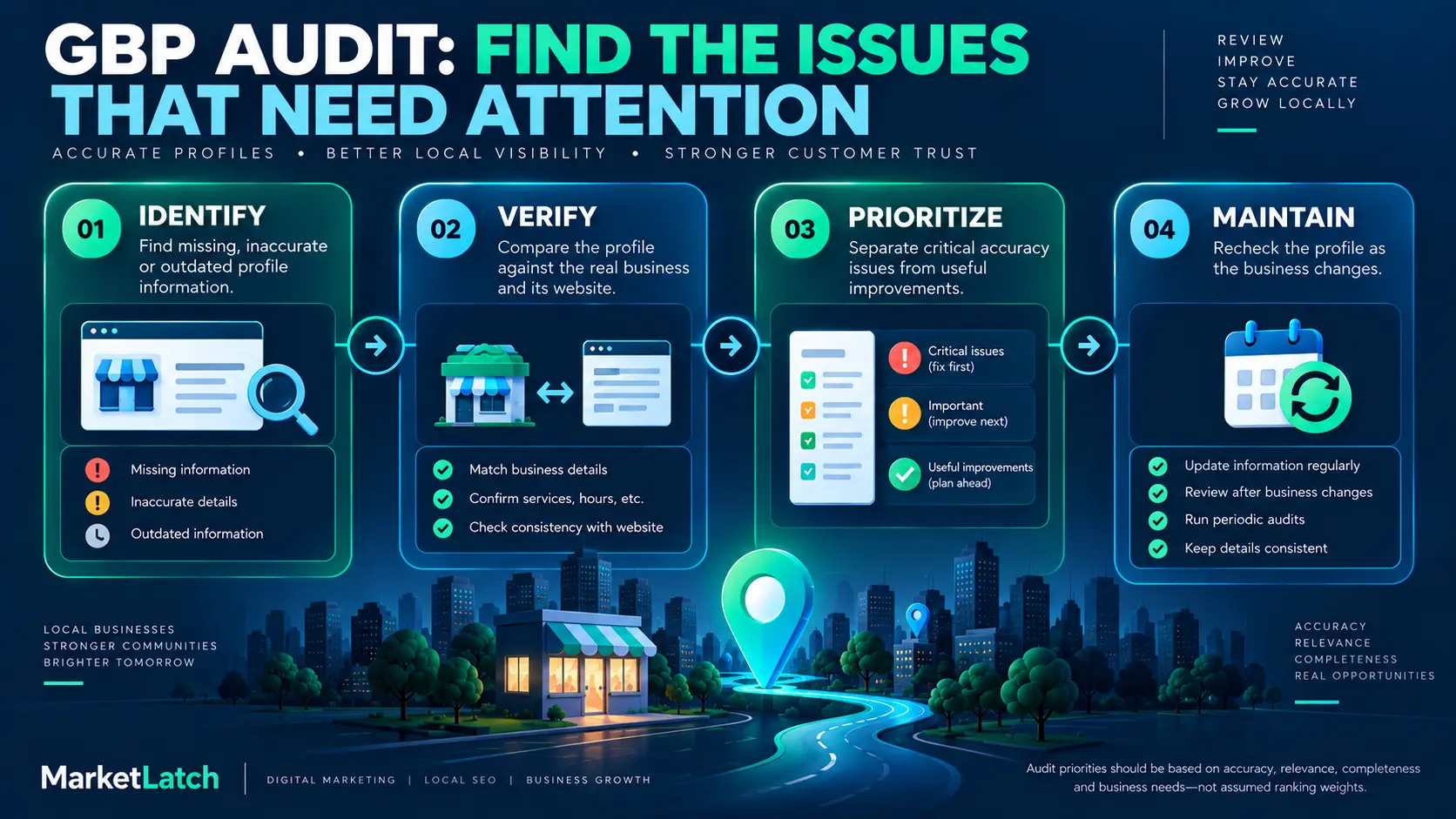
A practical audit should not be a giant spreadsheet of unchecked boxes. The useful part is the decision process that follows the check: identify the issue, verify it against the real business, prioritize the work and maintain the profile after the fixes.
Identify
Start by inventorying the profile. Look for missing or outdated information across the business name, categories, address or service area, phone, website, hours, description, services, attributes, photos and customer signals.
Do not assume a field is correct simply because it contains something. An outdated service can be just as important to find as a missing service. A wrong holiday hour is more urgent than an image that could simply be replaced later.
Verify
Compare profile information with the actual business and the business website. Where appropriate, compare other authoritative references as well.
Verification is where a checklist becomes an audit. You are not asking “does this field have data?” You are asking “is this data true, current and consistent with the business customers encounter?”
Google can use information from multiple sources when building Business Profile information. That makes factual consistency a useful part of ongoing local SEO maintenance.
Prioritize
Not every issue deserves the same urgency. A practical order is to fix factual inaccuracies and critical customer information first, then address identity and category problems, then complete important missing information, and finally work through supporting improvements.
This is an operational priority framework, not a statement that Google assigns these categories a particular ranking weight. The purpose is to spend effort where an error is most likely to create confusion or harm the customer experience.
Maintain
A Business Profile is not a document you optimize once and forget. Review it when the business changes and establish periodic checks for hours, services, categories, attributes, photos, website information and customer feedback.
A useful maintenance trigger is any real business change: a move, new service, changed opening hours, new website, major rebrand, new phone number, new location or significant change in what customers can buy or book.
MarketLatch — Local SEO & Google Business Profile Domination Kit
Common Google Business Profile Optimization Mistakes
- Keyword-stuffing the business name instead of using the real business name.
- Choosing categories because they contain attractive keywords rather than because they accurately describe the business.
- Adding services the business does not actually provide.
- Leaving old opening hours or special hours after the business changes them.
- Using misleading or heavily manipulated images instead of authentic business photography.
- Treating the description as an advertising block rather than useful business information.
- Ignoring review responses and customer questions.
- Assuming every profile field is a confirmed Google ranking factor.
- Assuming profile completeness guarantees a particular Map Pack position.
- Changing many fields at once without documenting what changed and why.
- Optimizing the profile while allowing the website and other customer-facing information to contradict it.
The common thread is that these mistakes replace accurate representation with search-engine guesswork. Good optimization does the opposite: it makes the business easier to understand without pretending to be something it is not.
Google Business Profile and Local SEO
Google Business Profile optimization is one part of local SEO, not the entire system. A useful Google Business Profile optimization strategy therefore connects profile work with the website and wider local presence. The profile can help customers discover and evaluate the business, but local visibility also depends on factors outside the profile.
The website should support the same business identity and services. Relevant local pages, useful service information, reviews, links and other legitimate sources of prominence can contribute to the wider local search picture.
This is another reason to avoid guarantees. A profile can be complete and accurate while a competitor remains more prominent or geographically closer to a particular searcher. The goal is to remove avoidable weaknesses and build a consistent local presence.
MarketLatch’s local SEO workflow treats GBP, citations, service details, hours, photography and review processes as connected pieces rather than isolated profile edits.
MarketLatch — GBP Optimization service
MarketLatch — Portfolio and verified work
Google Business Profile, Merchant Center & Product Visibility in 2026
Merchant Center deserves a careful explanation because product visibility and local Business Profile optimization can be related in some Google surfaces but are not the same thing.
Google documents free product listings as a way eligible products can appear across supported Google surfaces. Depending on eligibility and product data, those surfaces can include Search, Images, Lens, YouTube, Gemini, the Shopping tab and product areas associated with Business Profiles.
That does not make Merchant Center a documented Google Business Profile ranking factor. It is better understood as an additional product-discovery channel that can create organic visibility for eligible products.
Eligibility matters. Not every product or business qualifies for every Merchant Center surface, and inclusion or visibility is not guaranteed. This is particularly important for digital products: Google has specific policies for Shopping and free listings, and product eligibility should be checked against the current policy rather than generalized from physical retail examples.
For MarketLatch, which sells digital guides, checklists and templates, the safe approach is to evaluate each product type against Google’s current Merchant Center requirements. Do not assume that a digital PDF, template or service is automatically eligible simply because it is sold on a website.
Google Merchant Center — Free listings
Google Merchant Center — Unsupported Shopping content
Google Merchant Center — Free listings content policies
What About Posts, Q&A and Other GBP Features?
A complete profile can contain more features than the core fields covered here. Posts, questions and answers, messaging and other features can be useful depending on the business and Google’s current availability.
They should not distract from the fundamentals. An outdated phone number or incorrect opening hour is a more obvious information problem than whether a business has published another post this week.
For Posts specifically, keep that topic in its dedicated MarketLatch resource rather than expanding this pillar into a separate Posts guide. If a profile has been suspended, treat recovery as a separate problem; adding photos or editing a description is not a substitute for understanding a suspension.
Dedicated MarketLatch resources for Posts, suspension recovery and service-area businesses should be linked here once their live pages are available. No unpublished URL is invented in this draft.
Complete Google Business Profile Optimization Checklist
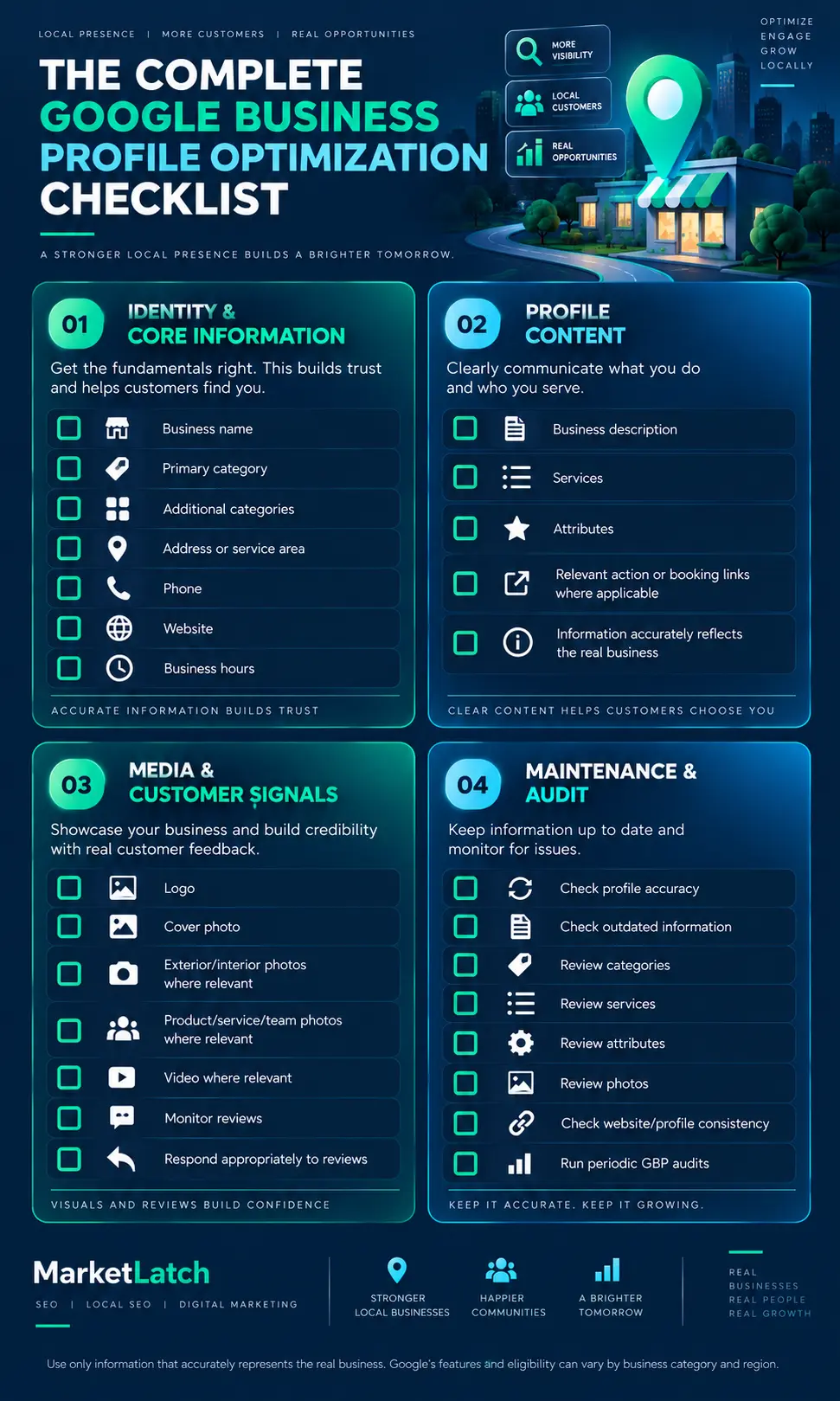
Use this condensed checklist after working through the detailed sections above.
Identity & Core Information
- Business name accurately represents the real business.
- Primary category accurately describes the business.
- Additional categories are relevant and defensible.
- Address or service-area information matches the real operation.
- Phone number is current.
- Website URL works and leads to the intended destination.
- Regular hours are correct.
- Special or holiday hours are reviewed when needed.
Profile Content
- Business description explains what the business actually offers.
- Description stays within Google’s current requirements.
- Services are genuine and clearly organized.
- Service categories match the actual business.
- Attributes are selected only when accurate.
- Relevant action or booking links are correct where available.
Media & Customer Signals
- Profile imagery represents the current business.
- Exterior/interior images are accurate where relevant.
- Products or completed work are represented where useful.
- Team/service imagery is used where it genuinely helps customers.
- Reviews are genuine.
- Review responses are professional and useful.
Maintenance & Audit
- Profile information has been compared with the website.
- Outdated information has been identified and corrected.
- Categories, services and attributes have been reviewed.
- Photos have been checked for accuracy and relevance.
- Website/profile consistency has been reviewed.
- A repeat audit date or trigger has been established.
Google Business Profile Optimization FAQ
What is Google Business Profile optimization?
Google Business Profile optimization is the process of reviewing and improving the information and supporting profile elements that describe a business on Google. It includes business identity, categories, services, description, contact details, hours, attributes, photos, reviews and ongoing maintenance. The goal is accurate, useful representation—not keyword stuffing.
How do I optimize my Google Business Profile?
Start with accuracy: business name, category, location or service area, phone, website and hours. Then review the description, services, attributes, photos and reviews. Compare the profile with the actual business and website, fix factual errors first, and establish a recurring audit process.
What are Google’s local ranking factors?
Google says local results are mainly based on relevance, distance and prominence. Relevance is how well the profile matches the search, distance relates to geographic proximity, and prominence reflects how well-known the business is. Google does not publish a fixed percentage weight for every Business Profile field.
How often should I audit my Google Business Profile?
There is no universal interval that fits every business. Review the profile when the business changes and schedule periodic checks for hours, services, categories, attributes, photos, website information and reviews. High-change businesses may need more frequent reviews.
What should I put in my Google Business Profile description?
Explain what the business offers, what makes it useful or distinctive, and other genuine business details. Google currently limits the description to 750 characters and does not allow URLs or HTML in the description. Keep the copy factual and customer-focused.
How many characters can a Google Business Profile description have?
Google’s current Business Profile documentation states that the description can contain up to 750 characters. Verify the current Google guidance when editing because platform requirements can change.
Do Google Business Profile categories affect local visibility?
Categories help describe what a business is and therefore relate to relevance. Choose categories that accurately represent the business. Avoid treating categories as a keyword list, and do not assume Google has published a ranking percentage for a particular category.
What are Google Business Profile attributes?
Attributes are additional business details that can help customers understand what a business offers or what the customer experience is like. Availability varies by business and location. Select only attributes that accurately describe the real business.
Do more Google Business Profile photos improve ranking?
Do not treat photo count as a guaranteed ranking formula. Google provides photo quality and technical guidance, and useful authentic images can improve how customers understand a business. The safer recommendation is to maintain a current, representative photo library.
Is Google My Business the same as Google Business Profile?
Yes. Google Business Profile is the current product name. Google My Business was the previous name. Searchers may still use the older phrase, which is why the legacy keyword can appear in research, but current content should generally use Google Business Profile.
Can Merchant Center products appear with a Business Profile?
Eligible products can appear on supported Google product surfaces, and Google documents product visibility associated with Business Profiles in its Merchant Center guidance. Eligibility and visibility are not guaranteed, and Merchant Center should not be presented as a documented GBP local-ranking factor.
Can every business have a Google Business Profile?
No. Google says a business generally must make in-person contact with customers during its stated hours, and it lists online-only businesses and lead-generation companies among examples that are not eligible. Check the current eligibility guidance before creating or optimizing a profile.
How should a service-area business set its profile up?
Use the service-area model only if the business actually visits or delivers to customers. Google says service areas should be entered using cities, postal codes or other areas rather than a radius, and the selected area should reflect where the business can realistically serve customers.
Google — Business Profile eligibility and ownership
Conclusion: Optimize the Profile You Actually Have
The most useful way to approach Google Business Profile optimization is to stop thinking of the profile as a collection of ranking fields and start treating it as a public representation of the business.
Make the identity accurate. Choose categories that describe the business. Explain the services clearly. Keep contact details and hours current. Use authentic images. Build genuine customer reviews. Make sure the website and profile tell the same basic story. Then audit the profile when the business changes instead of waiting for a problem to appear.
Google’s documented local framework—relevance, distance and prominence—also gives you a useful reality check. Optimization can improve the quality and clarity of your business information, but it cannot guarantee a particular local ranking. Geography and broader prominence still matter.
If you want to handle the work yourself, use the checklist and audit workflow in this guide. If you want a specialist to review the profile as part of a broader local SEO process, explore MarketLatch’s Google Business Profile optimization service.
MarketLatch — GBP Optimization service
MarketLatch — Local SEO & Google Business Profile Domination Kit
About the author

Nadeem Alam is the founder of Market Latch, a digital marketing agency working with clients across the USA, UK, Canada, Australia, the UAE and Pakistan. He is a digital growth strategist and WordPress specialist with around 5 years in search, covering technical, on-page, off-page and local SEO, generative engine optimization and answer engine optimization, WooCommerce and Elementor development, and Google and Meta Ads.
For local search, his work includes Google Business Profile optimization, local SEO audits, profile structure, category and service review, website/profile consistency, and ongoing optimization workflows. This guide reflects that practical approach: using Google’s published guidance as the baseline, then applying structured auditing and verification rather than treating individual GBP fields as guaranteed ranking factors.
Nadeem is also the author of the Generative Engine Optimization Book, the AEO Masterclass Guide and the AI SEO Implementation Checklist 2026. His training and certifications include Google Digital Garage, Semrush Academy, Coursera, uConnect and Virtual University (DigiSkills).
If you want this work handled as part of a broader local SEO strategy, explore Market Latch SEO Services.