The most useful Google Business Profile posts answer a real customer question, explain something specific about a business, or make the next step easier. This guide to google business profile high engagement posts 2026 focuses on practical ways to make each update relevant and useful. Instead of publishing repetitive promotional messages, businesses can share service updates, explain genuine offers, announce events, provide practical advice, and direct customers to relevant information.
This guide covers 20 adaptable Google Business Profile post examples, a decision framework for choosing the right post, Google’s published media guidance, a sustainable posting schedule, publishing troubleshooting, and ways to measure customer actions without confusing profile activity with post-level performance.
No post format, publishing frequency, or keyword phrase guarantees engagement or better local rankings. The objective is to publish accurate, relevant information that helps potential customers make informed decisions.
What Are Google Business Profile Posts?
Google Business Profile posts let eligible businesses share updates, offers, and event information through their Business Profile on Google Search and Google Maps. Depending on the post type and available controls, a post can include text, media, dates, and an action button that directs customers to an appropriate destination.
Posts are different from reviews, business information, products, services, and photos. Each serves a different purpose. A review reflects a customer’s feedback, business information communicates core details, and a post provides an update or a timely reason for someone to learn more or take action.
Google’s published guidance describes three main post categories:
- Updates: Share useful information, service news, announcements, tips, or other relevant business updates.
- Offers: Communicate a genuine promotion with accurate conditions and dates.
- Events: Promote a real event with appropriate timing and details.
Use the category that best matches the information you are communicating. Do not turn every announcement into an offer or describe an ordinary service update as an event.
Google also states that posts without a specified date range are archived after six months. Check the current publishing interface and official guidance for the options available to your profile.
Posts are one part of managing a Business Profile. For broader guidance on business information, services, and profile presentation, see our Google Business Profile optimization guide. Official reference: Create and manage posts on your Business Profile
How to Plan Google Business Profile High Engagement Posts 2026 Around Customer Needs
Before writing, decide what a prospective customer needs to know. That customer-first principle helps make posts more relevant and useful. The target phrase describes the topic of this guide, not a promise of results. This prevents a common mistake: choosing a promotional message first and trying to invent a reason for customers to care about it. For readers researching google business profile high engagement posts 2026, the practical starting point is the customer’s question—not a keyword or a posting quota.
| Customer need | Suitable approach | Useful next step |
| Understand a service | Explain the service and who it helps | Read the service page |
| Compare options | Explain differences, scope, or limitations | View the relevant details |
| Learn how something works | Share a practical tip or short explanation | Read a guide |
| Evaluate a business | Show genuine work or explain the process | View a relevant portfolio page |
| Check a current promotion | Publish a genuine offer and its conditions | Review the offer |
| Attend an activity | Share an event with accurate dates and details | View event information |
| Prepare for an appointment | Explain what to bring or expect | Follow the preparation instructions |
| Get a local question answered | Provide useful location or service information | Visit the appropriate page |
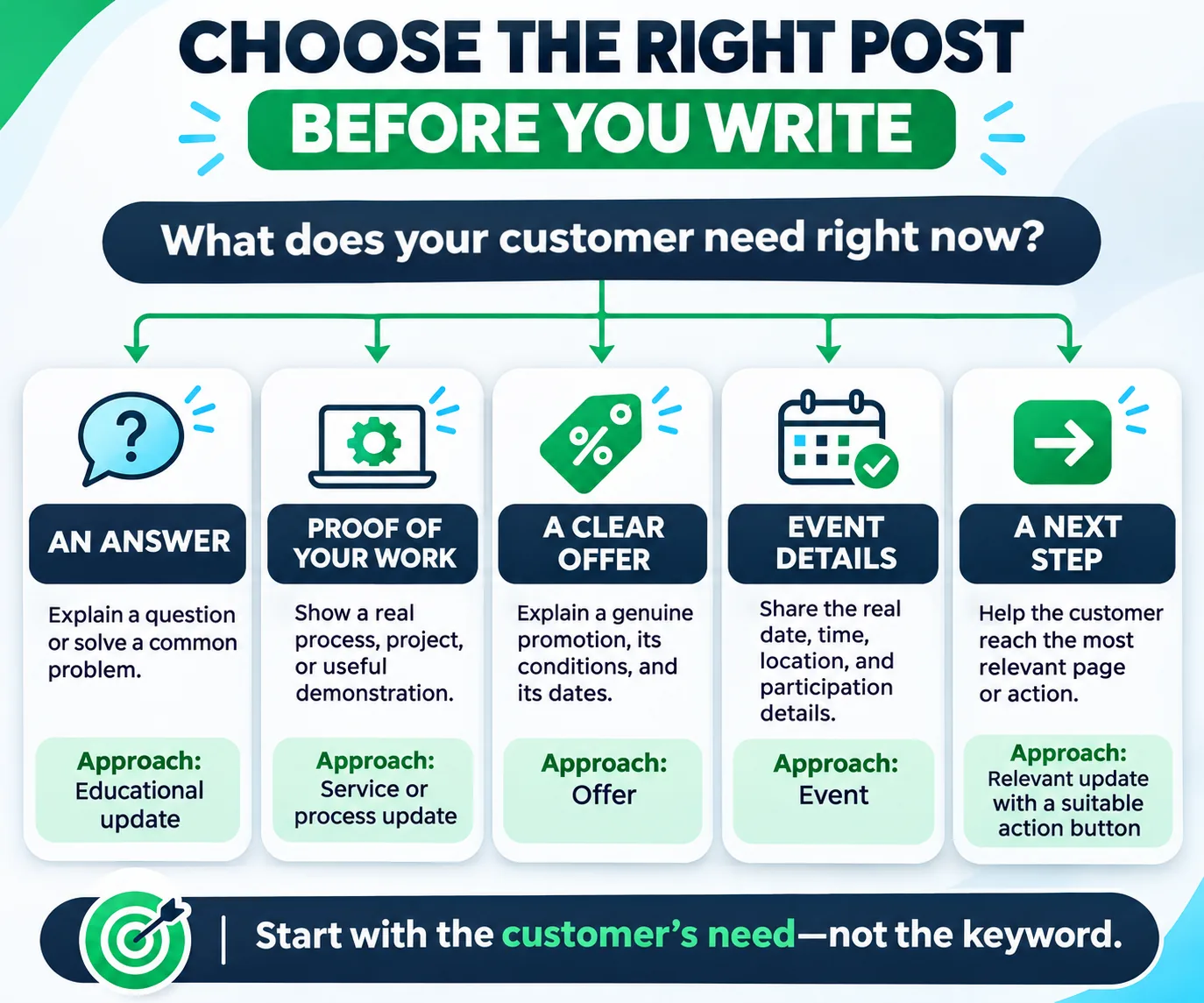
The table is a planning aid, not a Google ranking framework. The right choice depends on the business, the customer, the accuracy of the information, and the genuinely available action.
What Makes a Google Business Profile Post Useful?
A useful post gives readers a reason to pay attention without relying on exaggerated claims. These principles can improve clarity and usefulness, but they are not a formula that guarantees engagement. For google business profile high engagement posts 2026, usefulness should be judged by how well the post answers a real customer need, not by a promised engagement result.
Five Principles for Writing More Useful Business Profile Posts
Use the following principles to make each post specific, credible, and easy for a customer to act on. The keyword describes the topic of this guide; it is not a claim that a particular post will achieve a defined engagement level.
1. Lead with the customer’s need
Start with the question, problem, service, update, or opportunity that matters to the intended audience. Avoid opening every post with generic claims such as “We are the best” or “Contact us today.”
2. Include specific, accurate information
Use real service details, genuine dates, valid offer conditions, relevant instructions, or useful explanations. If information varies by customer or project, make that clear rather than promising a universal outcome.
3. Use genuine, relevant visuals
Choose a real business image, a relevant product or service photograph, a legitimate event visual, or a simple educational graphic. The visual should reinforce the message rather than distract from it.
4. Provide one clear next step
Use a suitable call to action and send readers to the most relevant destination. A service explanation should generally link to the service page, while a genuine event announcement should direct people to the event details or registration information where appropriate.
5. Avoid repetitive and unsupported claims
Do not stuff location phrases into every sentence, invent reviews, fabricate results, create artificial urgency, or promise rankings. Mention a location when it provides useful context to the customer.
Weak vs. improved example
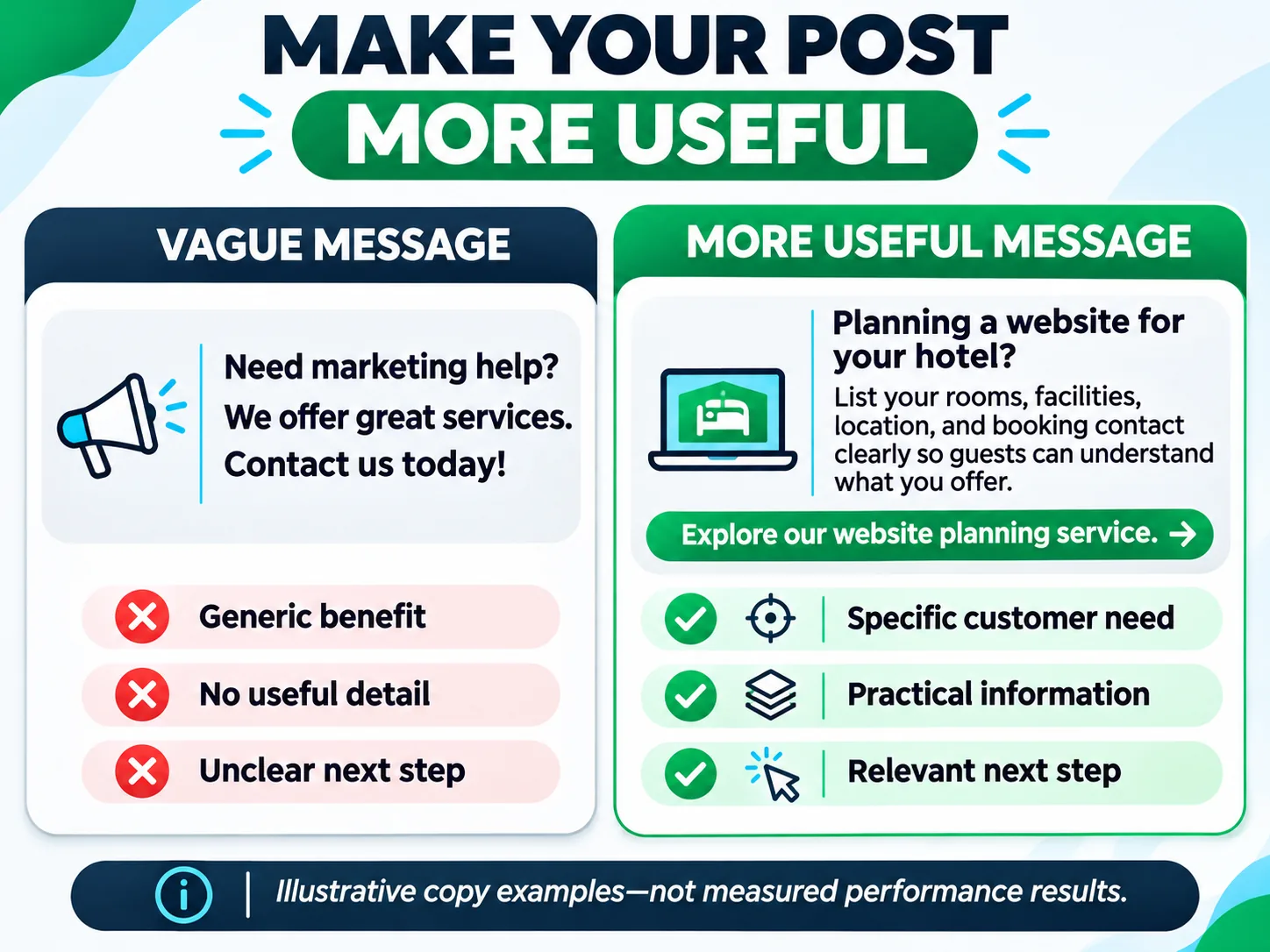
Weak version
“We are the best digital marketing agency. Contact us now for amazing results!”
This message makes a broad claim without explaining the service, the intended customer, or the next step.
Improved version
“Planning a website for your hotel in Hunza? A clear service page can help visitors understand your rooms, amenities, location, and booking process before they contact you. Explore our website development services to see how a business website can present essential information.”
The improved version addresses a specific audience, describes a practical consideration, and offers a relevant next step. It does not promise a ranking improvement or a guaranteed number of bookings.
20 Google Business Profile Post Ideas and Examples
The following examples are adaptable starting points for writing more useful Google Business Profile posts. Adjust each one to the business, the customer’s needs, and the information you can verify. Replace every bracketed detail with accurate business information, remove unsupported claims, and confirm that the chosen post type and call to action are available for the profile.
These examples are intended to help with planning and writing. They are not measured engagement results or promises that a particular post will outperform another.
Group 1: Service and product education
1. Explain a core service
Business type: Service business or professional agency.
Customer need: Understand what the service includes.
Post type: Update.
Example copy:
“Need help with [specific customer problem]? Our [service name] helps [intended customer] address [specific task or need]. Before getting started, it is worth understanding [important consideration]. Explore the service details to see whether it fits your requirements.”
Visual: A genuine service-related photograph or a clear educational graphic.
CTA and destination: Learn more → the relevant service page.
How to assess it: Review available profile-level website clicks and tagged website activity, where configured.
Why it may be useful: It explains the service rather than relying on a general promotional claim.
When not to use it: Do not describe features, outcomes, or qualifications that the business does not actually provide.
2. Answer a frequently asked question
Business type: Professional service, retailer, clinic, or home-service business.
Customer need: Resolve a common question before making contact.
Post type: Update.
Example copy:
“Wondering [common customer question]? The answer depends on [relevant factor]. Before choosing [service or product], check [important detail]. We explain the process and the information you may need on our website.”
Visual: A simple diagram or genuine image related to the question.
CTA and destination: Learn more → a relevant FAQ, service page, or guide.
How to assess it: Track website visits and meaningful enquiries where analytics permits.
Why it may be useful: It helps customers understand the process and reduces uncertainty.
When not to use it: Avoid giving professional, medical, financial, or legal assurances beyond the business’s competence and applicable rules.
3. Compare service options
Business type: Agency, repair company, consultant, or other business with clearly different service options.
Customer need: Understand which option fits their situation.
Post type: Update.
Example copy:
“Choosing between [option A] and [option B]? The main difference is [verified distinction]. [Option A] may suit [appropriate situation], while [option B] may be more relevant when [different situation]. Review the scope and requirements before deciding.”
Visual: A simple comparison graphic or genuine photographs of the relevant services.
CTA and destination: Compare options → the page explaining the available services.
How to assess it: Review relevant website visits and enquiries if those actions are tracked.
Why it may be useful: It supports informed decisions without forcing every reader toward the same service.
When not to use it: Do not create false comparisons or misrepresent competitors’ offerings.
4. Explain how to prepare for a service
Business type: Appointment-based service, repair business, consultant, or specialist.
Customer need: Know what to prepare before contacting or visiting.
Post type: Update.
Example copy:
“Preparing for [service or appointment]? Have [relevant document or item] ready, and consider [useful preparation step]. Requirements can vary depending on [relevant circumstance], so check the instructions before your appointment.”
Visual: A genuine preparation photo or a short checklist graphic.
CTA and destination: View preparation details → the relevant instructions page.
How to assess it: Monitor tagged website visits and enquiry quality where measurable.
Why it may be useful: It helps customers arrive better prepared.
When not to use it: Do not request sensitive personal information in a public post.
Group 2: Genuine offers, events, and timely updates
5. Publish a genuine limited-time offer
Business type: Eligible retailer or service business.
Customer need: Understand a current promotion and its conditions.
Post type: Offer, where eligible and supported.
Example copy:
“From [start date] to [end date], receive [specific offer] on [eligible product or service]. The offer applies to [clear conditions or exclusions]. Review the details before purchasing or booking.”
Visual: A genuine product or service image with a readable, accurate offer message.
CTA and destination: Redeem or learn more → the relevant offer or service page, where supported.
How to assess it: Use tagged destination links and available transaction or enquiry records.
Why it may be useful: Customers can understand what is offered, when it applies, and what to do next.
When not to use it: Do not publish expired, misleading, or unavailable promotions. Confirm eligibility and any industry-specific restrictions before using an Offer post.
6. Announce a real event or workshop
Business type: Training provider, community organization, retailer, or eligible local business.
Customer need: Find out what is happening and whether they can participate.
Post type: Event, where appropriate.
Example copy:
“Join us for [event name] on [date] at [time]. We will cover [specific topics or activities]. The event takes place at [location or venue], and [registration or participation details] apply. Check the event information before attending.”
Visual: An authentic event image or an accurate event graphic.
CTA and destination: Register or learn more → the event information page, where supported.
How to assess it: Review registrations, enquiries, and attendance records where available.
Why it may be useful: It communicates practical event information rather than a vague announcement.
When not to use it: Do not advertise an event that is not confirmed or use inaccurate dates, availability, or venue details.
7. Share a seasonal service reminder
Business type: Home services, hospitality, retail, or another business with a genuine seasonal need.
Customer need: Prepare for a seasonal change or period.
Post type: Update.
Example copy:
“Preparing for [season or local event]? This is a useful time to check [relevant item, service, or requirement]. Our [service or product] may help with [specific need]. Review the details to decide whether it is relevant to your plans.”
Visual: A genuine seasonal image related to the service or product.
CTA and destination: Explore the service → the relevant page.
How to assess it: Review website visits and enquiries during the relevant period, without assuming the post caused any change.
Why it may be useful: It connects the service to a timely customer need.
When not to use it: Do not create artificial urgency or imply a seasonal risk that is not supported by the facts.
8. Announce changed business hours or availability
Business type: Storefront, hospitality business, or appointment-based service.
Customer need: Confirm when the business is available.
Post type: Update.
Example copy:
“Our hours for [date or period] are [accurate hours]. During this period, [relevant service or availability detail]. Please check the current Business Profile information before visiting.”
Visual: A simple hours graphic or a genuine image of the business.
CTA and destination: View current details → the Business Profile or relevant information page.
How to assess it: Monitor relevant customer enquiries and any reduction in confusion reported by staff.
Why it may be useful: It helps customers plan visits or contact attempts.
When not to use it: Do not use a post as a substitute for updating the official Business Profile hours when those hours have changed.
Group 3: Trust, process, and genuine evidence
9. Show a real completed project
Business type: Designer, contractor, agency, photographer, or other project-based business.
Customer need: Understand the kind of work the business performs.
Post type: Update.
Example copy:
“We recently completed [project type] for [client description, only if disclosure is permitted]. The work involved [verified task] and focused on [specific objective]. Here is a look at the process and the final work.”
Visual: An authentic project photograph or approved portfolio image.
CTA and destination: View related work → the relevant portfolio or case-study page.
How to assess it: Review relevant portfolio visits and enquiries.
Why it may be useful: It gives customers a concrete example of the business’s work.
When not to use it: Do not disclose confidential client details or claim a measurable result without evidence and permission.
10. Explain the process behind a service
Business type: Consultant, agency, repair business, or specialist service.
Customer need: Understand what happens after making contact.
Post type: Update.
Example copy:
“Here is how our [service] process works: [step one], [step two], and [step three]. The exact steps may vary depending on [relevant factor]. Before starting, we explain the scope and information needed for your situation.”
Visual: A genuine behind-the-scenes photo or a simple process diagram.
CTA and destination: See the process → a service or process page.
How to assess it: Review relevant service-page visits and enquiry questions.
Why it may be useful: It makes the service less unfamiliar and helps set expectations.
When not to use it: Do not promise a fixed timeline or outcome if the business cannot reliably deliver it.
11. Introduce a team member
Business type: Local business with identifiable staff or specialists.
Customer need: Understand who they may interact with.
Post type: Update.
Example copy:
“Meet [team member’s name], who works on [actual role or responsibility]. Their work includes [relevant duties or expertise]. If you have questions about [related service], our team can explain the available options.”
Visual: A genuine, approved team photograph.
CTA and destination: Meet the team or learn more → a relevant page, if available.
How to assess it: Review customer enquiries or feedback mentioning the team or service.
Why it may be useful: It provides context about the people behind the business.
When not to use it: Obtain appropriate permission before publishing identifiable staff photographs or personal information.
12. Explain quality checks or safety procedures
Business type: Repair, installation, manufacturing, hospitality, or another business with a genuine inspection process.
Customer need: Understand how the business checks its work.
Post type: Update.
Example copy:
“Before we complete [service or task], we check [actual inspection points]. These checks help us identify [relevant issue or requirement]. The exact process depends on [applicable factors], and we explain any additional work before proceeding.”
Visual: A genuine photograph of the process, tools, or completed inspection.
CTA and destination: Learn about the process → the relevant service page.
How to assess it: Review enquiries and customer feedback related to the process.
Why it may be useful: It explains what the business actually does rather than relying on an unsupported “best quality” claim.
When not to use it: Do not imply formal certification, independent inspection, or regulatory compliance unless it is true and appropriately substantiated.
Group 4: Helpful information and customer questions
13. Share a practical maintenance tip
Business type: Home services, automotive services, property maintenance, or another relevant specialist.
Customer need: Understand a simple maintenance step.
Post type: Update.
Example copy:
“Looking after [item or system]? One useful check is [appropriate practical step]. If you notice [relevant warning sign], review the manufacturer’s instructions or consult a qualified professional where appropriate.”
Visual: A genuine photograph showing the relevant item or process.
CTA and destination: Learn more → a relevant service or advice page.
How to assess it: Review website visits and enquiries related to the topic.
Why it may be useful: It provides information even before the reader needs to buy a service.
When not to use it: Do not give unsafe instructions or recommend a procedure that requires qualified expertise.
14. Explain a common buying consideration
Business type: Retailer, professional service, or specialist supplier.
Customer need: Know what to consider before purchasing or booking.
Post type: Update.
Example copy:
“Before choosing a product or service, compare [factor one], [factor two], and [factor three]. The right choice depends on your requirements, budget, and intended use. Review the available specifications before deciding.”
Visual: A real product photograph or a clear comparison graphic.
CTA and destination: View options → the relevant product or service page.
How to assess it: Review visits to the relevant page and available enquiry or sales data.
Why it may be useful: It helps customers make a more informed decision.
When not to use it: Do not present subjective preferences as universal facts or hide important limitations.
15. Explain a frequently misunderstood detail
Business type: Specialist service or business whose customers commonly misunderstand a process.
Customer need: Correct a misconception.
Post type: Update.
Example copy:
“One common misunderstanding about [topic] is [misconception]. In practice, [accurate explanation]. If your situation involves [important exception], check the relevant requirements before proceeding.”
Visual: A simple educational graphic or authentic process image.
CTA and destination: Read the explanation → a relevant guide or service page.
How to assess it: Review relevant page visits and whether related enquiry questions change over time.
Why it may be useful: It provides a concise explanation of something that may otherwise confuse customers.
When not to use it: Avoid sensational claims or attacking other businesses to make the explanation seem more persuasive.
16. Share a local service-area explanation
Business type: Eligible service-area business or business serving several nearby locations.
Customer need: Determine whether the business serves their area.
Post type: Update.
Example copy:
“Looking for [service] in [location]? We provide [actual service] in [confirmed service areas]. Availability and travel arrangements may vary by location, so check the service details before arranging a visit.”
Visual: A genuine service photograph or a simple map graphic that accurately represents the service area.
CTA and destination: Check service availability → the relevant service-area page.
How to assess it: Review relevant enquiries and website activity by service area where analytics supports that analysis.
Why it may be useful: It helps potential customers assess whether the service is relevant to their location.
When not to use it: Do not claim coverage in areas the business does not serve or create misleading location information.
Group 5: Business news, inventory, and customer journey
17. Announce a genuine new product or service
Business type: Retailer, hospitality business, agency, or another business introducing a real offering.
Customer need: Learn what is new and whether it meets their needs.
Post type: Update.
Example copy:
“We now offer [new product or service]. It is designed for [intended customer or use case] and includes [verified feature or detail]. Review the specifications and availability before deciding whether it fits your needs.”
Visual: A genuine photograph of the new offering.
CTA and destination: Explore the new offering → the relevant product or service page.
How to assess it: Review relevant page visits, enquiries, and sales data where available.
Why it may be useful: It explains the new offering and provides a clear path to more information.
When not to use it: Do not announce something before it is genuinely available or imply that inventory is unlimited when it is not.
18. Share an accurate inventory or availability update
Business type: Retailer, accommodation provider, or business with changing inventory or availability.
Customer need: Check whether something is currently available.
Post type: Update, where suitable.
Example copy:
“Currently available: [accurate product, room type, service slot, or offering]. Availability can change, so confirm the details before travelling, booking, or making a purchase.”
Visual: A genuine image of the actual product, room, or offering.
CTA and destination: Check availability → the relevant booking, product, or information page.
How to assess it: Compare enquiries and completed transactions where those records are available.
Why it may be useful: It communicates timely information customers can act on.
When not to use it: Do not imply real-time availability unless the information is current and accurate.
19. Explain a genuine business milestone
Business type: Established local business, professional service, or community-facing organization.
Customer need: Understand a relevant change in the business.
Post type: Update.
Example copy:
“We have [completed or introduced a verifiable milestone]. This means [specific operational change or benefit, if supported]. Thank you to everyone who has supported the business as we continue working on [relevant service or priority].”
Visual: An authentic photograph of the milestone, team, or relevant work.
CTA and destination: Learn more → a relevant business update or service page, if useful.
How to assess it: Review relevant customer enquiries and feedback, rather than assuming that a milestone post will increase engagement.
Why it may be useful: It shares meaningful business news and explains why it matters.
When not to use it: Do not invent milestones, customer numbers, awards, or achievements.
20. Guide the customer to the next step
Business type: Any eligible local business with a clear customer journey.
Customer need: Know what to do after discovering the business.
Post type: Update.
Example copy:
“Interested in [service or product]? Start by reviewing [important information]. If you need help deciding, [accurate contact or enquiry instruction]. We explain the available options so you can choose the next step that fits your situation.”
Visual: A genuine business image or a simple customer-journey graphic.
CTA and destination: Learn more, book, or contact → the relevant destination and available CTA.
How to assess it: Review the specific website action or enquiry that the destination is designed to support.
Why it may be useful: It connects discovery to a clear, relevant next step.
When not to use it: Do not use a booking, purchase, or contact CTA if that action is unavailable or the destination does not support it.
How to Write a Google Business Profile Post: The MarketLatch PUBLISH Framework
The PUBLISH framework is a MarketLatch editorial workflow designed to make post creation more consistent. It offers a repeatable way to plan google business profile high engagement posts 2026 without treating the phrase as a ranking tactic. It is not an official Google framework, a validated ranking formula, or a guarantee of engagement.
P — Plan the objective
Choose one customer need or business objective. Examples include explaining a service, answering a question, announcing a genuine offer, or directing a reader to a relevant resource.
U — Understand the reader
Identify what the reader needs to know before taking the next step. Avoid writing only from the business’s perspective.
B — Build the message
Write a direct opening, include the most important details, and add relevant supporting information. Choose a genuine visual that reinforces the message.
L — Link to the appropriate destination
Choose the page that matches the post. A service post should lead to the relevant service details, while an offer should lead to accurate offer information where available.
If website attribution matters, use an appropriately tagged URL and ensure the analytics setup can capture the intended activity.
I — Inspect accuracy and policy
Check names, dates, locations, prices, eligibility, spelling, image relevance, claims, and destination links. Remove unsupported promises and verify any industry-specific restrictions.
S — Schedule or publish appropriately
Publish when the information is useful and accurate. Use scheduling or recurring publishing controls if they are available in the current interface and suitable for the content.
H — How did it perform?
Review the outcomes relevant to the post’s objective. Use the available Business Profile metrics and properly configured website analytics, but do not assume that profile-level changes prove an individual post caused them.
Google Business Profile Post Image Size and Video Requirements
Google’s general Business Profile photo and video guidance provides useful starting points for preparing media. In google business profile high engagement posts 2026, media should make the message easier to understand and remain accurate to the business. These are general media requirements and recommendations; do not assume that every post placement, interface, or media type will behave identically.
Photo guidance
Google’s published photo guidance includes:
- Supported image formats: JPG or PNG.
- File size: 10 KB to 5 MB.
- Recommended resolution: 720 × 720 pixels.
- Minimum resolution: 250 × 250 pixels.
- Images should be in focus, well lit, and representative of reality.
For post visuals, use a clear subject, strong contrast, and readable details at small screen sizes. Avoid placing essential information in tiny text or using an image that does not match the message.
Video guidance
Google’s general guidance specifies:
- Maximum duration: 30 seconds.
- Maximum file size: 75 MB.
- Resolution: 720p or higher.
Check the current official documentation and publishing interface before preparing media for a particular use case.
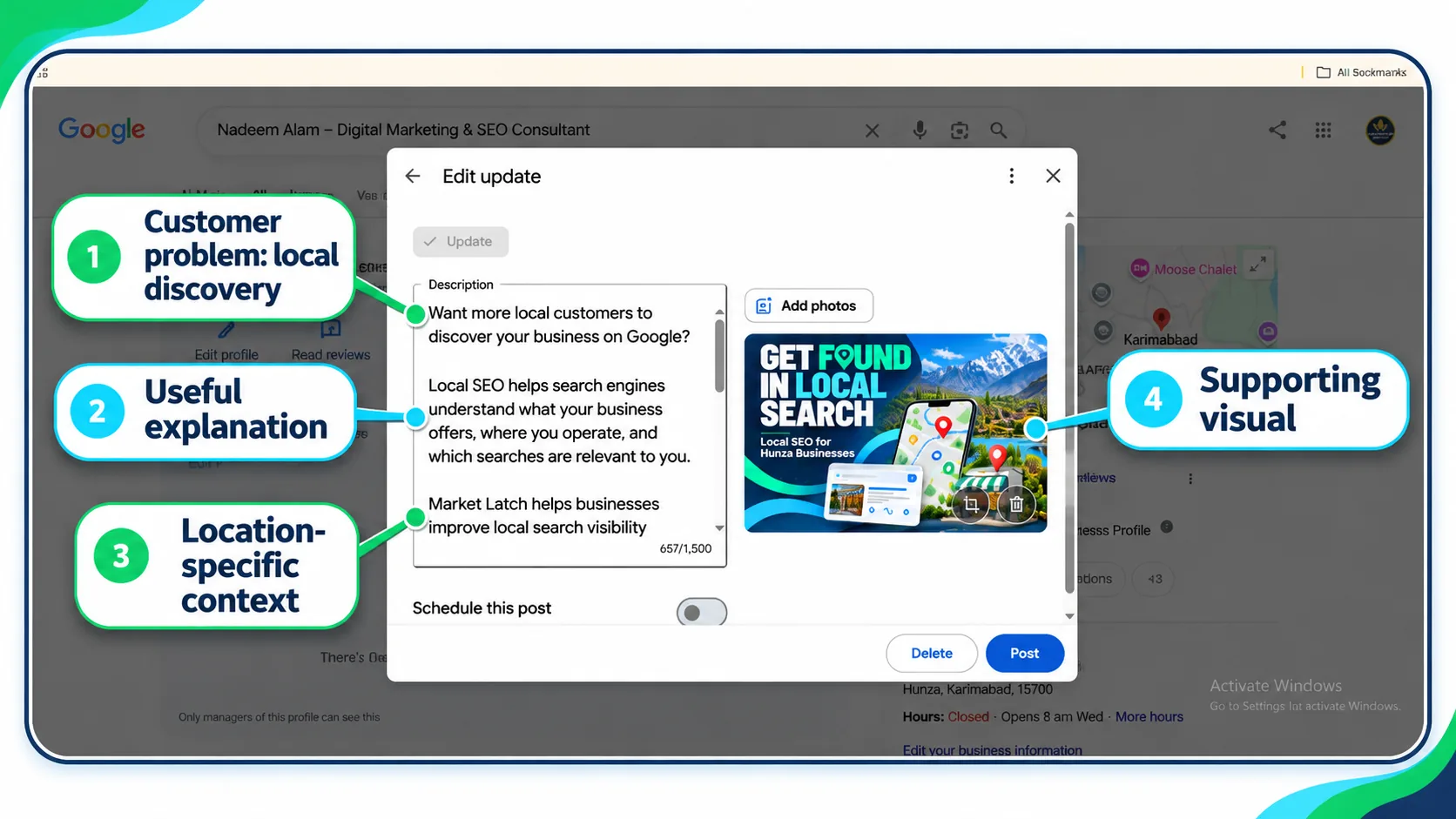
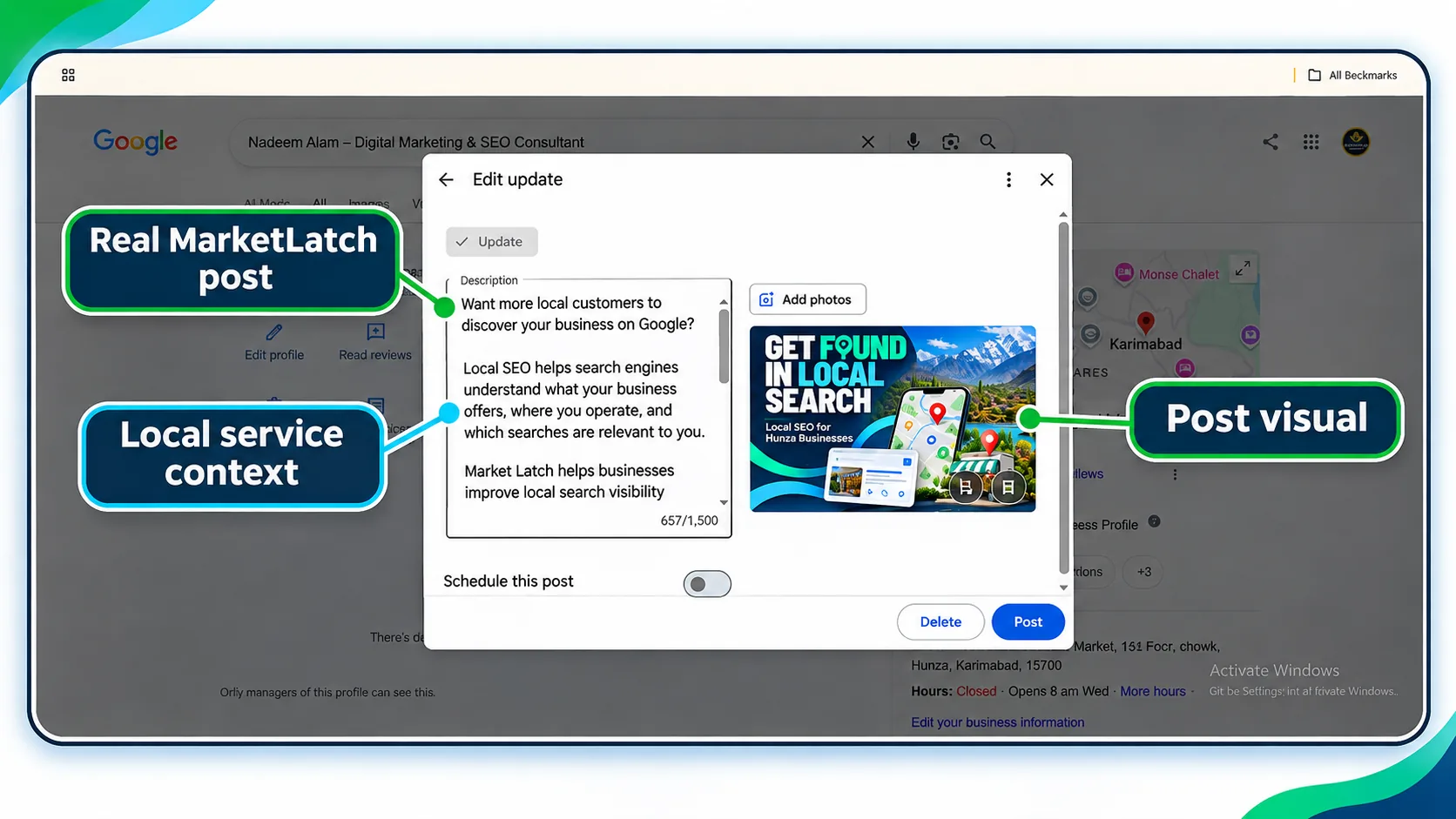
Official reference: Google Business Profile photo and video guidelines.
Google Business Profile Post Character Limit
For google business profile high engagement posts 2026, concise copy is useful only when it preserves the details customers need. There is no universal character-limit number in this guide because a single current official limit for every post type and publishing interface has not been established here. Limits and available fields should be checked against Google’s current documentation and the interface being used.
For practical writing, lead with the main point, keep supporting details relevant, and remove repetition. Do not add unnecessary text just to include more keywords.
A useful editing sequence is:
- State the customer need or announcement.
- Include the most important facts.
- Add relevant conditions or context.
- Provide one suitable next step.
- Remove filler and repetitive phrases.
- Confirm that the text fits the current publishing interface.
The objective is clarity and usefulness, not maximizing character count.
How Often Should You Post on Google Business Profile?
A sustainable publishing schedule is more useful than publishing daily simply to maintain activity. The same principle applies when planning google business profile high engagement posts 2026: choose a cadence you can support with useful, accurate information. One or two useful posts per week can be a reasonable editorial starting point for a business that has enough accurate information to share. This is a recommendation for planning, not a Google requirement or a confirmed local ranking factor.
Choose a cadence that the business can maintain without repeating offers, manufacturing announcements, or publishing outdated information.
A sample four-week posting calendar
| Week | Suggested post | Purpose |
| Week 1 | Explain a core service | Help customers understand the offering |
| Week 1 | Answer a frequent customer question | Reduce uncertainty |
| Week 2 | Share a genuine project or process | Demonstrate what the business does |
| Week 2 | Provide a practical tip | Help customers make an informed decision |
| Week 3 | Announce a real event, offer, or business update | Communicate timely information |
| Week 3 | Explain a common buying consideration | Support customer decision-making |
| Week 4 | Share a relevant service-area or seasonal update | Address a current customer need |
| Week 4 | Guide readers to a relevant next step | Make it easier to find more information |
This is a sample editorial calendar, not a recommended minimum number of posts. Adjust the schedule for business seasonality, customer demand, real events, available resources, and the accuracy of the information.
Do not publish just to fill the calendar. An outdated or repetitive post is not automatically more useful than publishing less frequently with relevant information.
How to Create and Schedule Google Business Profile Posts
Google’s official publishing workflow explains how to create and manage posts. Treat this publishing process as the operational side of google business profile high engagement posts 2026, and verify the available controls before relying on them. The exact controls can vary by interface and availability, so follow the current instructions for the profile you manage.
A practical workflow is:
- Sign in to the account that manages the Business Profile.
- Open the appropriate profile and locate the post creation or update controls.
- Select the appropriate post type, such as Update, Offer, or Event, where available.
- Add accurate copy and relevant media.
- Add dates, conditions, or other details where appropriate.
- Select a suitable CTA and destination if supported.
- Review the information, image, and link before publishing.
- Publish or use scheduling controls if available.
- Check the post status and confirm that the published information is accurate.
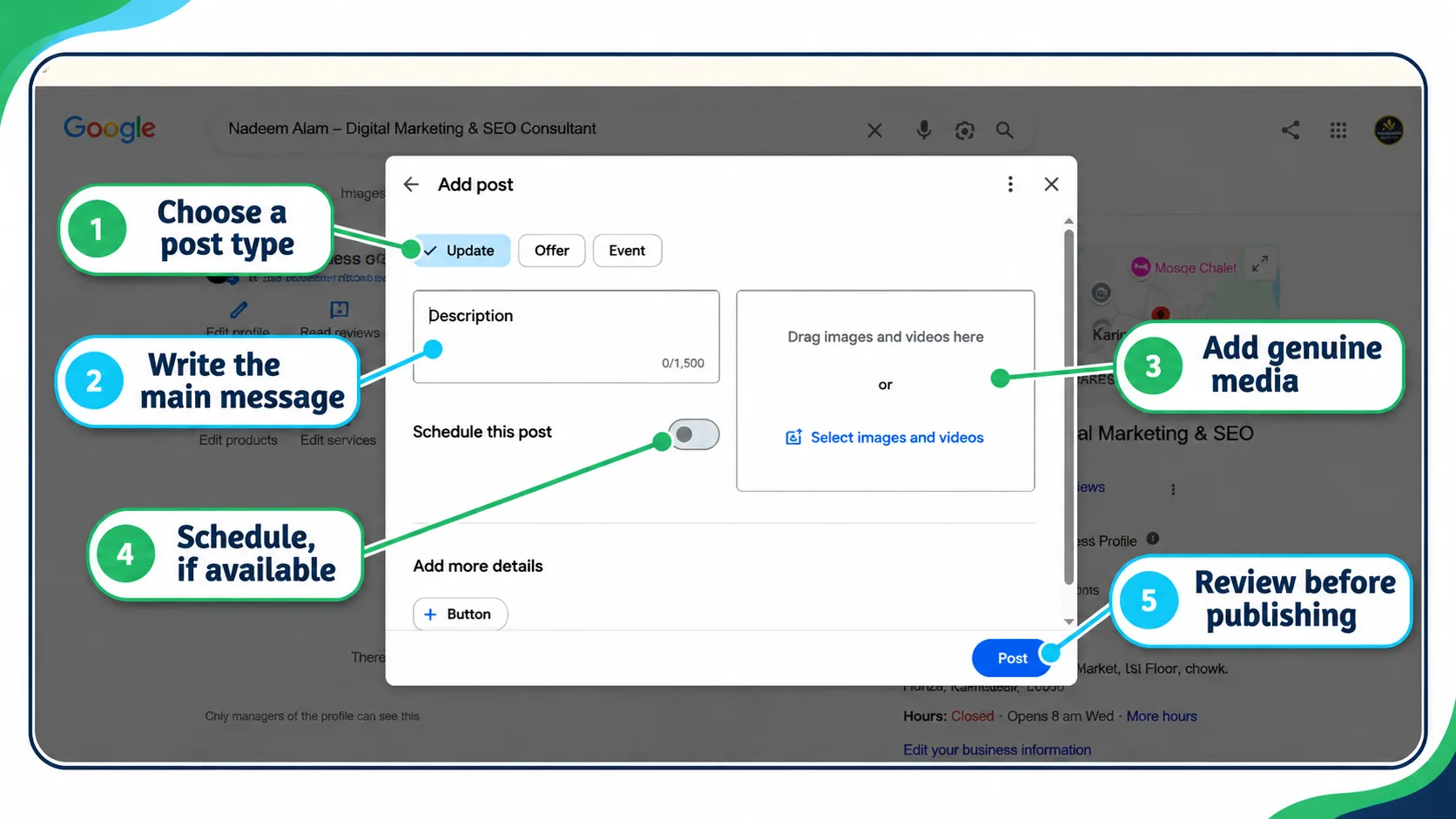
Understanding post statuses
Google documents the following post statuses:
- Live: The post has been published and is eligible to appear according to Google’s systems and policies.
- Pending: The post is still being processed or reviewed.
- Not approved: The post has not been approved, and the content or another issue may need attention.
A status does not guarantee a particular display position, audience, or number of interactions.
What to do when a post is not showing
Use this troubleshooting sequence instead of repeatedly submitting the same post.
Step 1: Check the status. Confirm whether the post is Live, Pending, or Not approved.
Step 2: If it is Pending, allow for processing and review. Check the current account or interface for relevant messages rather than assuming a fixed review time.
Step 3: If it is Not approved, review the applicable content policy and any explanation provided. Correct the issue before attempting to publish again.
Step 4: Check the details. Review dates, offer conditions, contact information, media, destination URLs, and claims for accuracy and policy compliance.
Step 5: Confirm visibility. Once the post is Live, check the available Business Profile surfaces and ensure the published information is correct. Display can vary, and a Live status is not a guarantee that every customer will see the post.
Content-policy considerations
Google’s post content policy should be treated as the authoritative source for prohibited or restricted content. Keep posts accurate, relevant, and appropriate for the business and audience.
Avoid misleading promotions, unsupported claims, inappropriate content, and unverified contact details. Do not include a phone number in post text; use the supported Call now button where available. Google may remove posts containing unverified contact information, including email addresses or social media handles. Hotels have additional restrictions: they cannot publish Offer posts or posts that mention or link to deals, promotions, special offers, or discounts. Check Google’s current content policy before publishing because requirements can change.
Some industries and post types may have additional restrictions. For example, hotels have specific restrictions relating to Offer posts. Check the current policy before preparing a promotion.
Official references:
Do Google Business Profile Posts Help Rankings?
When evaluating google business profile high engagement posts 2026, separate customer communication from ranking claims. Google’s published local ranking guidance identifies relevance, distance, and prominence as the main factors that help determine local search results. It does not establish a minimum posting frequency or confirm that publishing more posts directly improves local rankings.
Useful posts can communicate service details, explain offers, answer questions, and direct potential customers to relevant information. Those are practical customer-communication purposes, not proof of a direct ranking effect.
Avoid treating any of the following as a guaranteed ranking strategy:
- Publishing daily rather than weekly.
- Repeating location keywords in every post.
- Using a particular post format.
- Publishing a specific number of posts each month.
- Assuming that a rise in profile views proves that posts caused the change.
- Claiming that a post will produce AI search citations.
Keep the profile accurate, follow Google’s guidance, and make posts useful to the people who may encounter them. Official reference: How Google determines local ranking.
How to Measure Google Business Profile Post Performance
Measurement should begin with the outcome you want to understand. For google business profile high engagement posts 2026, reporting should distinguish profile-level activity from actions that can actually be attributed to a tagged website link or other tracked destination. A post intended to explain a service has a different purpose from an offer intended to generate sales or an event announcement intended to attract registrations.
It is important to separate profile-level activity, website activity, and post-level attribution.
1. Understand profile-level metrics
Depending on the available reporting, Business Profile performance can include profile views, searches, calls, direction requests, website clicks, and other customer interactions.
These figures describe activity associated with the profile or the reporting period. They should not automatically be described as engagement with a particular post.
2. Track website activity appropriately
When a post links to a website, a tagged URL can help distinguish traffic associated with that link from other website traffic, provided the analytics setup is configured correctly.
For example, a UTM-tagged link can include campaign parameters such as the source, medium, and campaign name. Use a consistent naming convention, check that analytics records the parameters, and test the destination before publishing.
Do not add tracking parameters to links in ways that break the destination or create misleading reporting.
3. Measure the outcome relevant to the post
Depending on the objective and the data available, useful outcomes may include:
- Visits to the relevant service or product page.
- Completed forms or enquiries.
- Registrations for a real event.
- Purchases or bookings recorded in the relevant system.
- Calls or direction requests recorded at the profile level.
- Customer questions that indicate greater understanding of the offering.
Not all outcomes can be attributed to an individual post. Where the available reporting cannot establish attribution, say so.
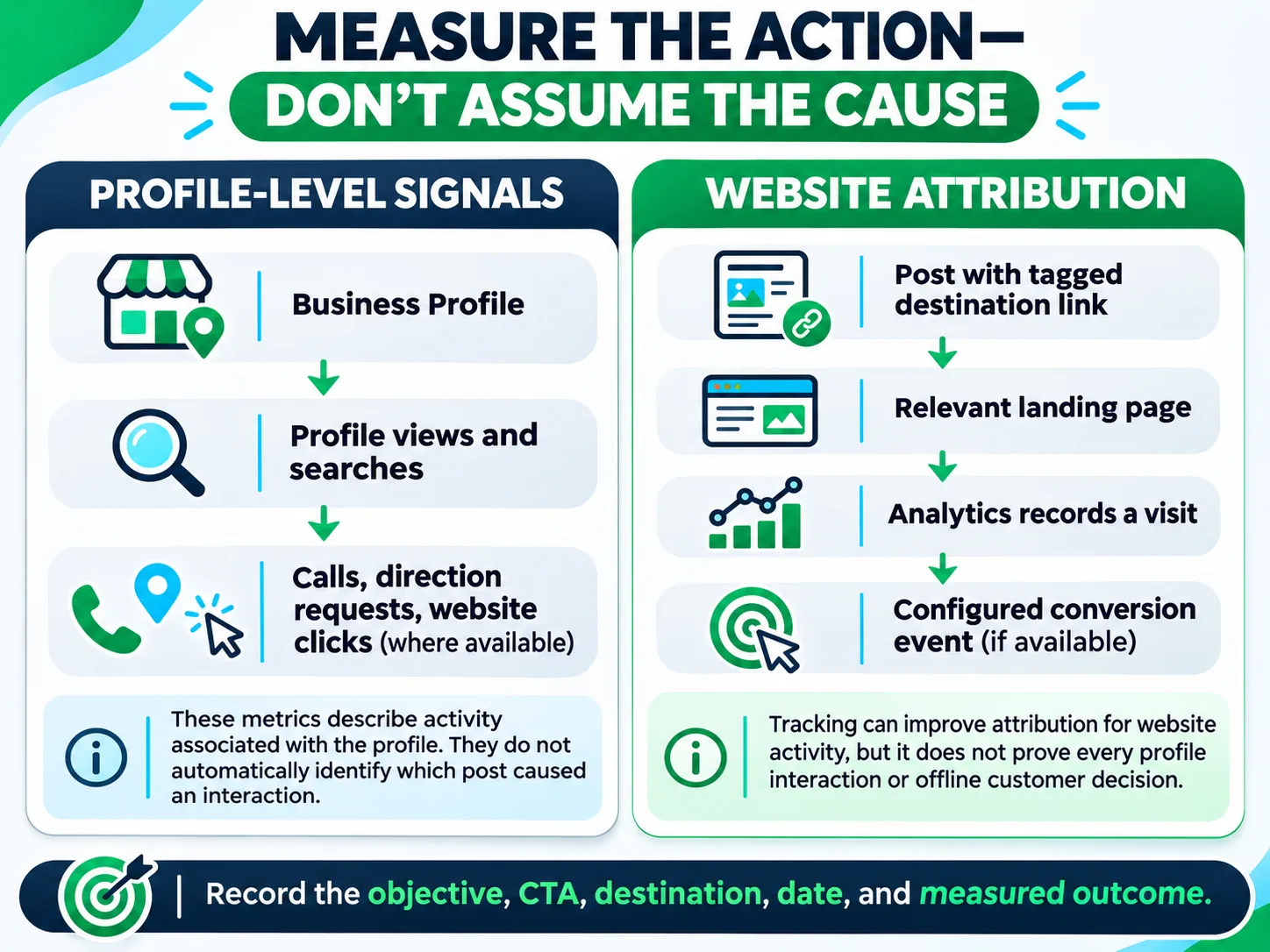
Official reference: Understand your Business Profile performance.
What I Learned From Managing My Own Google Business Profile
I recently began publishing Google Business Profile posts daily for MarketLatch, focusing on services, relevant locations, and the needs of local businesses. My posts cover local SEO, technical SEO, website usability, and Google Business Profile optimization. I also connect my services to the local market, including website development for hotels and digital marketing campaigns aimed at tourism-related businesses in Hunza and Gilgit-Baltistan.
My Business Profile performance report showed 364 profile views and 229 interactions for the reporting period. The dashboard reported a 45.6% increase in views vs. June–October 2025 and a 10.5% increase in interactions compared with its displayed comparison period.
Recorded interactions included 226 direction requests, one call, and two website clicks. Direction requests accounted for the largest share of the recorded interactions, so these totals should not be interpreted as 229 engagements with individual posts.
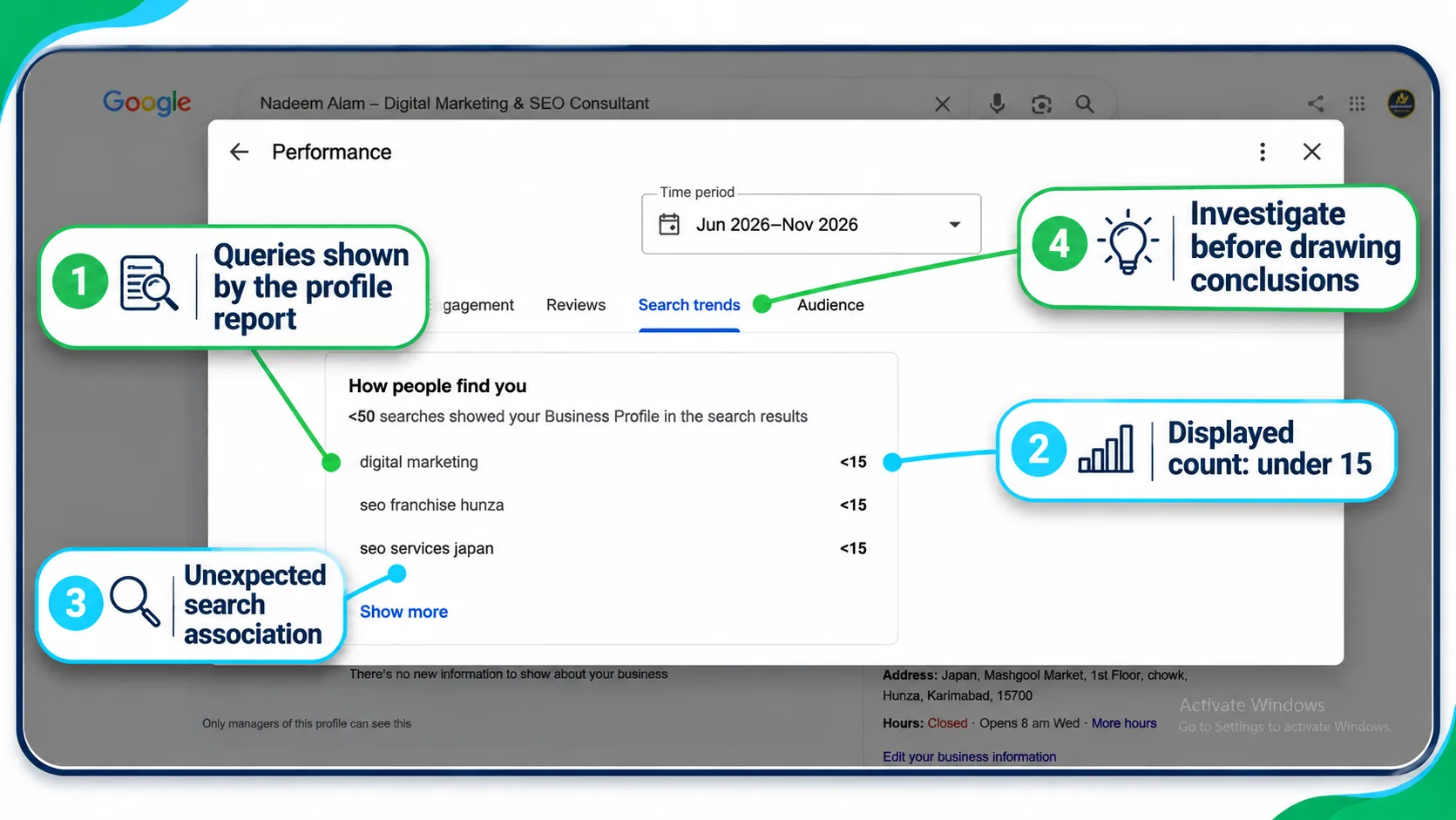
I also received a phone call from someone who explicitly told me they had found my business on Google Maps. This is a genuine example of a potential customer discovering my business through local search. However, it does not establish which profile element led to the discovery or whether my recent posts contributed to it.
I started publishing daily only about a week ago, and I could not access individual post-level metrics or historical screenshots for a more precise comparison. Therefore, I cannot attribute the reported increases in profile views or interactions to the new posting routine.
My practical takeaway is to make each post relevant to a genuine service, location, or customer need, provide useful information, and link to an appropriate next step. I plan to continue monitoring profile performance and customer enquiries rather than assuming that more posts or more keywords automatically produce better results.
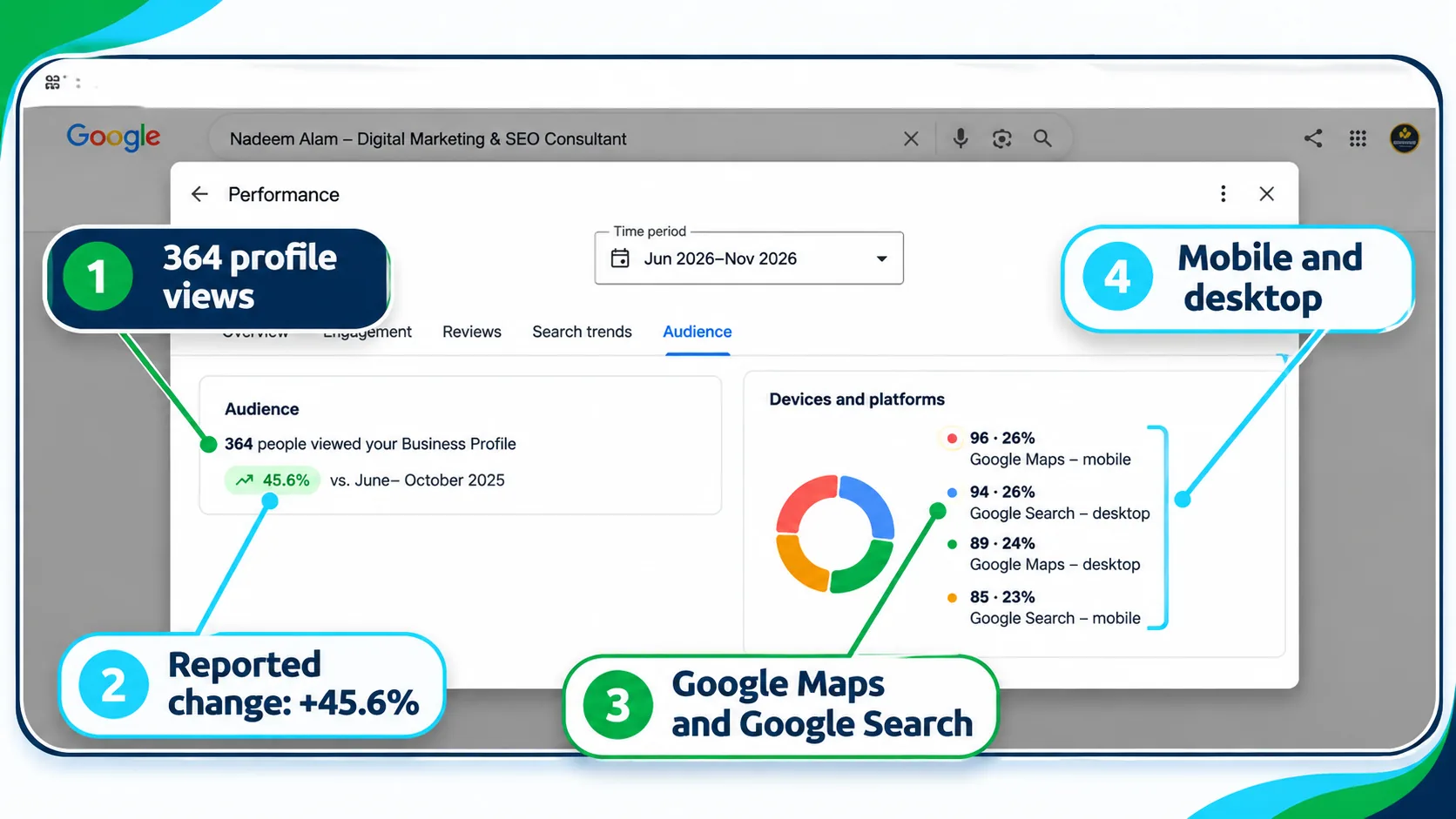
Interpreting the supporting screenshots
If the search-trends screenshot is used, explain what it shows without presenting its displayed queries as proof of post performance.
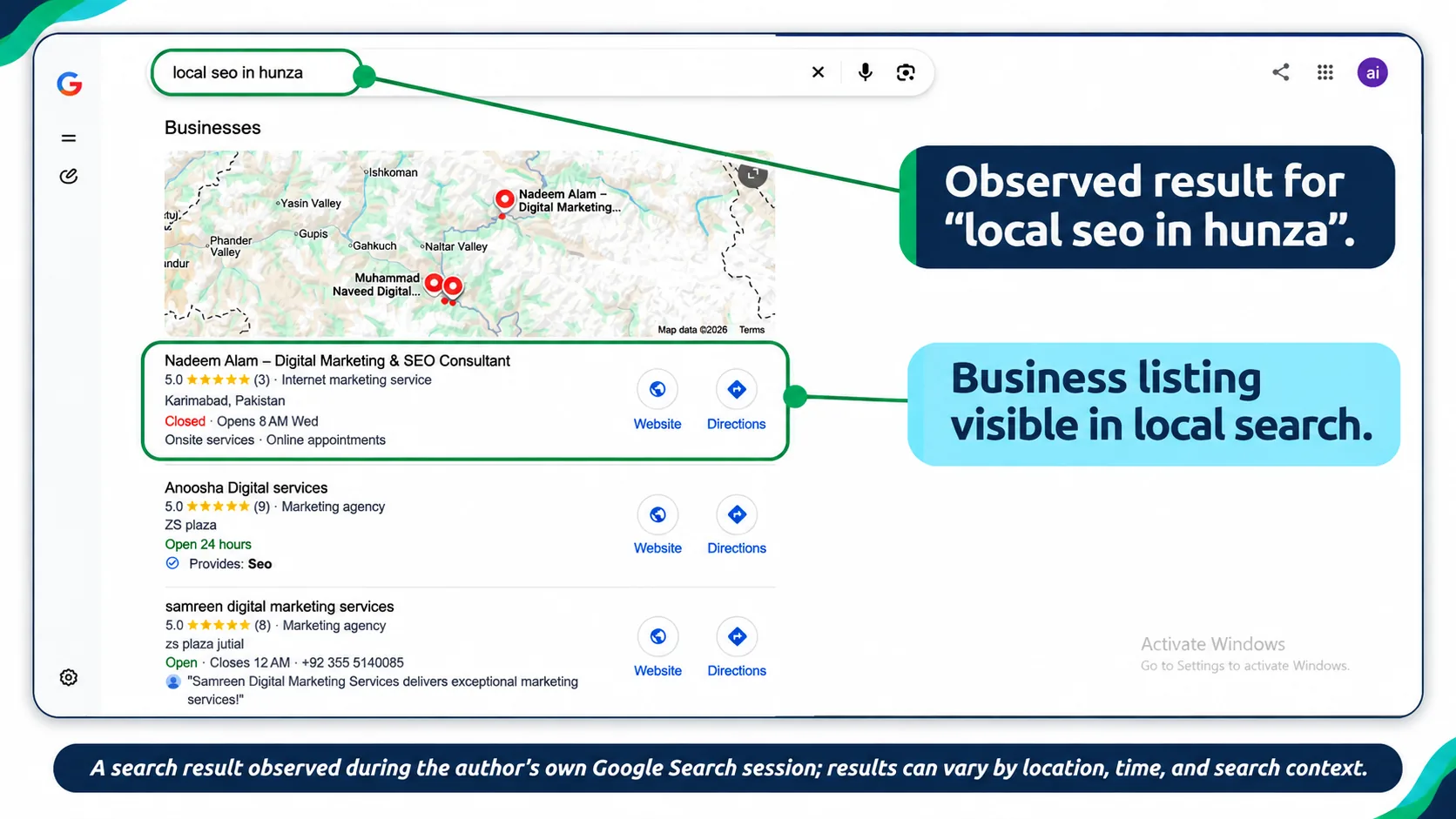
If the observed local search result is included, identify it as a single observation, not a general ranking claim.
Frequently Asked Questions
What are Google Business Profile posts?
They are updates, offers, and event announcements that eligible businesses can publish through their Business Profile on Google Search and Google Maps. Their purpose is to communicate relevant information and, where appropriate, guide customers to a next step.
What should I post on Google Business Profile?
Choose information that answers a customer question, explains a service, shares a genuine update, communicates a valid offer, or announces a real event. Use accurate details, relevant visuals, and an appropriate next step.
How often should I post on Google Business Profile?
There is no universal minimum weekly posting frequency established in Google’s local ranking guidance. One or two useful posts per week can be a practical editorial starting point, provided the business has relevant information to share. Adjust the cadence to your resources and customer needs.
What is the Google Business Profile post character limit?
Check the current publishing interface and official guidance for the post type you are using. This guide does not claim one universal current limit for every post type and interface. Prioritize clarity and remove repetitive wording.
What image size should I use for Google Business Profile posts?
Google’s general photo guidance recommends 720 × 720 pixels, with a minimum of 250 × 250 pixels, JPG or PNG format, and file sizes from 10 KB to 5 MB. These are general Business Profile media guidelines; check the current instructions for your specific publishing use.
Can I schedule Google Business Profile posts?
Publishing and scheduling options depend on the tools and interface available to the business. Before relying on a scheduling or recurring-post feature, confirm that it is supported by the publishing tool you use. Follow that tool’s current instructions and check the post’s status after publishing or scheduling.
Why is my Google Business Profile post not showing?
Check whether the post is Live, Pending, or Not approved. Review any policy messages, confirm the accuracy of the content and destination, and follow the relevant official guidance. A Live status does not guarantee a particular display position or audience.
Do Google Business Profile posts improve Google Maps rankings?
Google’s published local ranking guidance identifies relevance, distance, and prominence. It does not establish posting frequency as a direct ranking factor. Posts can provide useful information to potential customers, but that does not prove that posting more frequently improves rankings.
Can I measure engagement on individual Google Business Profile posts?
Do not assume that the profile’s total views, calls, direction requests, or website clicks belong to a particular post. Use the reporting that is actually available and use properly configured tagged links and website analytics where relevant. State attribution limitations clearly.
Should every post include a location keyword?
No. Include location information when it helps the reader understand the service area or relevance of the information. Repeating location phrases unnaturally is not a substitute for useful content or accurate business information.
Google Business Profile Post Publishing Checklist
Use this final checklist to quality-check google business profile high engagement posts 2026 before publishing, while keeping claims accurate and the next step relevant.
Before publishing, use this checklist to verify the post is useful, accurate, and ready to be shared.
- [ ] The post addresses one identifiable customer need or business update.
- [ ] The selected post type fits the content.
- [ ] All dates, prices, service details, conditions, and claims are accurate.
- [ ] The copy is clear, specific, and free of unnecessary repetition.
- [ ] The visual is genuine or accurately represents the subject.
- [ ] The image or video follows the relevant published requirements.
- [ ] The CTA is appropriate and supported by the current interface.
- [ ] The destination URL works and matches the post’s message.
- [ ] Tracking parameters are added where appropriate and have been tested.
- [ ] The content complies with Google’s current policies.
- [ ] The post has been published or scheduled using an available supported workflow.
- [ ] The post status has been checked.
- [ ] The intended outcome and its measurement limitations are understood.
For a structured review of profile setup, visibility, and key optimization checks, use the Google Business Profile audit checklist.
For broader Business Profile management and related tasks, explore these MarketLatch resources where they fit the reader’s needs:
Final Takeaway
Google Business Profile posts are most useful when they communicate accurate information that helps customers understand a business, evaluate an offering, or choose a sensible next step. Start with the customer’s need, select the appropriate post type, use genuine visuals, check the details, and measure only the outcomes the available data can support.
The 20 examples in this guide are starting points, not guaranteed engagement formulas. Adapt them to your business, maintain a sustainable publishing routine, and use evidence rather than assumptions when evaluating results.
If you need professional help with profile setup and ongoing optimization, review our Google Business Profile optimization service.
The goal is not to publish the most posts. A sound approach prioritizes usefulness over repetition: publish accurate information that helps customers understand the business and decide what to do next.
About the author

Nadeem Alam is the founder of MarketLatch and a digital growth strategist specializing in technical SEO, WordPress, WooCommerce, and AI search optimization. His work spans Generative Engine Optimization (GEO), Answer Engine Optimization (AEO), website analytics, structured data, and search performance measurement.
His approach to SEO and analytics is implementation-first and verification-driven. He focuses on examining measurable website data, validating traffic sources, interpreting analytics reports, and identifying technical issues through verifiable evidence. At MarketLatch, he helps businesses understand search visibility, improve website performance, and make more informed decisions about organic and AI-driven discovery.
Nadeem also authored the Generative Engine Optimization Book, AEO Masterclass Guide, and AI SEO Implementation Checklist 2026. His training and certifications include Google Digital Garage, Semrush Academy, Coursera, uConnect, and Virtual University (DigiSkills).