To implement llms.txt on WordPress, choose a publishing method, create or configure the file, and verify the public /llms.txt URL. This guide explains how to use Rank Math or publish a physical file, inspect the HTTP response, and check that the returned content and links are accurate.
llms.txt is a community proposal for giving compatible tools a concise guide to selected website resources. It is not required for Google Search and does not improve or harm Google Search visibility or rankings. Other services may choose to use it, but publishing the file does not guarantee that any particular system will fetch, follow, or cite it.
This guide explains what to include, how to publish llms.txt through Rank Math or a physical file, how to verify the public response, and how to maintain accurate links over time.
What Is llms.txt?
The llms.txt proposal describes a Markdown file that provides concise context about a website and links to selected resources. The idea is to offer a compact, human-readable map that an agent can consult instead of inferring a site’s most useful pages from a full HTML interface. Jeremy Howard published the proposal in September 2024; version 2 was updated in August 2026.
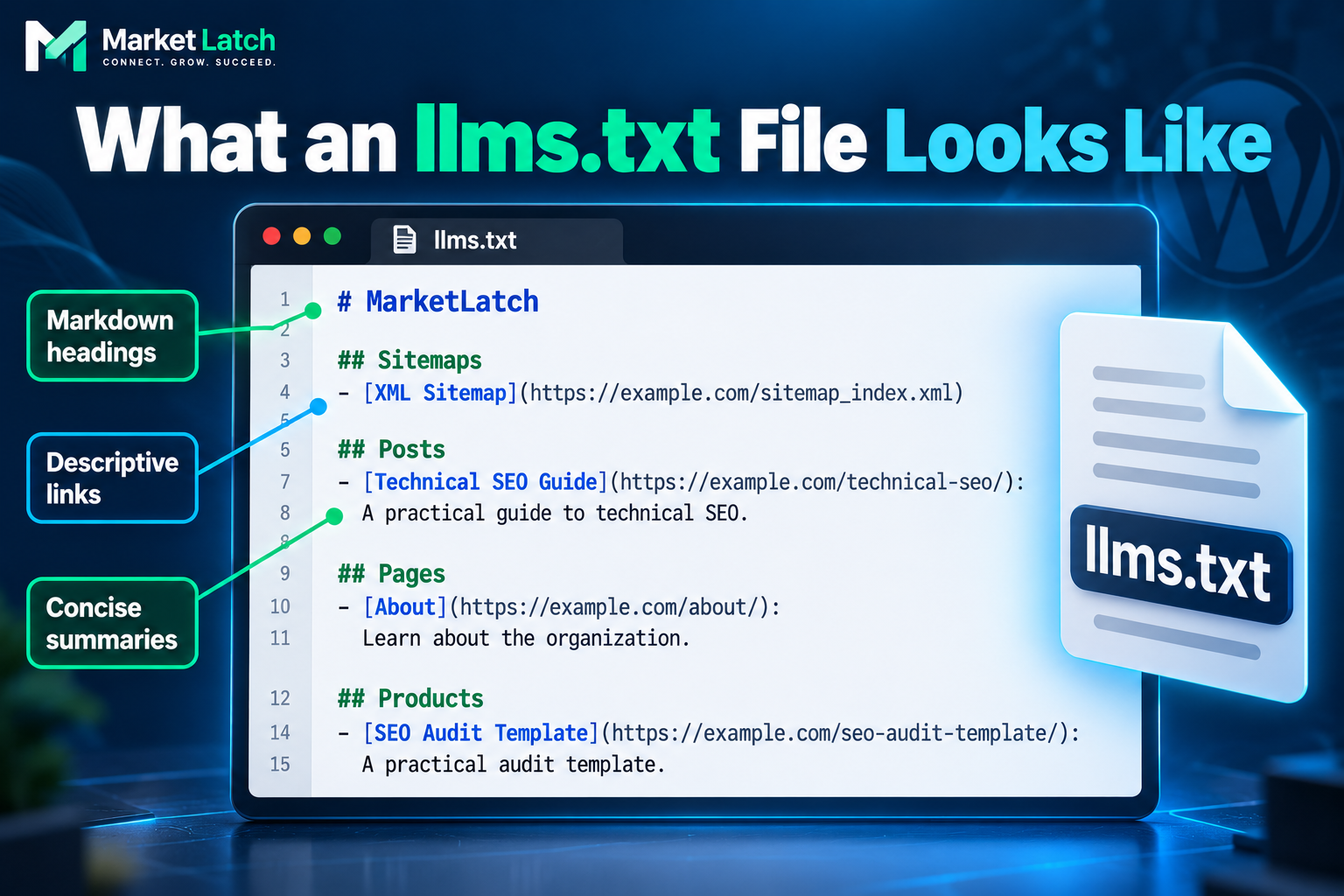
The proposal’s only required section is an H1 containing the site or project name. A short blockquote summary, explanatory Markdown, and H2 sections containing link lists are optional elements that can make the file more useful. Follow the current proposal rather than treating every older example as mandatory.
An llms.txt file is not a crawler access-control file, an XML sitemap, or a guarantee that a particular model will fetch or use its contents. Its practical value depends on whether a system recognizes it and whether it points to clear, relevant, publicly accessible information.
Does llms.txt work for SEO or AI Visibility?
There is no reliable basis for promising that publishing llms.txt will improve rankings, indexing, AI citations, or referral traffic. Google says the file is not needed for Google Search and does not positively or negatively affect Search visibility or rankings. Other systems may choose to use it, but adoption is not universal.
Treat implementation as an optional documentation and content-discovery experiment. A successful request confirms that a response was delivered; it does not show that an AI service consumes the file or that search outcomes have changed.
If you are evaluating broader generative engine optimization outcomes, see the GEO measurement framework for a separate approach to assessing visibility.
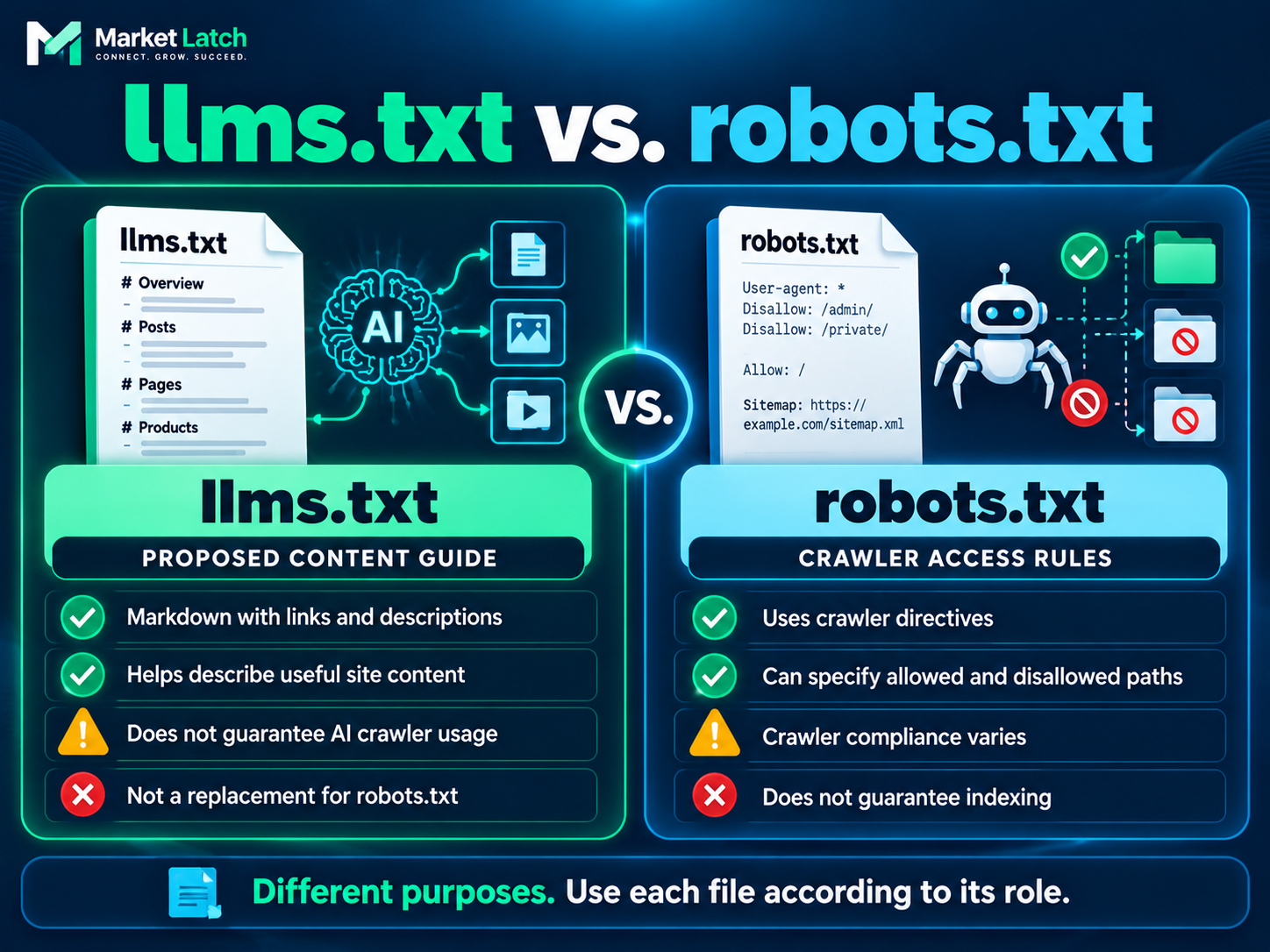
llms.txt vs. robots.txt vs. XML Sitemap
These files have different purposes. Do not use one as a substitute for another. If you need to review crawler directives in WordPress, see WordPress robots.txt: When to Replace the Virtual File With a Static File
| File | Main purpose | What it does not guarantee |
| llms.txt | Proposed curated Markdown guide to selected resources | AI use, citations, or ranking gains |
| robots.txt | Communicates crawler access rules | Index exclusion or universal crawler compliance |
| XML sitemap | Helps search engines discover URLs | Crawling, indexing, or ranking |
Read Google’s robots.txt introduction and sitemap documentation
What Should a Useful llms.txt File Contain?
Keep the file focused. The aim is to help a reader identify the site and navigate to its most useful resources—not to dump every URL WordPress can generate.
Do not include private, login-only, draft, irrelevant, or intentionally excluded destinations. Avoid describing a page as definitive if it is thin, outdated, or unrelated to the section. The file should reflect the site that actually exists.
- A clear H1 with the website or project name.
- A short, accurate summary of the site’s purpose and audience.
- H2 sections grouping links by purpose, such as Guides, Services, Documentation, Products, or Company.
- Full, canonical HTTPS URLs that resolve to public pages.
- Short descriptions explaining what each resource contains.
- A manageable set of high-value pages that you can maintain.
# Example Website
> A concise description of the website, its audience, and the information it provides.
## Guides
– [WordPress Technical SEO](https://example.com/wordpress-technical-seo/): A guide to diagnosing WordPress technical SEO issues.
– [Structured Data Guide](https://example.com/structured-data/): Practical advice on structured data.
## Services
– [SEO Services](https://example.com/seo-services/): Overview of SEO support.
This example is illustrative. Replace example.com and sample links with real, reviewed URLs before publishing.
How to Implement llms.txt for AI Crawlers in WordPress
Choose Rank Math if its generated output meets your needs and you can verify the public response. Choose a physical file if you need direct control over its contents. Before creating or replacing a file, confirm what currently serves /llms.txt to avoid unintentionally overriding an existing implementation.
Method 1: Configure llms.txt in Rank Math
If Rank Math is already installed, use its built-in controls before adding another plugin. The documented route is Rank Math SEO → General Settings → Edit llms.txt. If the option is missing, check whether the relevant module is enabled and whether your version requires Advanced Mode.
- Open Rank Math SEO → Dashboard and enable the LLMS Txt module if your version exposes it.
- Open Rank Math SEO → General Settings → Edit llms.txt.
- Select only useful public post types. Posts, Pages, and Products may make sense for a content-led business.
- Review taxonomy options carefully; categories and tags can add low-value URLs.
- Set the item limit according to useful content, not a desire for a larger file.
- Add an optional summary only if it improves clarity and avoids duplication.
- Save your changes, open the preview link, and then visit the public /llms.txt URL. Inspect the returned content to confirm that it reflects the configuration you intended.
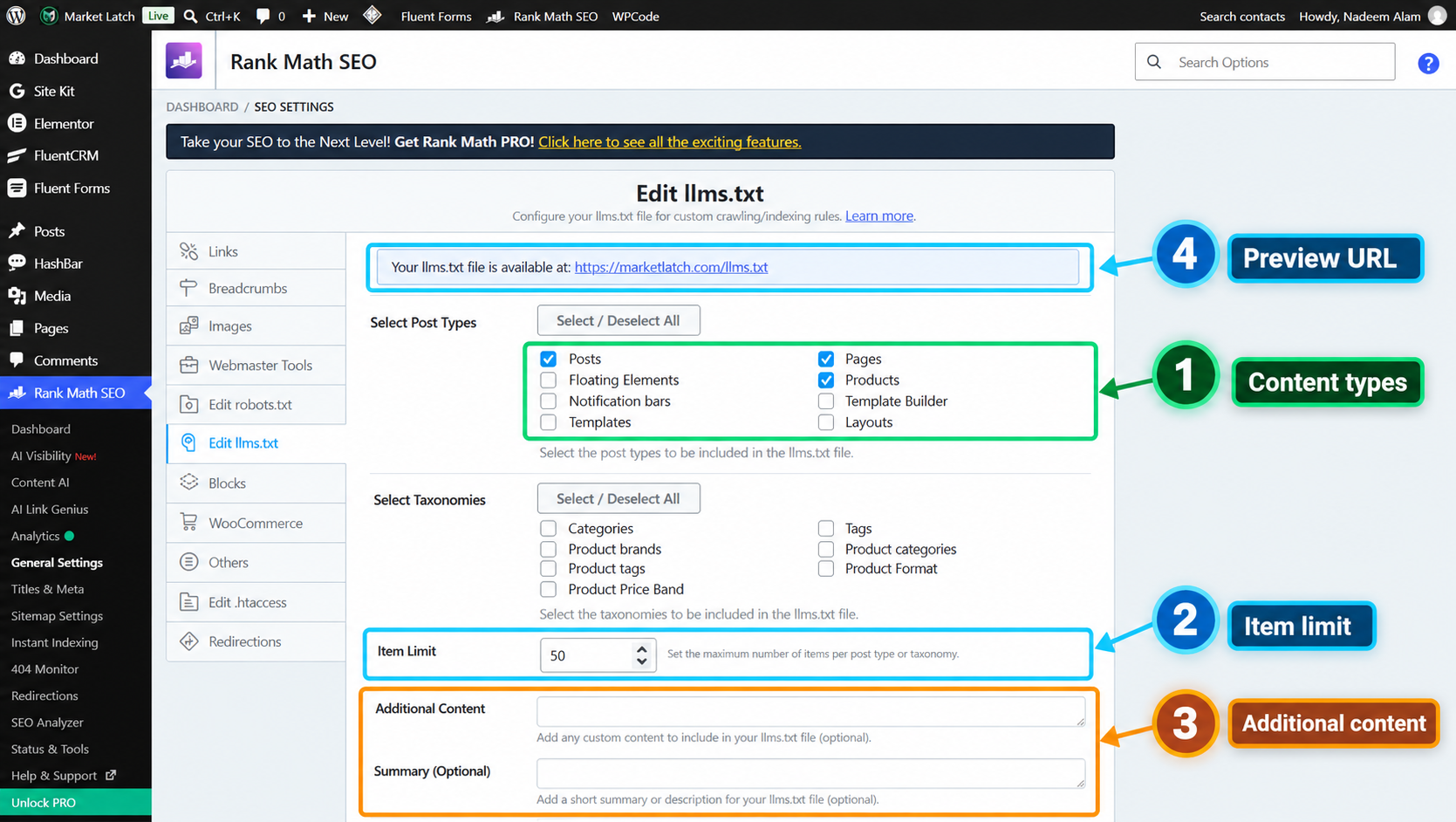
Rank Math documentation: How to Use llms.txt in Rank Math SEO.
Method 2: Publish a Physical llms.txt File
A physical file gives direct control over exact contents, but requires hosting-file access and a maintenance process. On many self-hosted WordPress sites, the public web root is called public_html, although the directory depends on the host and installation.
- Create a plain-text file named exactly llms.txt using Markdown.
- Add the site heading, summary, grouped links, and concise descriptions.
- Upload it to the correct public web root using File Manager or SFTP.
- Open https://yourdomain.com/llms.txt in a clean browser session.
- Inspect the response and compare it with the intended file.
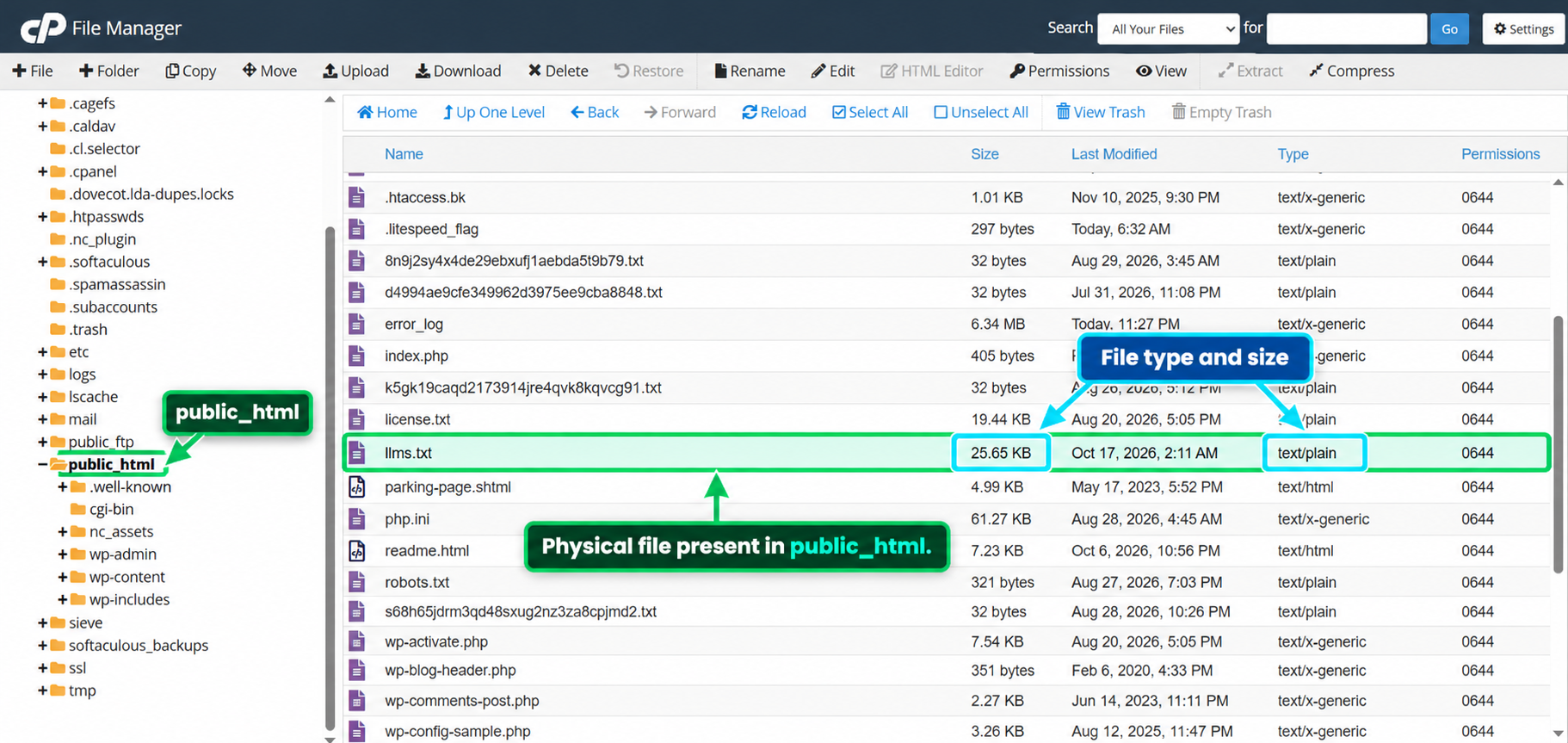
The MarketLatch hosting screenshot shows a physical llms.txt file in public_html, listed as text/plain with a displayed size of 25.65 KB. That proves the file was present in the captured File Manager view. It does not prove that its bytes match the public response or that it is the source currently serving the URL.
Avoid running a plugin generator and a manually maintained file without understanding which one serves /llms.txt. Depending on the setup, a plugin may generate a physical file, serve a virtual response, or use another mechanism. Confirm the implementation before editing or deleting files.
How to Verify the Public llms.txt URL
Verification should test the public response, not just the WordPress settings screen. Use browser developer tools or another HTTP inspection method.
- Open https://yourdomain.com/llms.txt.
- In browser developer tools, open Network, enable Disable cache, and reload.
- Inspect the status code and response headers.
- Check Content-Type, commonly text/plain for a plain-text response.
- Inspect the response body, not only the preview/settings screen.
- Test a sample of listed URLs separately.
- Repeat after significant changes.
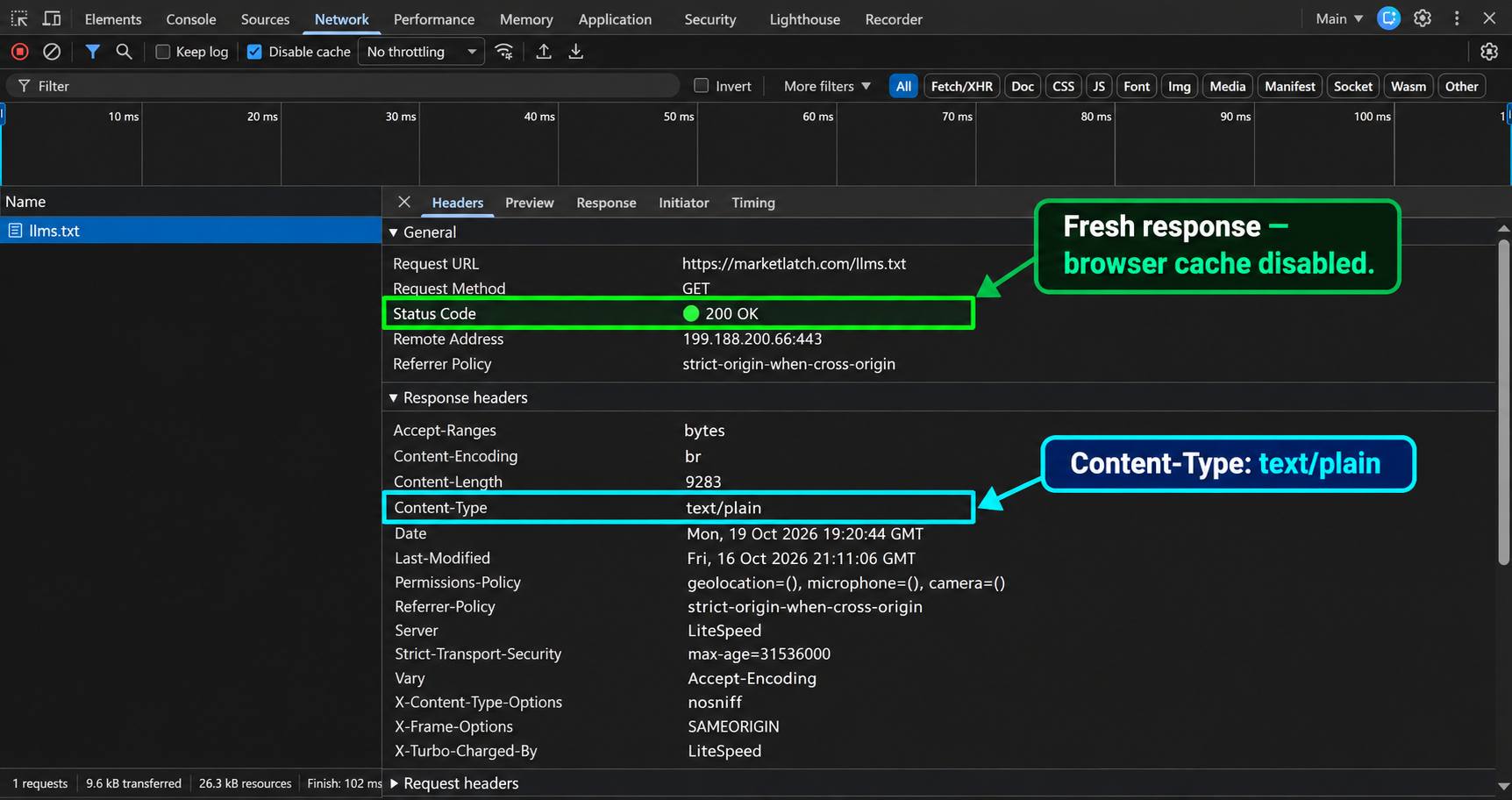
In the supplied MarketLatch browser capture, the public GET request to https://marketlatch.com/llms.txt returned HTTP 200 OK and a text/plain content type while the browser cache was disabled. The headers also showed Brotli content encoding and a compressed content length. This supports a successful response during that test; it does not prove every listed page was valid, that the physical file was identical, or that an AI system consumed the file.
MarketLatch’s llms.txt Verification Workflow
The MarketLatch audit illustrates why implementation should be treated as a series of checks rather than a single plugin toggle.
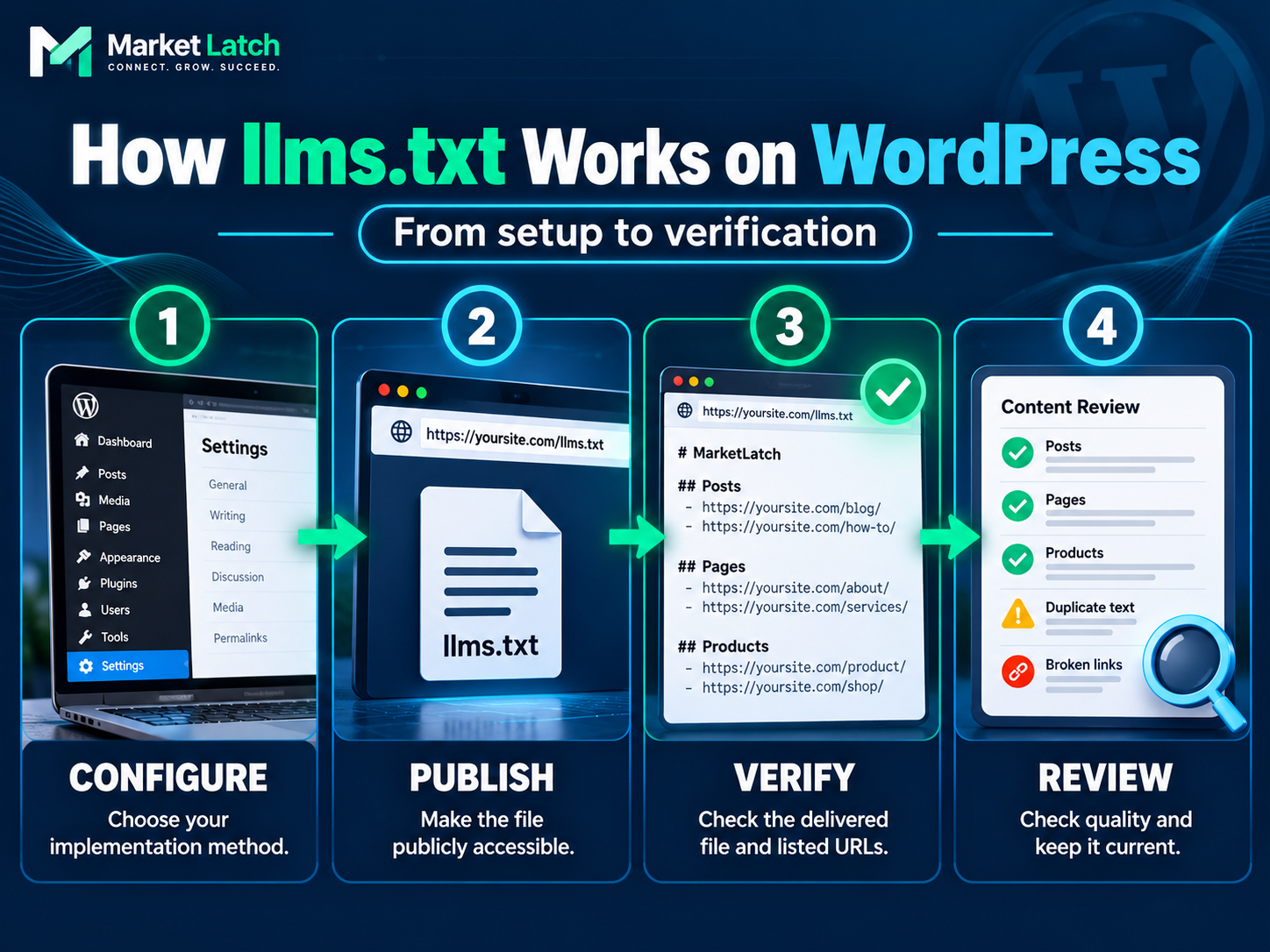
- Record selected content types, taxonomies, item limit, optional fields, and capture date.
- Inspect the public endpoint for expected text, not an error page or unrelated HTML.
- Record response status, content type, cache behavior, and returned body.
- Review descriptions, Markdown, links, irrelevant URLs, and encoding.
- Compare physical and generated content if both exist.
- Re-test after changes and record the result.
This is a MarketLatch diagnostic workflow based on supplied evidence, not an official Google procedure or an official llms.txt conformance test.
Common llms.txt Mistakes
Treating it as a ranking hack: The file is not evidence that rankings or citations will improve.
Confusing it with robots.txt: A content guide does not replace crawler access rules.
Including every URL: Weak archives, duplicates, thin pages, and irrelevant destinations can reduce usefulness.
Using inaccurate descriptions: Review generated text against the destination page.
Assuming preview equals live output: Inspect the public URL and returned body.
Assuming physical and generated files match: Compare content; size and timestamps are not proof.
Ignoring encoding issues: Compare source bytes and response body before diagnosing a display artifact.
Never maintain the file: Recheck links and summaries when important pages change.
Reviewing llms.txt Content Quality: A MarketLatch Audit Example
A file can return HTTP 200 and still need editorial review. Check whether summaries accurately describe the destination, whether sentences are complete, and whether link groupings help a reader choose the right resource. A successful response is a delivery check—not a content-quality score. For a related example of checking technical output against what a system actually returns, read How to Fix Structured Data Errors in Google Search Console.
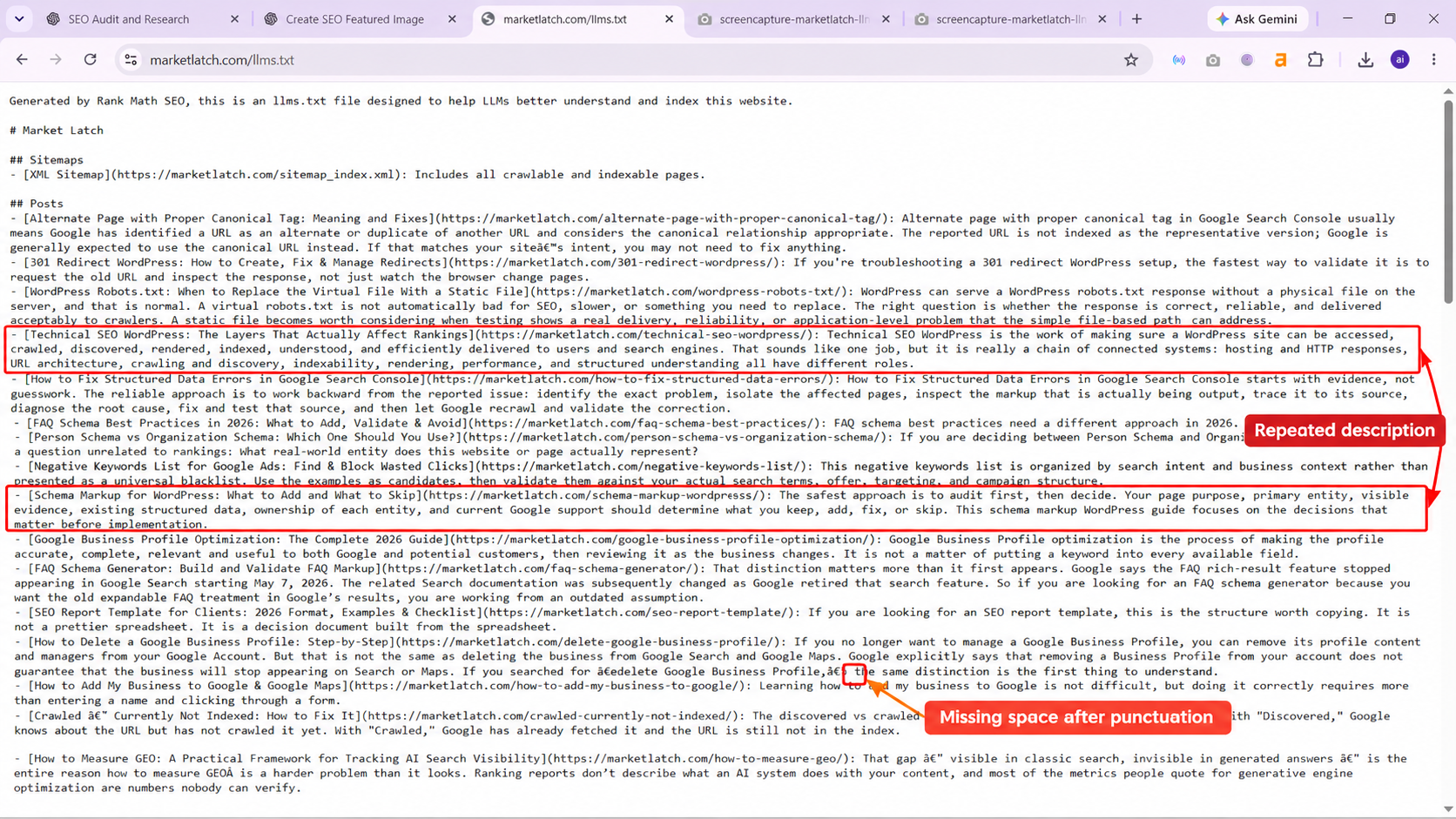
| Do not treat screenshot annotations as verdicts The supplied content-review screenshot flags possible repeated descriptions and a missing space. Verify each against the actual returned text before treating it as a confirmed defect. Similar-looking descriptions are not necessarily duplicates. |
The audit evidence does not establish a byte-for-byte comparison between the physical file and live response. Unusual characters in an extracted text view may also reflect an extraction or transcoding artifact. Separate confirmed observations from items requiring direct comparison.
How Often Should You Update llms.txt?
Update the file when important destinations, product or service structure, documentation, or descriptions change. A small stable site may need occasional maintenance; a frequently changing documentation or commerce site may need a repeatable review. There is no universal update interval that guarantees better performance.
Useful triggers include a key URL moving, a product or service being removed, a major guide being replaced, or the site’s main offering changing. After an update, verify the public response and test a sample of linked pages.
Frequently Asked Questions
How do I implement llms.txt in WordPress?
Configure a compatible plugin such as Rank Math or publish a physical text file in the public web root. Then inspect the public response and test sample links.
Where should llms.txt be located?
The common site-wide location is https://example.com/llms.txt. The proposal also allows files at paths within a site to cover pages under that path.
Does Rank Math generate llms.txt?
Rank Math documents settings to select content types and configure output. Controls can vary by version, so verify the live URL.
What is the difference between llms.txt and robots.txt?
llms.txt is a proposed curated guide; robots.txt communicates crawler access rules.
Does llms.txt improve Google rankings?
Google says it is not required for Search and does not positively or negatively affect visibility or rankings.
Will it make ChatGPT, Claude, or Perplexity cite my website?
No citation is guaranteed. A file’s presence does not prove a particular service fetches it or cites the site.
What HTTP status should llms.txt return?
A publicly available file should normally return a successful response such as HTTP 200. Inspect the body and content type too.
Should I use a plugin or a physical file?
Choose the method you can maintain and verify. Avoid competing implementations until you know what serves the public URL.
Should every page be included?
No. Select useful public pages and exclude irrelevant, duplicate, private, thin, or outdated destinations.
Is llms.txt an official web standard?
It is a proposal, not a universal requirement adopted by every search engine or AI service.
Final llms.txt WordPress Verification Checklist
- One implementation method is selected and understood.
- The public URL is accessible without unintended authentication.
- The response returns the expected status and a suitable content type.
- The returned body—not only the settings preview—has been inspected.
- The site heading and summaries are accurate.
- Links point to canonical, public, relevant pages.
- Markdown headings and link lists are readable.
- Potentially repeated or malformed descriptions were checked against source text.
- Physical and generated outputs were compared if both exist.
- The file is rechecked after meaningful changes.
- No claims imply guaranteed rankings, indexing, crawling, or AI citations.
Final Takeaway
Treat llms.txt as an optional, curated content guide—not a ranking shortcut. Choose a WordPress implementation you can maintain, publish accurate links and descriptions, and verify the public response. A successful response confirms delivery, not adoption by an AI service or improved search performance.
About the author

Nadeem Alam is the founder of MarketLatch and a digital growth strategist specializing in technical SEO, WordPress, WooCommerce, and search optimization. His work also covers structured data, Generative Engine Optimization (GEO), Answer Engine Optimization (AEO), Google Ads, and Meta Ads.
His technical SEO approach is implementation-first and verification-driven: inspect what a website actually outputs, identify the source of technical signals, make targeted changes when the evidence supports them, and verify results rather than relying solely on plugin settings.
Nadeem authored the Generative Engine Optimization Book, AEO Masterclass Guide, and AI SEO Implementation Checklist 2026. His training and certifications include Google Digital Garage, Semrush Academy, Coursera, uConnect, and Virtual University (DigiSkills).
Sources and Further Reading
- The llms.txt proposal (v2) — Primary source for purpose and structure.
- Changes to the llms.txt proposal — Version 2 change notes.
- Rank Math: How to Use llms.txt — Plugin setup and configuration.
- Google: AI features and your website — Google AI Search guidance.
- Google: Latest documentation updates — June 2026 clarification.
- Google: People-first content — Experience, originality, accuracy, and trust.
- Google: Robots.txt introduction — Crawler access rules.
- Google: Sitemap overview — URL discovery and sitemap limits.