A negative keyword tells Google Ads to exclude searches that match the negative term or phrase according to its negative match type. The difficult part is not finding words to exclude. It is deciding which searches are genuinely irrelevant, how narrowly to exclude them, and where the exclusion should apply.
This negative keywords list is organized by search intent and business context rather than presented as a universal blacklist. Use the examples as candidates, then validate them against your actual search terms, offer, targeting, and campaign structure.
MarketLatch rule: a negative keyword should have a business reason behind it—not simply a place on somebody else’s list.
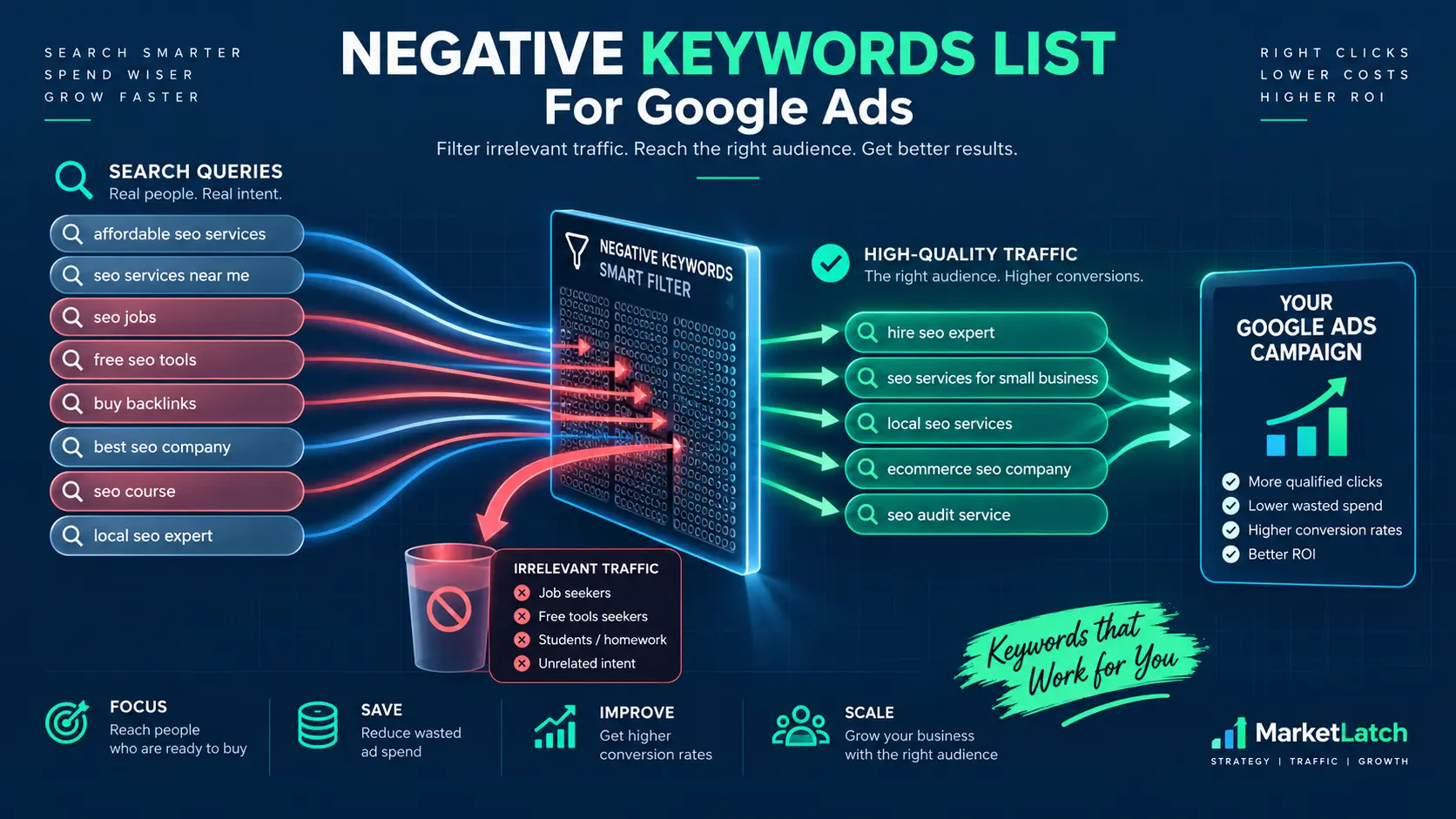
What Are Negative Keywords in Google Ads?
Negative keywords are terms you add to Google Ads to prevent your ads from showing for searches that are irrelevant to what you sell. This guide covers negative keywords for Google Ads as a decision system: apply an exclusion according to the negative match type you choose, then review the search, business context, and intended scope. Google recommends using actual search-term data to identify searches that are related to your offer but not useful to your business. The practical question is: how do negative keywords work in Google Ads when you apply those exclusions? See Google’s Search Terms guidance for the current workflow.
For example, an agency targeting “google ads agency” may decide that searches such as “google ads jobs” or “google ads course” are irrelevant to its service. The important point is that the exclusion comes from the searcher’s intent, not simply from the appearance of a particular word.
A word is not an intent. The word “course” might be irrelevant for an agency selling management services, but it could be highly relevant to a business that sells Google Ads training.
Negative matching also differs from positive keyword matching. Negative keywords do not match close variants; they automatically account for casing and misspellings. If you need to block a close variant or different wording, add the specific term you intend to exclude.
A useful operating model is:
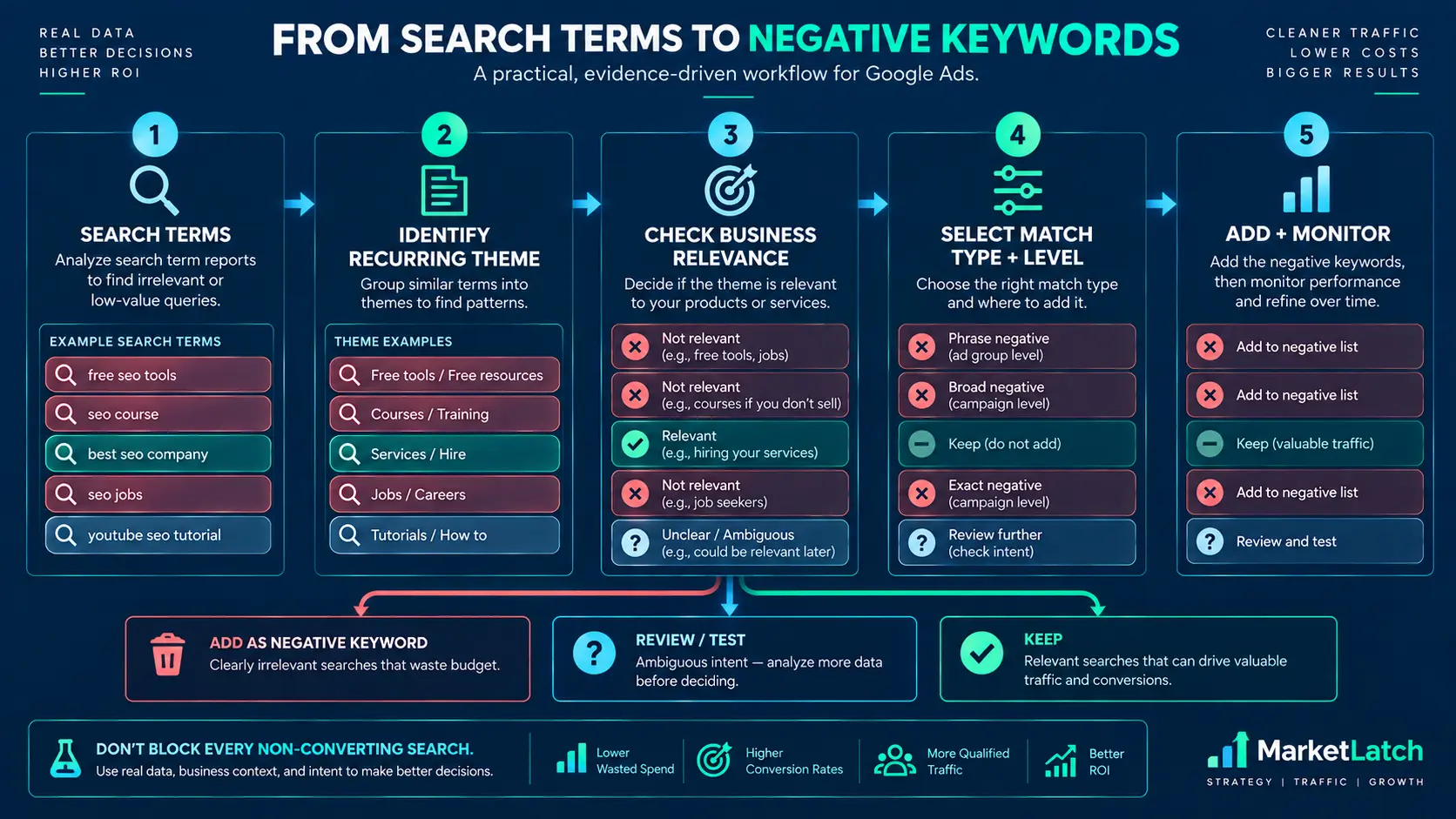
- Search term → relevance check → intent check → negative decision → match type → level → monitor.
That turns a negative keywords list from a static collection of words into a working decision system.
How to Use This Negative Keyword List
Treat every item in this negative keywords list as a candidate, not an automatic exclusion. A useful negative keywords list is built through review, not copied wholesale. The same keyword can be useful in one business and harmful in another.
A candidate negative is a term that looks irrelevant. An approved negative is a term you have reviewed against your offer, search intent, campaign structure, and available evidence.
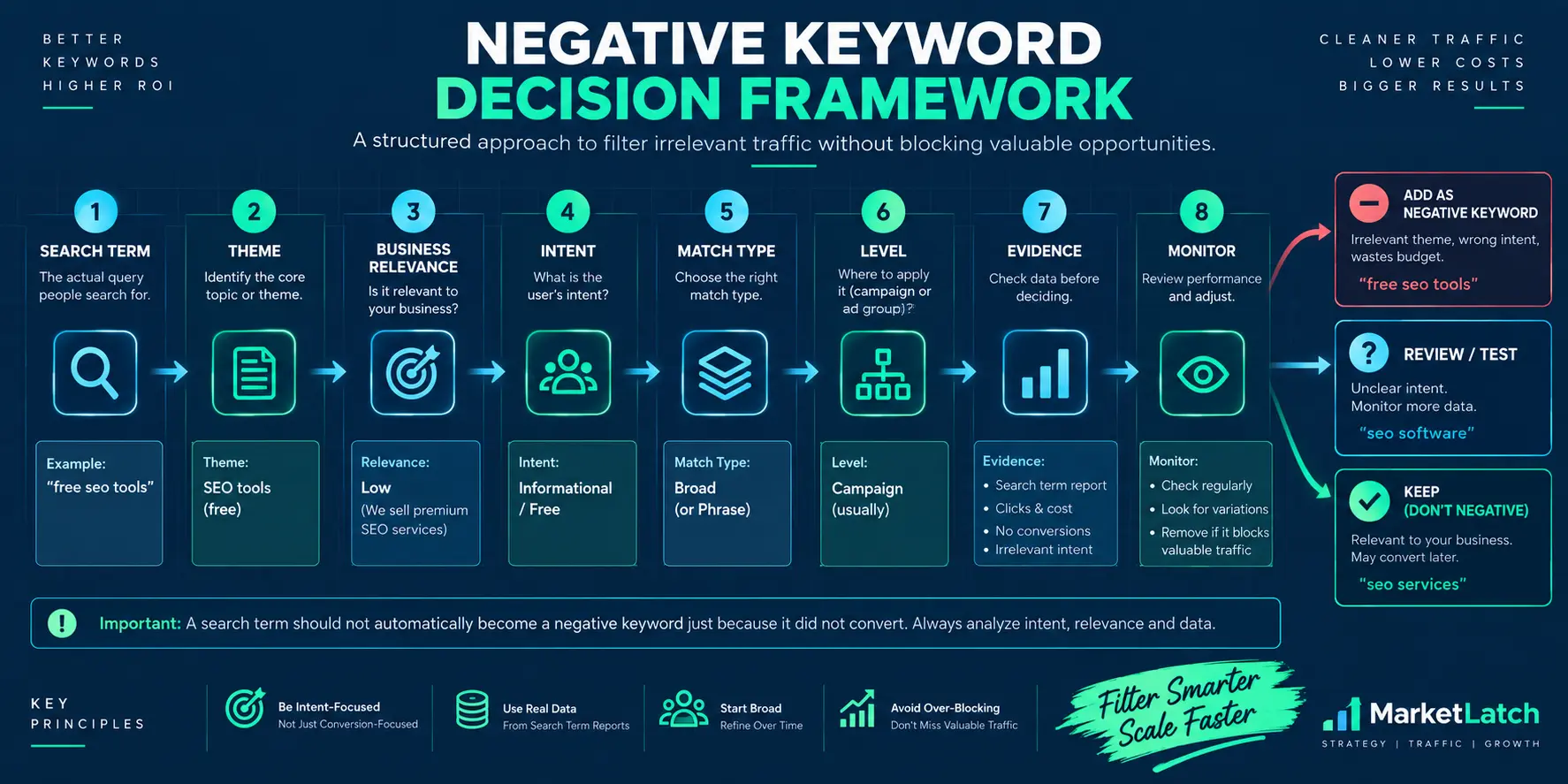
Negative Keyword Decision Framework
| Field | What to record |
| Search Term | The actual query that triggered the ad |
| Theme | Jobs, free, course, DIY, wholesale, location, etc. |
| Business Relevance | Relevant, irrelevant, or ambiguous |
| Intent | Buying, research, employment, learning, DIY, comparison, etc. |
| Match Type | Broad, phrase, or exact |
| Level | Ad group, campaign, shared list, or account |
| Evidence | One query, recurring theme, spend, conversion data, or business rule |
| Monitor | What you will check after adding the negative |
For example, “free google ads course” may be an obvious candidate for a Google Ads management agency. But “google ads free consultation” is a different intent and should not be blocked simply because the word “free” appears.
- Start with an actual search term.
- Identify the theme or intent behind it.
- Check whether that intent is genuinely outside the business offer.
- Decide whether the problem is a single query or a recurring theme.
- Choose the narrowest match type that solves the problem.
- Choose the smallest sensible level of application.
- Record the reason and evidence.
- Monitor the exclusion after implementation.
How I Use Negative Keywords in Google Ads Campaigns
In my own Google Ads campaign reviews, I start with actual search-term data rather than a copied master blacklist. I look for the searcher’s intent first, then decide whether the issue is a one-off query or a recurring theme. That keeps a negative keywords list tied to the offer and account structure instead of turning it into a collection of guesses. The practical test is simple: can I explain why this search is irrelevant, why this match type is appropriate, and why this level is safe?
The record should be simple enough to maintain: keyword, match type, level, reason, date added, and notes. In practice, this matters during later account reviews because an exclusion can outlive the campaign decision that created it. A documented negative keywords list lets you challenge old assumptions instead of inheriting a list nobody remembers.
You can also see examples of MarketLatch’s broader digital marketing and paid-media work in the portfolio.
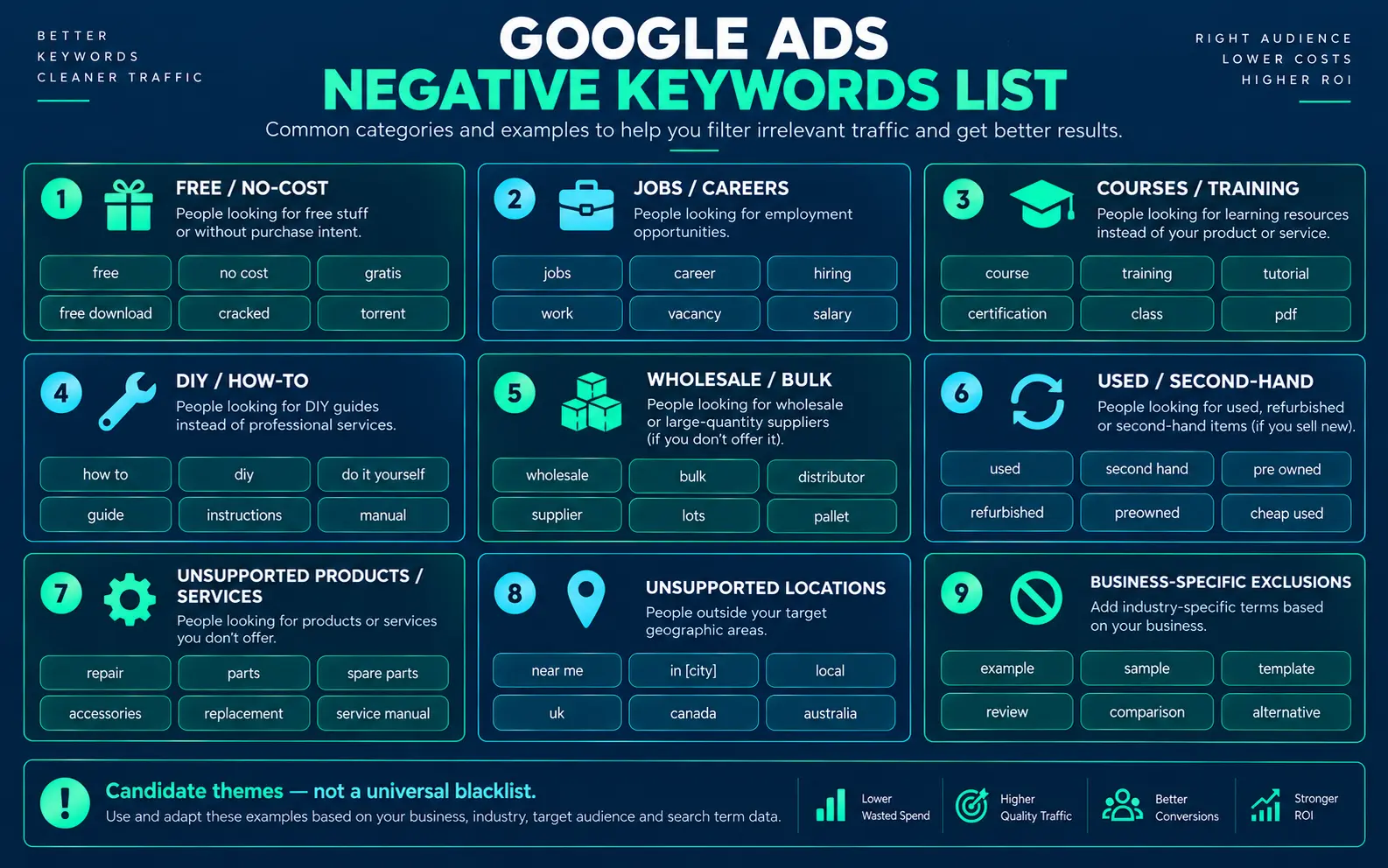
Google Ads Negative Keywords List by Intent
The following categories are useful starting points when building a negative keywords list. Use this negative keywords list as a working reference, then adapt it to the account. They are not universal exclusions. Review each category against your business model and the searches you actually receive.
Free / No-Cost
Free, free trial, free template, free tool, free download — only when free-intent searches do not fit the offer.
Jobs / Careers
Jobs, job, career, careers, salary, hiring, internship, vacancy — useful for businesses that sell services rather than employment opportunities.
Courses / Training
Course, courses, training, certification, classes, tutorial, lesson — useful when the business sells managed services rather than education.
DIY / How-To
How to, tutorial, guide, do it yourself, DIY, steps — useful when the commercial offer is implementation rather than education.
Wholesale / Bulk
Wholesale, bulk, supplier, distributors, distributor — useful when the business does not sell wholesale or bulk orders.
Used / Second-Hand
Used, second hand, second-hand, refurbished — useful when only new products or services are offered.
Unsupported Products or Services
Terms for products, services, or variants that the business does not provide.
Unsupported Locations
Cities, regions, countries, or service areas the business does not serve.
Business-Specific Exclusions
Competitor brands, internal terminology, legacy services, irrelevant product names, or other exclusions supported by actual account evidence.
What are examples of negative keywords?
Examples depend on the offer. These negative keyword examples should be treated as candidates, not a universal blacklist. A Google Ads management agency might test candidates such as “google ads jobs,” “google ads course,” “free google ads tutorial,” or an unsupported location. An online store might instead exclude “wholesale,” “used,” or product terms it does not carry.
The safer approach is to start from your search terms and then expand recurring themes. Do not paste a large generic blacklist into every campaign without checking what those terms mean for your business.
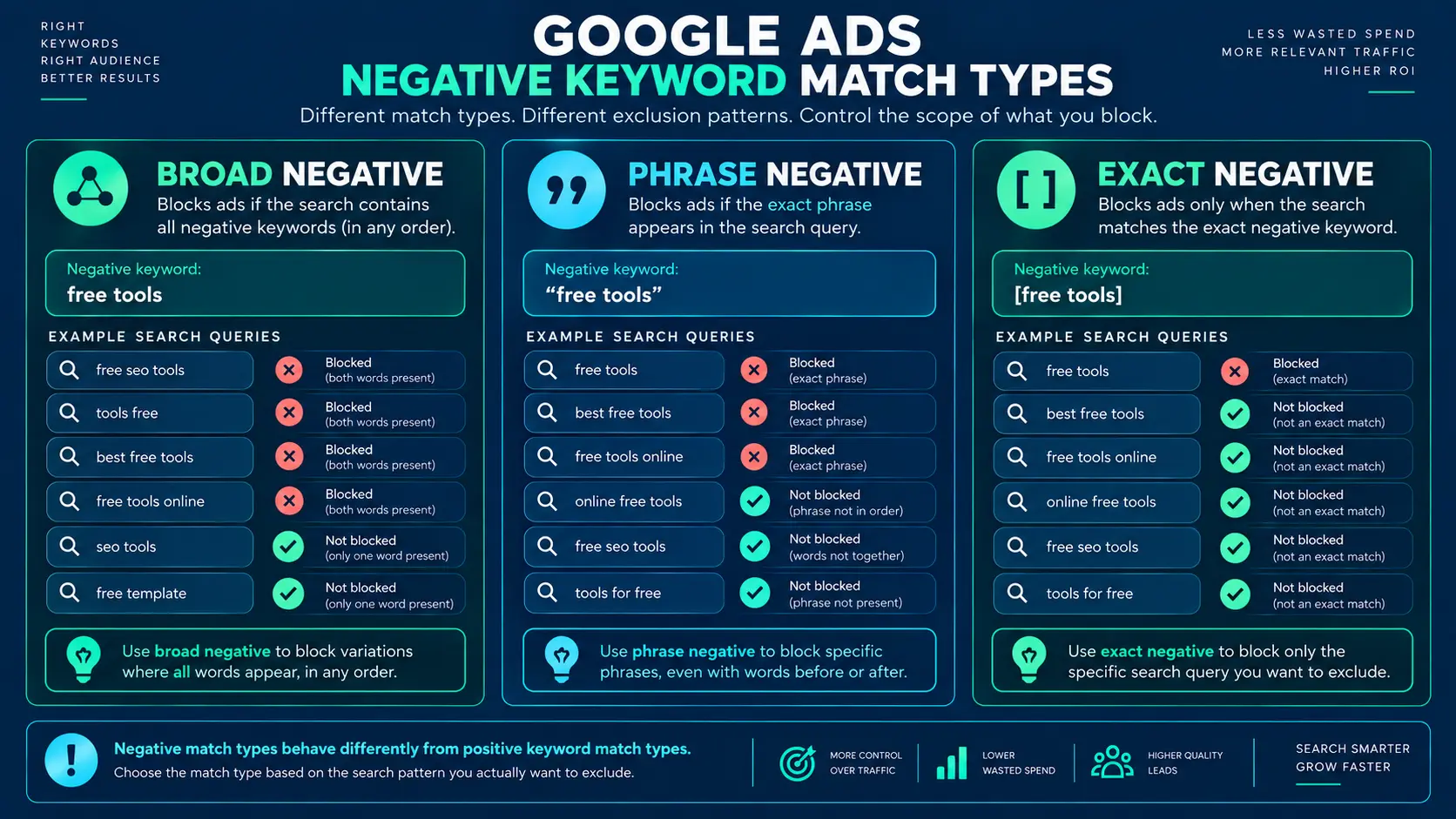
Negative Keyword Match Types: Broad, Phrase, and Exact
Negative keyword match types determine how narrowly Google Ads applies an exclusion. They should not be treated as a ranking system or as a universal “best” choice.
| Negative match type | How it works | Use when |
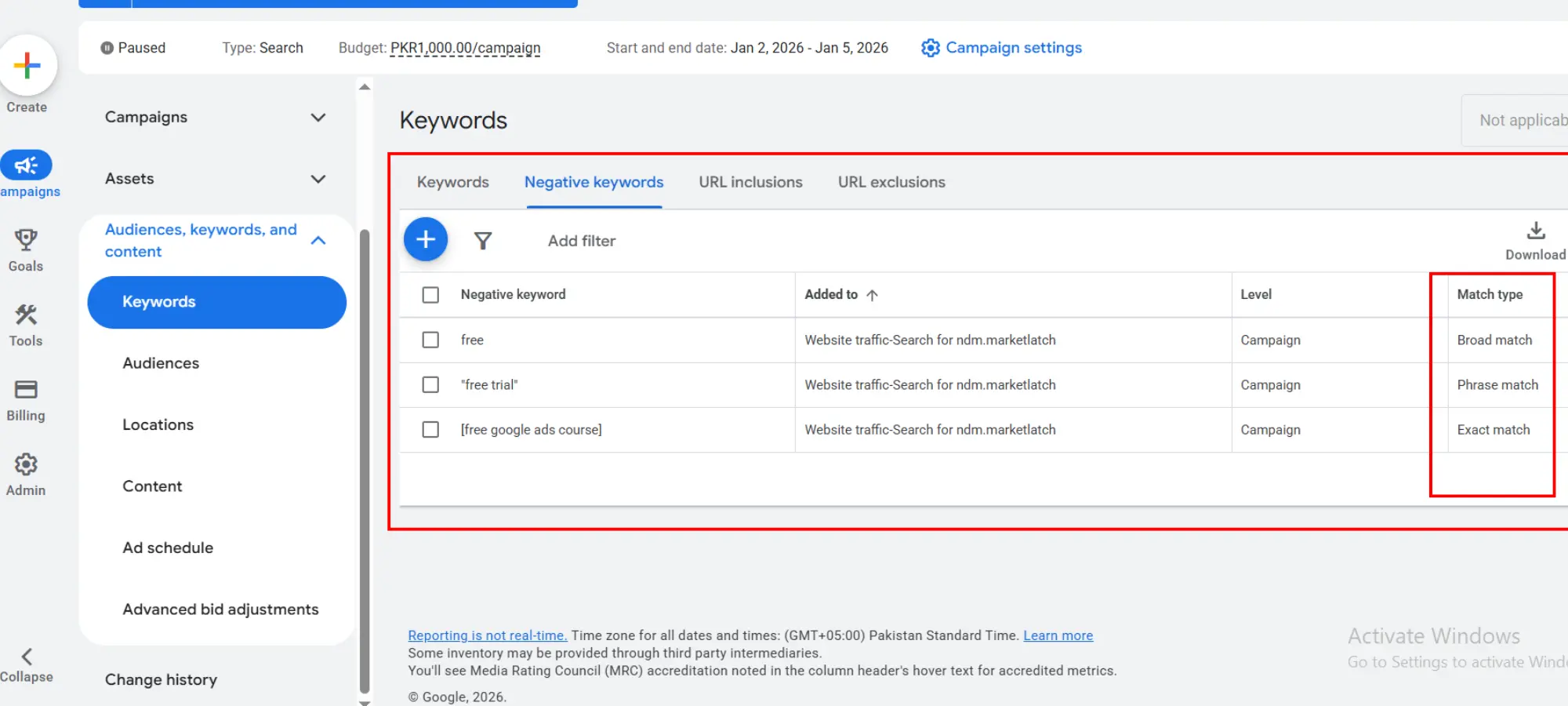
| Broad negative | Blocks searches when all negative terms are present, regardless of order. It does not expand to close variants. | You want to exclude a broader unwanted combination. |
| Phrase negative | Blocks when the negative phrase appears in the same order. Additional words can appear around the phrase. | You want to block a recurring phrase while allowing other wording. |
| Exact negative | Blocks the exact negative keyword phrase without additional words. | You want to block one specific query and preserve broader variations. |
For example, Google explains that a negative broad keyword such as “house” can block searches containing “house,” while a search using “houses” may still match because negative keywords do not match close variants. See Google’s negative keyword matching guidance for the current matching rules.
This is why negative broad should not be described as semantic or AI expansion. It is broader than phrase or exact negative matching within Google’s negative keyword rules, but it does not behave like positive broad match.
Match Type Is a Decision, Not a Ranking
There is no universal best negative match type. Use broad when the unwanted combination itself should be excluded, phrase when the unwanted phrase should remain intact, and exact when one specific search should be blocked.
Be especially careful with single-word negatives. A single broad negative can have a much larger blast radius than the original search term that caused you to add it.
How to Build and Add a Negative Keyword List
The most reliable source for building a negative keyword list is the Search Terms report because it shows actual searches that triggered your ads. Google notes that negative keywords added from the Search Terms report to a Search campaign are negative exact by default unless you change the match type. Google Ads Search Terms instructions
- Start with actual search terms. Look for queries that are clearly outside the offer.
- Identify recurring themes. If several unrelated queries share the same unwanted intent, the theme may be more useful than one individual phrase.
- Check business relevance. Ask whether the searcher could reasonably become a customer under the current offer.
- Choose the exclusion pattern. Decide whether you need a broad, phrase, or exact negative.
- Choose the level. Apply the exclusion to the narrowest sensible ad group, campaign, shared list, or account scope.
- Record the reason. Keep a short note explaining why the negative exists.
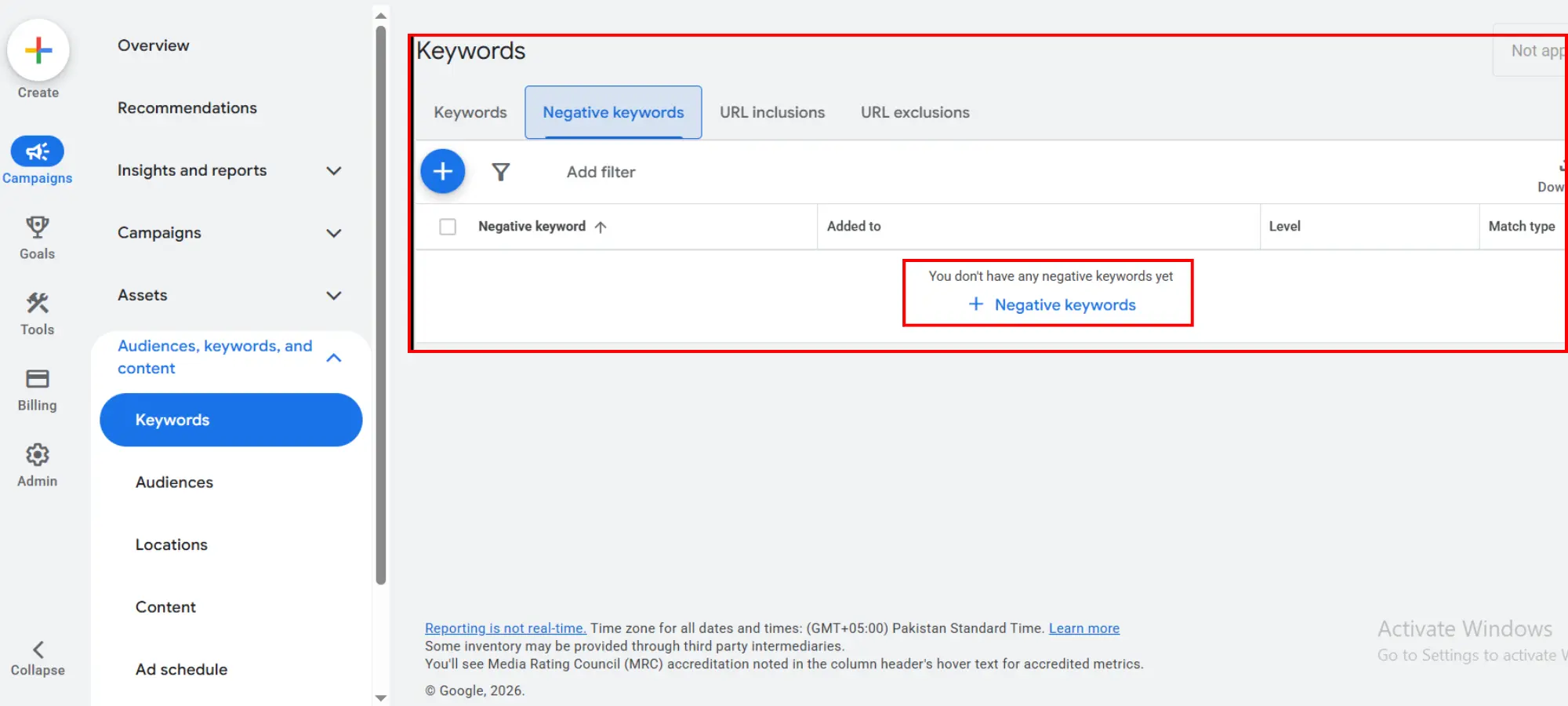
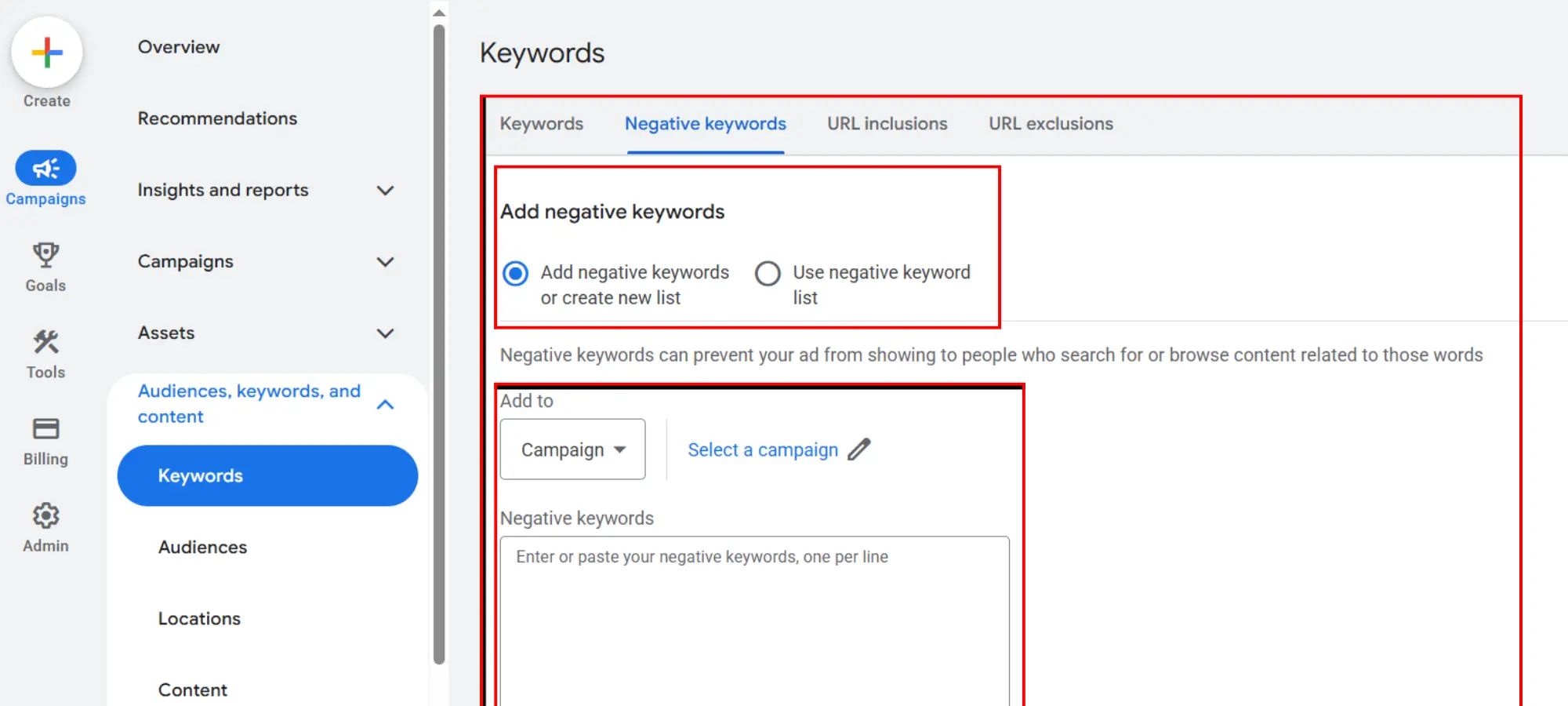
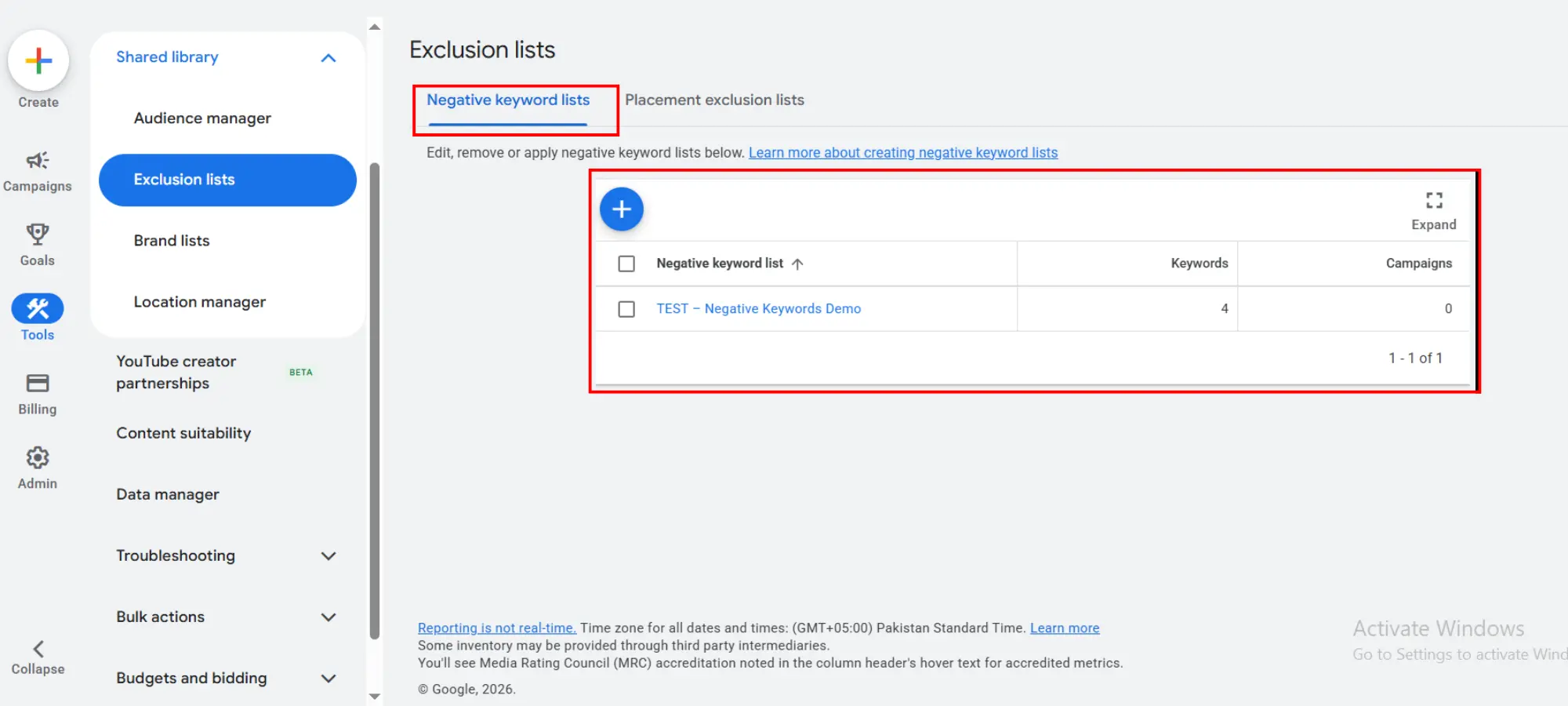
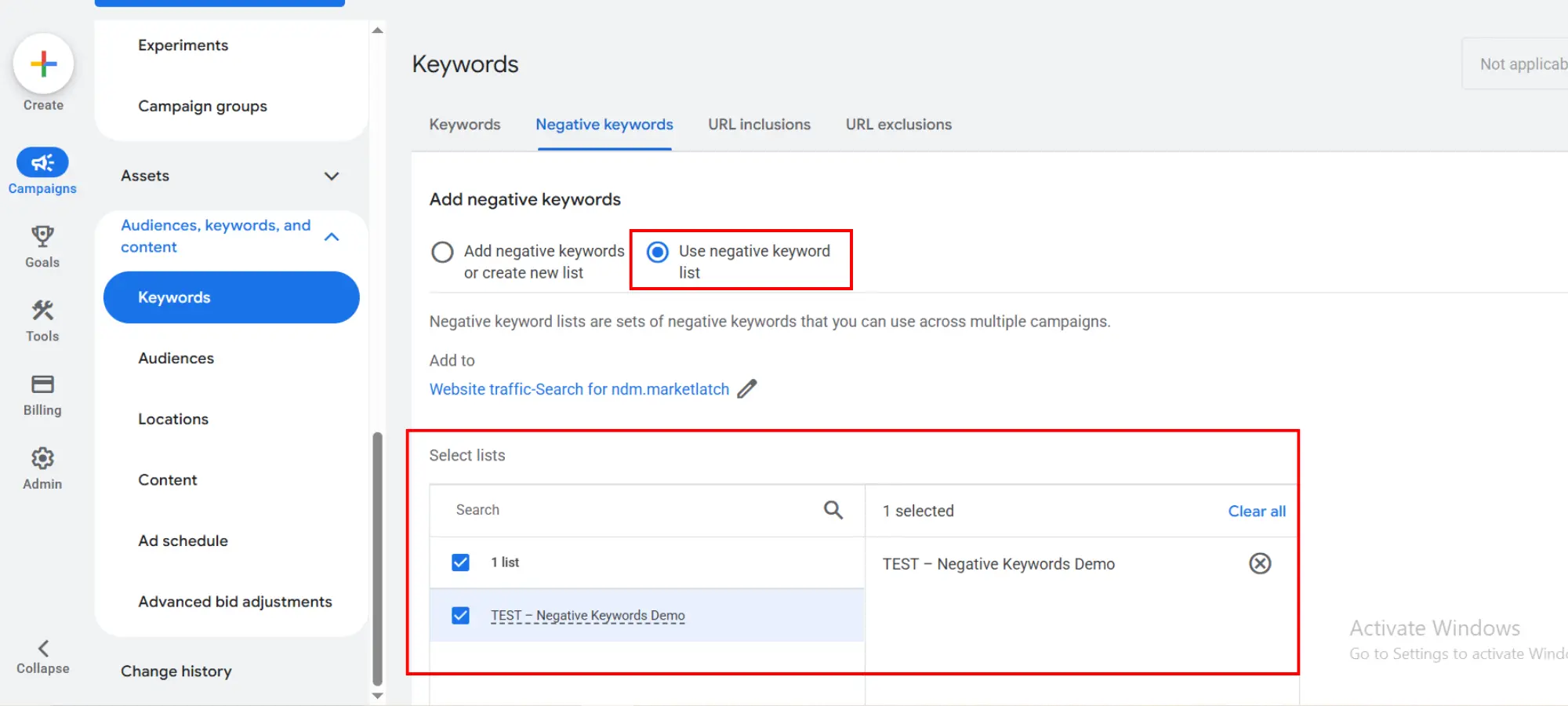
If you are learning how to add negative keywords in Google Ads, start with the Search terms report and the Negative keywords area under the relevant campaign or ad group. If you need hands-on campaign implementation, see our Google Ads management service. If you need to know how to create a negative keyword list, Google also supports saving campaign negatives to a negative keyword list so the same exclusions can be reused across campaigns. Google Ads: Add negative keywords to campaigns
Google Ads interface checkpoints
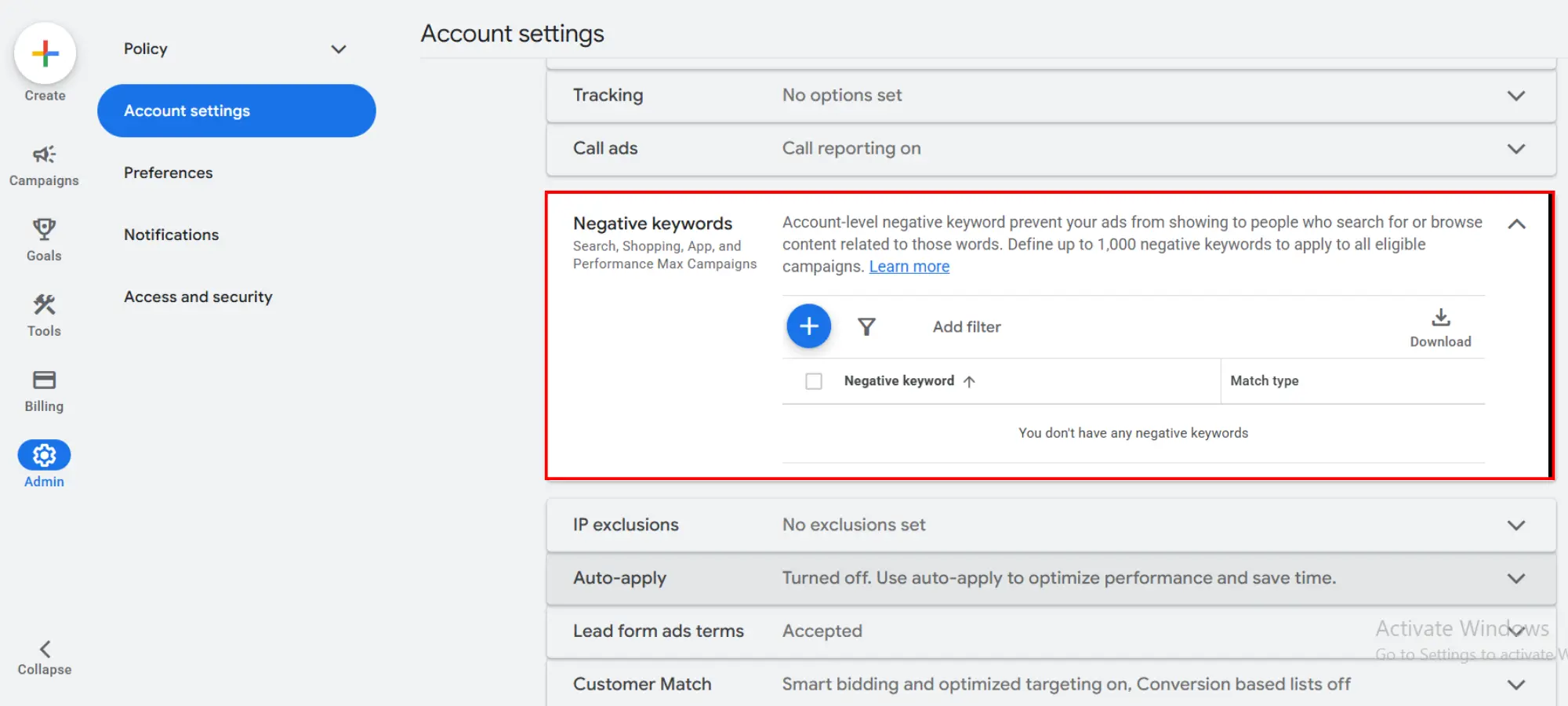
The interface can change as Google updates Google Ads, but the current workflow exposes negative keywords at the relevant campaign or ad-group level, supports reusable negative keyword lists, and provides account-level negative keywords under account settings. Use the labels in your current account as the source of truth when following the screenshots below.
Where to Apply Negative Keywords in Google Ads
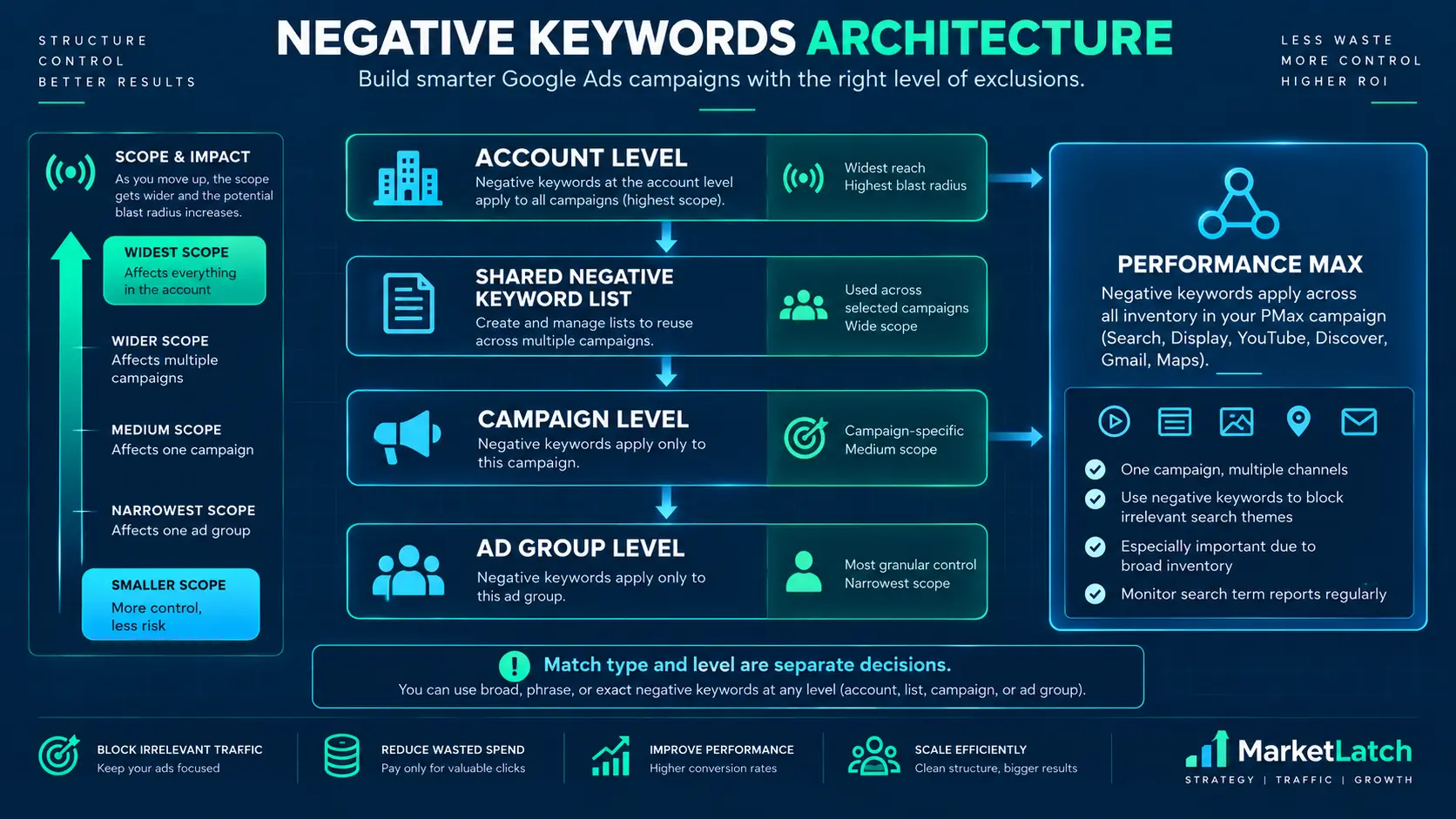
The level you choose determines the blast radius of the exclusion. A negative keyword at ad-group level is more contained than one applied across a campaign, and a shared or account-level exclusion can affect multiple campaigns.
| Level | Typical use | Risk to review |
| Ad group | A very specific exclusion tied to one ad group. | Can be too narrow if the same issue exists elsewhere. |
| Campaign | An exclusion relevant to the campaign’s offer or targeting. | Can remove valid traffic from multiple ad groups. |
| Shared negative keyword list | A repeatable theme that genuinely applies to several campaigns. | One incorrect negative can affect every campaign using the list. |
| Account level | A genuinely global exclusion that should apply across relevant inventory. | Broadest scope; review carefully before adding. |
| Performance Max | Google supports account-level negative keywords for Performance Max. | Account-level scope can affect eligible inventory broadly; verify the current account setup. |
Google currently documents a maximum of 20 negative keyword lists per account, up to 5,000 keywords per list, and up to 1,000 account-level negative keywords. Google also documents up to 10,000 campaign-level negative keywords for Performance Max. These are platform limits, not recommended targets. For account-level negative keywords, treat the 1,000-keyword limit as a ceiling, not a target. See Google’s current [negative keyword limits and setup guidance] for the platform’s documented limits.
For negative keywords in Performance Max, use them selectively because they are a restrictive control. Google states that Performance Max negative keywords apply to Search and Shopping inventory. For excluding your own brand traffic, Google currently recommends brand exclusions rather than relying on negative keywords alone because brand exclusions can cover common misspellings, variants, and subsidiary brands. Google’s current Performance Max negative-keyword guidance
Current PMax safeguard: Google also lets advertisers preview predicted conversion or conversion-value impact for up to 10 proposed negative keywords before applying them.
Negative keyword list and account-level controls
Reusable negative keyword lists are useful when the same exclusion theme genuinely belongs across multiple campaigns. Account-level negatives have a broader scope, so treat them as global controls rather than a shortcut for campaign-specific exclusions.
How many negative keywords should you use?
There is no universal ideal number. Google provides limits, but those limits do not tell you how many negatives your campaign should contain.
Aim for enough coverage to remove genuinely irrelevant traffic without unnecessarily shrinking the eligible search space. A small, well-reasoned list can be more useful than a large list built from generic exclusions.
Match Type vs Level
Keep these decisions separate:
- Match type answers: “How narrowly should this exclusion match?”
- Level answers: “Where should this exclusion apply?”
- Evidence answers: “Why am I making this exclusion at all?”
Do not use a broad match type to compensate for poor campaign-level decisions. First decide what should be excluded; then decide how narrowly and where.
Negative Keywords You Should NOT Add Automatically
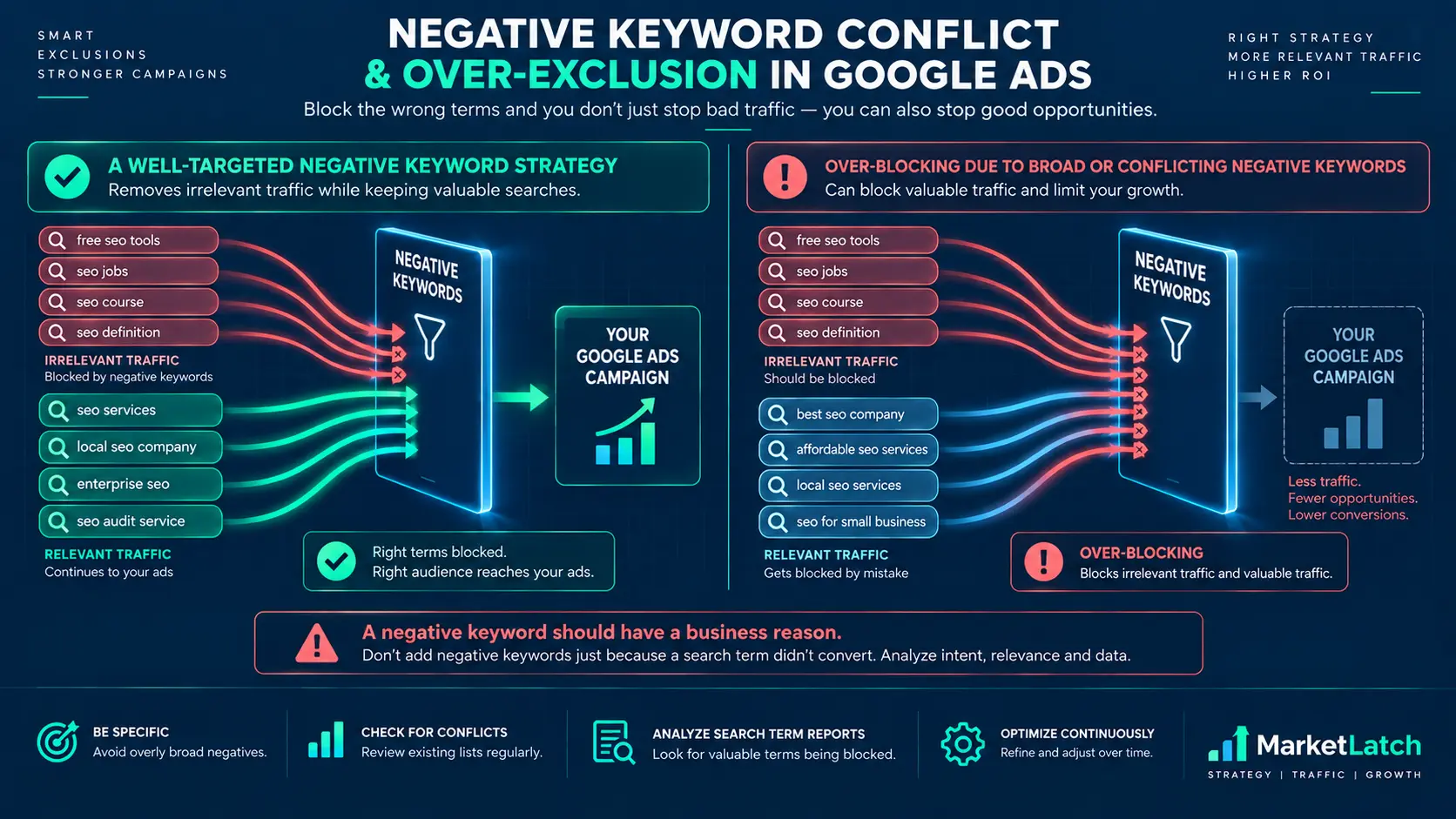
A negative keywords list becomes dangerous when every non-converting or unfamiliar search is treated as irrelevant. A strong negative keywords list protects relevance without unnecessarily shrinking eligible traffic. A search can fail to convert for many reasons without being a bad fit for the business.
Non-converting search ≠ automatically bad
Check relevance and intent before using conversion data as the only reason for exclusion. A low-volume search may simply need more data, while a high-cost search may still be commercially relevant.
Don’t block a word just because it appears in an irrelevant query
Suppose one irrelevant query contains the word “free.” That does not mean every search containing “free” is irrelevant. Review the full query and the offer before turning the word into a negative.
Negative keyword conflicts
Google warns that negative keywords should not overlap with regular keywords in a way that prevents your ads from showing. Before publishing an exclusion, check whether it conflicts with keywords you intentionally want to serve. Google Ads guidance on negative keyword conflicts
Blast radius
- Ad group = more contained.
- Campaign = broader.
- Shared list = multiple campaigns.
- Account level = broadest scope.
MarketLatch rule: narrow evidence → narrow exclusion. Strong recurring evidence → broader exclusion.
If you cannot explain why an exclusion belongs at a particular level, it probably needs another review before you apply it broadly.
How to Maintain and Review Your Negative Keyword List
A negative keyword list should change as the campaign, offer, market, and search behavior change. Maintenance is not just adding more exclusions; it also means checking whether old exclusions still make sense.
Use this maintenance loop:
- Search Terms → Review → Classify → Decide → Add Negative → Monitor → Reassess
During each review, look for:
- new irrelevant search themes
- repeated unwanted searches
- negatives that may be too broad
- negative keyword conflicts
- shared-list scope that has expanded beyond its original purpose
- account-level exclusions that need another business review
- business, product, service, or location changes that make an old exclusion outdated
The key maintenance question is not only, “What else can I add to my negative keywords list?” It is also: “Which existing negative keywords still deserve to be there?”
Frequently Asked Questions
How do I find negative keywords in Google Ads?
Start with the Search Terms report. Review actual searches, classify recurring irrelevant themes, then add a negative at the appropriate match type and level. Google recommends using search-term data to identify searches that are not relevant to your business.
Should I use broad, phrase, or exact negative match?
Use the match type that fits the exclusion you actually need. Broad negative can exclude searches containing all specified terms, phrase negative keeps the words in the specified order, and exact negative targets the exact search query without extra words. Negative keywords do not match close variants.
Can negative keywords hurt a Google Ads campaign?
Yes, if they are too broad or applied at too wide a level. A negative can prevent a relevant search from triggering an ad, and conflicts between negative and regular keywords can prevent ads from showing. Review the intended blast radius before applying an exclusion.
What is the difference between campaign-level and account-level negative keywords?
The difference is scope. Campaign-level negatives affect the selected campaign, while account-level negatives can affect relevant Search and Shopping inventory across the account. Choose the narrowest scope that matches the business reason for the exclusion.
How often should I review my negative keyword list?
Review it whenever meaningful new search-term data appears and as part of ongoing campaign maintenance. Look for new irrelevant themes, repeated unwanted searches, negatives that are too broad, conflicts, shared-list scope, and changes in your products, services, or locations.
Can I use negative keywords in Performance Max?
Google supports negative keywords for Performance Max, but treats them as restrictive. Campaign-level negatives can be used in Performance Max, while account-level negatives can affect relevant Search and Shopping inventory. Use them selectively and review their potential impact before broad exclusions.
Conclusion
A negative keywords list works best as a decision system, not a giant blacklist.
Start with actual search terms. Identify recurring intent. Check business relevance. Choose the appropriate match type. Choose the narrowest sensible level. Record why the exclusion exists, then monitor what happens after you apply it.
The goal is not the biggest negative keywords list. The goal is a safer working system for deciding what to exclude, how to match it, where to apply it, and when to reconsider it.
For hands-on campaign-management support, see MarketLatch Google Ads management.
About the author

Nadeem Alam is the founder of Market Latch, a digital marketing agency working with clients across the USA, UK, Canada, Australia, the UAE and Pakistan. He is a digital growth strategist and WordPress specialist with around 5 years in search, covering technical, on-page, off-page and local SEO, generative engine optimization and answer engine optimization, WooCommerce and Elementor development, and Google and Meta Ads.
For paid search, his work includes Google Ads campaign structure, search-term analysis, negative keyword research, match-type decisions, conversion tracking, and ongoing campaign optimization. This guide reflects that practical approach: starting with actual search-term evidence, then applying the narrowest sensible exclusion rather than relying on copied negative-keyword lists. Selected project results and implementation examples are also available in the MarketLatch case studies.
Nadeem is also the author of the Generative Engine Optimization Book, the AEO Masterclass Guide and the AI SEO Implementation Checklist 2026. His training and certifications include Google Digital Garage, Semrush Academy, Coursera, uConnect and Virtual University (DigiSkills).
Published: September 24, 2026. This guide is based on current Google Ads documentation, practical PPC campaign-management workflows, and the MarketLatch approach to negative keyword research, search-term analysis, and campaign optimization. Examples and workflows are intended for educational purposes and do not disclose confidential client information.