How to track AI referral traffic in Google Analytics (GA4) starts with the Reports → Acquisition → Traffic acquisition report. Check the built-in AI Assistant channel, then inspect Session source/medium to identify recorded referrals such as chatgpt.com / ai-assistant. Review landing pages, engagement, and configured key events associated with those sessions. Create a custom channel group only if you need a reporting classification that the built-in channel does not provide.
The important limitation is that GA4 measures visits it can observe and classify. It does not show every time an AI system mentions your brand, every AI-influenced journey, or every visit whose source was not passed to analytics.
How to Track AI Referral Traffic in Google Analytics: What GA4 Can and Cannot Tell You
GA4 is useful for answering a specific question: which identifiable website sessions arrived with recorded AI-assistant referral information, and what happened during those sessions? It is not a complete AI visibility or attribution system.
| Question | Best-fit evidence | What it does not prove |
| Which identifiable AI referrals reached my site? | GA4 Traffic acquisition and Session source/medium | All AI-related discovery or visits with missing referrers |
| Which Google Search results generated clicks? | Google Search Console Performance report | All AI-assistant referrals or every AI answer mention |
| Which automated requests reached my server? | Server or CDN logs, when available | That a bot request was a human visit or a citation |
| Did an AI answer mention my brand? | A suitable AI visibility monitoring process and manual checks | That the mention produced a website session |
| Did an AI assistant cause a conversion? | GA4 journey data plus careful attribution analysis | Causation from a referral row alone |
Google’s own documentation explains the scope of the GA4 Traffic acquisition report and Search Console Performance reporting.
Step 1: Check GA4’s built-in AI Assistant channel
Start with the existing report before building anything custom. In GA4, open Reports → Acquisition → Traffic acquisition. Set a useful date range. In the Traffic acquisition report, inspect the Session default channel group dimension and look for the AI Assistant/AI Assistants row as labelled in your current GA4 interface. If your property uses an editable primary channel group, inspect that dimension separately and document which grouping you used. If the AI Assistant row does not appear, verify that the date range is correct, the report is using the appropriate dimension, and relevant sessions were recorded during that period.
When checking the GA4 AI Assistant channel, verify the default channel group and reporting period before creating custom rules or interpreting missing data.
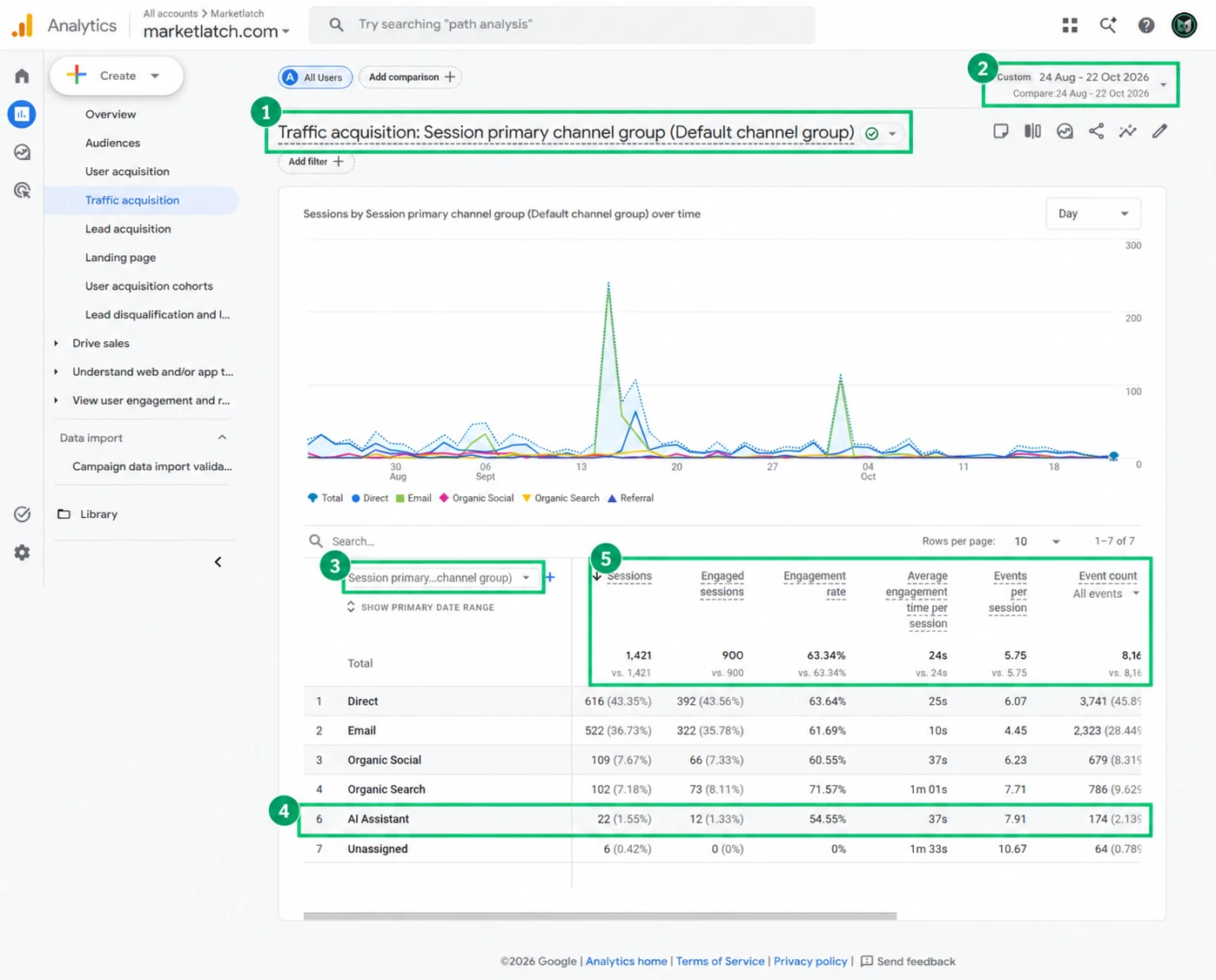
In the supplied MarketLatch property screenshot, the selected period is 24 August–22 October 2026. The AI Assistant row shows 22 sessions, 12 engaged sessions, a 54.55% engagement rate, 37 seconds average engagement time per session, 7.91 events per session, and 174 total events. Treat these as an example from this property and date range—not as a target, benchmark, or proof that AI referrals caused a particular outcome. GA4’s predefined channel group uses rules to classify recorded traffic. For the current channel definitions and updates, consult Google’s default channel group documentation
Step 2: Inspect Session source/medium
The AI Assistant channel gives you a useful summary. To see which recorded source values sit behind it, change the primary dimension in Traffic acquisition to Session source/medium. Search the table for source values associated with AI assistants, such as chatgpt.com / ai-assistant, when that value is present in your property. To track Perplexity referrals, look for identifiable Perplexity-related source values in Session source/medium and verify that the recorded sessions fall within your selected reporting period. When learning how to track AI referral traffic in Google Analytics, use the recorded source and medium values to identify the referrals your GA4 property can actually observe.
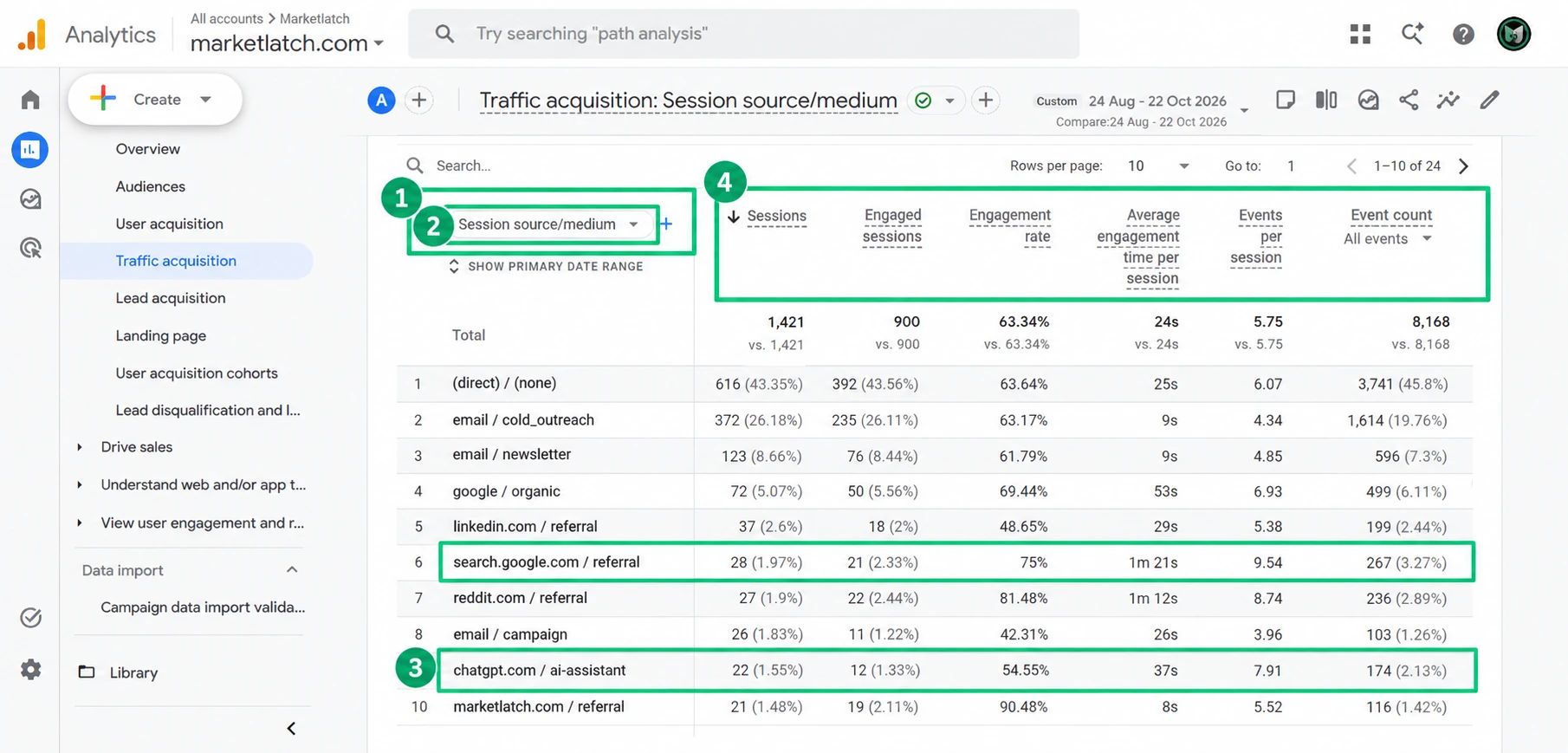
Use the source/medium row to investigate the landing pages and behavior associated with recorded visits. Depending on your report configuration, add or navigate to dimensions and metrics that answer the business question, such as landing page, sessions, engaged sessions, engagement rate, average engagement time, key events, and revenue where applicable.
Do not assume every AI assistant will appear under the same source name or medium. Use the values actually recorded in your property and document any custom reporting rules you apply.
To investigate Perplexity referrals, inspect Session source/medium in GA4 and search for the source values actually recorded in your property, including perplexity.ai when present. Do not assume every Perplexity visit will appear in the AI Assistant channel. If the source is recorded but grouped differently from the way you need to report it, consider a custom channel group that matches the relevant source value. Test the rule against available data before relying on the resulting totals. If no source information was recorded, a custom channel group cannot reconstruct it.
Step 3: Decide whether you need a custom channel group
A custom channel group is optional. If the built-in AI Assistant channel answers your reporting question, there is no need to create a second classification just for the sake of it. Consider a custom group when you need a tailored roll-up, want to group selected source values under a business-specific label, or need a consistent classification across a documented reporting workflow.
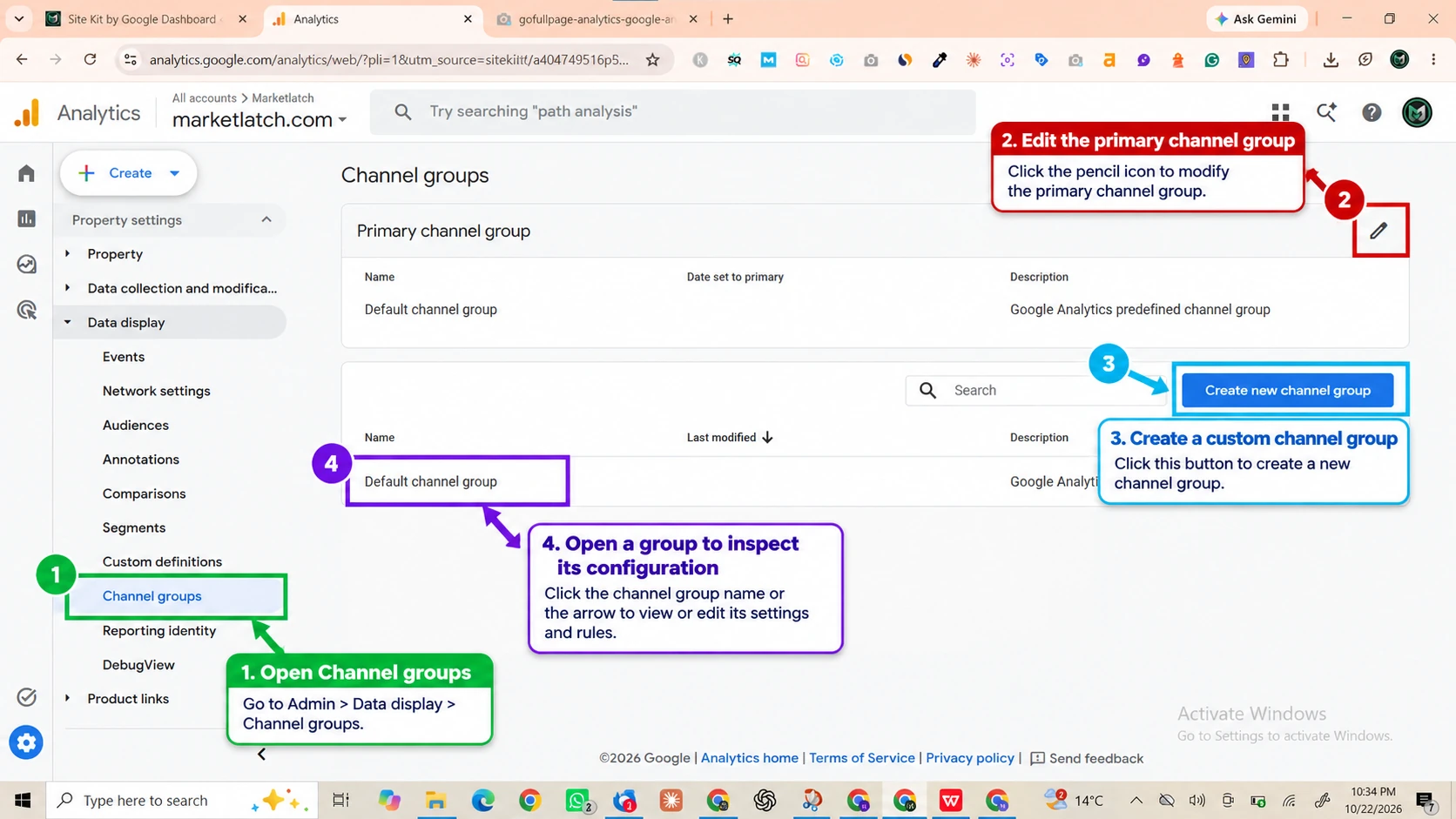
In the GA4 interface shown, open Admin → Data display → Channel groups. Review the existing group and choose Create new channel group if a custom definition is genuinely needed. The available controls and labels may change as Google updates the interface; use the current custom channel group documentation as the authority.
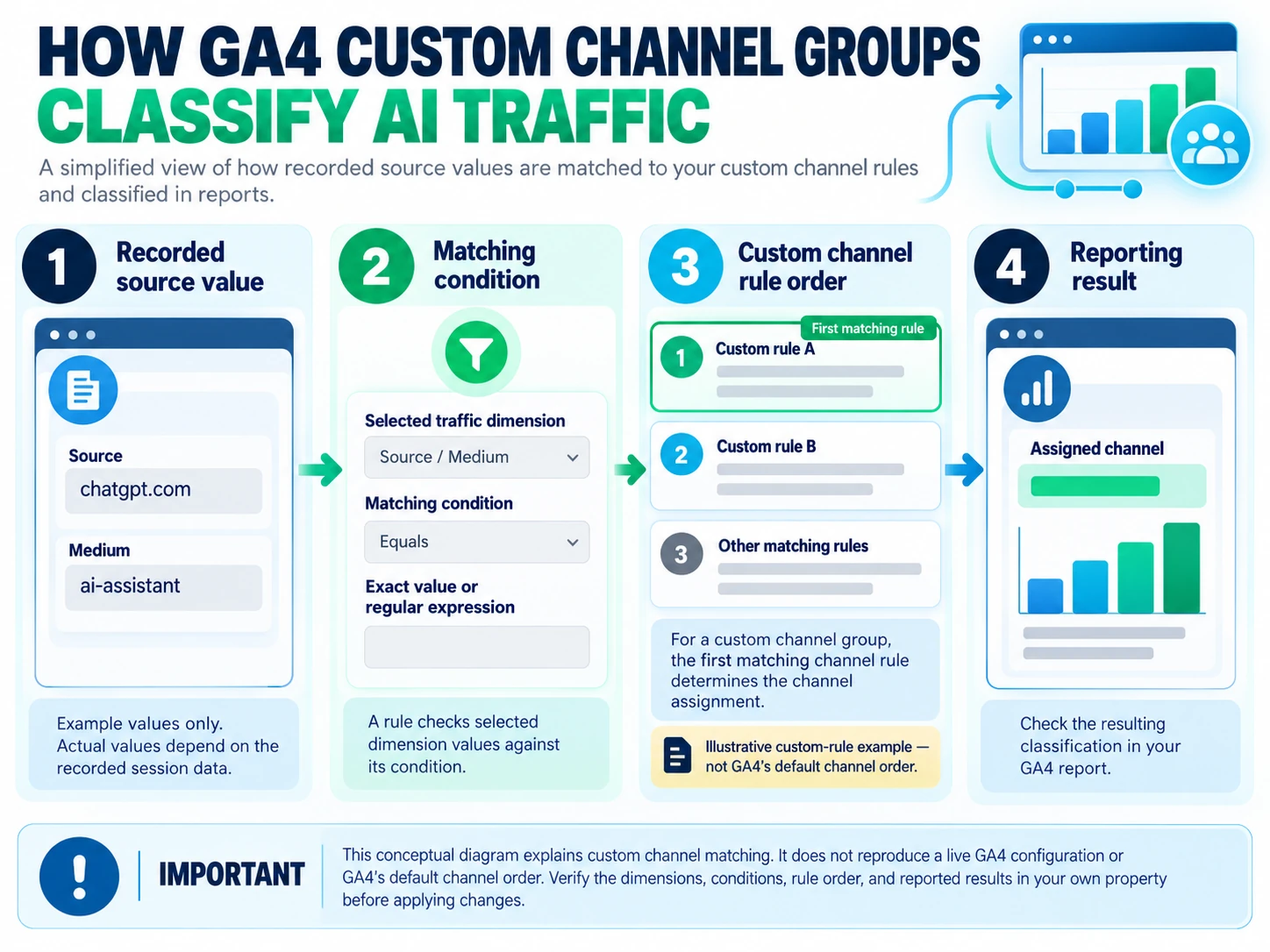
A custom channel group classifies recorded dimension values according to the conditions you configure. Rule order matters because the first matching rule determines the channel assignment within the group. Before saving a rule, decide which dimension you will match, whether the condition should be an exact value or a carefully tested pattern, and how the new classification will be validated.
- Write down the source values or patterns the rule is intended to include.
- Avoid broad matching rules that could accidentally absorb unrelated referral traffic.
- Test the result in a supported report before using it for performance comparisons.
- Document the definition and the date you introduced it so future reports remain interpretable.
Custom channel groups can be applied retroactively in supported GA4 reports when recorded traffic-source dimensions match the configured rules. Their behavior is not identical across every GA4 reporting context. Check the documentation for the specific feature you plan to use, test the rules against available data, and document the definition used for reporting. This cannot reconstruct referrer information that was never recorded.
Step 4: Build a report that helps you make a decision
To track AI referral traffic in Google Analytics effectively, look beyond session totals. Review the landing pages that attract identifiable AI referrals, assess engagement, and examine configured key events or revenue where applicable. This helps you evaluate recorded visits without treating referral data as proof of every AI-influenced journey. A practical AI search traffic analytics workflow combines referral sources, landing-page performance, engagement metrics, and configured key events to evaluate the visits GA4 can identify.
When you track AI traffic in GA4, compare consistent date ranges and interpret changes alongside engagement and key-event data rather than relying on session counts alone.
| Dimension or metric | What to look for | How to interpret it carefully |
| Session source/medium | Recorded AI-assistant source values | A recorded referral label, not a complete list of AI influence |
| Landing page | Pages where the sessions begin | Useful for finding content that attracts identifiable referral visits |
| Sessions | Volume during the chosen period | Small counts can fluctuate; compare consistent date ranges |
| Engaged sessions and engagement rate | Whether sessions meet GA4’s engagement definition | Not a standalone measure of lead quality or revenue |
| Average engagement time | Time the site was actively engaged with | Interpret alongside the page, sample size, and user intent |
| Key events/revenue | Configured business actions linked to sessions | Check event configuration and attribution settings before drawing conclusions |
Compare like with like: use consistent date ranges, confirm the same report dimensions, and note any changes to tagging, consent, channel definitions, or key-event configuration. For acquisition questions, prefer session-scoped traffic reporting over treating a new-user report as a substitute. Google’s guide to User acquisition versus Traffic acquisition explains the distinction.
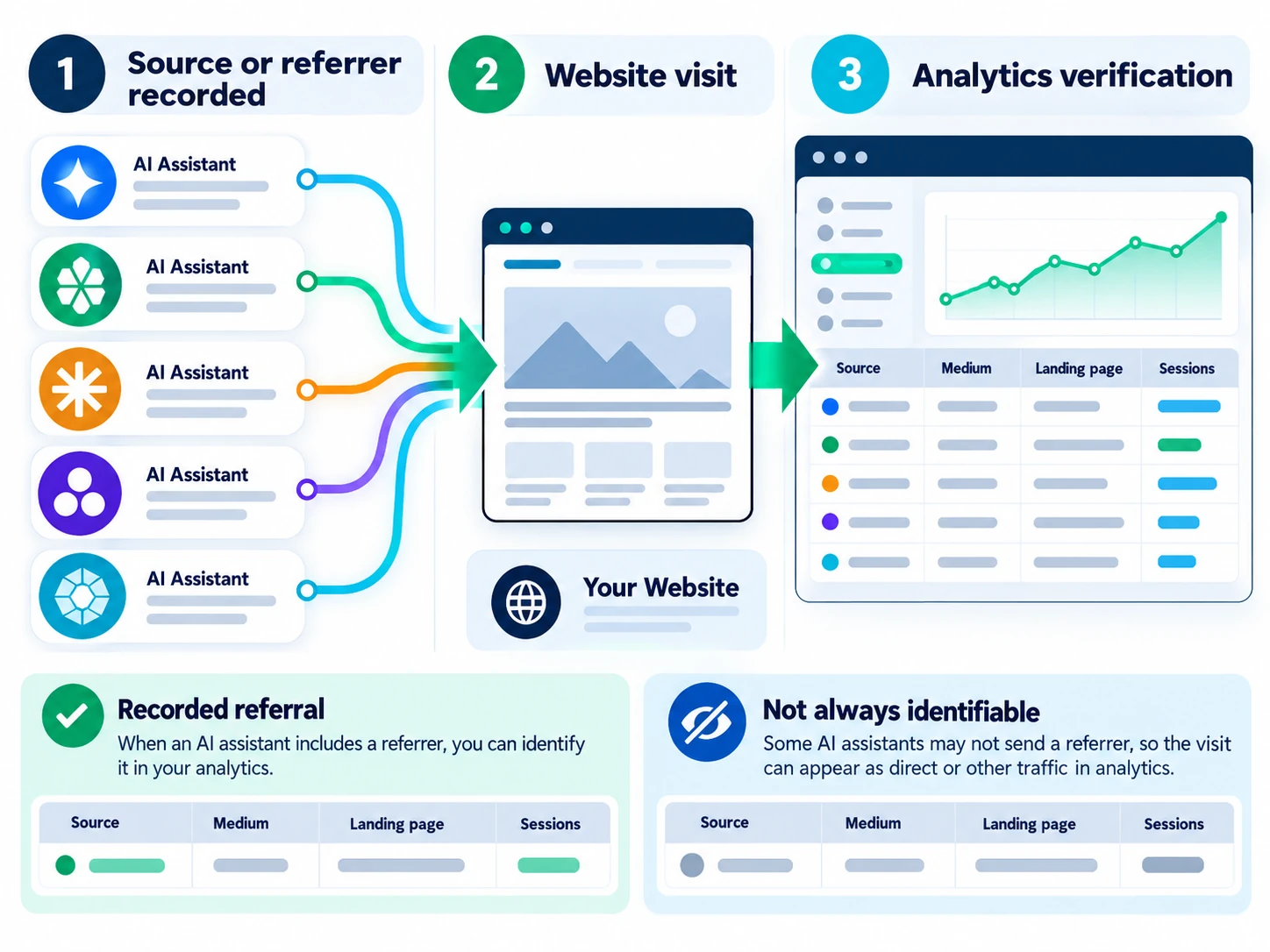
Step 5: Troubleshoot missing or unexpected AI traffic
The AI Assistant channel is missing
If you are checking how to track AI referral traffic in Google Analytics and the AI Assistant channel is missing, start with the date range and report dimension. Then inspect Session source/medium for relevant recorded values and confirm that the property collected data during the period. A missing row does not prove that nobody discovered your site through AI; it may simply mean that no sessions were classified into that channel for the selected period.
A source appears, but not in the channel you expected
If you are investigating traffic from Google AI Overviews or AI Mode, do not expect it to appear in the default AI Assistant channel. Google classifies traffic from those Search features as Organic Search. Use the acquisition report to examine recorded sessions and Search Console for supported Google Search performance data.
Inspect the recorded source and medium and review the applicable channel definition. If you introduce a custom group, test the exact matching condition and rule order. Avoid assuming that all AI-related domains use the same naming convention.
Direct / (none) traffic increases
Direct / (none) is not proof of AI traffic. It indicates that GA4 does not have a usable source/referrer classification for those sessions under the reporting context. There can be multiple reasons for missing campaign or referral information, so investigate tagging, browser behavior, redirects, consent, and implementation issues before making an attribution claim. See Google’s explanation of Direct traffic.
You want to measure AI visibility or crawler activity
A referral report is not designed to measure every brand mention, citation, AI answer impression, or automated crawl. Those questions need different evidence. Keep the measurement systems separate, then combine findings only when their definitions and limits are clear.
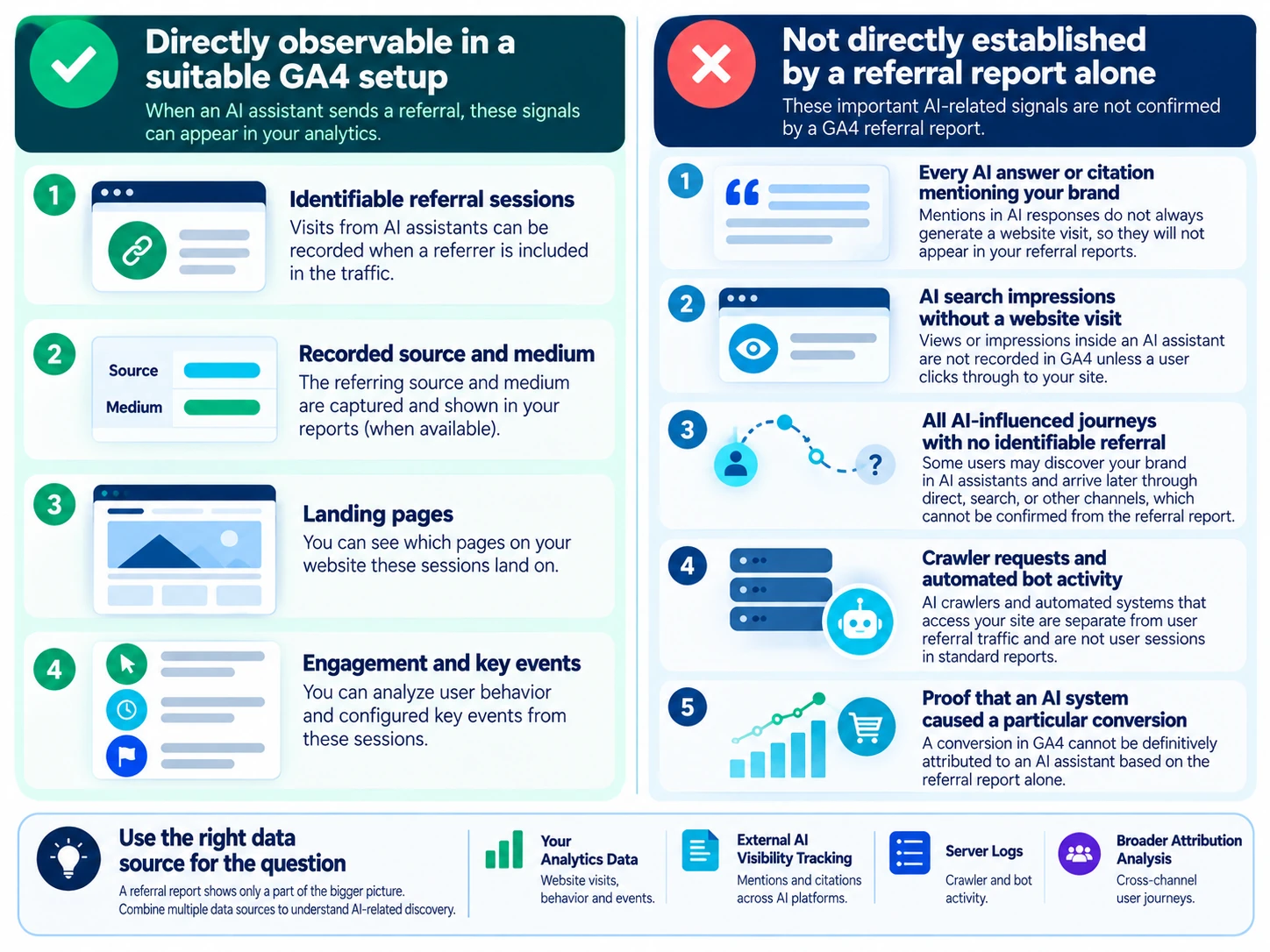
The MarketLatch AI Referral Measurement Framework
Use this framework to keep reporting decisions tied to the evidence available instead of turning a small referral count into a broad claim about AI visibility.
| Observed situation | Recommended action | Avoid concluding |
| AI Assistant channel has sessions | Inspect source/medium, landing pages, engagement, and key events | That these are all AI-influenced visits |
| AI source appears outside the expected group | Check the recorded value and channel rule conditions | That the platform is necessarily misreporting |
| No identifiable AI referral appears | Check date range, dimensions, implementation, and available data | That AI assistants never send visitors |
| You need to know whether the brand is cited in AI answers | Use an appropriate visibility monitoring process and record its scope | That GA4 can count every mention or citation |
| You need to understand AI bot requests | Review server/CDN logs and user-agent/request data where available | That each bot request is a human visit |
| A referral session includes a conversion | Review configured events and attribution context | That the AI assistant definitively caused the conversion |
Use the Observation → Interpretation → Next action pattern
- Observation: Record the exact report, date range, dimension, metric, and value.
- Interpretation: Explain what that evidence supports—and what it cannot establish.
- Next action: Choose a proportionate follow-up, such as checking landing-page performance, validating an event, or improving content that already attracts relevant visits.
For repeatable reporting, document the date range, data source, source/medium definition, channel rules, landing pages, engagement metrics, key events, and known limitations. This makes comparisons more defensible when the GA4 interface or source classification changes.
GA4 vs. Search Console vs. server logs
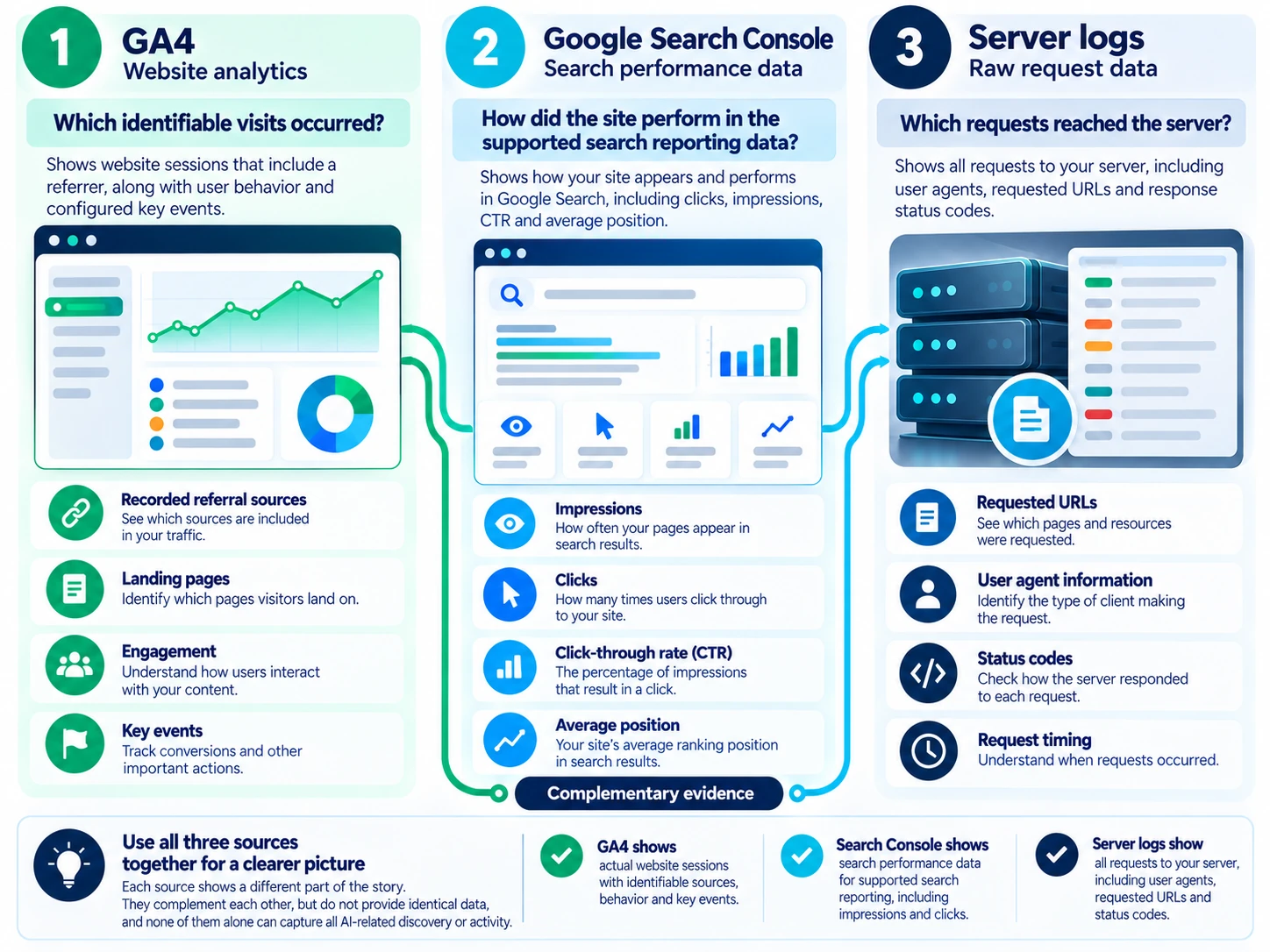
Use GA4 for identifiable website sessions, recorded traffic sources, engagement, and configured key events. Use Search Console for Google Search performance and its dedicated Generative AI performance reports, which show impressions for supported Google Search generative AI features, including AI Overviews and AI Mode. The report can help you review trends and pages receiving impressions; it is not a report of external AI-assistant referral sessions and does not provide a universal count of AI answer mentions or every AI-influenced journey. Use server or CDN logs to investigate requests reaching your infrastructure, remembering that automated requests are not automatically human visits.
To inspect the newer Google Search reporting, open the Generative AI performance report (Search Console Help). Google announced the report on 3 June 2026 and stated that its worldwide rollout was completed on 31 August 2026. If the report is not visible, check the property’s available reporting and impression thresholds before concluding that no AI Search visibility exists.
AI features and your website: Google’s guidance on AI features and your website says foundational SEO practices remain relevant for eligibility in AI Overviews and AI Mode; it does not prescribe a special AI schema or secret optimization formula. Google AI Overviews and AI Mode are different from external AI assistants such as ChatGPT or Perplexity. Traffic from these Google Search features is included in Organic Search, rather than the default AI Assistant channel. Use GA4 acquisition reports for recorded website sessions and Search Console for supported Google Search performance data. Neither report, by itself, measures every AI answer mention or every AI-influenced journey. Keep important content accessible, crawlable, useful, and consistent with the visible page.
Practical AI referral tracking checklist
- Choose a clear reporting period and note any tracking or configuration changes.
- Open Traffic acquisition and inspect the AI Assistant channel.
- Switch to Session source/medium to investigate recorded source values.
- Review landing pages, engaged sessions, engagement, and configured key events.
- Use a custom channel group only when the built-in grouping does not answer the reporting question.
- Validate matching rules and channel order before relying on custom classifications.
- Treat Direct / (none) as unknown or unclassified source information—not as confirmed AI traffic.
- Use Search Console for Google Search performance and logs for requests reaching the server.
- Record definitions, limitations, and the evidence behind any reported conclusion.
Frequently asked questions
How do I see ChatGPT traffic in GA4?
To see ChatGPT traffic in GA4, open Reports → Acquisition → Traffic acquisition and inspect the AI Assistant channel and Session source/medium. To understand how to track AI referral traffic in Google Analytics, check for recorded values such as chatgpt.com / ai-assistant when present in your property. Then review the date range and landing pages before interpreting the results.
Does GA4 automatically track AI referral traffic?
GA4 can classify identifiable traffic into its available channel definitions when the relevant source information is recorded and matches the rules. It cannot identify every AI-related visit or brand discovery event.
Do I need to create a custom AI channel group?
Not necessarily. Start with the built-in AI Assistant channel. Create a custom group only when a defined reporting need remains, and test its conditions and order.
Why is some AI traffic missing from GA4?
Some visits may arrive without an identifiable referrer, may be classified under another source, or may not be present in the selected report or date range. GA4 cannot recover referral information that was never recorded.
Can GA4 prove that ChatGPT caused a conversion?
A GA4 report can show recorded sessions, events, and configured attribution information. A referral row by itself does not establish that an AI assistant caused a conversion or influenced every step of the user’s journey.
Does Search Console show all AI traffic?
No. Search Console reports performance within its supported Google Search reporting scope. It is not a universal report for referrals from ChatGPT, Perplexity, or other AI assistants.
Conclusion
The reliable way to track AI referral traffic in Google Analytics 4 is to start with the built-in AI Assistant channel, verify the recorded source/medium, and analyze the landing pages and outcomes that matter to your site. Add a custom channel group only when it solves a specific reporting problem, and document how its rules work.
Keep the conclusion proportional to the evidence: GA4 can show identifiable referral sessions, but it cannot independently measure every AI mention, citation, crawler request, or AI-influenced journey. For the broader measurement picture, read MarketLatch’s practical GEO measurement framework. If you need help connecting AI search visibility work with analytics and reporting, explore the MarketLatch GEO and AEO services.
About the author

Nadeem Alam is the founder of MarketLatch and a digital growth strategist specializing in technical SEO, WordPress, WooCommerce, and AI search optimization. His work spans Generative Engine Optimization (GEO), Answer Engine Optimization (AEO), website analytics, structured data, and search performance measurement.
His approach to SEO and analytics is implementation-first and verification-driven. He focuses on examining measurable website data, validating traffic sources, interpreting analytics reports, and identifying technical issues through verifiable evidence. At MarketLatch, he helps businesses understand search visibility, improve website performance, and make more informed decisions about organic and AI-driven discovery.
Nadeem also authored the Generative Engine Optimization Book, AEO Masterclass Guide, and AI SEO Implementation Checklist 2026. His training and certifications include Google Digital Garage, Semrush Academy, Coursera, uConnect, and Virtual University (DigiSkills).
Primary sources and further reading
- Google Analytics: Default channel group
- Google Analytics: Traffic acquisition report
- Google Analytics: Custom channel groups
- Google Analytics: Direct traffic
- Google Analytics: User acquisition vs. Traffic acquisition
- Google Search Console: Performance report
- Google Search Central: AI features and your website
- Google Search Central: Helpful, reliable, people-first content
- Google Search Central: Article structured data