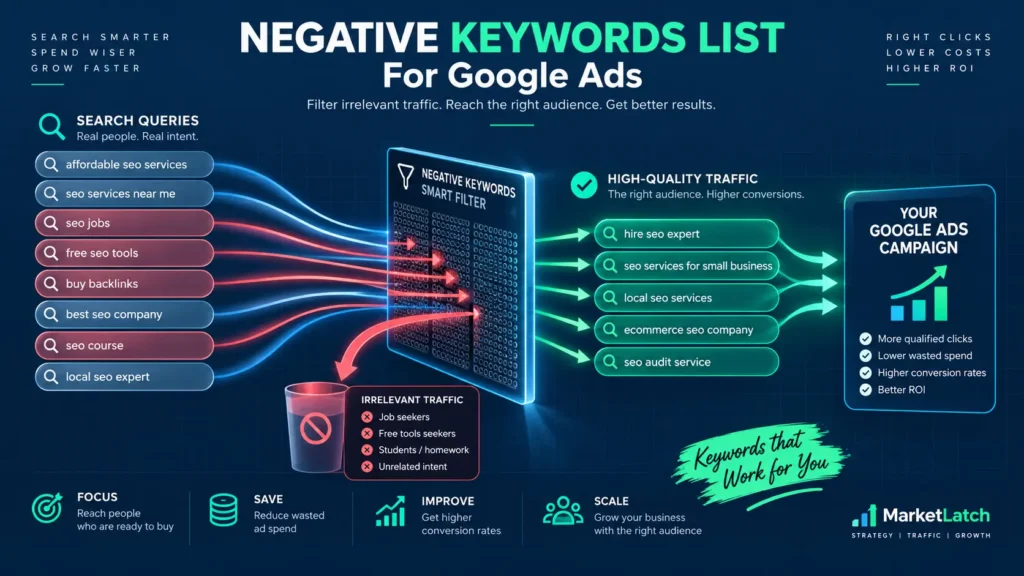
Are your Google Ads wasting money, or are the campaigns simply being judged before the evidence is complete? Clicks without leads, high CPCs, fast budget use and a low conversion count can all look concerning. None of those signals, by itself, proves that the advertising spend was avoidable.
To identify wasted Google Ads spend, follow the full path from the search or audience that triggered the ad to the landing page, tracked conversion, qualified lead and final customer. Verify measurement first, then investigate search intent, campaign settings, traffic sources, bidding, page experience and sales outcomes.
That difference changes the action: a tracking fault needs repair, an irrelevant search may justify exclusion, and a costly campaign may need no change if it still acquires profitable customers. Treating every weak metric as confirmed waste can remove valuable traffic, interrupt learning and make the account harder to improve.
This guide explains how to find the source of potential waste, estimate financial exposure without double-counting the same spend, choose proportionate corrective actions and verify what changed. It also gives you a repeatable process you can apply to Search and other campaign types where the relevant reporting is available.
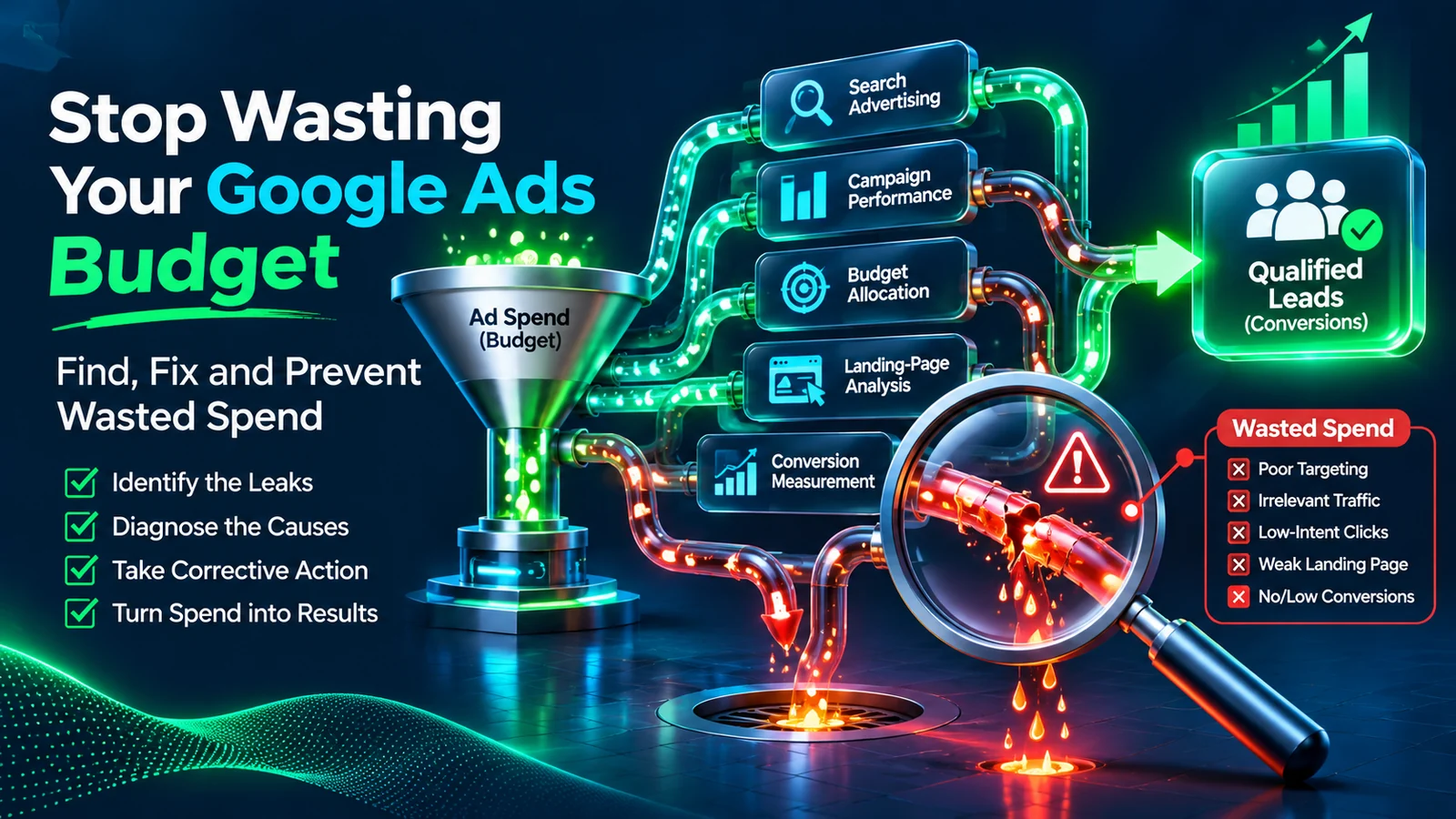
Quick answer: How do you find wasted spend in Google Ads?
| THE SHORT ANSWER If you’re asking how to fix wasted spend in Google Ads, start with reliable measurement, identify the source of the problem, estimate the business impact and verify each corrective action. Use these checks in order: |
- Confirm that the conversion actions used for reporting and bidding represent meaningful business outcomes.
- Check conversion reporting delay, attribution and the tracking implementation before judging recent results.
- Review the Search terms report for searches that do not match the product, service, or customer you intend to reach.
- Group search terms and keywords by intent, then investigate campaign networks, locations, placements where applicable, devices and schedules.
- Review budgets, bidding, Change History and automated recommendations for changes that may explain a performance shift.
- Check landing-page functionality, lead quality and CRM outcomes rather than relying only on the Google Ads conversion count.
- Separate confirmed issues from probable and uncertain findings, estimate only plausibly avoidable expenditure, then make a proportionate change and verify the result after the conversion cycle.
Do not pause a keyword simply because it has clicks but no conversions. First confirm tracking, conversion delay, search intent, sample size and the economics of the action you expect the keyword to produce.
Quick diagnostic: What should you check first?
| What you notice | First investigation | What you should not assume |
| Clicks but no inquiries | Conversion tracking, form functionality, call tracking and landing-page experience | Every click was irrelevant |
| Conversions but few qualified leads | Search intent, lead qualification rules, form questions and CRM outcomes | Google Ads tracking must be broken |
| Performance drops suddenly | Change History, tracking changes, website changes, bidding inputs and campaign settings | The bid strategy alone caused the decline |
| Irrelevant searches appear | Actual search terms, match behavior and negative-keyword coverage | One negative keyword blocks every close variant |
| CPC is high | Cost per qualified lead, close rate, customer value and allowable acquisition cost | A high CPC automatically means waste |
| Traffic appears outside the service area | Location options, location signals and actual customer locations | Every out-of-area visit proves a targeting error |
| Recent clicks have no conversions | Conversion lag, reporting latency, attribution and tracking status | Those clicks have permanently failed |
| Display, video or app placements look weak | Placement evidence available for that campaign type, plus the campaign objective | Every placement with low average conversions should be excluded |
| Performance Max channel metrics differ | Campaign-level results and marginal return, not one channel’s average CPA alone | The channel with the highest average CPA is necessarily wasting spend |
Use these checks when you suspect Google Ads wasting money, but treat each symptom as a reason to investigate—not as proof of a loss. The table should guide the first investigation, not trigger an automatic account change.
What does wasted Google Ads spend actually mean?
Wasted Google Ads spend is expenditure associated with activity that does not contribute meaningfully to the campaign’s intended business outcome, or that could reasonably have been avoided because of a demonstrable targeting, measurement, delivery or conversion-path problem.
Examples include:
- Ads repeatedly triggered by search intent that has no reasonable relationship to the advertised offer.
- Spend continuing while a verified technical issue makes the advertised conversion path unusable.
- Targeting that consistently attracts people the business cannot serve, where the campaign settings or location choices are responsible.
- Duplicate or misleading conversion signals that cause the bidding system or account reporting to optimize towards the wrong outcome.
- Paid traffic reaching a page that does not provide the service, product or next step promised in the ad.
- Leads that are demonstrably irrelevant or unserviceable, or whose acquisition cost cannot be justified by real sales outcomes.
A click that does not convert is not automatically wasted. Someone may research before purchasing, return through another channel, need approval from another person or contact the business later. Some campaigns are also designed to support awareness or consideration rather than generate an immediate sale.
The right question is not simply, “Did this click produce a conversion?” It is, “Did this expenditure have a reasonable and measurable role in achieving the campaign’s objective, and what evidence supports that conclusion?”
People may describe the same problem as a wasted Google Ads budget or a waste of money on Google Ads. Those phrases express a concern, not a diagnosis. The investigation must establish what actually happened before a financial loss is assigned.
Searches phrased as “Google Ads wasted budget,” “Google Ads waste of money,” or “Google Ads wasted spend” point to a similar concern: where avoidable expenditure is occurring and what evidence can establish it.
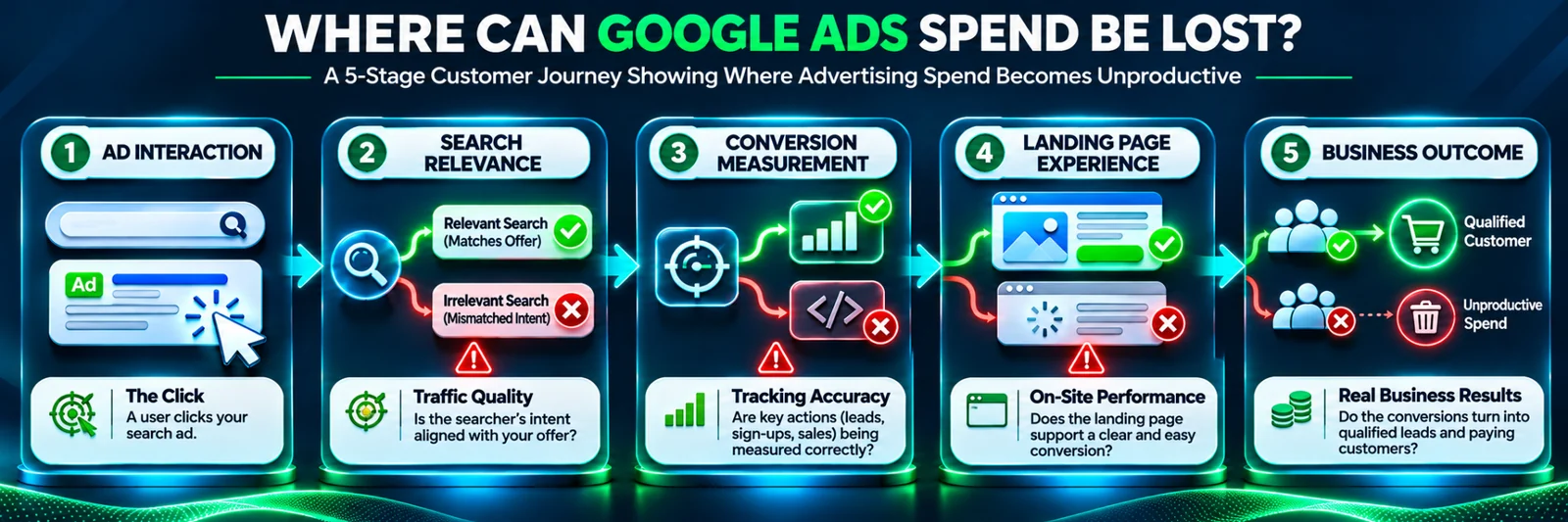
When is Google Ads wasting money—and when is it simply underperforming?
A defensible finding of waste should meet three tests.
1. The issue is identifiable. There is a specific problem, such as irrelevant search intent, incorrect targeting, a broken form, an unsuitable landing page or a misleading conversion setup.
2. The evidence supports the finding. Account reports, website tests, CRM records, settings, call records or other reliable information show that the issue occurred during the period being assessed.
3. The business impact can be reasonably estimated. The reviewer can identify the expenditure connected to the issue, account for overlap and explain why some portion was avoidable.
A suspected problem should remain under investigation when evidence is incomplete. A campaign can have a high cost per lead and still be profitable if its leads close at a strong rate and generate sufficient customer value. Conversely, a campaign can report a low cost per conversion while counting low-value actions such as page views or button clicks.
This is why a useful audit separates confirmed waste, probable issues and uncertain expenditure. It avoids turning an awkward metric into a definitive financial claim.
Understand the business economics before changing campaigns
Google Ads reports advertising activity. The business needs to understand whether that activity produces economically useful outcomes.
| Metric | What it measures | Important limitation |
| CPC | Average cost for a click | A click does not prove business value |
| Cost per conversion | Advertising cost divided by the conversions recorded for the selected action or reporting column | The action may be a page view, call, form submission, purchase or another event |
| CPL | Advertising cost divided by leads generated | A lead may not be qualified |
| Cost per qualified lead | Advertising cost divided by leads that meet the business’s qualification criteria | Qualification rules must be applied consistently |
| Paid-media CAC | Advertising cost divided by customers acquired through the paid-media activity being measured | It excludes other acquisition costs unless they are deliberately included |
| Fully loaded CAC | Acquisition cost including the additional sales, agency, software, people and overhead costs defined by the business | Do not compare it directly with paid-media CAC without accounting for the difference |
| Potential waste exposure | An estimate of expenditure plausibly associated with confirmed and probable issues | It is an audit estimate, not a Google Ads metric or guaranteed saving |
Calculate an allowable cost per qualified lead
Suppose a business can afford a maximum paid-media cost of $600 to acquire one customer. If 25% of qualified leads become customers, its indicative maximum paid-media cost per qualified lead is:
$600 × 25% = $150
The business therefore has a working paid-media threshold of $150 per qualified lead.
This example assumes that $600 is the maximum allowable paid-media cost per acquired customer. It is not automatically the business’s fully loaded customer acquisition cost. Agency fees, sales salaries, software, fulfillment, overhead and other operating expenses should be considered separately when calculating total acquisition economics.
Use actual close-rate data where possible. A 25% close rate should not be assumed simply because it makes a campaign appear profitable. Also make sure “qualified lead” has a consistent definition across campaigns and reporting periods.
A campaign that generates leads at $100 each may be performing well if those leads regularly become customers. Another campaign generating leads at $40 may be inefficient if most inquiries are irrelevant, uncontactable, or outside the service area.
Step 1: Check whether Google Ads is tracking the right conversions
Before deciding that Google Ads is wasting money, establish whether the account measures the actions that matter. Poor reporting can make effective campaigns look weak. Misleading conversion actions can make ineffective campaigns look successful.
A. Confirm which actions are used for reporting and optimization
Review the conversion goals and actions used by each campaign. For a lead-generation business, meaningful primary actions may include a successfully submitted inquiry form, a qualified phone call, a completed booking, a genuine quote request, or a qualified lead imported from the CRM through a correctly implemented offline-conversion workflow.
A page view, button click or visit to a contact page may be useful for analysis, but it does not necessarily represent a qualified lead.
Check whether low-value actions have been set as Primary and included in the campaign’s optimization goals. A campaign optimizing towards page views can report conversions while producing little commercial value.
Google Ads generally uses Primary conversion actions for the Conversions column and bidding when they are included in the campaign’s goals. Secondary actions are generally for observation in All conversions and are not used for bidding. One important exception is a Secondary action included in a custom goal: custom-goal actions can be used for bidding regardless of the Primary or Secondary setting. Review the campaign’s actual goals rather than relying on the label alone. See Google’s guidance on primary and secondary conversion actions.
B. Understand the One and Every counting settings
Google Ads provides two main conversion-counting methods for a conversion action:
- Every: Counts every conversion recorded after an eligible ad interaction. This is often suitable for purchases where each sale has value.
- One: Counts one conversion per ad click or eligible interaction for that conversion action. This is often suitable for lead-generation actions where multiple submissions after one click should not be treated as multiple independent leads.
The correct choice depends on what is being measured. Counting every e-commerce purchase may be appropriate. Counting one inquiry action per ad click may be more appropriate for some lead-generation businesses.
One does not mean one conversion per unique person. It does not automatically deduplicate every lead in a CRM, across separate ad clicks or across different conversion actions. Review duplicate form events, repeated tag firing, imported conversions and transaction IDs where relevant. Google’s conversion counting documentation explains the choices and how they affect reporting.
C. Test whether the conversion actually works
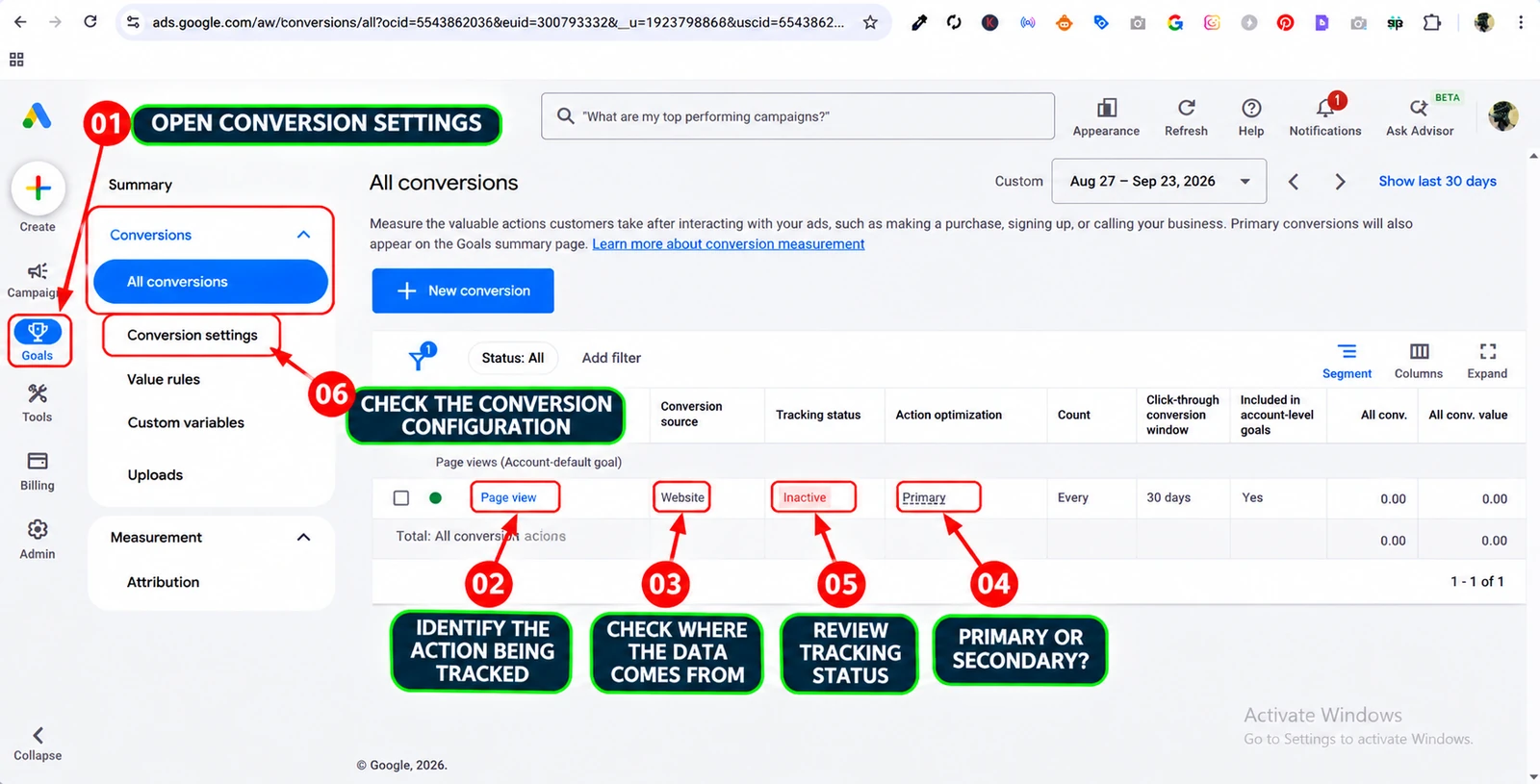
Do not rely on a status label alone. Status names depend on which screen you are reading. The conversion summary can show labels such as Active, Needs attention, Misconfigured, Awaiting conversions or Removed, while the Tracking status column can show labels such as Inactive, Unverified, Tag inactive, Needs attention or No recent conversions. These are interface diagnostics, not identical definitions and not a direct measure of wasted spend. Open the conversion action, inspect the relevant diagnostics and test the customer journey before deciding what the label means.
Useful checks include:
- Submit the website form and confirm that the success event fires only after a successful submission.
- Check whether the Google tag or Google Tag Manager event fires on the correct page or interaction.
- Test call tracking and imported conversion actions where used.
- Use Google Tag Assistant to inspect tag implementation.
- Follow Google’s conversion tracking status troubleshooting if a tag is marked Inactive, Unverified or Needs attention, or conversions are missing.
Conversion reporting freshness varies by conversion source and attribution model. Google’s current data-freshness table lists about 3 hours for Google Ads conversion tracking with last-click attribution and about 15 hours with other attribution models. Goals and transactions imported from Google Analytics are listed at about 12 hours with last-click attribution and 24 hours with other models. These are typical data-readiness timelines, not a guarantee that every report is final: late-arriving conversions and subsequent adjustments can still change figures. Check the relevant source and attribution row in Google’s conversion data-freshness guidance before diagnosing a recent reporting gap.
After general Google tag or sitewide-tag fixes, Google advises allowing 24–48 hours for the diagnostic dashboard and Tracking status to update. Low traffic can also produce warnings that need context. See the sitewide-tag troubleshooting guidance
Enhanced Conversions for web has a related but separate diagnostic report that may take about 48 hours to reflect an updated implementation status. Do not apply that timing to every conversion action. See the Enhanced Conversions diagnostic timing guidance for the product-specific details.
Important: A screenshot showing a Page view action marked Primary and Inactive is an example of a configuration that needs investigation. It is not a recommendation to make Page views Primary for a lead-generation campaign.
D. Compare tracked conversions with real business outcomes
The Google Ads conversion count is not the same as the number of qualified leads or paying customers. Compare campaign results with CRM and sales records. Check whether leads were genuine, within the service area, relevant to the offer, contactable, qualified and ultimately converted.
If Google Ads records 40 conversions but the CRM shows only 12 genuine inquiries, investigate the difference before changing bids or excluding keywords. The explanation may be low-quality traffic, duplicate tracking, invalid form events, different attribution rules or inconsistent lead definitions.
Google Ads attributes conversions to the date of the ad click that led to the conversion. A CRM may record the date the lead was received or the sale occurred. Align reporting periods and allow for the sales cycle before concluding that the systems disagree. See Google’s conversion measurement explanation.
For businesses that close sales offline, consider whether qualified leads or sales should be imported back into Google Ads. Offline conversion imports and Enhanced Conversions for Leads can connect ad interactions with downstream business outcomes, but the setup, consent requirements, identifiers and data quality must be handled correctly. Google’s current guidance states that, from June 15, 2026, offline conversion imports and Enhanced Conversions for Leads uploads move to the Data Manager API; legacy Google Ads API uploads are blocked unless access is allowlisted. Check that the integration you use supports the current workflow. See Google’s Enhanced Conversions for Leads setup guidance.
Step 2: Allow for conversion delay before judging performance
A click today may produce a lead or sale days or weeks later. This is especially important for services, expensive products, business-to-business campaigns and purchases that require research or approval.
Google Ads reporting can also take time to process, and conversions may be attributed to the date of the ad click rather than the date they occur. In some cases, conversions can be reported after the initial click, within the conversion window configured for the action. Google’s conversion lag reporting and customer conversion-time guidance help explain this effect.
Before judging a recent period, establish the typical time between:
- The ad interaction.
- The website visit or inquiry.
- The qualified lead.
- The completed sale.
Use a reporting window long enough to include a representative share of the conversion cycle. If a campaign’s customers typically take several days to enquire and several more weeks to buy, judging yesterday’s clicks as permanently wasted is premature.
Be careful when evaluating Smart Bidding
Smart Bidding continues to optimize using available historical and new conversion data. Major structural changes, such as creating a new campaign or bid strategy, may show a Learning status for up to seven days. This does not mean the campaign has stopped running.
Do not confuse the Learning label with the time required for performance to adjust. Changes to budgets, targets or targeting settings generally do not trigger the Learning label, but they can still affect auction behavior and performance. A significant change in the conversion behavior being optimized may require one or two conversion cycles for the system to adapt. Google’s current Smart Bidding learning guidance explains these distinctions.
Avoid repeatedly changing targets or conversion goals before the previous change can be evaluated. Record the change date, allow an appropriate period for conversions to mature and compare equivalent periods.
Use expected conversion rates to interpret small samples
A small number of clicks without a conversion does not automatically establish that a keyword is wasteful. If a comparable, mature segment has an estimated conversion rate p, a simplified model assumes the probability of zero conversions after n independent clicks is (1 − p) raised to the power n. For example, if a comparable segment converts at 5%, the chance of seeing zero conversions after 20 independent clicks is about 36%; after 60 clicks it is about 4.6%.
This is an illustration of sampling uncertainty, not a universal pause threshold. Real clicks do not all have identical intent or conversion probability; the historical rate is an estimate, and conversion delay, tracking quality, changes in traffic mix and allowable acquisition cost all affect the decision. Use the calculation as one input alongside search relevance, spend and business economics—not as an automatic rule.
Step 3: Review the Search Terms report for irrelevant searches
The Google Ads Search Terms report is one of the most useful diagnostic tools for finding search-intent mismatch in Search campaigns. It shows searches that triggered ads and had sufficient activity to be shown in the report.
A keyword is the targeting input in the account. A search term is what a person actually searched for when an ad was triggered. They are not necessarily identical. Match behavior can cause an account keyword to trigger searches with different wording or intent.
Where to find the Search Terms report
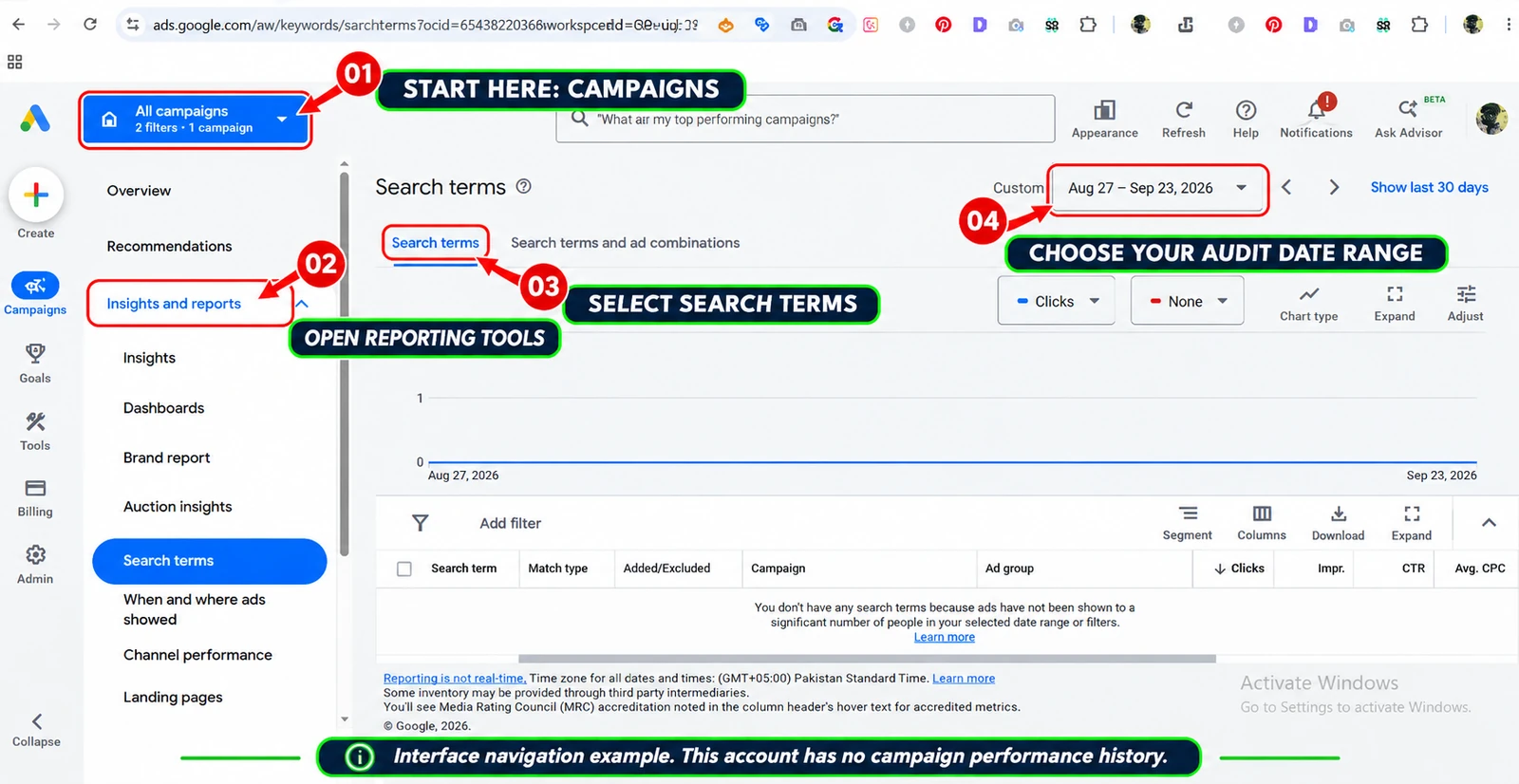
In Google Ads, open Campaigns, go to Insights and reports, and select Search terms. Choose the relevant date range and campaign or ad-group scope. Add columns such as Search term, Keyword, Match type, Clicks, Cost, Conversions and Conversion value where available.
What should you look for?
Imagine a business advertising professional bookkeeping services. Its ads might be triggered by searches such as:
- Free bookkeeping course.
- Bookkeeping jobs.
- Bookkeeping salary.
- Personal budgeting spreadsheet.
- Accounting software tutorial.
Those searches may be irrelevant if the business only sells outsourced bookkeeping services to small companies. But context matters: “bookkeeping software” might be irrelevant to a service provider or commercially useful to a business that offers software implementation.
Evaluate each search against the actual offer, target customer and campaign objective. Do not exclude a term simply because it contains an unexpected word.
Group keywords and search terms into intent cohorts
A useful way to make search-term analysis more consistent is to group related searches into cohorts before taking action. This prevents a single unusual query from driving a broad account change.
| Cohort | What to investigate | Possible decision |
| Brand searches | Existing demand, returning customers and the role of brand protection | Retain or assess incrementality separately |
| Non-brand commercial searches | New-customer acquisition, lead quality and allowable cost | Retain, improve or test |
| Informational searches | Whether the campaign is paying for research intent that does not fit the offer | Investigate or exclude where clearly irrelevant |
| Jobs, training and salary searches | Whether the business actually sells recruitment, education or career services | Exclude when unrelated to the offer |
| Competitor or alternative-brand searches | Policy, strategy, actual lead quality and economics | Review individually; do not assume all are waste |
| Broad or ambiguous searches | The specific query, ad, landing page and CRM outcome | Investigate before excluding |
The cohort labels are an analysis aid, not Google Ads match types or an automatic rule. A search that is informational for one business may be commercially valuable for another. The actual offer and outcome determine whether a query is useful.
Review the relevant columns
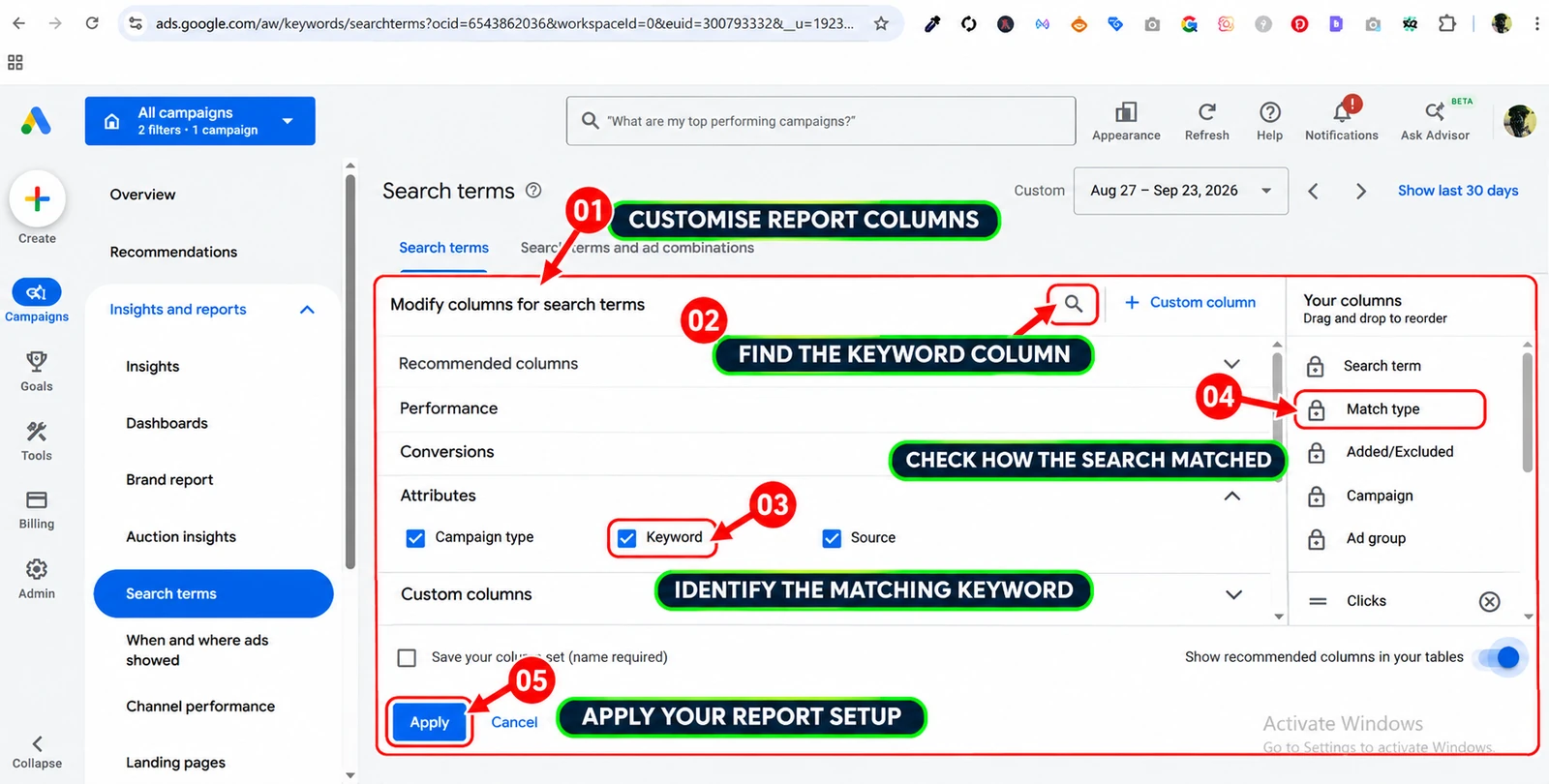
The Keyword column helps identify which account keyword triggered the search. It may need to be added manually. Match type adds context about how the search term related to the keyword, but it is not a complete explanation on its own.
Review the actual query alongside the campaign, ad group, ad, landing page, cost and business outcome. Where the report supports it, include conversion value and cost per qualified lead rather than relying only on the default conversion columns.
Understand the report’s limitations
The Search Terms report does not necessarily display every individual query. Some low-activity searches are omitted for privacy reasons or represented through broader categories in Search Terms Insights. Search Terms Insights groups search activity into themes and may present information differently from the row-level report.
A missing search term is not proof that no other search occurred. Use available data as evidence, but do not claim that it represents every search that triggered an ad. See Google’s Search Terms report guide and Search Terms Insights documentation.
If AI Max is enabled, inspect expanded matching and landing-page reporting
AI Max for Search campaigns adds controls that can affect which searches match and which landing pages receive traffic. If it is enabled, review the settings for search term matching, text customization, and Final URL expansion, along with any brand inclusions or exclusions and URL inclusions or exclusions. Then inspect the AI Max Search terms and ad-combinations reporting to understand the search terms, headlines and landing pages associated with the ad experience. Do not rely only on traditional keyword rows when evaluating AI Max traffic.
Google’s AI Max reporting can distinguish AI Max expanded matches from AI Max landing-page matches. Its reporting guidance recommends allowing at least two weeks after enabling AI Max before making non-urgent changes such as adding negative keywords, so the campaign has time to ramp up and produce usable evidence. That is a review recommendation, not a reason to ignore clearly harmful or policy-violating traffic. Google states that negative keywords continue to be respected when AI Max is enabled.
Add negative keywords carefully
When a search is clearly unrelated to the business, a negative keyword can help prevent future ads from appearing for searches matching that exclusion. However, negative keywords do not behave exactly like positive keywords. They do not automatically cover all singular and plural forms, synonyms or close variants. Google automatically accounts for casing and misspellings, but other variations may need separate review.
For example, a negative keyword for house may not block a search containing houses. Review negative match type and scope before applying an exclusion at the ad-group, campaign or account level. A broad list of exclusions can also block relevant demand if it is built from assumptions rather than actual query evidence.
For the implementation details, see the MarketLatch Google Ads negative keywords guide and Google’s official explanation of negative keywords.
Step 4: Review campaign settings, placements and account changes
A relevant search term can still be part of a poorly configured campaign. Examine settings that influence where, when and how ads are eligible to appear. The available reports differ by campaign type, so do not apply a Search campaign rule to Display, Video or Performance Max without checking the applicable reporting.
A. Check campaign networks
Review the campaign’s network settings and the performance available for relevant traffic sources. For Search campaigns, check whether Search Partners are enabled and whether the resulting traffic supports the campaign objective.
Compare cost, qualified conversions and business value where reporting permits. Do not assume that every network source performs identically, and do not disable a network solely because its average conversion rate is lower in a short reporting window.
B. Review location targeting
A campaign targeting a city or region may reach people physically there and, depending on the location option, people who have shown interest in that location. Google’s default Search location option generally reaches people in, regularly in or interested in the selected locations.
For a local service business that only serves a defined area, inspect whether the broader option is appropriate. Compare location signals with actual inquiries and customers before changing the setting. Location reporting relies on signals and is not guaranteed to identify every person’s exact physical location. Do not interpret every out-of-area impression or click as proof of faulty targeting.
See Google’s advanced location options before narrowing targeting.
C. Review placements and inventory where applicable
Placement-level investigation matters for campaign types and inventory where Google Ads provides placement reporting. Depending on the campaign, review relevant websites, apps, YouTube channels or videos, and other available inventory breakdowns.
Ask whether the placement fits the intended audience, whether the campaign goal is being measured correctly and whether the evidence supports an exclusion. One placement with few conversions is not automatically poor: it may have low volume, delayed conversions or an assist role. Check the placement’s cost, context, conversion quality and campaign objective before acting.
Do not assume every campaign type exposes the same placement controls or the same level of detail. For Search campaigns, the search query and keyword are usually the more direct starting point. For Display, Video and other eligible inventory, placement reporting can provide a different diagnostic view.
D. Inspect Change History
If performance changed suddenly, review the account’s Change History. Look for changes to budgets, bidding strategies, campaign structure, keywords, negative keywords, locations, audience settings, conversion goals, ads, assets and landing-page URLs.
Google Ads Change History lets you review account changes over the previous two years. Use it to establish what changed, when it changed and who made the change. The current interface provides a dedicated Change history page within the Campaigns menu. See Google’s account history guidance.
Also review which automated recommendations have been enabled for auto-application. Do not assume that an automated recommendation caused a performance problem without checking the actual change and its impact. See Manage auto-apply recommendations.
Review account access, administrative continuity and change responsibility
An audit should establish who can change campaigns and who is responsible for the measurement systems connected to them. In Google Ads, review the user list, access levels and pending invitations in Access and security. Check manager-account relationships and ownership where an agency manages the account, and document who is responsible for campaign settings, billing, conversion tracking, Tag Manager, Analytics and website changes. Use individual user access rather than shared logins, remove access that is no longer needed and make sure the account has an appropriate administrative backup. Google notes that relying on a single administrator can create a continuity risk if that person becomes unavailable.
For agencies using manager accounts, review the manager-account user and ownership settings as well. Access to Google Ads does not automatically mean someone controls the website, Google Tag Manager, Analytics property or billing profile; verify each system separately.
E. Check the complete message-to-page journey
The search query, keyword, ad message and landing-page offer should make sense together.
For example:
- Search query: emergency commercial plumbing repair.
- Keyword: commercial plumber.
- Ad: emergency commercial plumbing services.
- Landing page: commercial plumbing services with a clear emergency contact option.
If the ad promises emergency support but the page only provides a general contact form with no indication of emergency availability, the journey is inconsistent. Check the actual ad and page, not just the keyword list. A relevant keyword cannot compensate for an unclear offer or misleading message.
For a new Search campaign, the MarketLatch Google Ads Search Campaign Launch System is a related planning resource for organizing campaign structure, keywords, ads and pre-launch measurement checks. It complements this investigation guide; it does not replace the review of a live account.
F. Treat Quality Score as a diagnostic tool
Quality Score can help identify potential issues with expected click-through rate, ad relevance and landing-page experience. It is a diagnostic metric, not a business-performance KPI and not an input in the ad auction.
Do not try to improve a campaign simply to achieve a higher Quality Score number. Use its diagnostic components to investigate specific improvements, then evaluate actual results such as qualified leads, sales and cost efficiency. Google’s Quality Score explanation describes how to interpret it.
G. Separate brand and non-brand performance
Brand campaigns can produce strong reported conversion rates because they capture people already searching for the business by name. That can be valuable, but high branded ROAS does not automatically prove that a campaign generated incremental demand. Some users may already have intended to visit or buy from the business.
Report brand and non-brand campaigns separately. Examine their different roles and avoid using branded performance alone to justify the economics of non-brand customer acquisition. Attribution answers which interactions received credit under the selected model; it does not by itself establish how many conversions would have happened without the ad.
Where brand incrementality is commercially important and the account is eligible, a controlled Conversion Lift study or other credible holdout design can estimate the additional conversions driven by advertising by comparing an exposed group with a control group. Google’s lift-study guidance describes Brand Lift, Search Lift and Conversion Lift, but these tools are not available to every advertiser. If no suitable experiment has been run, describe incrementality as unmeasured rather than presenting attributed branded ROAS as proof that the campaign created new demand.
Step 5: Investigate device, schedule and audience performance
Review how performance differs across devices, days, times and relevant audience segments. A mobile campaign may receive substantial traffic but perform poorly if the landing page is difficult to use on a phone. A campaign may also generate inquiries outside the hours when the business can respond.
Check:
- Device-level cost and qualified-lead outcomes.
- Day-of-week and time-of-day performance.
- Whether phone calls can be answered during advertised hours.
- Whether the website and forms work correctly on mobile.
- Whether audience settings match the actual customer profile.
- Whether a segment has enough volume and conversion history to justify a decision.
Do not make a large exclusion based on a small sample. A device or time period with fewer conversions may still be important if volume is low or the conversion cycle is longer. Use business outcomes and a representative period to support changes.
Step 6: Examine budgets, bidding and impression share
A campaign using its full daily budget is not automatically wasting money. A campaign with a high CPC is not automatically inefficient either. The business needs to understand what the spend is buying and what amount is actually billed.
Check daily budget and billed cost
For most campaigns, Google Ads can serve up to twice the average daily budget on a particular day to respond to traffic fluctuations. The monthly spending limit is generally 30.4 times the average daily budget. Campaign-specific exceptions can apply, so check the account’s applicable billing rules rather than assuming the same limit applies universally.
A single day’s spend should not be compared with the average daily budget without understanding overdelivery. Google distinguishes served cost—the cost of all clicks or impressions received—from billed cost, the amount actually payable after applicable adjustments and limits.
Where appropriate, use the Billed cost report in Report editor to compare served and billed cost. Subtract billed cost from served cost to understand the adjustment. A difference caused by the platform’s spending limit or invalid-activity adjustments is not the same thing as a targeting failure. See Google’s overdelivery and average daily budget guidance and spending-limit explanation.
Do not judge the campaign by CPC alone
A high CPC may be justified when a click has a realistic chance of producing a profitable customer. A low CPC may still be expensive in business terms if it produces irrelevant inquiries.
Evaluate the relationship between CPC, conversion rate, cost per qualified lead, lead-to-customer close rate, customer value and allowable acquisition cost. The objective is not necessarily to find the cheapest click. It is to acquire valuable customers at an economically sustainable cost.
Use impression share as context
Search impression share helps explain how often a campaign received impressions compared with the estimated opportunities available to it. Lost impression share due to budget or rank can provide context for campaign delivery.
However, low impression share is not evidence of waste by itself, and high impression share does not prove profitability. Use it to understand coverage and constraints, not as a substitute for qualified-lead or sales analysis.
Step 7: Investigate Performance Max with the correct evidence
Performance Max can serve across Google’s available channels and inventory. Campaign-level totals remain important, but they may not explain where the campaign is engaging users or how channels contribute to the stated conversion goals.
Where the channel performance report is available, review the campaign-level summary alongside its channel breakdown. Check the selected date range, conversion goals, cost, conversions, conversion value and the type of interactions being reported. Google’s Channel performance report documentation explains the current reporting view.
Ask:
- Which channels are contributing to the campaign’s reported goals?
- Are the conversion actions meaningful to the business?
- Are conversions qualified and commercially useful?
- Do assets and landing pages match the intended audience?
- Has the campaign recently undergone significant changes?
- Does the reporting period account for conversion delay?
Do not compare average channel CPA or ROAS as though each channel were an independent campaign. Performance Max evaluates targets across the campaign and considers marginal return: the incremental value expected from the next unit of spend. A channel with a lower average return may still offer a stronger marginal return on the next dollar. This is one reason a channel with a higher average CPA is not automatically wasting money. See Google’s channel performance troubleshooting guidance.
Do not assume a low Search Terms report conversion count proves that Performance Max is wasting money. The campaign can serve through multiple channels, and available reporting is not identical to a Search-only campaign. Use the complete campaign objective and business outcome when deciding what to change.
Step 8: Check landing-page performance and lead quality
Not every poor campaign outcome begins inside Google Ads. A visitor may arrive through a relevant search and click a relevant ad, but the website may fail to turn that visit into an inquiry.
Review the landing page from the visitor’s perspective.
Message match: Does the page deliver what the ad promised?
Offer clarity: Can the visitor quickly understand the service, price context, location or next step?
Mobile experience: Does the page work properly on a phone? Are buttons, forms and contact details easy to use?
Trust: Does the page provide credible information and enough detail for someone to feel comfortable enquiring?
Functionality: Do forms submit correctly? Are confirmation messages displayed? Do calls and booking links work?
Lead qualification: Does the form attract the right type of prospect, or does it create inquiries the business cannot serve?
Sales follow-up: Are inquiries contacted promptly and consistently? Are missed calls, unassigned leads or delayed replies being recorded as advertising failures?
A campaign can have a reasonable click-through rate and still produce poor business outcomes because the landing page, offer or sales process is weak. Do not exclude good traffic before checking the experience that follows the click.
For lead-generation businesses, compare Google Ads conversions with CRM outcomes. Where the measurement setup supports it, import qualified leads or sales so the bidding system can learn from outcomes closer to revenue rather than treating every form submission as equally valuable. This requires a properly configured offline conversion or enhanced-conversions workflow; a CRM export alone does not update Google Ads bidding.
Connect lead stages to conversion values when the measurement supports it
A raw inquiry, a qualified lead, a sales opportunity and a paying customer are different outcomes. Define each stage in the CRM and apply the qualification rules consistently. Where the implementation, consent basis and data quality support it, import qualified-lead or converted-lead actions rather than treating every form submission as equally valuable. Google documents dedicated Qualified lead and Converted lead conversion actions for CRM-based measurement.
Conversion values can help distinguish outcomes with different business value, but they should reflect a defensible business model rather than arbitrary numbers. Google’s conversion-value best practices recommend choosing a single stage in the lead-to-sale journey for bid optimization and balancing value accuracy, conversion delay and volume. Google’s Target ROAS requirements for Search and Shopping campaigns specify at least 15 conversions in the past 30 days at the conversion-tracking level. Other campaign types have different eligibility thresholds, so treat these figures as platform eligibility guidance, not a guarantee of performance or a universal requirement for every campaign. Do not move to value-based bidding until values are reliable, consistently uploaded and aligned with the stage the campaign is optimizing for.
Step 9: Understand invalid clicks before alleging click fraud
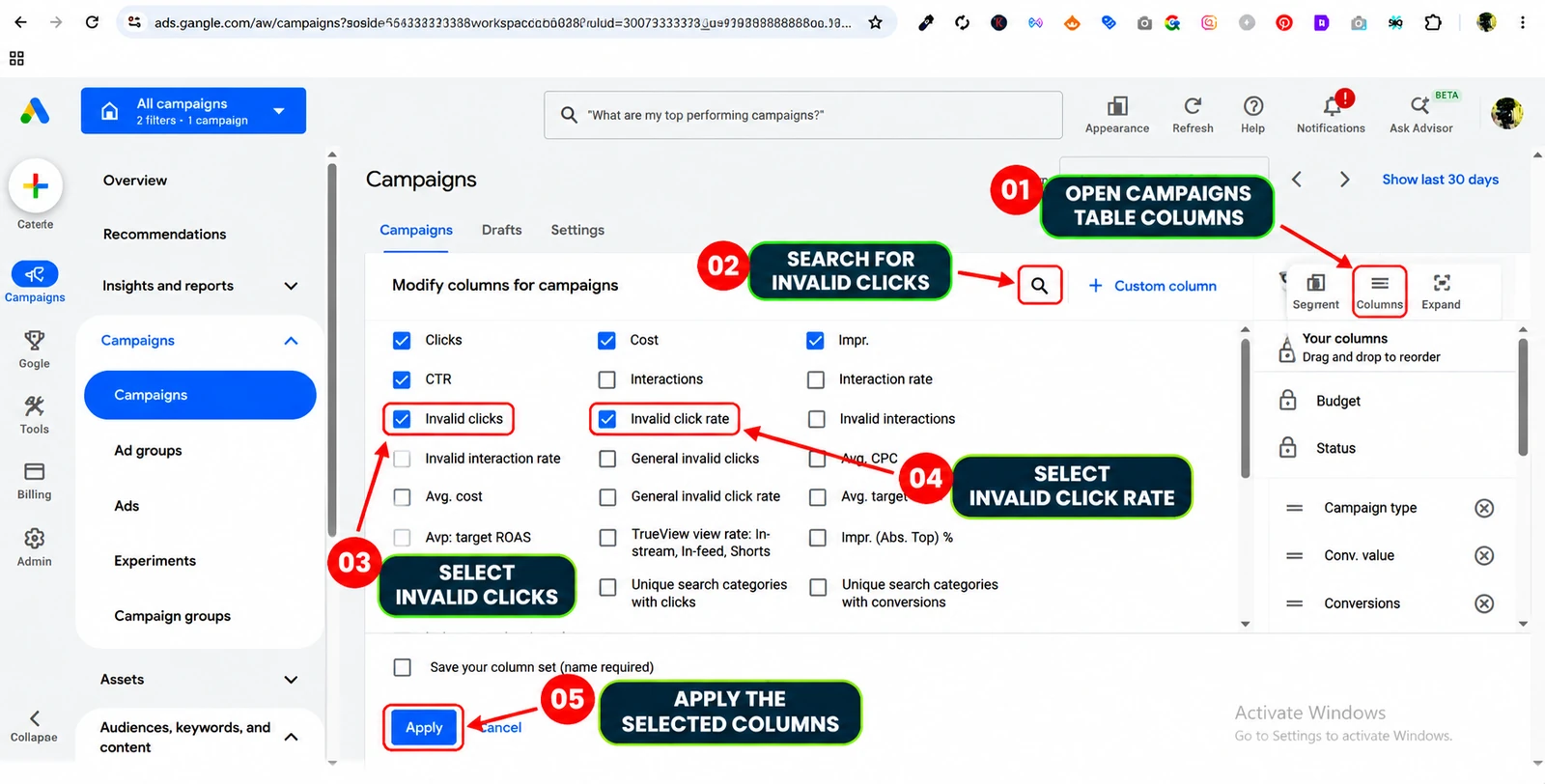
Google Ads filters invalid clicks and does not charge advertisers for clicks it identifies as invalid. The Invalid clicks and Invalid click rate columns show activity Google has already filtered. A high number of invalid clicks does not automatically prove that the remaining billed clicks are fraudulent; it may show that Google’s systems are filtering activity.
If you suspect invalid traffic that was not automatically filtered, collect relevant account and traffic evidence. Google provides an investigation process for eligible activity within a 60-day window. The investigation process does not guarantee a credit, and Google does not disclose every click-level determination because that could expose its detection systems.
Do not label traffic as fraud based only on repeated IP addresses, unusual click patterns or a third-party tool’s automated flag. Those signals can justify investigation, but they do not independently prove that Google charged for invalid activity. See Google’s invalid traffic guidance.
The MarketLatch Evidence-to-Action Method: From findings to verified decisions
Finding a concerning metric is only the beginning of an audit. The next task is to decide what the evidence proves, estimate its business impact, choose an appropriate response and check whether the response worked.
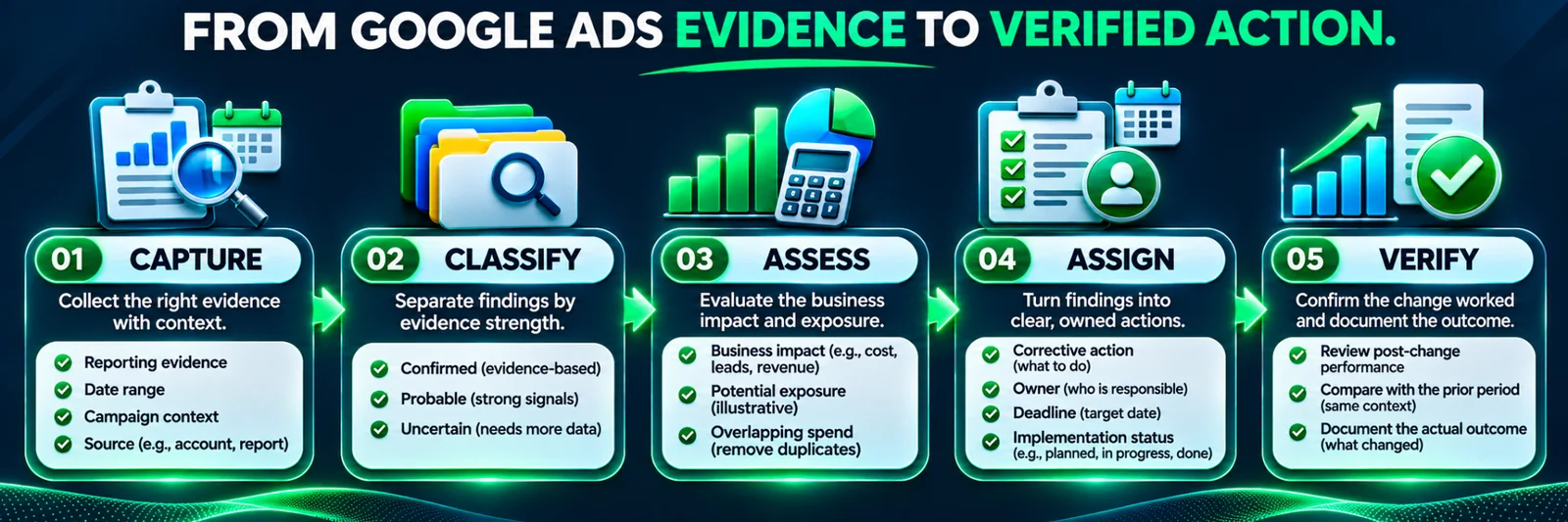
The MarketLatch Evidence-to-Action Method uses five stages:
Capture → Classify → Assess → Assign → Verify
This is an editorial audit framework for organizing investigation and decisions. It is not an automated Google Ads feature. It does not independently identify waste, change campaigns or verify savings.
1. Capture: Record the evidence
Record enough information for another person to understand and reproduce the finding. For each issue, capture:
- Account and campaign scope.
- Date range and reporting source.
- Search term, keyword, setting, conversion action, placement or landing page involved.
- Relevant cost, clicks, conversions and business outcomes.
- Screenshot, export, CRM record or test result supporting the finding.
- Known limitations in the available data.
A finding without a source, date range or account context is difficult to verify. A screenshot without the reporting period may create confusion when the issue is revisited.
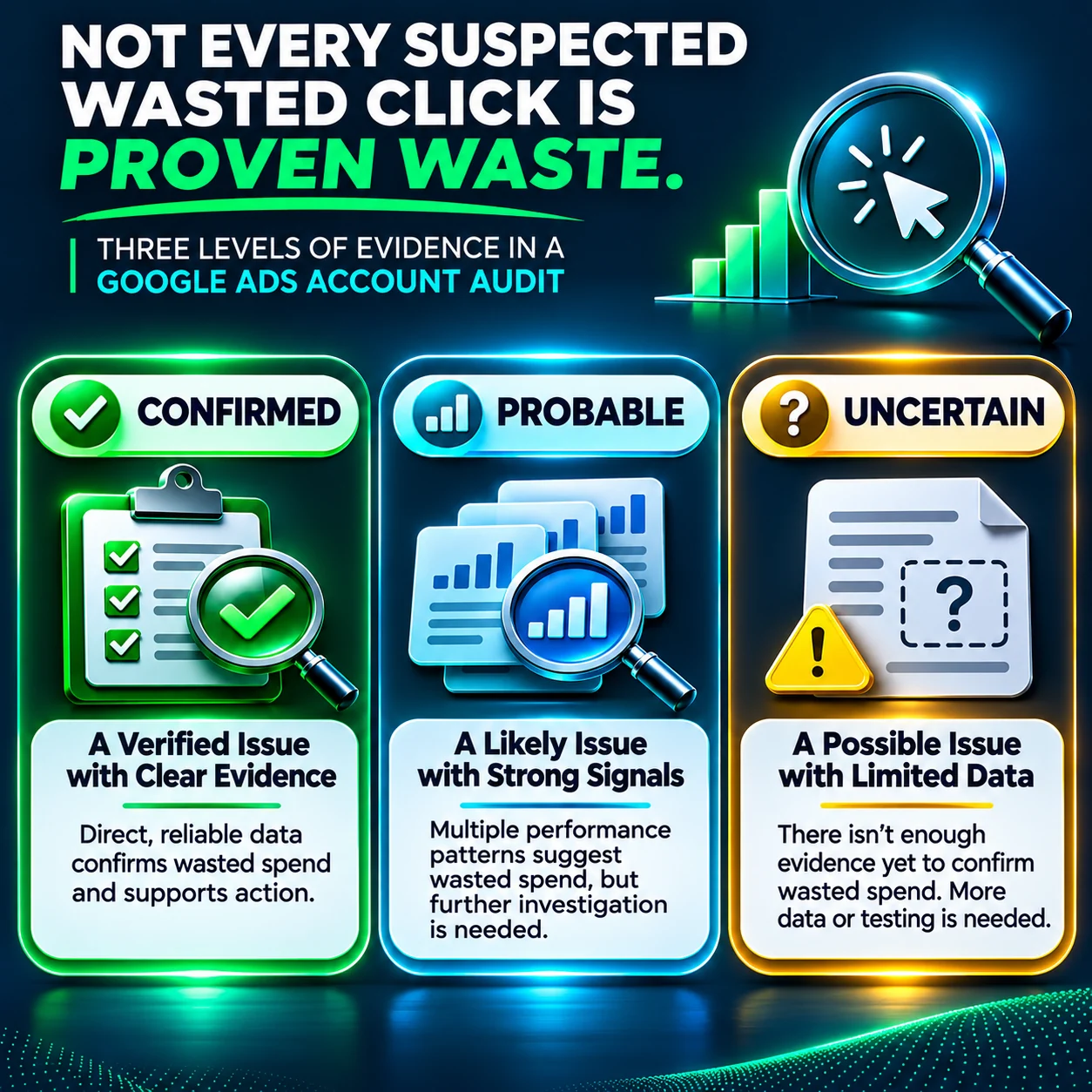
2. Classify: Separate confirmed, probable and uncertain findings
Use three evidence categories.
| Classification | Meaning | Example |
| Confirmed | Directly supported by reliable evidence | A documented form test shows the advertised inquiry form fails to submit during the review period |
| Probable | Evidence points towards an issue, but an important part remains unverified | Several relevant-looking searches produce weak leads, but CRM qualification records are incomplete |
| Uncertain | The available data is insufficient for a reliable conclusion | Recent clicks have no recorded conversions, but the conversion cycle has not matured |
This classification prevents the audit from treating every suspicious metric as a confirmed financial loss. Confirmed findings can move towards corrective action. Probable findings need targeted investigation. Uncertain findings need monitoring or better data.
3. Assess: Estimate unique expenditure and business impact
Do not calculate suspected waste by adding every concerning report, category or finding. The same expenditure may appear in multiple analyzes. A search-term issue may also appear in a campaign-level performance review. Counting both totals as separate losses overstates the amount.
Use underlying records to identify genuine overlap. Where exports provide suitable row-level detail, use consistent identifiers and fields such as date, campaign, ad group, search term or placement, and cost to trace duplicate observations. Only subtract expenditure when the overlap is supported by identifiable records or another defensible method. If the overlap cannot be demonstrated, show separate totals or a range instead of inventing a deduction.
A useful distinction is:
- Unique observed spend: The expenditure in the review population after demonstrable overlap is removed.
- Potentially avoidable exposure: The estimated portion of that unique spend linked to confirmed or probable issues and reasonably considered avoidable.
- Actual savings: A result that can only be assessed after a correction and subsequent measurement. It is not automatically equal to potential exposure.
Worked example: Avoid counting the same expenditure twice
Assume two investigation groups contain the following observed expenditure:
| Investigation group | Observed spend |
| Group A | $900 |
| Group B | $600 |
| Verified overlapping spend | −$350 |
| Unique observed spend | $1,150 |
The calculation is:
$900 + $600 − $350 = $1,150
The $350 deduction is valid only because this illustration assumes the same underlying expenditure has been identified in both groups. Do not subtract two similar-looking report totals simply because they appear related.
Now assume the reviewer has examined the unique spend and estimated the portion plausibly avoidable under each evidence category:
| Evidence category | Estimated potentially avoidable exposure |
| Confirmed issue | $300 |
| Probable issue | $160 |
| Uncertain expenditure | $690 of the remaining observed spend, not counted as potential exposure |
| Unique observed spend | $1,150 |
For this illustration, confirmed and probable exposure together equal:
$300 + $160 = $460
$460 ÷ $1,150 = 40%
The $460, or 40% of unique observed spend, is an illustrative potential-exposure estimate. It is not a Google Ads reporting metric, industry benchmark, guaranteed saving or promise that the business can recover $460.
The calculation also assumes the $300 and $160 figures already represent the estimated avoidable portions attributable to the findings—not every dollar spent in the campaigns or categories that were reviewed. A confirmed issue does not automatically make all associated campaign spend avoidable. For example, a form may have failed for only part of the review period. The expenditure connected to the verified failure must be isolated before its financial impact is estimated.
The $690 uncertain balance remains outside the potential-exposure calculation. It requires better evidence. Do not add it to confirmed waste simply to create a larger headline figure.

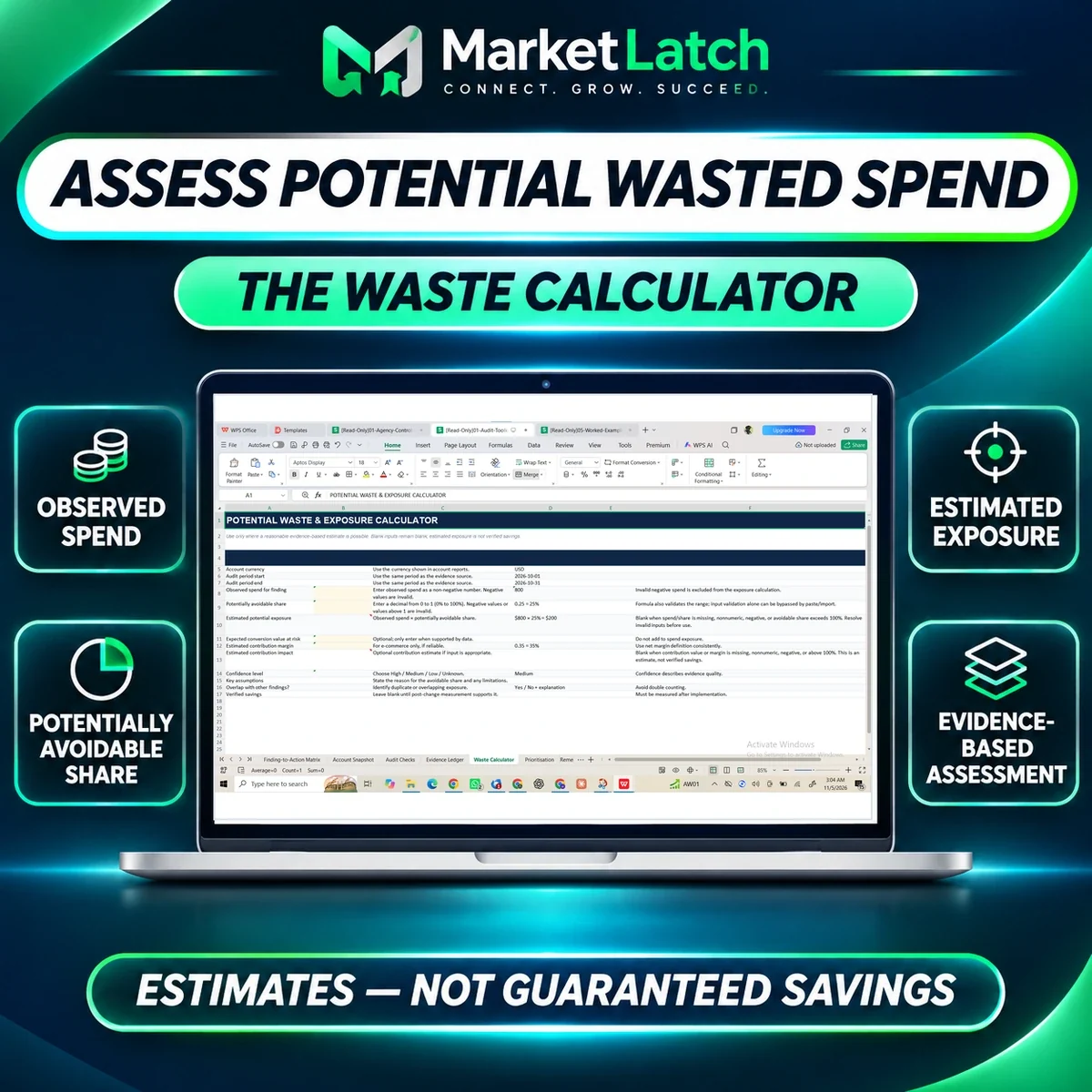
A manual calculator can help organize observed expenditure and the reviewer-assessed potentially avoidable share. It does not decide that share automatically; the reviewer must support each input with evidence.
4. Assign: Choose a proportionate action
Once a finding is classified and assessed, decide what should happen next.
- Exclude: Prevent clearly irrelevant or unsuitable traffic from recurring.
- Repair: Fix a verified technical or configuration problem, such as a broken conversion path.
- Investigate: Collect missing evidence before making a larger change.
- Monitor: Allow an appropriate period for data or conversions to mature.
- Retain: Keep activity that is performing acceptably or has a justified role in the campaign.
Assign an owner, priority, intended result and review date. Record the reason for the decision. Avoid making several unrelated changes at once unless an urgent business or technical issue requires it. When practical, isolate changes so their effects can be evaluated more clearly.
5. Verify: Check whether the action improved the result
A completed change is not proof of a successful correction. After implementation, compare performance with a suitable baseline. Consider:
- Whether the original issue stopped occurring.
- Whether irrelevant spend or technical failures decreased.
- Whether qualified leads or sales improved.
- Whether cost per qualified lead moved towards the business target.
- Whether the change created a negative side effect elsewhere.
- Whether enough time has passed for the conversion cycle to mature.
Document the outcome as improved, unchanged, worsened, or inconclusive. If the result is inconclusive, keep investigating rather than claiming that the problem has been fixed. The audit is complete only when the business can explain what was found, what changed and what happened afterwards.
A complete example: From an irrelevant search to a verified decision
Consider a fictional bookkeeping firm that sells outsourced bookkeeping to small businesses. Its Search campaign receives a search for “bookkeeping jobs.” The query is not aligned with the firm’s service offer.
Capture: The reviewer records the search term, campaign, date range, clicks, cost, match type, ad and landing page. The CRM is checked to determine whether the query produced any genuine prospective customers.
Classify: If the query is clearly employment-related and the firm does not provide recruitment services, the relevance issue can be classified as confirmed. If the CRM data is unavailable, the cost may be known but the business outcome remains incomplete.
Assess: The reviewer isolates the expenditure associated with that search-term finding. If the same cost has already been included in another report-level finding, the amount is counted only once. The review does not assume that all campaign expenditure is avoidable.
Assign: The reviewer adds an appropriate negative keyword at the narrowest suitable scope, checks whether the exclusion could block relevant searches and records an owner and review date.
Verify: After the change, the reviewer checks whether the irrelevant query recurs, whether relevant searches remain eligible and whether qualified-lead performance changes over a suitable period.
This is an illustrative workflow, not a real MarketLatch client case or a claim that a particular amount was saved. It shows how a finding becomes a documented decision rather than an assumption based on a single metric.
How to prevent wasted Google Ads spend from returning
A one-time investigation can identify problems, but it does not guarantee they will not recur. Build a recurring review routine around the evidence that matters.
Weekly: Review material search-term changes, spend anomalies, conversion tracking alerts, placements where relevant, and significant account changes. Prioritize issues with a clear business impact.
Monthly: Compare campaign performance with qualified leads, sales, allowable acquisition cost and the previous period. Review targeting, devices, landing pages, brand versus non-brand performance and negative-keyword coverage.
After significant changes: Test conversion actions, forms, calls, landing pages, campaign goals and bidding settings. Record the baseline and monitor the result over an appropriate conversion cycle.
Periodically: Review account access, auto-applied recommendations, Change History, conversion definitions and the business’s actual product or service offering.
The goal is not to change campaigns constantly. It is to identify meaningful problems early, respond proportionately and verify whether the response improved the business outcome. Businesses that need ongoing campaign review can explore MarketLatch Google Ads management.
How the MarketLatch Wasted Spend Finder™ supports the audit process
A structured investigation becomes difficult to manage when evidence, findings, priorities and corrective actions are scattered across separate spreadsheets and notes.
The MarketLatch Google Ads Audit Template and Wasted Spend Finder™ provide manual workbook resources for documenting and organizing this work.
Tier 2: Audit the account and document evidence
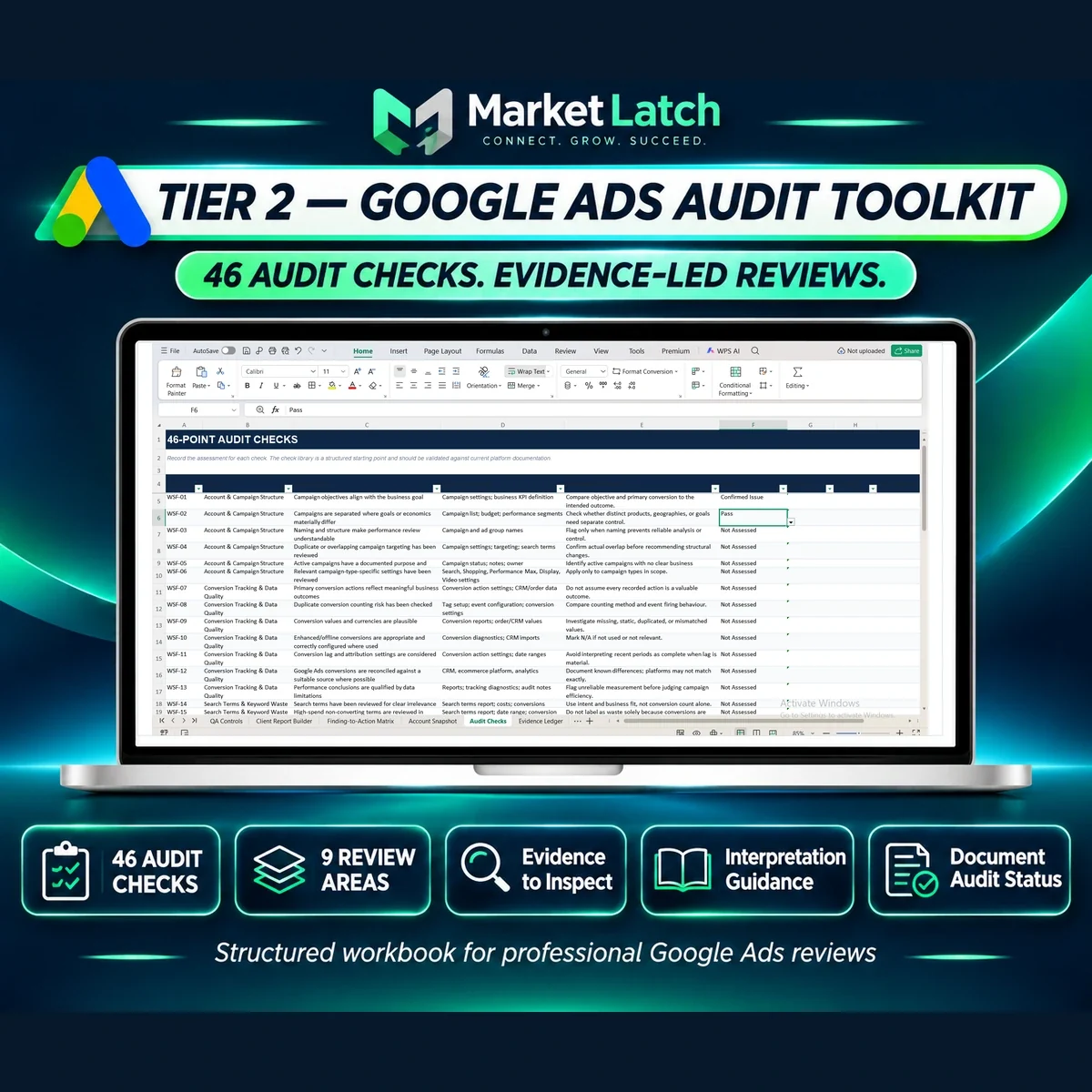
The Tier 2 Audit Toolkit includes 46 review prompts across nine audit areas, organized across 14 workbook tabs in seven files. Its resources include:
- Audit Checks for a structured account review.
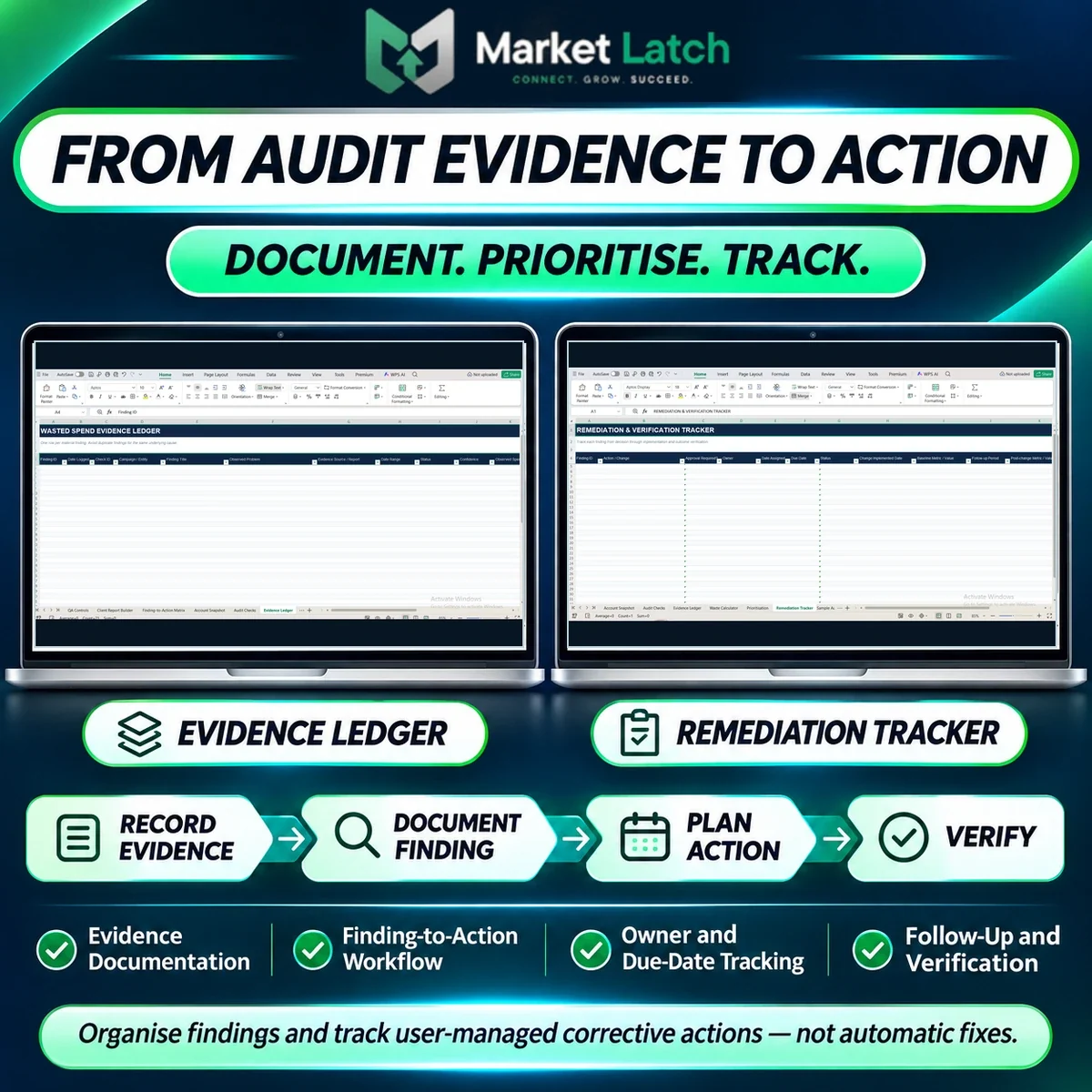
- An Evidence Ledger for recording findings and supporting evidence.
- A Waste Calculator for estimating potential exposure using user-entered assumptions.
- Prioritization and Finding-to-Action resources.
- A Remediation Tracker for recording corrective work.
Tier 3: Manage findings, action owners and follow-up
The Tier 3 Agency Control Center adds 10 workbook tabs across five files for managing multiple clients, audits, findings, actions and reporting workflows. The complete bundle combines both packages into 12 files.
The Tier 3 registers are designed with defined working capacities: the Client Register and Audit Register each accommodate up to 100 records, while the Findings Register and Action Tracker each accommodate up to 200 records. The dashboard displays the first 25 client rows. These are workbook capacities, not a promise of unlimited automated client management.
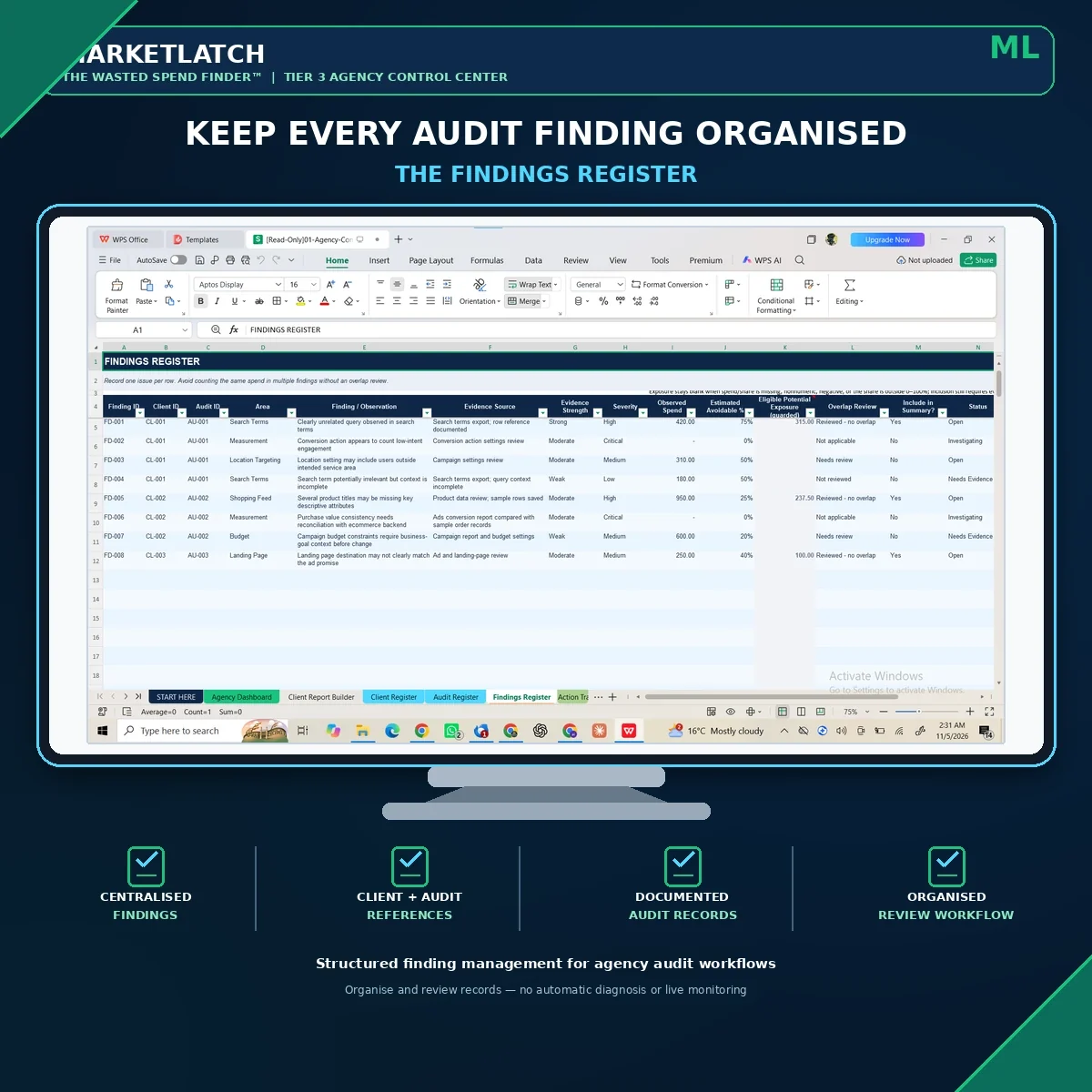
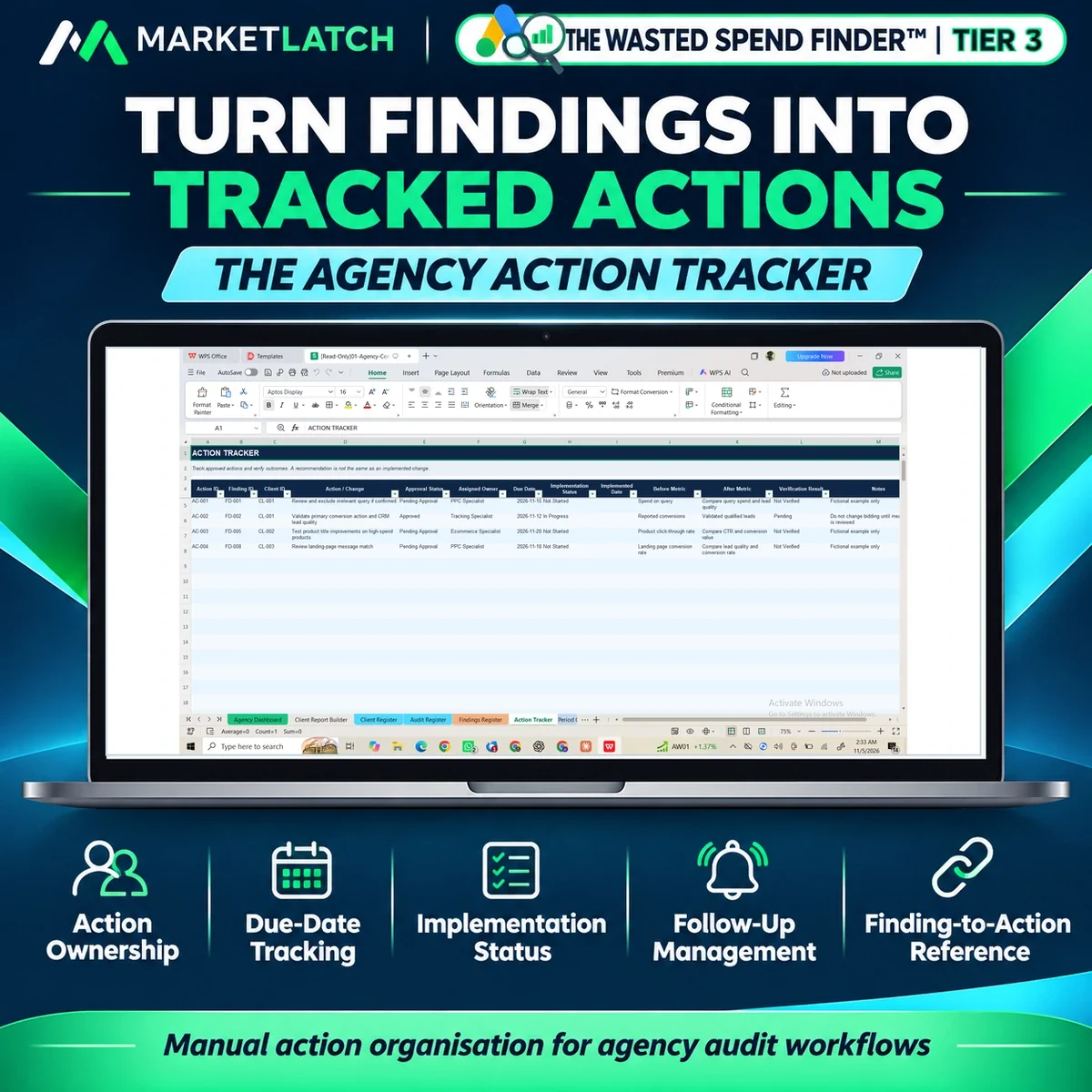
The workbooks are manual resources for Excel and Google Sheets. They do not connect directly to a live Google Ads account, automatically inspect campaigns, independently classify evidence, reconcile every overlapping record, change campaign settings or verify savings. Reviewers supply and validate the data, decide which findings justify action, enter the calculator assumptions and manage implementation. The calculator organizes those inputs; it does not decide what share of spend is avoidable or prove that the estimate is recoverable money.
For recurring client or campaign reporting, the separate Google Ads reporting template provides a structured way to organize campaign results and recommendations. It complements the audit workflow but is not a substitute for investigating evidence or validating business outcomes.
The workbook supports documentation and organization; professional analysis, approval and follow-up remain the reviewer’s responsibility.
The complete Wasted Spend Finder master bundle
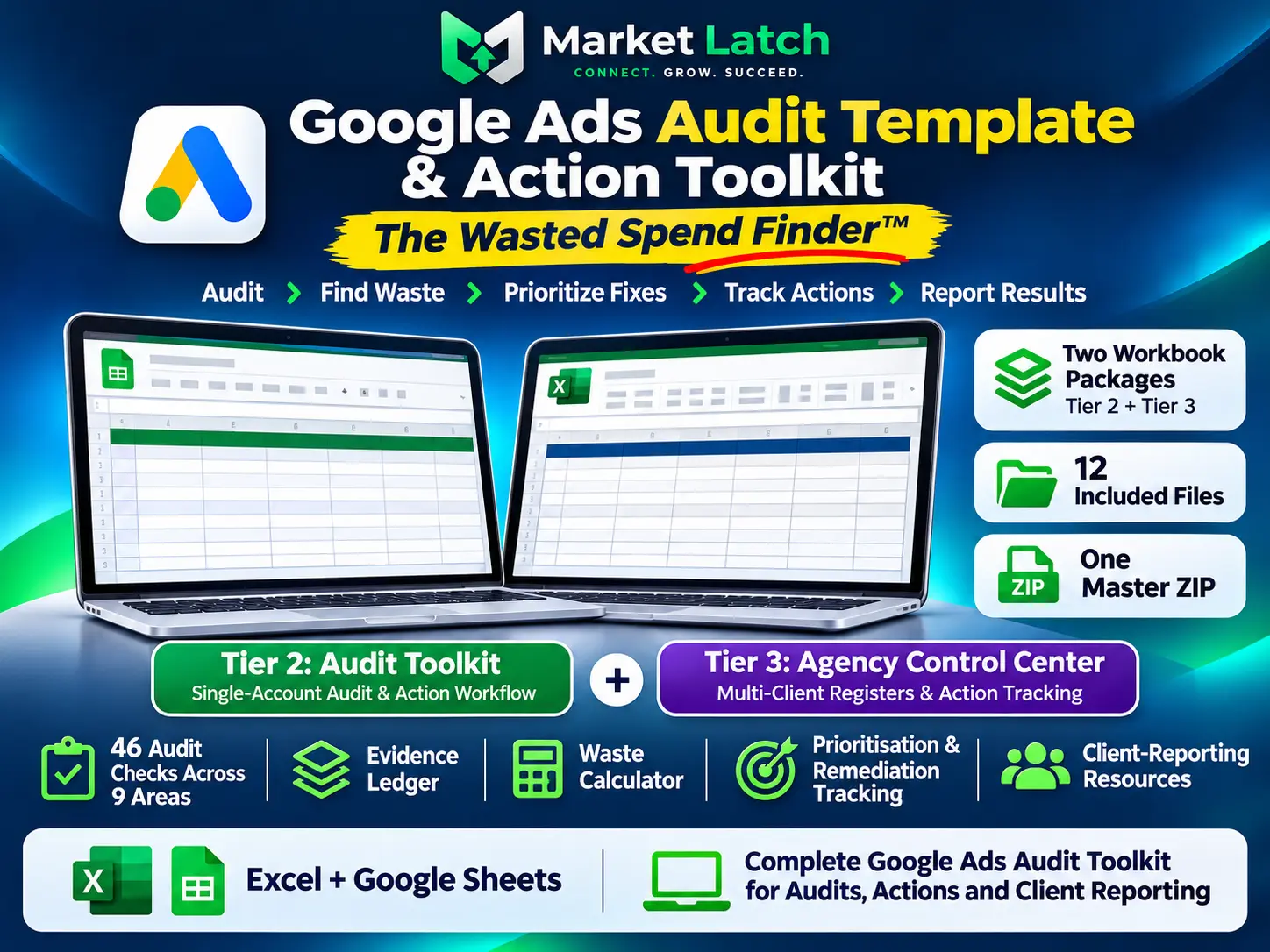
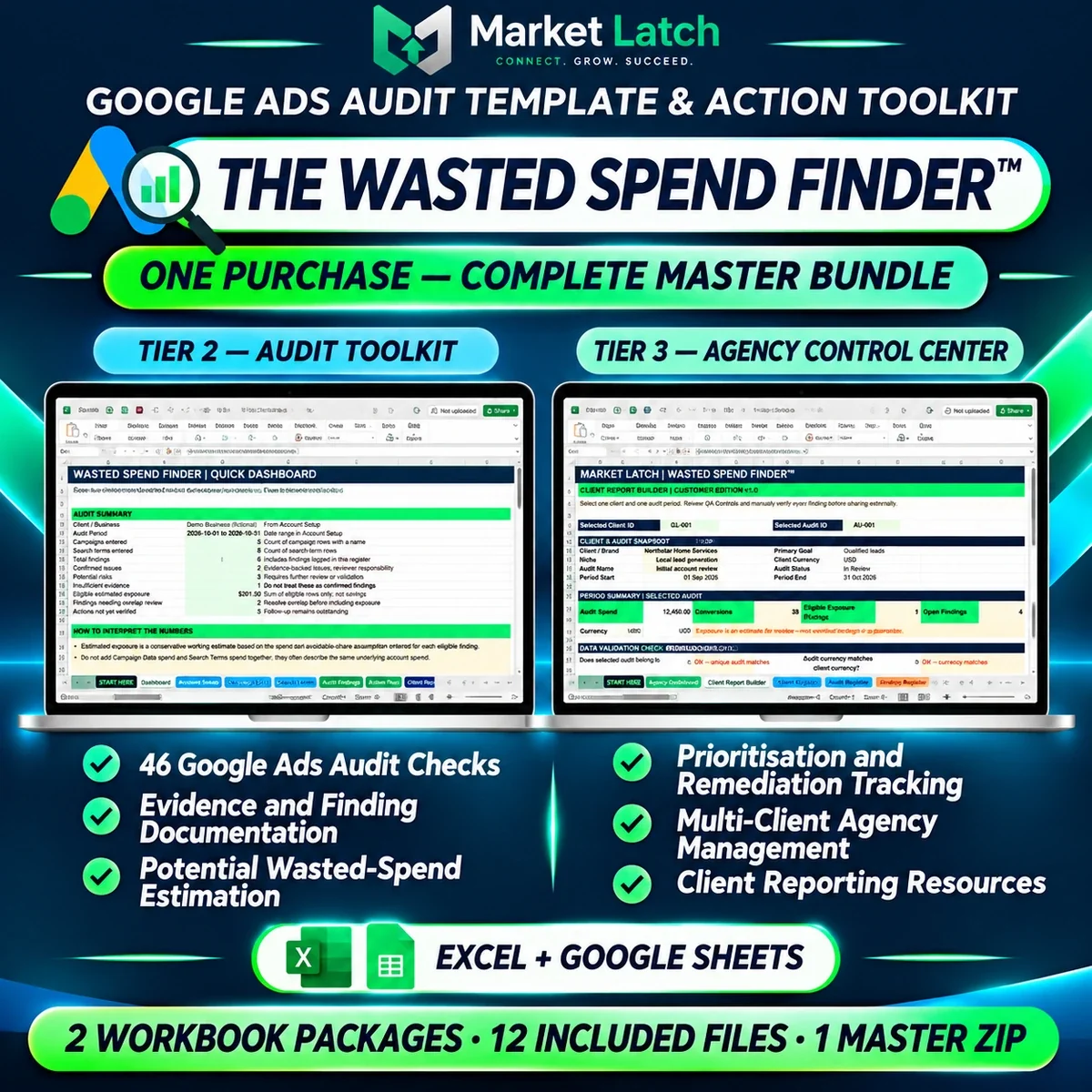
For teams that need both a structured single-account review and repeatable agency workflows, the master bundle combines the Tier 2 Audit Toolkit and Tier 3 Agency Control Center in one purchase. Together, the two packages contain 12 files covering audit checks, evidence records, potential-exposure assessment, prioritization, client and audit registers, findings, action tracking and reporting resources. The bundle remains a manual Excel and Google Sheets workflow: reviewers supply and validate the data, make decisions and manage implementation.
Frequently asked questions about wasted Google Ads spend
How do I know if Google Ads are wasting money?
Look for evidence of irrelevant search traffic, broken conversion paths, unsuitable targeting, misleading conversion tracking or expenditure that cannot be justified by qualified leads and customer outcomes. Confirm the issue and estimate its impact before classifying the spend as waste.
How do I fix wasted spend in Google Ads?
Validate conversion tracking first, then investigate search terms, campaign settings, location targeting, placements where relevant, landing pages, bidding and lead quality. Classify each finding, prioritize proportionate changes and verify the outcome using a suitable comparison period.
Why are my Google Ads getting clicks but no leads?
Possible causes include irrelevant search intent, weak ad-to-page relevance, a broken form, poor mobile experience, an unclear offer, missing tracking or a longer conversion cycle. Check the complete journey before deciding that the clicks themselves are wasted.
Why are my Google Ads not converting?
First, check whether the correct conversion action is configured and recording correctly. Then inspect search intent, landing-page experience, conversion delay, bidding objectives and traffic quality. A tracking issue can hide conversions that are actually happening.
How do I find the Google Ads Search Terms report?
Open Campaigns, go to Insights and reports, and select Search terms. Choose the appropriate date range and campaign scope, then review queries alongside cost, clicks, conversions, keyword and match type where available.
What does the Google Ads Search Terms report show?
It shows searches that triggered ads and had sufficient activity to appear in the report. Some low-activity queries may be omitted for privacy reasons. Search Terms Insights can provide grouped themes and additional context.
How can I reduce wasted Google Ads spend on irrelevant clicks?
Review actual search terms, identify queries that do not match the business’s offer and add appropriate negative keywords. Also review match behavior, networks, locations and landing-page relevance. Check the effect after making changes.
How many clicks without a conversion should make me pause a keyword?
There is no universal click threshold that reliably identifies wasted spend. The decision depends on conversion probability, expected lead value, conversion delay, tracking reliability, sample size and allowable acquisition cost. Use those factors instead of relying on an arbitrary number.
Does a high CPC mean Google Ads are wasting money?
No. A high CPC can be commercially reasonable when the traffic generates valuable customers at an acceptable acquisition cost. A low CPC can still be inefficient if it produces irrelevant clicks or unqualified leads.
How do I calculate potential wasted Google Ads spend?
Identify unique expenditure associated with confirmed and probable issues, remove only demonstrable overlap between records and keep uncertain expenditure separate. Estimate the portion that could reasonably have been avoided. The result is potential exposure, not automatically recoverable money or guaranteed savings.
Author and methodology

Written by Nadeem Alam, Founder of MarketLatch. His practical work spans digital marketing, Google Ads campaign planning, measurement and troubleshooting workflows. The diagnostic perspective in this guide is reflected in the sequence used to review an account: test whether the intended event fires, trace how it is reported, compare it with CRM outcomes, review query and landing-page relevance, and document the decision. See the MarketLatch team page for additional company and author context.
The guide combines current Google Ads documentation with the MarketLatch Evidence-to-Action framework. The screenshots in this article are interface-navigation or configuration demonstrations and workbook previews; they are not presented as client-account performance evidence. The financial calculations are clearly labelled illustrations, not verified client results. No guaranteed savings or fabricated performance outcomes are claimed. The author’s first-hand perspective informs the audit sequence and practical interpretation, but this guide does not claim a measured client case study.
Nadeem also authored the Generative Engine Optimization Book, AEO Masterclass Guide, and AI SEO Implementation Checklist 2026. His training and certifications include Google Digital Garage, Semrush Academy, Coursera, uConnect, and Virtual University (DigiSkills).
Final takeaway
Finding wasted Google Ads spend isn’t about pausing every keyword with no conversions, chasing the lowest CPC, or treating every unusual metric as a loss. It is about establishing reliable measurement, understanding the customer journey, investigating evidence, estimating unique financial exposure, choosing a proportionate correction and verifying what changed. Measure before you judge. Investigate before you exclude. Verify before you claim savings.