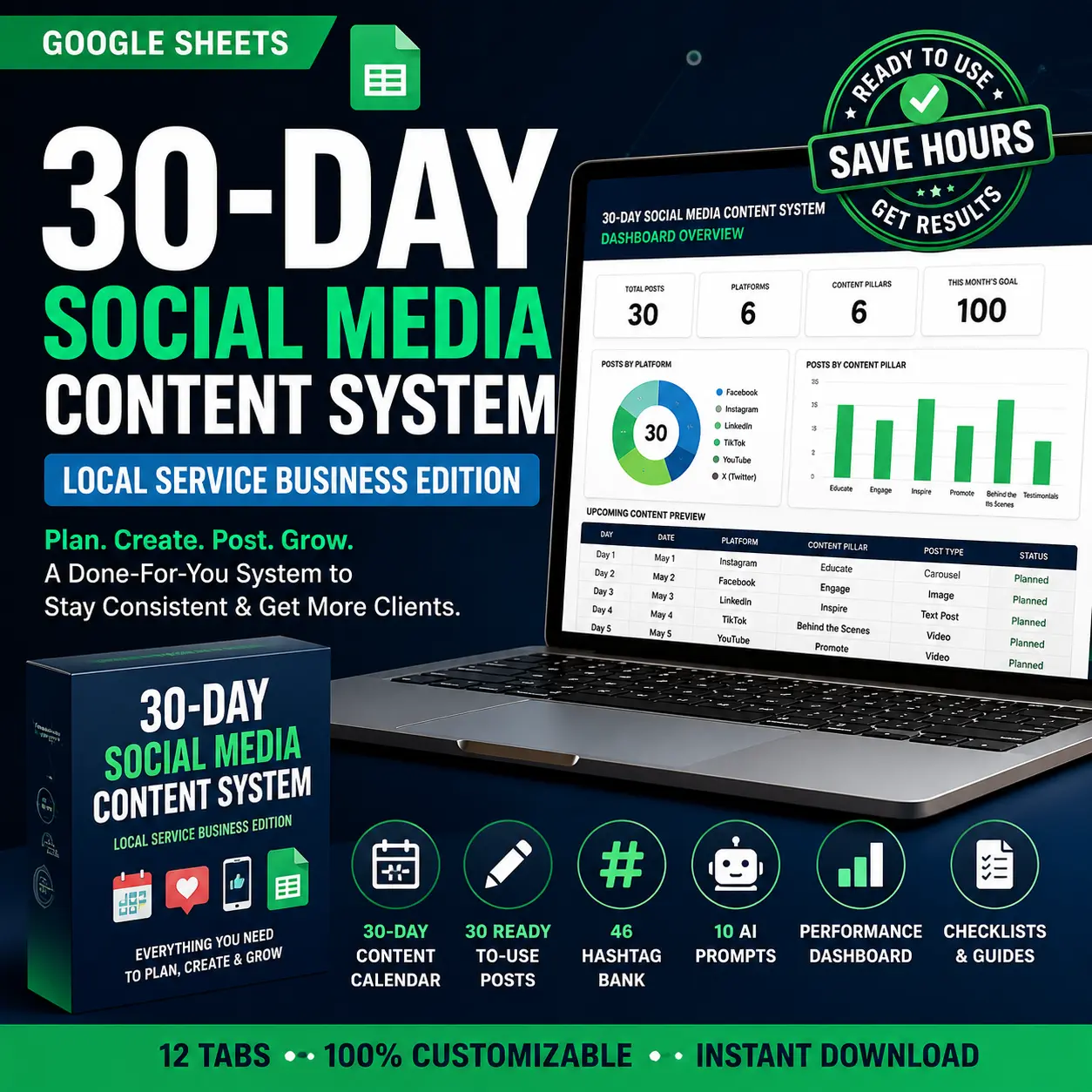
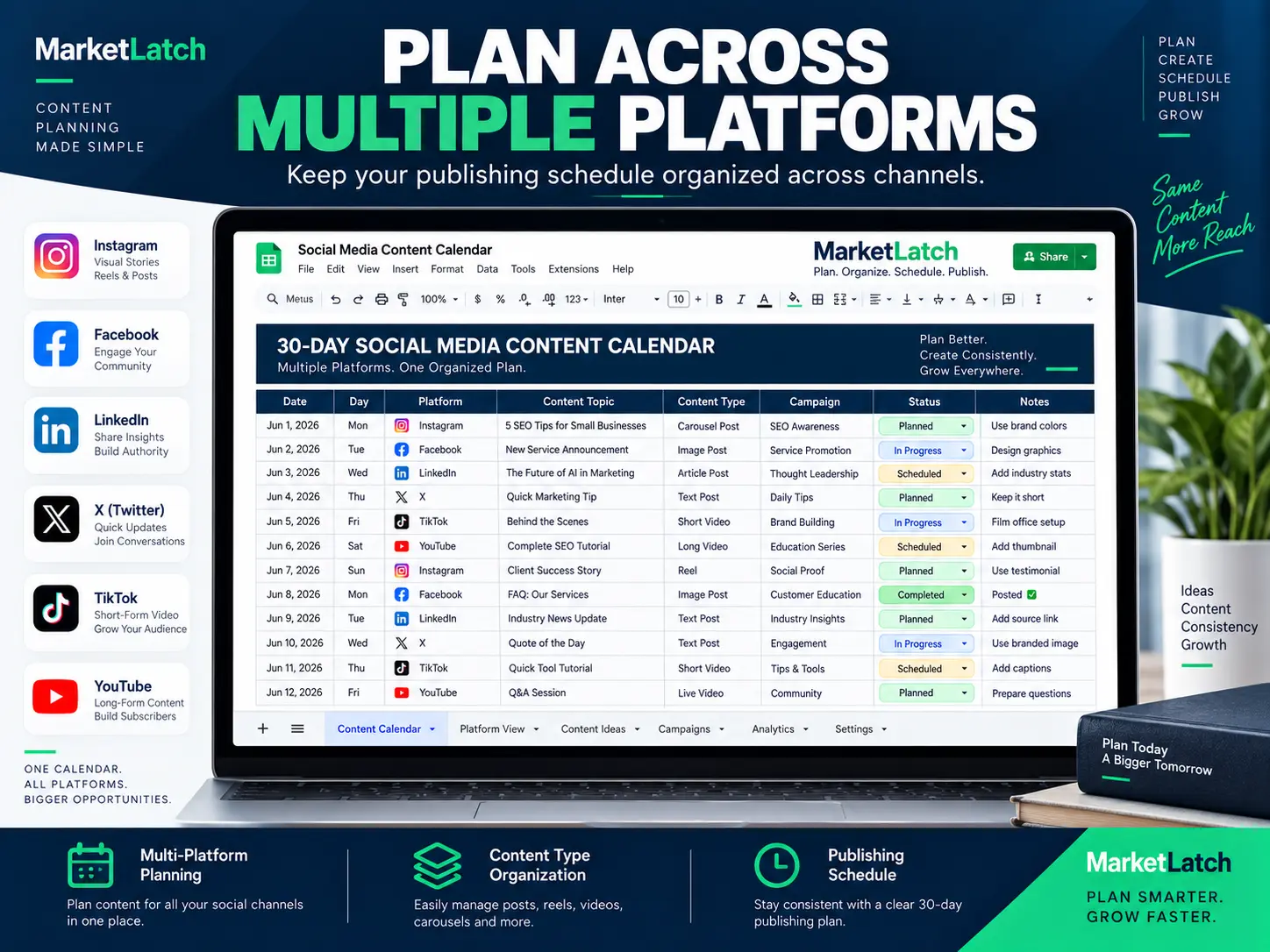
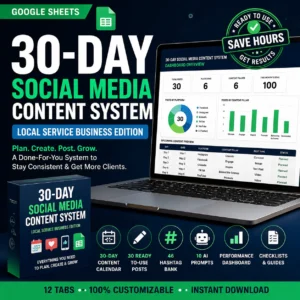
A reusable 30-day Google Sheets social media planning system with mapped posts, content pillars, caption frameworks, hashtags, AI prompts, a performance dashboard and a pre-publish checklist.
Planning social media content shouldn’t mean keeping ideas in scattered notes, half-finished spreadsheets and chat messages. This content calendar template Google Sheets workspace gives you one organized place to plan and manage 30 days of content. It includes a calendar, captions, hashtags, and reporting already built for you.
It is a complete social media content calendar system, not an empty grid. It has twelve connected tabs, thirty posts already planned for a balanced mix, and a workflow you can reuse each month. Instead of starting with a blank spreadsheet, you get a content calendar template Google Sheets system. It gives your next planning cycle a clear starting point.
What You Get in the Google Sheets Content Calendar
- 12 connected planning tabs
- 30 mapped social media posts
- Content pillars for organizing your strategy
- 15 reusable caption frameworks
- 46 organized hashtags
- 10 AI prompts for content creation
- Performance dashboard
- Pre-publish checklist
- Niche customization guidance
- License and usage instructions
Not Just a Blank Content Calendar
Most free content calendars give you a blank grid and expect you to build everything yourself. This template starts with a working 30-day structure, mapped content, reusable caption frameworks, organized hashtags, AI prompts and a performance dashboard—so you can customize a system instead of building one from scratch.
What’s Inside This Content Calendar Template Google Sheets Workspace
Your download is a twelve-tab Google Sheets file. Each tab does one job, and they connect to each other. Together, they turn a basic spreadsheet into a practical content calendar template Google Sheets workflow for planning, creating and publishing social media content.
- Start Here — how the system fits together and the order to work through it
- Quick Start — the short version if you want to be planning within ten minutes
- Business Info — enter your business details and start date once; the calendar builds from it
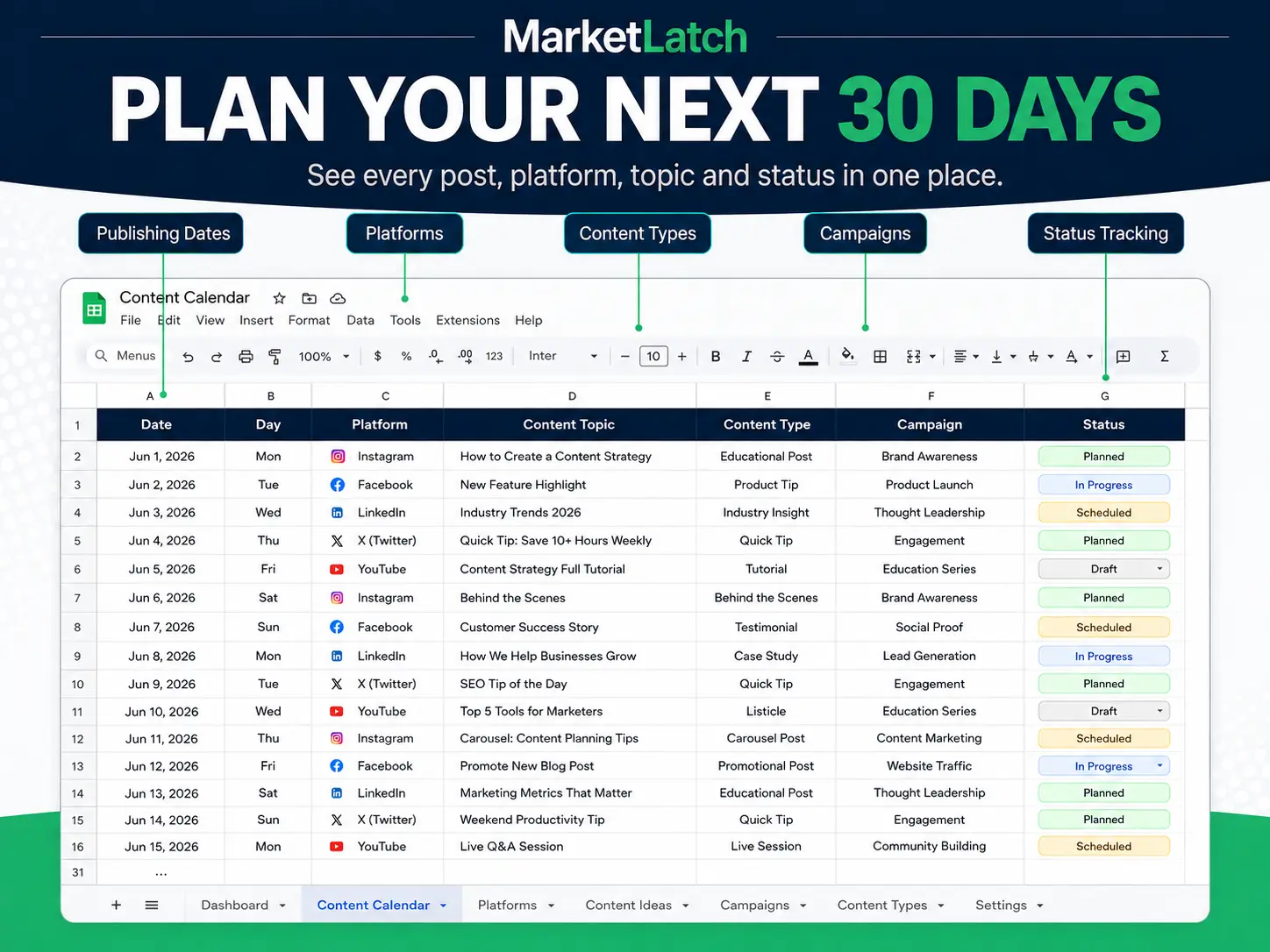
- 30-Day Calendar — thirty posts mapped by date, platform, pillar, format, caption and status
- Content Pillars — a balanced mix so you are not posting promotions six days running: Education 8, Engagement 6, Social Proof 5, Behind the Scenes 4, Promotional 4, Authority 3
- Caption Frameworks — 15 reusable caption structures you adapt to your own offer
- Hashtag Bank — 46 organized hashtags grouped for reuse
- AI Prompts — 10 prompts for drafting and expanding content when you run dry
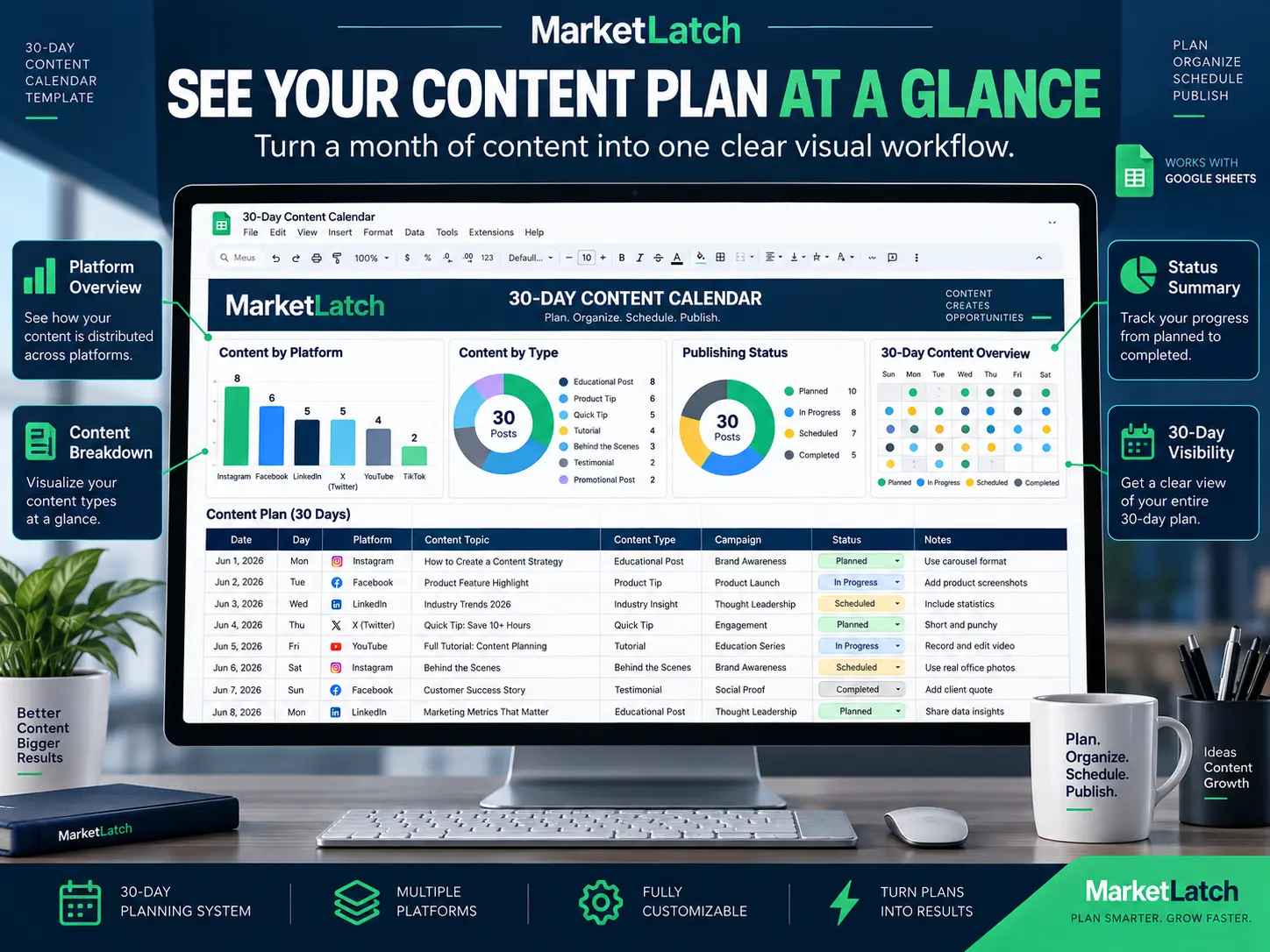
- Performance Dashboard — charts showing your content mix and completion across the month
- Pre-Publish Checklist — what to check before a post goes live
- Niche Customization — how to adapt the system to a different industry
- License & Usage — plain-English terms for personal, business and client use
Because you set your own start date, this content planning spreadsheet recalculates for whatever month you are planning. It does not expire and it is not tied to the year you bought it. You can keep the original as your master and create a fresh working copy whenever you need another planning cycle.
The template also ships with a fully worked example built for local service businesses — plumbers, electricians, cleaners, landscapers and contractors — so you can see exactly how a finished month looks before writing anything yourself. Every example is clearly marked so you can replace it with your own.
30-Day Content Calendar Workflow
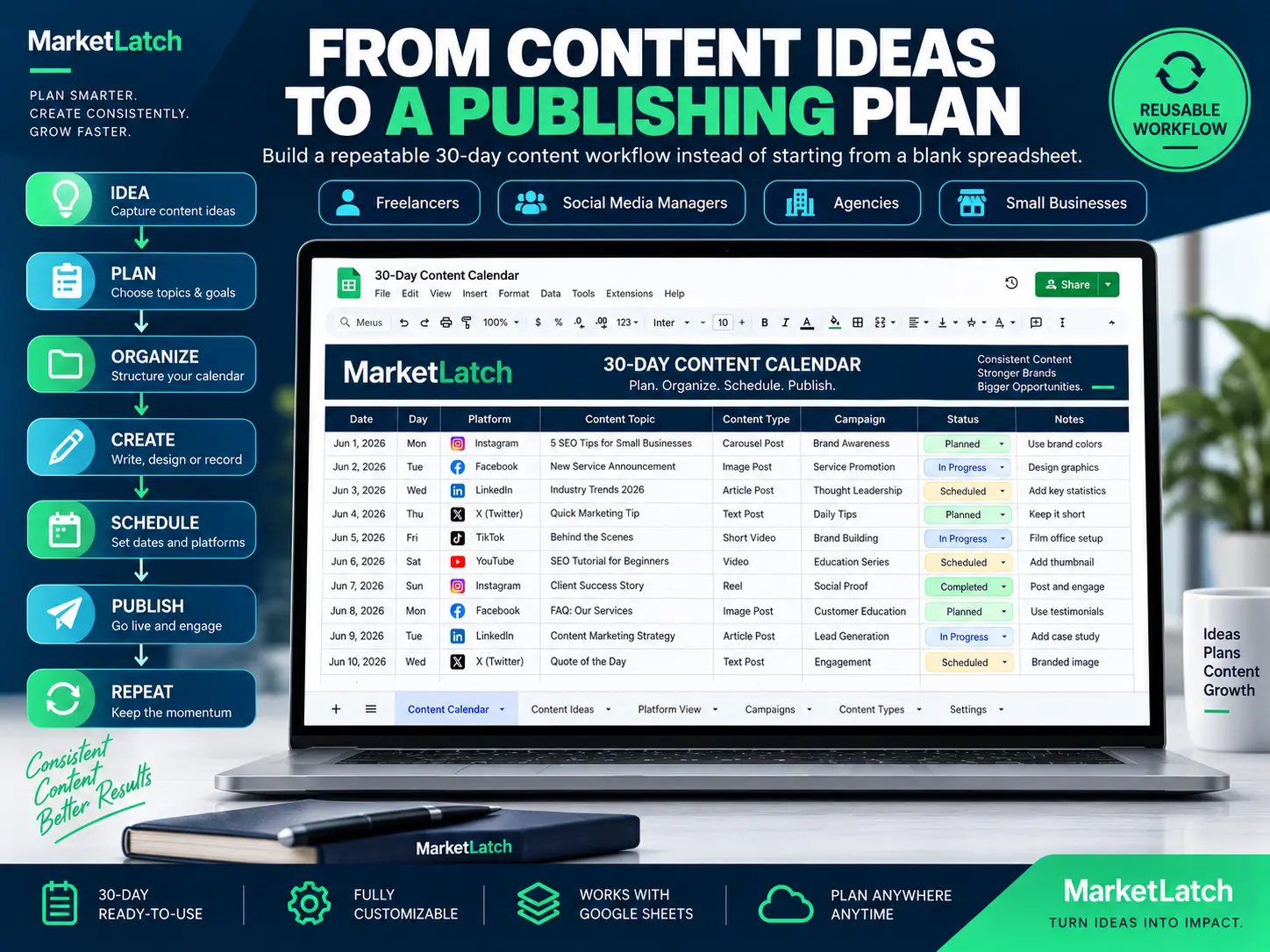
Plan → Organize → Create → Schedule → Publish → Review
- Plan your month using the 30-Day Calendar.
- Organize posts around your Content Pillars.
- Create captions using the Caption Frameworks and AI Prompts.
- Schedule content using the publishing workflow.
- Publish your completed posts.
- Review results in the Performance Dashboard and improve the next month.
Why Use This Instead of a Blank Free Template?
| Typical Free Template | MarketLatch Template |
|---|---|
| Blank planning grid | 30 mapped posts |
| Basic columns | 12 connected tabs |
| Write captions yourself | 15 caption frameworks |
| Find hashtags yourself | 46 organized hashtags |
| Find AI prompts yourself | 10 AI prompts |
| Basic planning | Performance dashboard |
| No publishing checklist | Pre-publish checklist |
| Rebuild your workflow | Reusable monthly system |
What You Can Plan With This Social Media Content Calendar
A social media content calendar should do more than store a list of post ideas. It should show what you plan to publish, when it goes live, and how each piece fits your wider marketing. This Google Sheets social media calendar template gives you a structured place to connect those decisions before content reaches your audience.
Social Media Posts
Plan individual posts by date, platform, topic, format, caption and status so your upcoming schedule is visible at a glance.
Content Themes
Group content around recurring pillars, campaigns, offers and educational topics — with the balance already set for you.
Publishing Schedule
Map content across the full planning period so you can avoid last-minute posting and spot gaps before they become silence.
Campaign Content
Coordinate multiple posts around a product launch, promotion, seasonal campaign, service or event without losing sight of the rest of your publishing schedule.
Content Workflow
Keep planning and production details together so you move from idea to published post instead of losing good ideas in scattered notes. The result is a repeatable content calendar template Google Sheets workflow rather than another spreadsheet you use once and abandon.
How the 30-Day Content Calendar Works
The workflow is intentionally simple: Plan → Organize → Create → Schedule → Publish → Review. The structure is designed so your social media calendar template Google Sheets becomes part of your regular content process instead of simply storing a list of ideas.
1. Plan
Decide what you want your content to achieve over the next month, and let the content pillars keep the mix balanced.
2. Organize
Add your ideas to the 30-day content calendar and sort them by date, platform, topic, format and pillar.
3. Create
Use the caption frameworks and hashtag bank as your production reference while preparing captions, graphics, videos and links.
4. Schedule
Assign publishing dates and keep upcoming content visible in one place.
5. Publish
Run the pre-publish checklist, then use the calendar as your publishing reference so planned content does not get forgotten.
6. Review
At the end of the cycle, check the dashboard, review what was published, and use it to shape next month’s plan.
Who Is This Content Planning Spreadsheet For?
This content planning spreadsheet is for anyone who wants a repeatable way to organize recurring content. It is useful for:
- Small business owners managing their own social media
- Freelancers managing content for clients
- Social media managers and content marketers
- Agencies running content for multiple brands
- Creators publishing on a consistent schedule
- Local service businesses that need to stay visible between jobs
If you would rather not run it yourself, we also offer done-for-you social media management for small businesses.
Why Use a Social Media Planner Template?
Without a plan, social media becomes reactive. You remember an idea, create a post, publish it, then start wondering what to post next. A social media planner template changes that by giving you a planning view before publication — the same principle behind our content marketing services.
A structured calendar helps you:
- Plan ahead instead of improvising daily
- Keep a consistent posting rhythm across platforms
- Balance educational, promotional and engagement content
- Spot gaps in your schedule before your audience notices them
- Coordinate posts around campaigns and launches
- Hand a clear plan to a team member or client
For businesses that want a repeatable planning process, a content calendar template Google Sheets format can also make it easier to maintain the same workflow from one month to the next.
How to Use the Template
Getting started takes a few basic steps.
Step 1: Make Your Copy
Open the template and make your own copy in Google Sheets. Keep the original unchanged so you always have a clean master version.
Step 2: Enter Your Business Details
Fill in the Business Info tab and set your start date. Every date in the calendar builds from it.
Step 3: Choose Your Platforms
Identify the channels that matter to your audience. If you serve a local area, keep your Google Business Profile active alongside social — for local businesses it can complement your wider visibility strategy.
Step 4: Add Your Content Ideas
Enter the posts, topics, campaigns and educational content you want to publish. Use the AI Prompts tab when ideas run short.
Step 5: Write Your Captions
Work through the caption frameworks and hashtag bank rather than starting from a blank box.
Step 6: Create and Publish
Use the calendar as your production reference through the month, and the pre-publish checklist before each post goes live.
Step 7: Reuse the System
At the end of the cycle, duplicate your working copy, set a new start date, and improve the plan using what the dashboard tells you.
Google Sheets vs. Excel: Which Should You Use?
Both can hold a calendar. The differences that actually matter for content planning:
| Google Sheets | Excel | |
|---|---|---|
| Access | Any browser, no install | Desktop app or Microsoft 365 |
| Sharing with clients | Share a link, set view or edit rights | Send a file, or use OneDrive |
| Real-time collaboration | Built in | Requires Microsoft 365 |
| Working on mobile | Straightforward | Workable, more limited |
| Cost | Free with a Google account | Paid licence |
| This template | Built and tested for Sheets | Not supported |
This product is built specifically for Google Sheets. If your workflow is entirely Excel-based, this is not the right product for you — and we would rather tell you now than take your money.
That distinction matters when comparing a social media calendar template Excel option with a Google Sheets workflow. This product is intentionally built and tested for Sheets, so its formulas, dropdowns and dashboard should be used in the environment it was designed for.
Free Template vs. a Reusable Planning System
A free content calendar template Google Sheets users can download is a reasonable way to understand the idea of content planning. It usually gives you a blank grid and a few column headers.
The difficult part is not the grid. It is deciding what goes in the thirty rows, writing thirty captions, keeping the mix balanced so you are not selling every day, and doing it again next month without losing momentum.
That is the gap this system fills. The content mix is structured, the caption frameworks are written, the hashtags are organized, and the dashboard shows where you are. You customize a working system instead of building one.
Ready to stop rebuilding your calendar every month? Get the 30-Day Content Calendar Template →
Why Choose Market Latch?
Market Latch builds practical digital marketing resources that turn marketing knowledge into repeatable workflows. Our products focus on systems, templates and checklists rather than theory. You can browse our full library of marketing templates and checklists to see the rest.
If you already use AI in your content process, this template pairs directly with 1,000 ChatGPT prompts for marketing and SEO — the calendar tells you what to write, the prompt library helps you write it.
Frequently Asked Questions
What is a content calendar template Google Sheets users can run?
It is a reusable spreadsheet for planning and organizing content by date, platform, topic, format and campaign. Instead of rebuilding a calendar each month, you customize a working template around your own content.
Does this work as a Google Sheets social media calendar template?
Yes. It is designed as a Google Sheets planning workspace for organizing content across platforms and turning it into a structured publishing plan.
Can I use this content planning spreadsheet for multiple clients?
Yes. Freelancer and agency use is permitted: create separate working copies for different brands, campaigns or clients and produce client content with it. You may not resell or hand over the editable template itself. Full terms are on the License & Usage tab.
Can I use this in Excel instead?
The product is built and tested for Google Sheets. Some content may open in Excel, but formulas, dropdowns and the dashboard are not supported there and we do not recommend it.
Is there a free content calendar template Google Sheets version?
No. You can find free blank grids elsewhere, and they are fine if a grid is all you need. This is a structured system with a mapped content mix, caption frameworks, a hashtag bank and a dashboard.
How long does setup take?
Around ten to fifteen minutes for a basic plan: make your copy, enter your business details, set your start date, choose your platforms, and start adding content.
Can I reuse the 30-day content calendar every month?
Yes, and that is the intended workflow. Keep a clean master copy, duplicate it for each planning period, and set a new start date. Nothing expires.
Is this social media planner template suitable for beginners?
Yes. No spreadsheet or marketing experience is needed. The Start Here and Quick Start tabs walk you through it, and the worked examples show what finished content looks like.
What do I get after purchase?
Instant access to the content calendar template Google Sheets file. Make your own copy and start planning immediately.
Ready to Plan Your Next 30 Days?
Stop deciding what to post at the last minute. Use this content calendar template Google Sheets system to organize your upcoming content, build a clearer publishing schedule, and create a reusable social media content calendar you can run every month.
Get the 30-Day Content Calendar Template →
Instant download · Reusable every month · Yours for life
Prefer someone else to run your content? Talk to us about managing it for you.

Reviews
There are no reviews yet.