Turn Google Ads Exports Into a Client-Ready Report
Google Ads reporting becomes difficult when campaign data is available but the reporting process still depends on manually checking numbers, rebuilding tables, explaining performance changes and writing client recommendations every month.
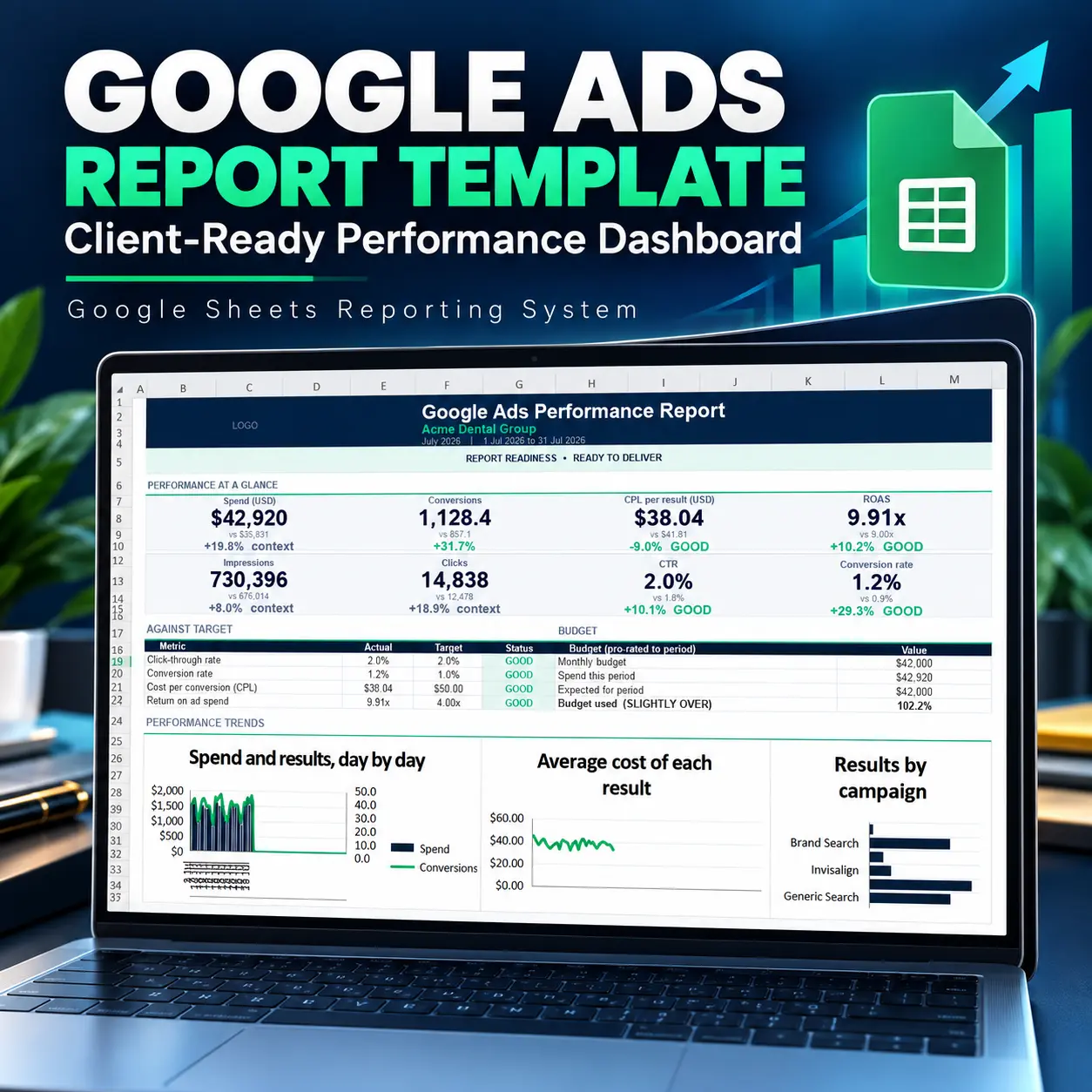
This Google Ads report template provides a structured Google Sheets workflow for turning a supported Google Ads export into a validated performance report, campaign analysis, client summary and one-page reporting deliverable.
Instead of starting from a blank spreadsheet each reporting period, you can follow a repeatable workflow:
Export → Paste → Validate → Review → Analyze → Explain → Act → Deliver
The system is designed for Google Ads freelancers, PPC consultants, small agencies, in-house marketers and digital marketing professionals who need professional Google Ads client reporting without requiring a recurring reporting SaaS subscription.
More Than a Google Ads Dashboard
A dashboard can show numbers. Professional reporting also requires you to check whether the underlying data is usable, understand campaign-level changes, identify what needs attention, explain the results, and decide what to do next.
This Google Ads dashboard template combines those stages into one reporting workflow.
You get:
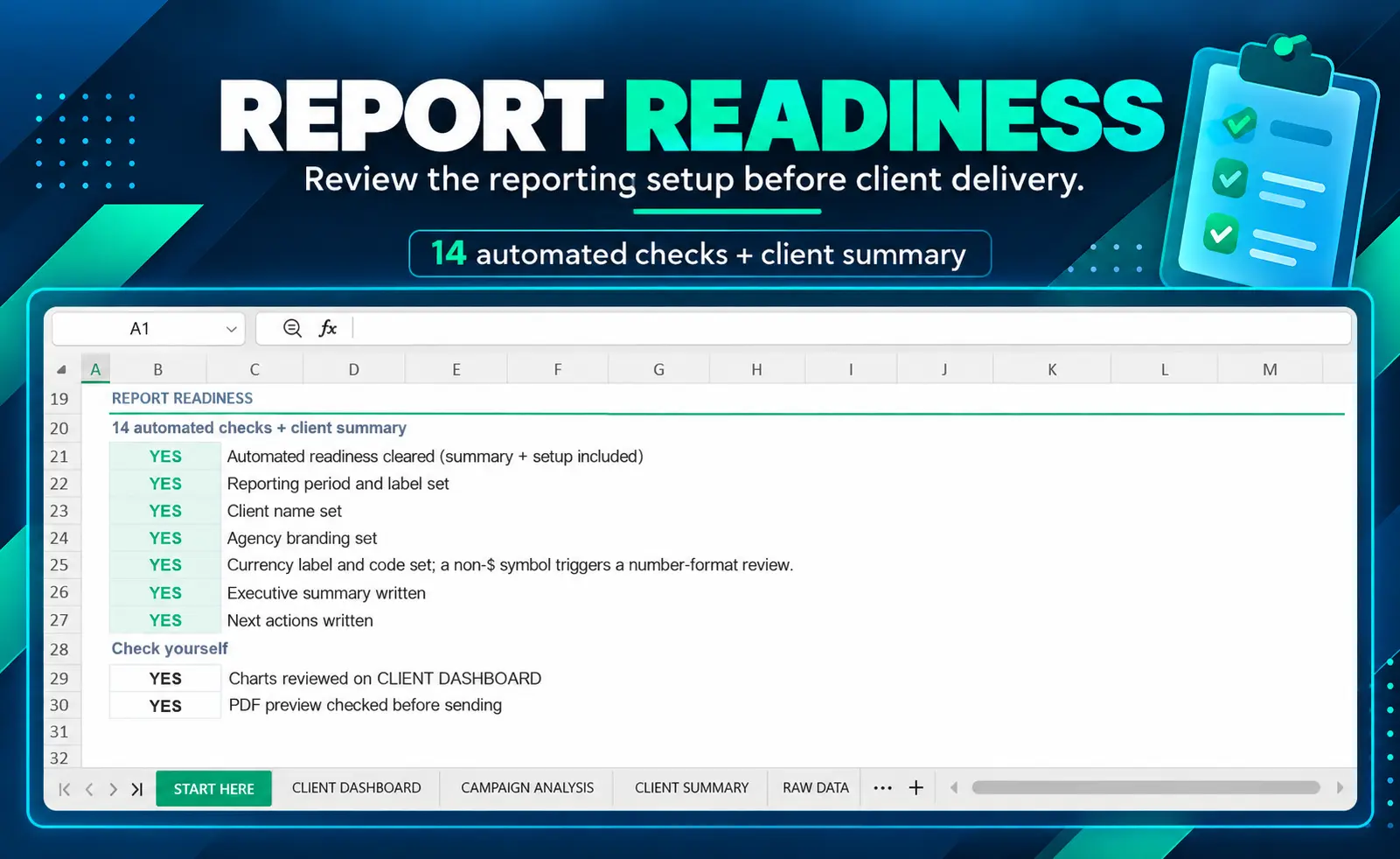
- 14 automated checks to review the reporting data before delivery
- Report Readiness to identify whether the report is ready, requires review, has an incomplete client summary, or contains a data error
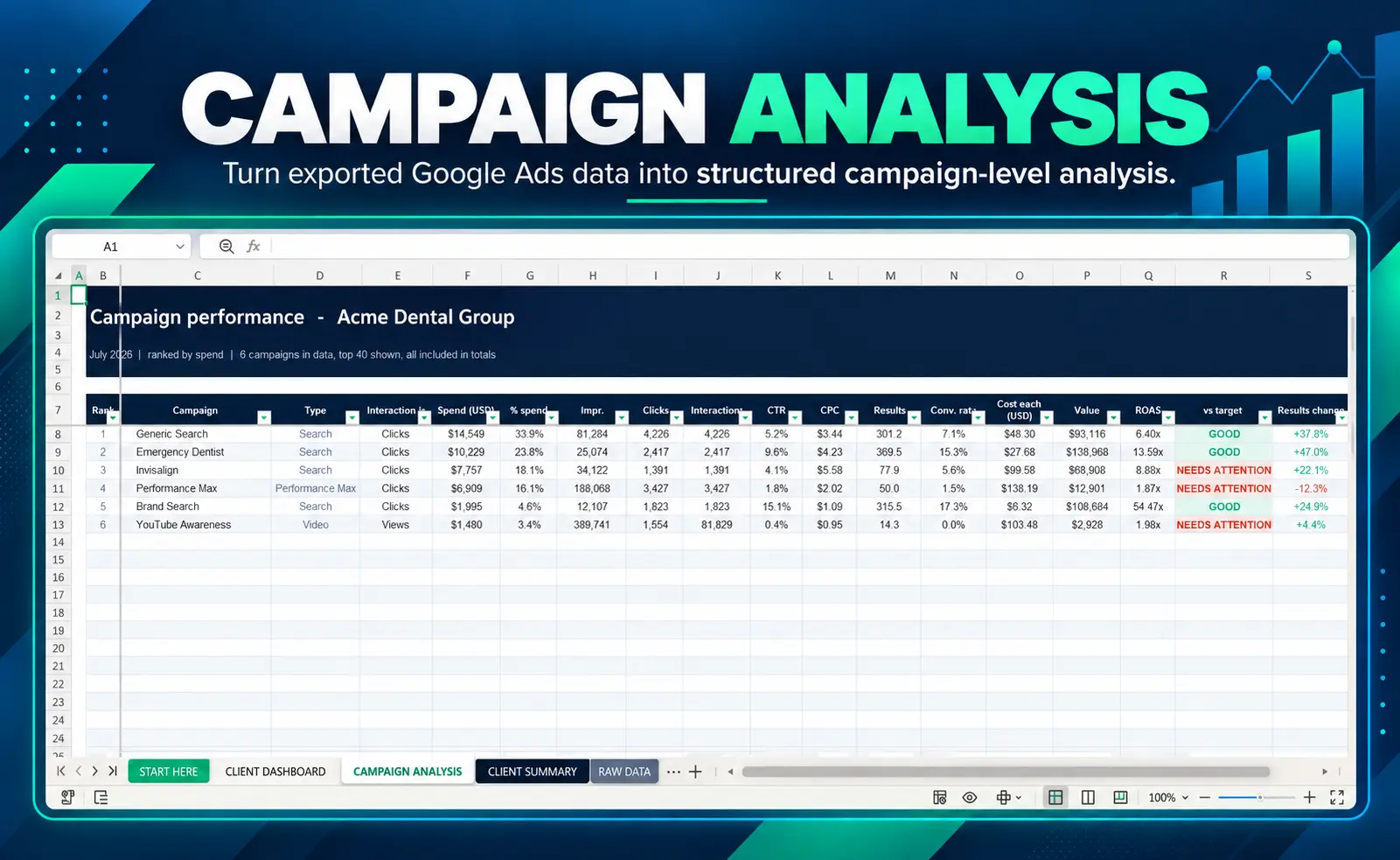
- Campaign performance analysis for supported Google Ads campaign types
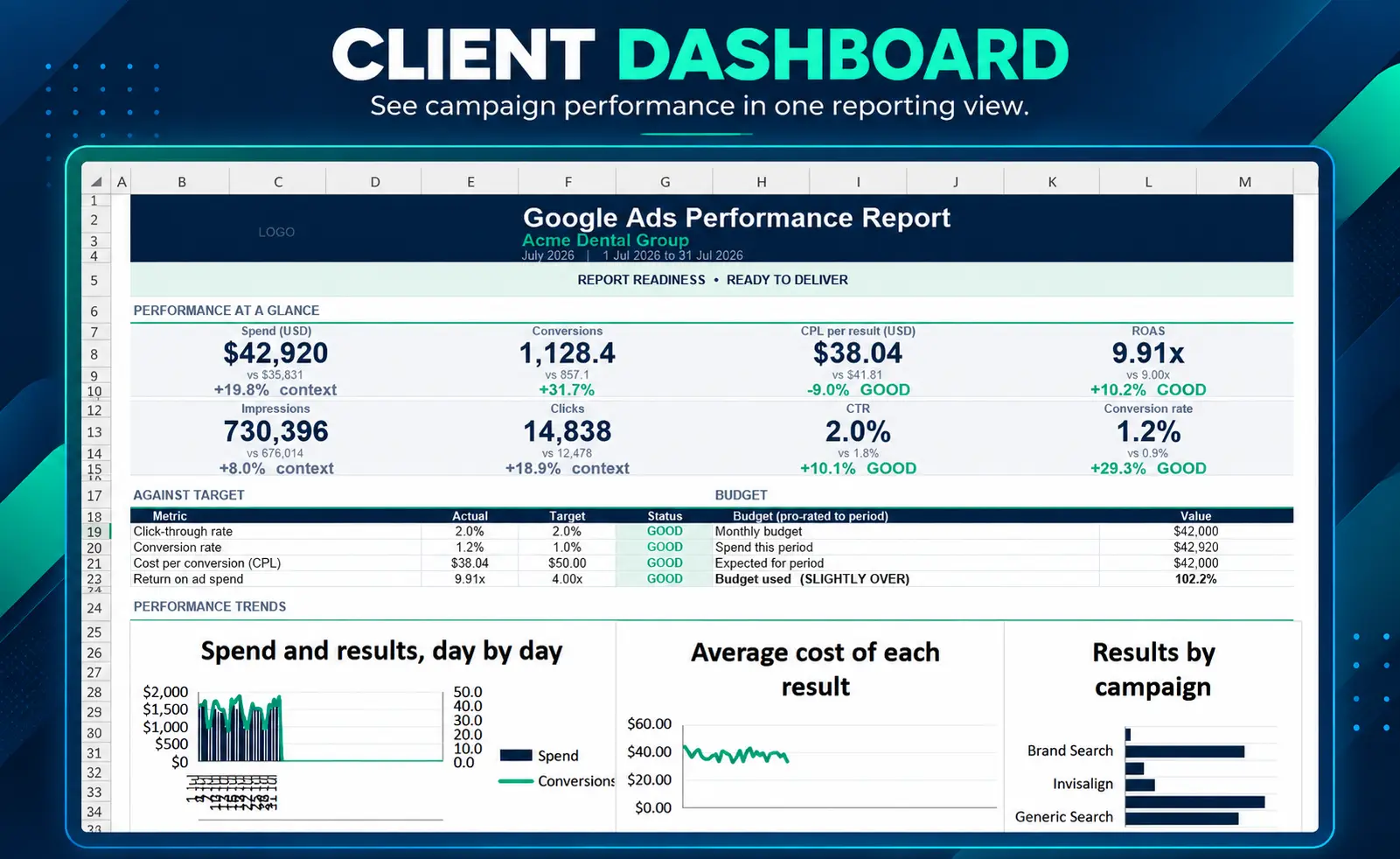
- Client Dashboard with campaign KPIs, trends and performance views
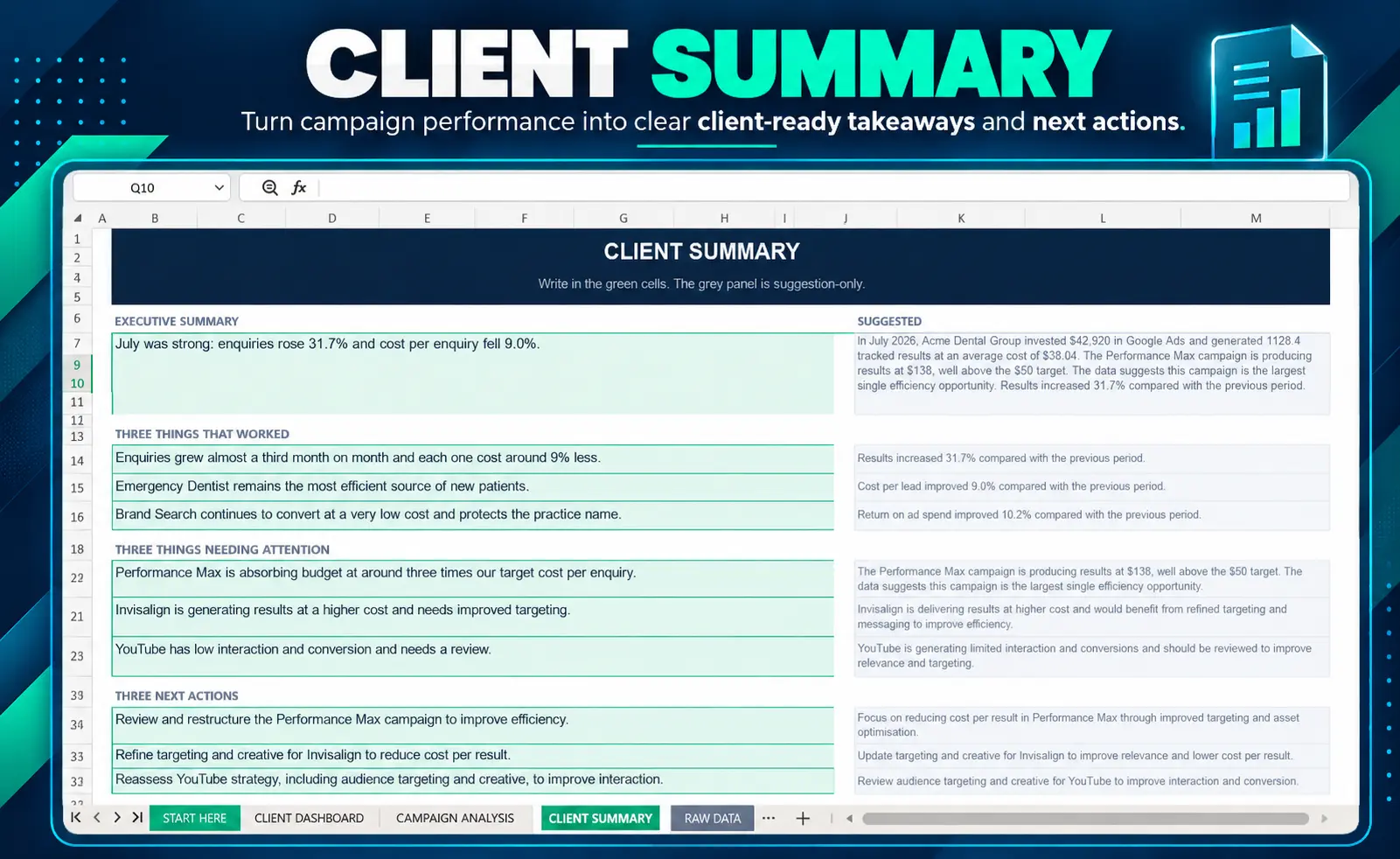
- Client Summary for organizing the most important findings
- What This Means and Next Actions sections for turning metrics into client-facing interpretation
- One-page PDF reporting workflow for preparing a concise client deliverable
The goal is not to make the spreadsheet look complicated. The goal is to give your PPC reporting process a consistent structure that can be reused from one reporting period to the next.
What’s Included in the Google Ads Reporting Template
The package includes the main Google Ads reporting template together with supporting files designed to help you understand, validate and reuse the workflow.
- Google Ads Performance Dashboard Template — the main reporting workbook
- Demo Workbook — a fictional Google Ads account example showing how the completed workflow looks
- Quick Start Guide — step-by-step setup and reporting instructions
- Google Ads Export Guide — guidance for preparing the source data
- Metric Definitions — explanations of the reporting metrics used in the workbook
- Troubleshooting Guide — practical guidance for common data and workflow issues
- Monthly Reporting Checklist — a repeatable checklist for recurring reporting
- README — package and workflow reference
- Version History — documented product changes and updates
Report Readiness: Review Before Client Delivery
One of the main differences between a simple Google Ads spreadsheet template and this reporting workflow is the emphasis on reviewing the underlying data before relying on the report.
The workbook includes a Report Readiness section designed to surface common reporting problems before you prepare the final client deliverable.
14 Automated Reporting Checks
- Data has been pasted
- Dates are valid
- Numeric columns contain numbers
- Columns appear correctly aligned
- Current period has data
- Comparison data available
- Duplicate date/campaign rows
- Interactions supplied
- Campaign types consistent
- Conversion values for sales goal
- Reporting period is 92 days or less
- Campaign count is 40 or less
- Spend is accompanied by clicks
- Currency check
Report Readiness States
- READY TO DELIVER
- REVIEW REQUIRED
- CLIENT SUMMARY INCOMPLETE
- DATA ERROR — DO NOT DELIVER
These checks are designed to support your reporting review process. They do not replace professional judgment or a final human review of the completed report.
Campaign Performance Analysis
The campaign analysis section turns exported Google Ads data into a structured performance view so you can review individual campaigns instead of relying only on account-level totals.
The Google Ads performance report template workflow helps organize campaign metrics, comparison information, rankings and performance changes in a format that can be reviewed before client delivery.
Key Reporting Metrics
Depending on the supplied Google Ads export and reporting setup, the workbook works with core campaign performance information such as:
- Spend
- Impressions
- Clicks
- Interactions
- Conversions
- Conversion value
- CTR
- CPC
- Conversion rate
- Cost per conversion
- ROAS
- Budget and spend status
- Current-period and comparison-period performance
Where interactions are supplied, the workbook can use an interaction-aware conversion-rate calculation. When interactions are not supplied, the workflow can fall back to click-based conversion-rate logic.
Supported Google Ads Campaign Types
The workflow is designed to support reporting across:
- Search
- Shopping
- Display
- Performance Max
- Demand Gen
- App
- Video
The campaign ranking view is capped at 40 campaigns, while account totals continue to reflect the supplied reporting data.
Client Dashboard: See the Performance Clearly
The Client Dashboard brings the main campaign KPIs and reporting views together so you can review performance before preparing the client-facing summary.
Use the dashboard to identify:
- Overall campaign performance
- Changes between reporting periods
- Important campaign-level differences
- Performance trends across the reporting period
- Spend and conversion patterns
- Campaigns that require additional attention
The result is a structured Google Ads performance dashboard rather than a collection of disconnected spreadsheet tables.
Client Summary: Turn Data Into a Story
Clients usually do not need every row of the Google Ads export. They need to understand what happened, what worked, what needs attention and what should happen next.
The Client Summary helps organize that interpretation into a concise reporting structure.
Executive Summary
Summarize the most important account-level performance changes in a client-friendly format.
Three Things That Worked
Identify the strongest positive observations from the reporting period rather than simply presenting raw metrics.
Three Things Needing Attention
Highlight the areas that require review, investigation or optimization.
Three Next Actions
Turn the reporting findings into practical next steps for the next reporting period.
This makes the reporting workflow move beyond measurement into interpretation and action.
How the Google Ads Reporting Workflow Works
The workflow is intentionally structured so you can repeat the same process each reporting period.
1. Export
Prepare the required Google Ads reporting data from your account. Google provides tools for creating, downloading and scheduling reports from its statistics tables and reporting environment. See Google’s Google Ads reporting documentation.
2. Paste
Paste the prepared reporting data into the RAW DATA sheet using the required structure.
3. Validate
Review the 14 automated checks and identify any data-quality or reporting issues before relying on the dashboard.
4. Review
Check the Report Readiness state and resolve any issues that require attention.
5. Analyze
Review campaign performance, comparison data, trends and key Google Ads campaign reporting metrics.
6. Explain
Use the Client Dashboard and Client Summary to organize the most important performance observations.
7. Act
Record the most useful next actions based on the reporting findings and your own campaign-management judgment.
8. Deliver
Review the charts, confirm the client narrative, preview the PDF and prepare the final client report.
Prepare a One-Page Client Report
The workbook supports a simple one-page reporting workflow for clients who need a concise performance summary rather than the underlying spreadsheet.
The recommended process is:
Client Dashboard → Print → Current Sheet → A4 Landscape → Fit to Width → PDF
Final Human Delivery Checks
- Review the charts
- Preview the PDF
- Confirm the final narrative
- Check the next actions
- Send the completed report
The workbook does not automatically generate or send the PDF. The workflow is designed to help you prepare the report efficiently while keeping the final delivery under your control.
Ready to turn your Google Ads export into a structured client report?
Get the Google Ads Report Template →
Built for Google Ads Client Reporting
This product is designed specifically around the recurring problem of turning Google Ads export data into a usable client report.
It is particularly useful when you need a repeatable reporting structure for:
- Monthly Google Ads reporting
- Freelance PPC client reporting
- Small-agency campaign reporting
- Internal Google Ads performance reviews
- Client performance summaries
- Campaign comparison workflows
- Recurring PPC reporting without a reporting platform
If your work involves managing campaigns directly, you can also explore our Google Ads Management service.
Designed for Google Sheets
This Google Ads spreadsheet template is designed around a Google Sheets reporting workflow.
You work with a structured Google Ads export rather than connecting the workbook directly to the Google Ads API. This keeps the workflow straightforward and avoids requiring a separate reporting connector or recurring reporting platform.
Google also provides an official Google Ads add-on for Google Sheets that can be used to create and work with Google Ads reports directly in Sheets. Learn more about the Google Ads add-on for Google Sheets.
This product is specifically designed around its documented workbook workflow. Full Excel compatibility is not guaranteed.
Google Ads Reporting Without Starting From Scratch
A blank spreadsheet gives you cells. A reusable reporting system gives you a process.
With this template, the recurring workflow is already organized around data validation, campaign analysis, client interpretation and delivery.
That means you can keep a clean master copy, create a working copy for each reporting period or client, paste the appropriate export and follow the same reporting sequence instead of rebuilding the structure every month.
Who Is This Google Ads Report Template For?
This product is designed for professionals who need a repeatable Google Ads reporting process.
- Google Ads freelancers preparing recurring client reports
- PPC consultants who need structured campaign reporting
- Small PPC agencies standardizing reporting workflows
- In-house marketers preparing internal performance reports
- Digital marketing professionals combining campaign data with client-facing insights
- Business owners who need a structured Google Ads performance review
When This Template Isn’t the Right Fit
This product is intentionally transparent about what it does and does not do.
It may not be the right choice if you primarily need:
- Live Google Ads account synchronization
- Automatic API-based data refreshes
- Large-scale multi-account reporting
- Multi-client reporting roll-ups
- Scheduled automated client delivery
- Automatic PDF generation and sending
- Keyword-level reporting
- Ad-group reporting
- Search-term reporting
- Device-level reporting
- Geographic reporting
- Impression Share reporting
- Quality Score reporting
- Live intra-month budget pacing
If you need a live reporting platform with automated data connections and large-scale account management, a dedicated reporting platform may be more appropriate.
Use Your Google Ads Data Responsibly
The template provides a structured reporting framework, but the quality of the final report still depends on the source data, campaign configuration and professional interpretation.
The automated checks are designed to help identify common reporting issues. They do not guarantee that every underlying Google Ads data issue has been detected.
Always review the final dashboard, narrative, charts and PDF before sending a report to a client.
Commercial Use License
The included license is designed for professional use by the purchaser.
You May
- Use the template for your own business
- Use it for your own Google Ads client work
- Create reports for your clients
- Reuse the workflow for recurring reporting
- Brand the resulting client reports as your own deliverables
You May Not
- Resell the editable template
- Redistribute the workbook as a standalone product
- Repackage the template as your own digital product
- Upload or distribute the editable files in another template library
- Give away the editable template as a standalone resource
The license applies to use of the template itself. Your client-facing reports and analysis remain part of your own client work.
Built, Tested and Refined as a Reporting Workflow
Version 1.2 focuses on making the reporting process easier to review before client delivery.
The workbook was refined around controlled reporting scenarios including clean demo data, missing interactions, duplicate rows, invalid numeric data, missing data, campaign-count limits, currency changes and Report Readiness outcomes.
The goal is not to claim that spreadsheet automation eliminates human review. The goal is to give you a more structured starting point for recurring Google Ads reporting.
Version 1.2 Focus
- Report Readiness workflow
- 14 documented automated checks
- Improved Client Summary structure
- Clearer delivery checks
- Updated reporting documentation
- Improved troubleshooting guidance
- Demo workflow designed to reach READY TO DELIVER
Frequently Asked Questions
What is a Google Ads report template?
A Google Ads report template is a reusable reporting framework that helps organize Google Ads performance data into a structured report. This product adds data validation, campaign analysis, client summaries and a repeatable delivery workflow.
Does this Google Ads reporting template connect directly to Google Ads?
No. It does not provide a live Google Ads API connection or automatic account synchronization. You work from a supported Google Ads export and paste the data into the workbook.
Does this Google Ads dashboard template work with Google Sheets?
Yes. The workflow is designed for Google Sheets. Full Excel compatibility is not guaranteed.
Which Google Ads campaign types are supported?
The workflow supports Search, Shopping, Display, Performance Max, Demand Gen, App and Video campaign types.
How many automated checks are included?
The workbook includes 14 automated reporting and data checks, followed by human review before client delivery.
What is Report Readiness?
Report Readiness is the workbook’s review status that helps identify whether the supplied reporting data is ready for delivery, requires review, has an incomplete client summary or contains a data error.
Can I use this Google Ads spreadsheet template for multiple clients?
Yes. The included commercial-use license allows you to use the workflow for your own client reporting. You may create client reports and reuse the system, but you may not redistribute or resell the editable template itself.
Does it automatically create and send PDF reports?
No. The workbook supports a one-page PDF reporting workflow, but PDF generation and client delivery remain manual steps so you can review the final report before sending it.
Does the Google Ads performance report template include keyword or search-term reporting?
No. Keyword, ad-group, search-term, device, geographic, Impression Share and Quality Score reporting are outside the scope of this product.
Do I need a reporting SaaS subscription?
No. The template is designed to work from a supported Google Ads export without requiring a dedicated reporting SaaS subscription or live connector.
Does the demo contain real client data?
No. The demo workbook uses fictional data so you can inspect the workflow without exposing real client information.
Can I use this as a monthly Google Ads reporting template?
Yes. The workbook is designed for recurring reporting. The included Monthly Reporting Checklist helps provide a repeatable process for preparing each reporting period.
Ready to Turn Your Google Ads Export Into a Structured Client Report?
If you need a reusable reporting workflow that sits between a raw Google Ads export and a finished client deliverable, this template gives you the structure to validate the data, analyze campaign performance, organize the client summary and prepare the final report.
Export → Validate → Analyze → Explain → Act → Deliver
Get the Google Ads Report Template →
Reusable reporting workflow · Google Sheets · Version 1.2
Related MarketLatch Resources
If your Google Ads work also involves reducing wasted spend, see our Negative Keywords List for Google Ads: Find & Block Wasted Clicks.
For businesses that need ongoing campaign management rather than a reporting workflow, explore our Google Ads Management service.




Reviews
There are no reviews yet.